How to use the DATE function
What is the DATE function?
The DATE function returns a number that acts as a date in the Excel environment.
Table of Contents
- Introduction
- Syntax
- Arguments
- Example 1
- Example 2 - add or subtract months and days
- Example 3
- What does the function do?
- Formatting an Excel date
- Function not working
- How to make Excel order by date
- Add days
- Subtract days
- Add months
- Last day of a given month
- Get Excel file
- Calculate date given weekday and week number (week starts on Sunday)
- Calculate date given weekday and week number (week starts on Monday)
1. Introduction
What is an Excel date?
Dates are stored numerically but formatted to display in human-readable date/time formats, this enables Excel to do work with dates in calculations.
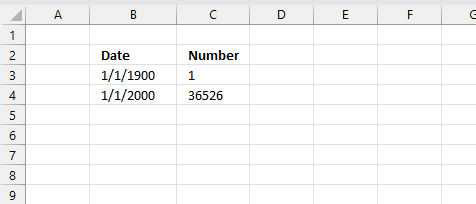
For example, dates are stored as sequential serial numbers with 1 being January 1, 1900 by default. The integer part (whole number) represents the date the decimal part represents the time.
This allows dates to easily be formatted to display in many date/time formats like mm/dd/yyyy, dd/mm/yyyy and so on and still be part of calculations as long as the date is stored numerically in a cell.
You can try this yourself, type 10000 in a cell, press CTRL + 1 and change the cell's formatting to date, press with left mouse button on OK. The cell now shows 5/18/1927.
2. Syntax
DATE(year, month, day)
3. Arguments
| year | A number equal or higher than 1900. |
| month | A number between 1 (January) and 12 (December). You can use larger numbers as well. |
| day | A number between 1 and 31 based on the number of days in the month specified in argument month. |
4. Example 1
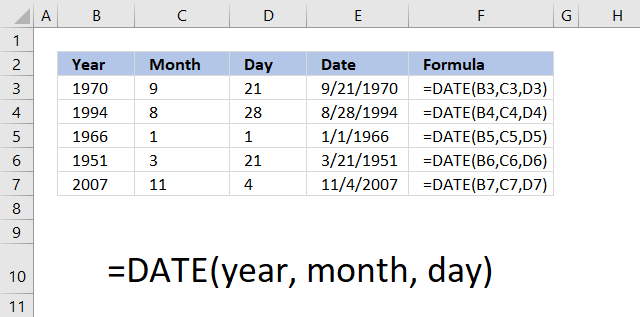
The image above shows you the DATE function in column E. It uses three arguments, the first argument is the year found in column B.
The second argument is the month, shown in column C. Note that you need to use a number for the month.
The third argument is the day of the month, displayed in column D. Make sure you enter the correct day for the month, keep in mind most months have 30 days or 31 days. February has 28 days except for leap years that have 29 days.
5. Example 2 - add or subtract months and days
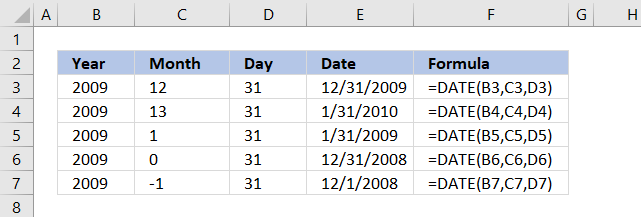
If you use a month number larger than 12, for example 13, DATE(2009,13,1) the DATE function returns 1/1/2010. Month number zero returns the previous month.
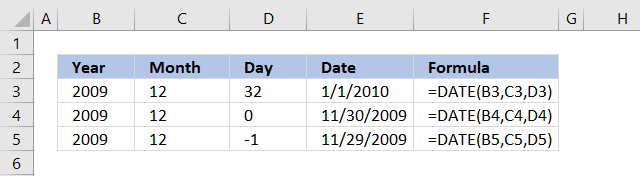
The same thing happens with a day number that is larger than 31 or smaller than 1.
You can use that to do dynamic date series or do date-based calculations.
6. Example 3
The image above demonstrates the date function in column E, it uses values from column B, C and D.
Formula in cell F3:
7. What does the function do?
The DATE function returns an Excel date that you can use in formulas, Excel can't calculate dates in formulas unless you reference a cell containing an Excel date or create an Excel date using the DATE function.
Hard-coding dates in a formula are not possible, use the DATE function to create an Excel date.
Why is that?
Excel uses numbers formatted as dates, 1 is 1/1/1900, and 1/1/2000 is 36526.
Prove it?
Sure, type 1 in a cell and press Enter. Select the cell and press CTRL + 1 to format the cell.
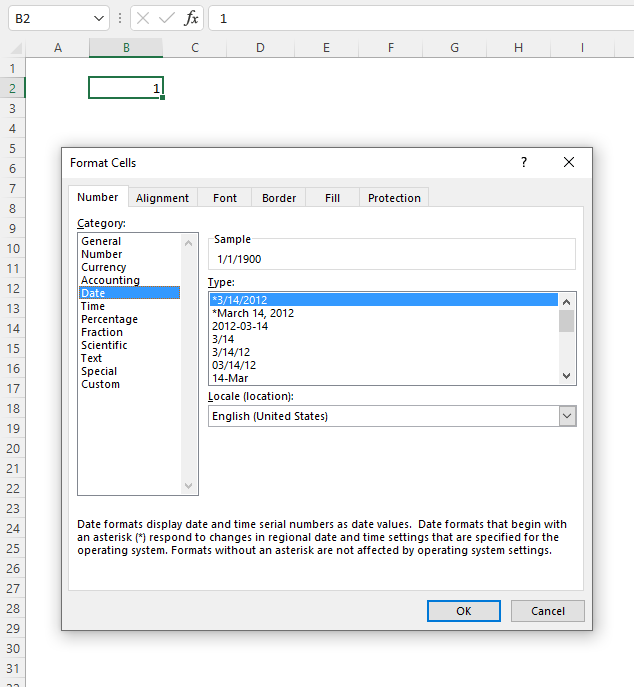
A dialog box appears, select Date in Category: and press the "OK" button.
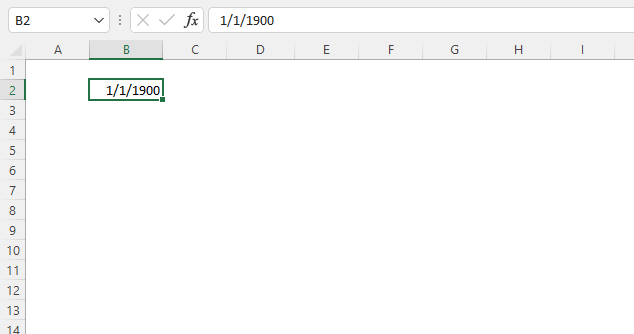
Number 1 is now formatted as an Excel date, the cell shows 1/1/1900.
8. Formatting an Excel date
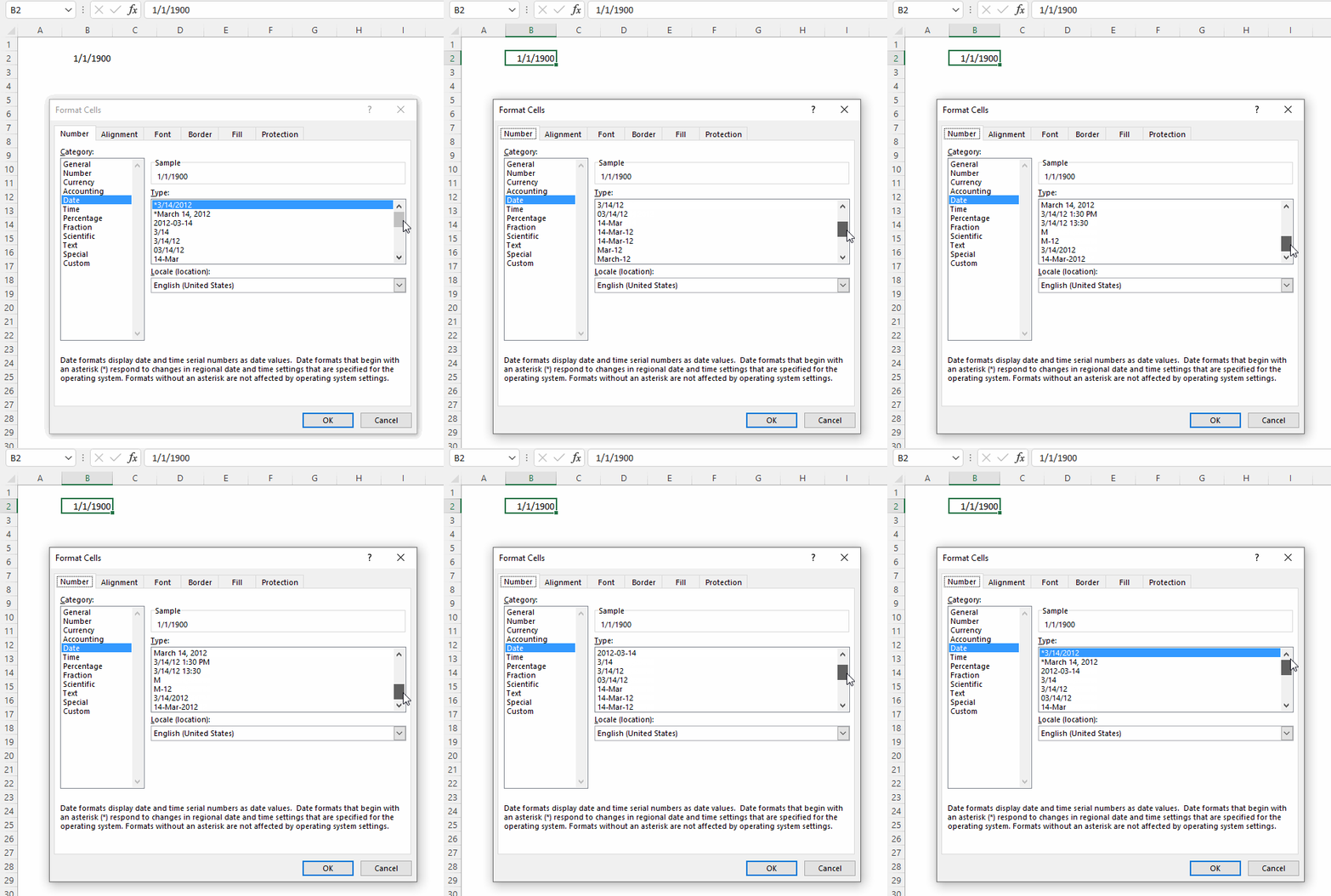
The animated image above shows you the "Format Cells" dialog box, it allows you to choose from many different date formatting types. Here is how:
- Select the cell.
- Press CTRL + 1 to open the "Format Cells" dialog box.
- Select Date in the Category:, see the image above.
- Pick a formatting type.
- Press with left mouse button on "OK" button to apply changes.
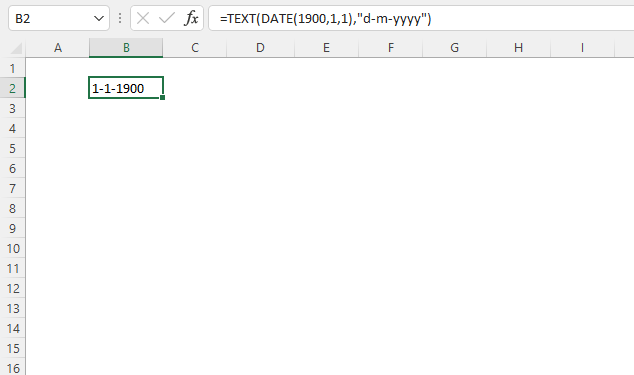
You can also use the TEXT function to format dates.
Formula in cell B2:
Explaining formula in cell B2
Step 1 - Create an Excel date
The DATE function calculates a serial number that represents a specific date based on three arguments. Year, month, and day.
DATE(year, month, day)
DATE(1900, 1, 1)
returns 1.
Step 2 - Return a number formatted as a date
The TEXT function formats a cell value based on given placeholder characters.
TEXT(value, format_text)
TEXT(DATE(1900, 1, 1), "d-m-yyyy")
becomes
TEXT(1, "d-m-yyyy")
and returns 1-1-1900.
9. Function not working
- Did you spell the DATE function correctly?
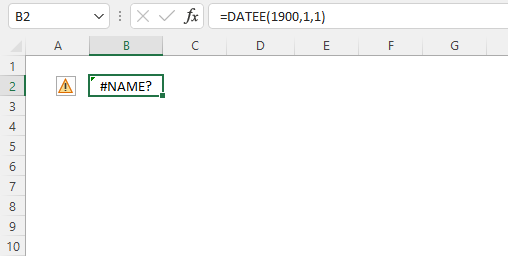
Excel returns a #NAME? error if you didn't. - Check the arguments, they must be numerical. Text is not allowed.
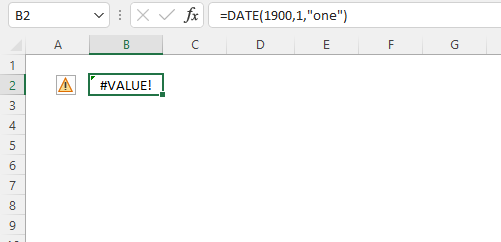
Excel returns a #VALUE! error if any of the arguments contain a text value.
year - a number equal or larger than 0 (zero)
month - any number positive or negative
day - any number positive or negative - Did you use exactly three arguments?
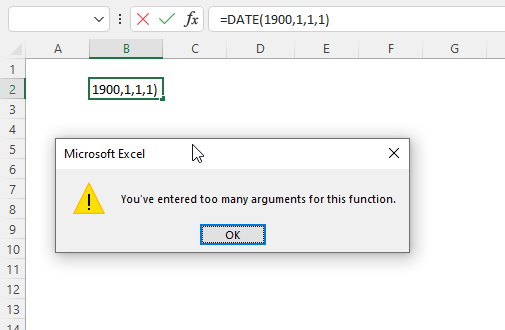
Excel returns a dialog box: You've entered too many arguments for this function.
DATE(year, month, day) - Excel Date function returns the wrong date.
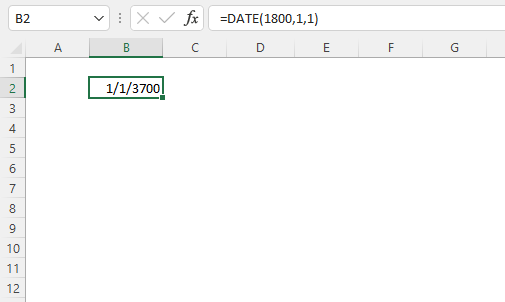
If you try a year before 1900 Excel returns a date that you probably didn't expect. Here is how Excel came up with that date. 1900+1800 = 1/1/3700 - The DATE function returns hashtags.
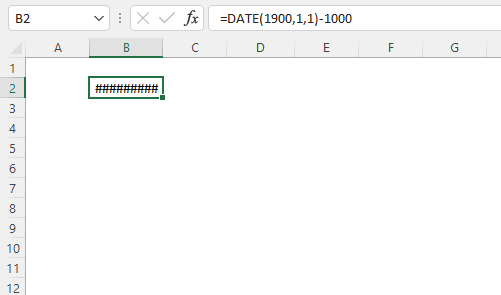
The DATE function can't return dates before 1/1/1900. The formula in cell B2 above tries to calculate an Excel date before 1/1/1900.
9.1 Troubleshooting the error value
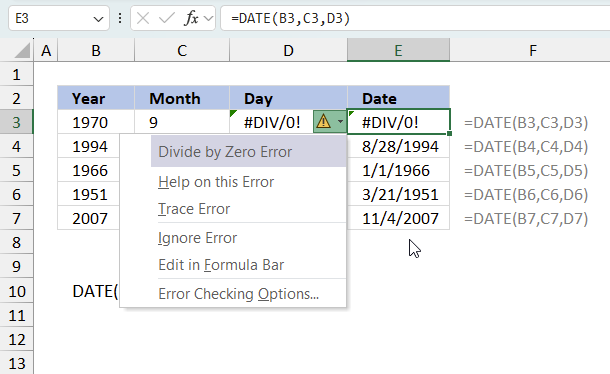
When you encounter an error value in a cell a warning symbol appears, displayed in the image above. Press with mouse on it to see a pop-up menu that lets you get more information about the error.
- The first line describes the error if you press with left mouse button on it.
- The second line opens a pane that explains the error in greater detail.
- The third line takes you to the "Evaluate Formula" tool, a dialog box appears allowing you to examine the formula in greater detail.
- This line lets you ignore the error value meaning the warning icon disappears, however, the error is still in the cell.
- The fifth line lets you edit the formula in the Formula bar.
- The sixth line opens the Excel settings so you can adjust the Error Checking Options.
Here are a few of the most common Excel errors you may encounter.
#NULL error - This error occurs most often if you by mistake use a space character in a formula where it shouldn't be. Excel interprets a space character as an intersection operator. If the ranges don't intersect an #NULL error is returned. The #NULL! error occurs when a formula attempts to calculate the intersection of two ranges that do not actually intersect. This can happen when the wrong range operator is used in the formula, or when the intersection operator (represented by a space character) is used between two ranges that do not overlap. To fix this error double check that the ranges referenced in the formula that use the intersection operator actually have cells in common.
#SPILL error - The #SPILL! error occurs only in version Excel 365 and is caused by a dynamic array being to large, meaning there are cells below and/or to the right that are not empty. This prevents the dynamic array formula expanding into new empty cells.
#DIV/0 error - This error happens if you try to divide a number by 0 (zero) or a value that equates to zero which is not possible mathematically.
#VALUE error - The #VALUE error occurs when a formula has a value that is of the wrong data type. Such as text where a number is expected or when dates are evaluated as text.
#REF error - The #REF error happens when a cell reference is invalid. This can happen if a cell is deleted that is referenced by a formula.
#NAME error - The #NAME error happens if you misspelled a function or a named range.
#NUM error - The #NUM error shows up when you try to use invalid numeric values in formulas, like square root of a negative number.
#N/A error - The #N/A error happens when a value is not available for a formula or found in a given cell range, for example in the VLOOKUP or MATCH functions.
#GETTING_DATA error - The #GETTING_DATA error shows while external sources are loading, this can indicate a delay in fetching the data or that the external source is unavailable right now.
9.2 The formula returns an unexpected value
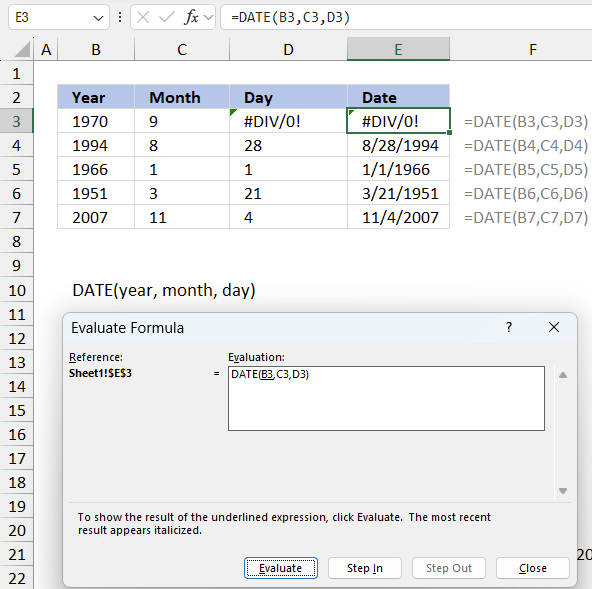
To understand why a formula returns an unexpected value we need to examine the calculations steps in detail. Luckily, Excel has a tool that is really handy in these situations. Here is how to troubleshoot a formula:
- Select the cell containing the formula you want to examine in detail.
- Go to tab “Formulas” on the ribbon.
- Press with left mouse button on "Evaluate Formula" button. A dialog box appears.
The formula appears in a white field inside the dialog box. Underlined expressions are calculations being processed in the next step. The italicized expression is the most recent result. The buttons at the bottom of the dialog box allows you to evaluate the formula in smaller calculations which you control. - Press with left mouse button on the "Evaluate" button located at the bottom of the dialog box to process the underlined expression.
- Repeat pressing the "Evaluate" button until you have seen all calculations step by step. This allows you to examine the formula in greater detail and hopefully find the culprit.
- Press "Close" button to dismiss the dialog box.
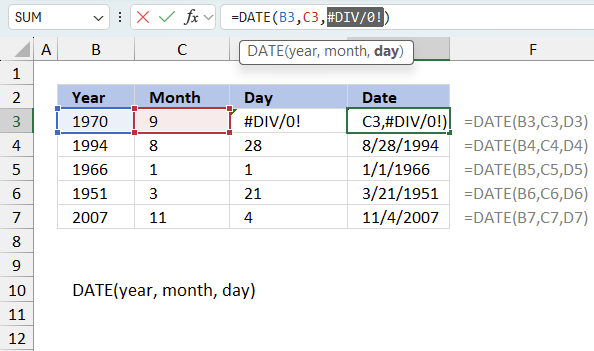
There is also another way to debug formulas using the function key F9. F9 is especially useful if you have a feeling that a specific part of the formula is the issue, this makes it faster than the "Evaluate Formula" tool since you don't need to go through all calculations to find the issue..
- Enter Edit mode: Double-press with left mouse button on the cell or press F2 to enter Edit mode for the formula.
- Select part of the formula: Highlight the specific part of the formula you want to evaluate. You can select and evaluate any part of the formula that could work as a standalone formula.
- Press F9: This will calculate and display the result of just that selected portion.
- Evaluate step-by-step: You can select and evaluate different parts of the formula to see intermediate results.
- Check for errors: This allows you to pinpoint which part of a complex formula may be causing an error.
The image above shows cell reference D3 converted to hard-coded value using the F9 key. The DATE function requires valid non-error values which is not the case in this example. We have found what is wrong with the formula.
Tips!
- View actual values: Selecting a cell reference and pressing F9 will show the actual values in those cells.
- Exit safely: Press Esc to exit Edit mode without changing the formula. Don't press Enter, as that would replace the formula part with the calculated value.
- Full recalculation: Pressing F9 outside of Edit mode will recalculate all formulas in the workbook.
Remember to be careful not to accidentally overwrite parts of your formula when using F9. Always exit with Esc rather than Enter to preserve the original formula. However, if you make a mistake overwriting the formula it is not the end of the world. You can “undo” the action by pressing keyboard shortcut keys CTRL + z or pressing the “Undo” button
9.3 Other errors
Floating-point arithmetic may give inaccurate results in Excel - Article
Floating-point errors are usually very small, often beyond the 15th decimal place, and in most cases don't affect calculations significantly.
10. How to make Excel order by date
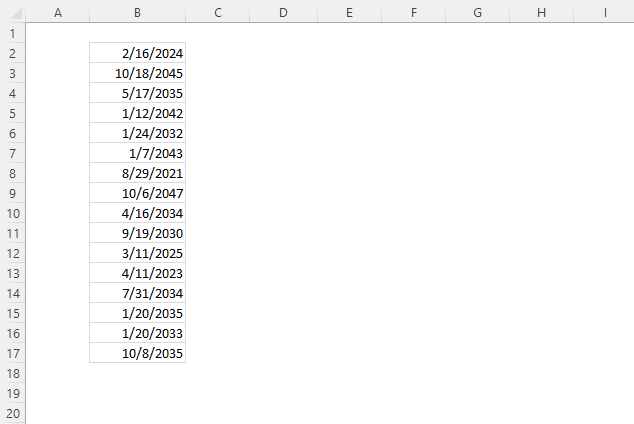
The image above shows a list of dates in column B, here is how to sort the dates.
- Press with right mouse button on any date in column B.
A popup menu appears.
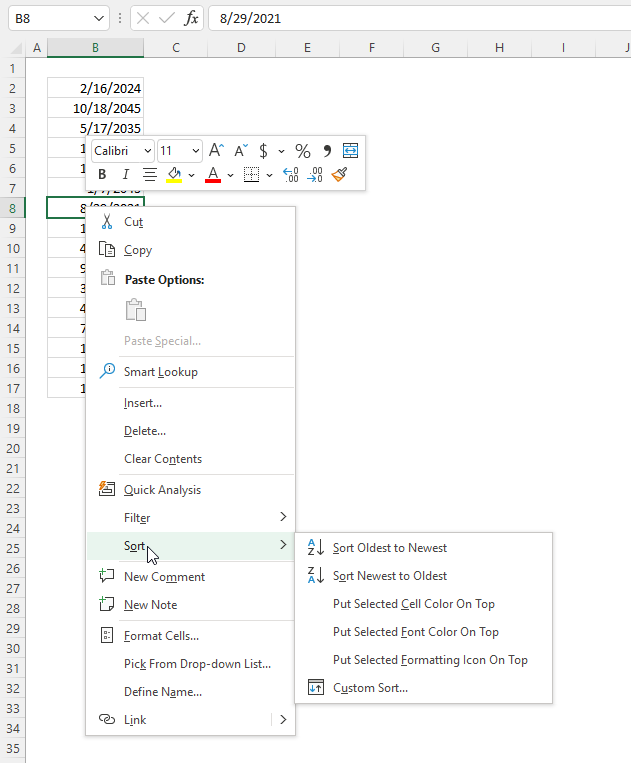
- Press "Sort". Another popup menu appears.
- Press either "Sort Oldest to Newest" or "Sort Newest to Oldest".
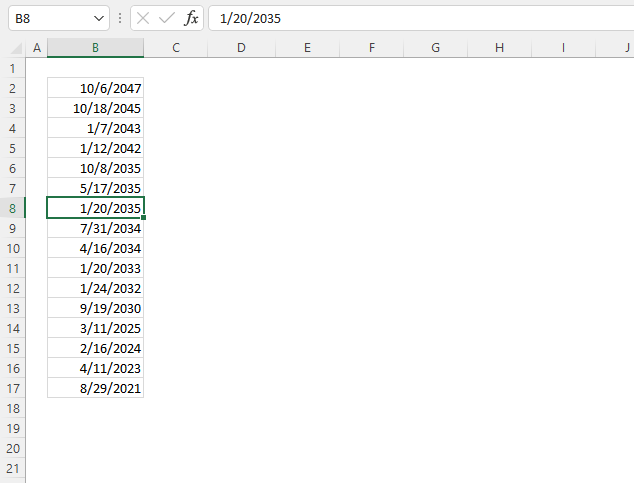
Here is how to sort the dates using a formula.
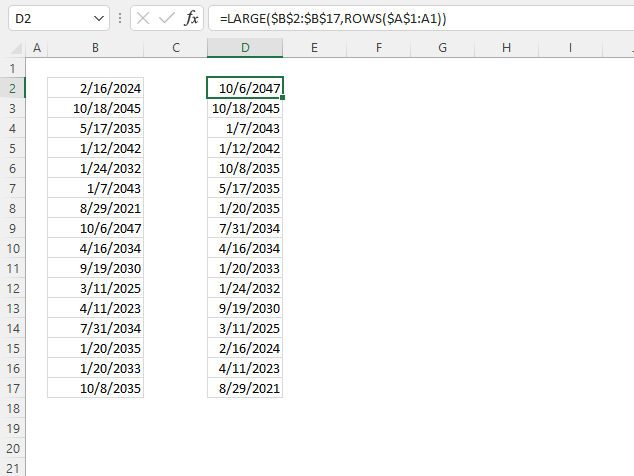
Formula in cell D2:
Explaining formula in cell D2
Step 1 - Create a sequence of values from 1 to n
The ROWS function returns a number based on the number of rows in a cell reference.
ROWS(ref)
ROWS($A$1:A1)
returns 1.
Step 2 - Extract k-th largest serial number
The LARGE function calculates the k-th largest number.
LARGE(array, k)
LARGE($B$2:$B$17, ROWS($A$1:A1))
becomes
LARGE($B$2:$B$17, 1)
becomes
LARGE({45338; 53253; 49446; 51878; 48237; 52238; 44437; 53971; 49050; 47745; 45727; 45027; 49156; 49329; 48599; 49590}, 1)
and returns 53971 (10/6/2047) in cell D2.
11. Add days
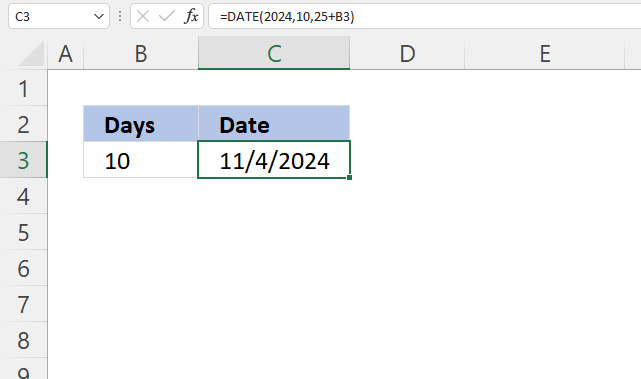
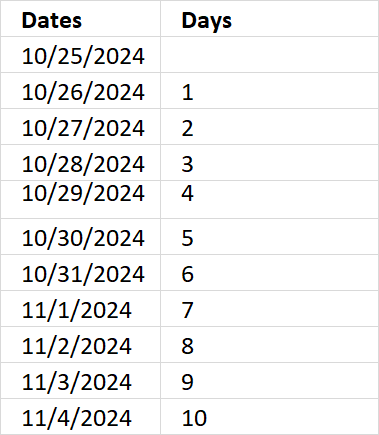
The formula in cell C3 adds 10/25/2024 with 10 days specified in cell B3.
Formula in cell C3:
Explaining formula in cell C3
Step 1 - Add dates
The plus sign lets you add numbers in Excel formulas.
25+B3
becomes
25 + 10 equals 35.
Step 2 - Calculate serial number representing an Excel date
The DATE function calculates a serial number that represents a specific date based on three arguments. Year, month, and day.
DATE(year, month, day)
DATE(2024,10,25+B3)
becomes
DATE(2024,10,35)
and returns 45600 formatted as 11/4/2024 in cell C3.
12. Subtract days
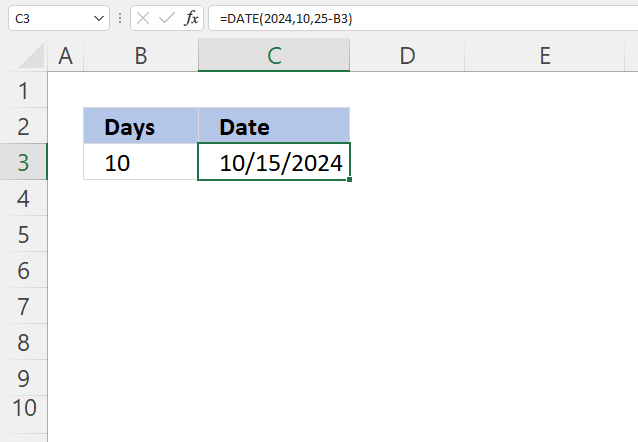
The formula in cell C3 subtracts 10/25/2024 with 10 days specified in cell B3.
Formula in cell C3:
Explaining formula in cell C3
Step 1 - Subtract dates
The minus sign lets you subtract numbers in Excel formulas.
25-B3
becomes
25 - 10 equals 15.
Step 2 - Calculate serial number representing an Excel date
The DATE function calculates a serial number that represents a specific date based on three arguments. Year, month, and day.
DATE(year, month, day)
DATE(2024,10,25-B3)
becomes
DATE(2024,10,15)
and returns 45580 formatted as 11/4/2024 in cell C3.
13. Add months
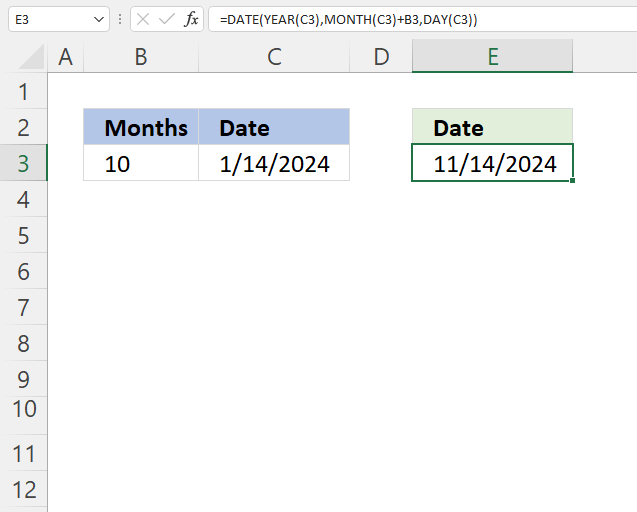
The formula in cell E3 adds months based on the number in cell B3 to a date specified in cell C3.
Formula in cell C3:
Explaining formula in cell C3
Step 1 - Calculate year
The YEAR function returns a number representing the year based on an Excel date (serial number).
YEAR(serial_number)
YEAR(C3)
becomes
YEAR(1/14/2024)
becomes
YEAR(45305)
and returns 2024.
Step 2 - Calculate month
The MONTH function returns a number representing a month. 1 - January, ..., 12 - December.
MONTH(serial_number)
MONTH(C3)+B3
becomes
MONTH(45305)+10
becomes
1+10 equals 11.
Step 3 - Calculate day
The DAY function returns a number representing the day from an Excel date (serial number).
DAY(C3)
becomes
DAY(45305)
and returns 14.
Step 4 - Calculate date
The DATE function calculates a serial number that represents a specific date based on three arguments. Year, month, and day.
DATE(year, month, day)
DATE(YEAR(C3), MONTH(C3)+B3, DAY(C3))
becomes
DATE(2014, 11, 14)
and returns 45610 (11/14/2024).
14. Last day of a given month
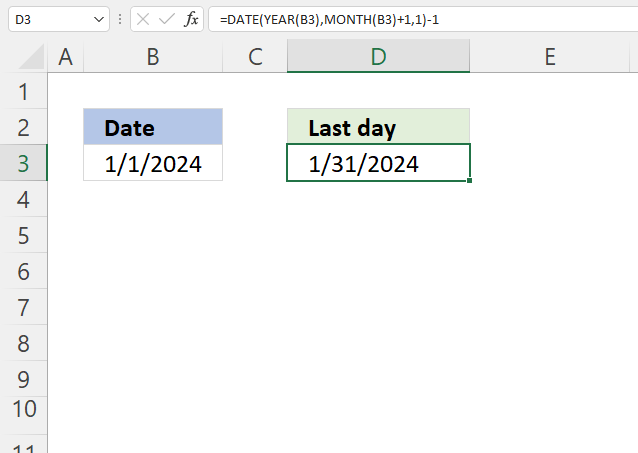
The formula in cell D3 calculates the last day for a given month based on a date in cell B3. The date is 1/1/2024, the last day in January 2024 is 31.
The way this works is that the formula adds one month to the date in cell B3 then subtracts with 1 to get the last date of the previous month.
Formula in cell C3:
Explaining formula in cell C3
Step 1 - Calculate year
The YEAR function returns a number representing the year based on an Excel date (serial number).
YEAR(serial_number)
YEAR(B3)
becomes
YEAR(1/1/2024)
becomes
YEAR(45292)
and returns 2024.
Step 2 - Calculate month
The MONTH function returns a number representing a month. 1 - January, ..., 12 - December.
MONTH(serial_number)
MONTH(B3)+1
becomes
MONTH(45292)+1
becomes
1+1 equals 2.
Step 3 - Calculate day
The DAY function returns a number representing the day from an Excel date (serial number).
DAY(B3)
becomes
DAY(45292)
and returns 1.
Step 4 - Calculate the date
The DATE function calculates a serial number that represents a specific date based on three arguments. Year, month, and day.
DATE(year, month, day)
DATE(YEAR(B3),MONTH(B3)+1,1)-1
becomes
DATE(2014, 2, 1)-1
becomes
45323-1
and returns 45322 (1/31/2024).
15. Get Excel file

16. Calculate date given weekday and week number (week starts on Sunday)
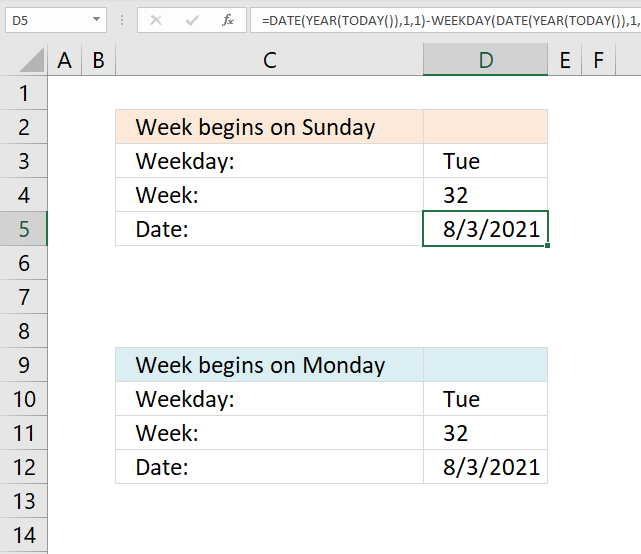
This section demonstrates formulas that returns a date based on a week number and a weekday like Sun to Sat. It uses the current year to calculate the date.
La Thăng asks:
I want to find the day if given date and week, for example: if given Tuesday, 32nd week, 2015 >>> how to create a formula to point out 4/8/2015?
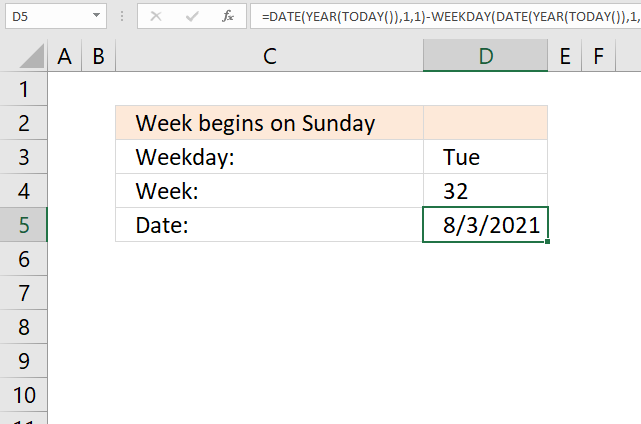
Formula in cell D6:
Explaining formula in cell D6
Step 1 - Calculate the first date of this year
The TODAY function returns today's date, the function is volatile meaning it recalculates every time you enter a value in a cell and press enter or press F9.
TODAY() returns 5/8/21.
Step 2 - Calculate the first date of this year
The YEAR function returns the year based on an Excel date.
YEAR(TODAY())
becomes
YEAR(44324)
and returns 2021.
Step 3 - Calculate the first date of this year
The DATE function returns an Excel date based on a year number, month number and day number.
DATE(year, month, day)
Year is a number from 1900 to 9999, month is a number from 1 to 12. 1 = January, ... , 12 = December. Day is usually a number between 1 and 31 but can be larger.
DATE(YEAR(TODAY()), 1, 1)
becomes
DATE(2021, 1, 1)
and returns 44197.
Step 4 - Subtract with the corresponding weekday number
The WEEKDAY function converts an Excel date to a number ranging from 1 to 7, based on when the week begins.
WEEKDAY(serial_number, [return_type])
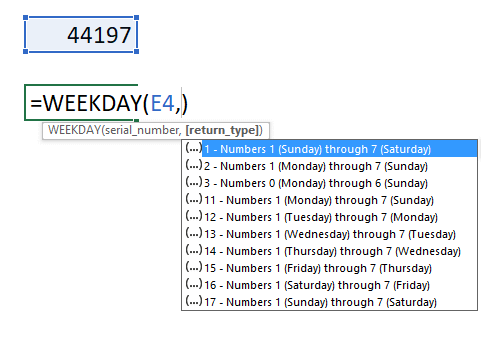
If you live in the US the week in starts on Sundays, return_type is 1.
WEEKDAY(DATE(YEAR(TODAY()), 1, 1), 1)
becomes WEEKDAY(44197, 1)
and returns 6. 44197 is 1/1/2021 and that day is a Friday.
1 - Sunday, ... , 7 - Saturday.
Step 5 - Subtract date with weekday number
DATE(YEAR(TODAY()), 1, 1)-WEEKDAY(DATE(YEAR(TODAY()), 1, 1), 1)
becomes
44197 - 6 equals 44191.
Step 6 - Calculate and add the number of days from Monday/week 1 to Monday/(nth week -1)
+7*(D4-1)
Example, 7*(32-1)
becomes
7*31 and returns 217.
Step 7 - Calculate and add weekday number
The MATCH function returns the relative position of the given item in a cell range or array.
MATCH($D$4, {"Sun", "Mon", "Tue", "Wed", "Thu", "Fri", "Sat"}, 0)
If you week begins on sunday, this is the array you want to be using:
{"Sun", "Mon", "Tue", "Wed", "Thu", "Fri", "Sat"}.
Example, "Tue" returns 3. "Tue" is in position three in the array.
Step 8 - Add and subtract
44192+217+2 = 44411
44411 is 8/3/2021.
17. Calculate date given weekday and week number (week starts on Monday)
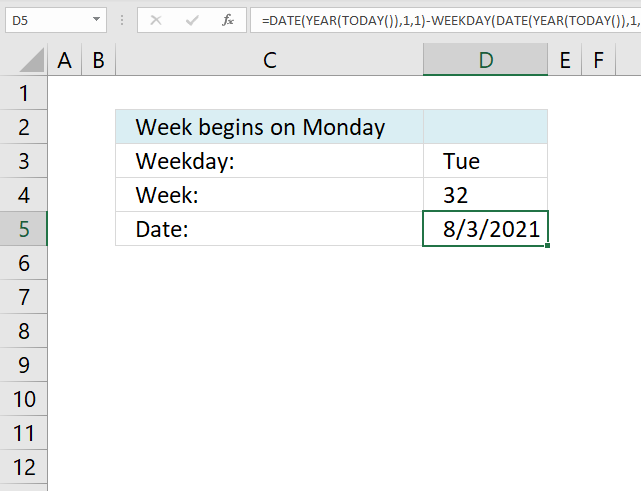
This example demonstrates a formula that works with weeks that begin with Mondays.
Formula in cell 5:
Note that the WEEKDAY function uses 2 in the second argument meaning the week begins with a Monday and the array in the second argument in the MATCH function begins with Monday.
Tip! You can shrink the formula if you can convert the weekday to a number yourself.
'DATE' function examples
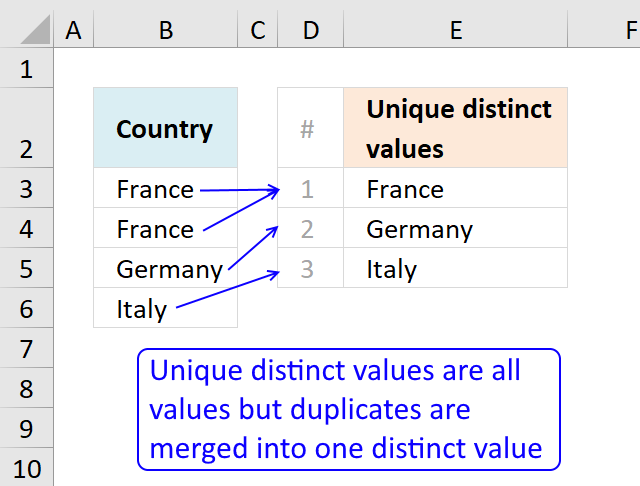
This article describes how to count unique distinct values. What are unique distinct values? They are all values but duplicates are […]
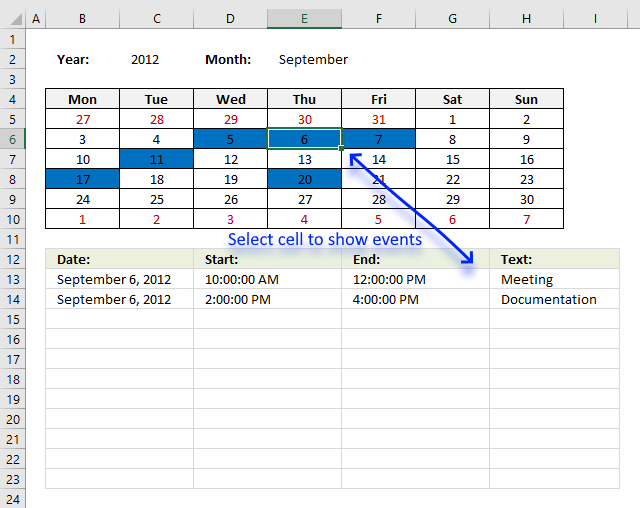
Table of Contents Excel monthly calendar - VBA Calendar Drop down lists Headers Calculating dates (formula) Conditional formatting Today Dates […]
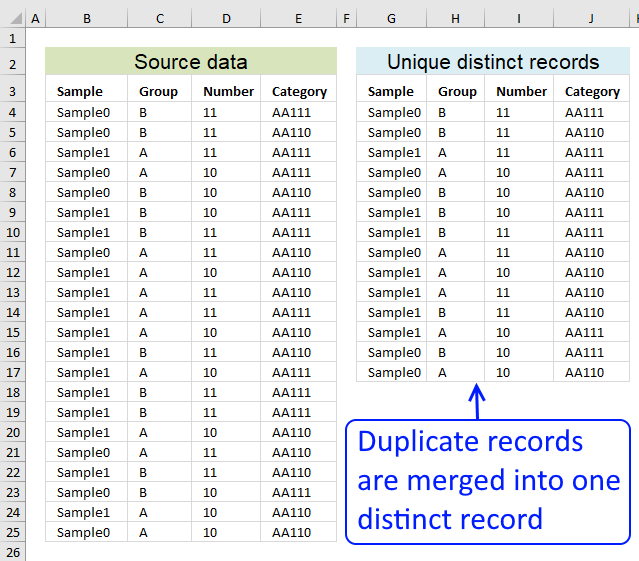
Table of contents Filter unique distinct row records Filter unique distinct row records but not blanks Filter unique distinct row […]
Functions in 'Date and Time' category
The DATE function function is one of 22 functions in the 'Date and Time' category.
Excel function categories
Excel categories
One Response to “How to use the DATE function”
Leave a Reply
How to comment
How to add a formula to your comment
<code>Insert your formula here.</code>
Convert less than and larger than signs
Use html character entities instead of less than and larger than signs.
< becomes < and > becomes >
How to add VBA code to your comment
[vb 1="vbnet" language=","]
Put your VBA code here.
[/vb]
How to add a picture to your comment:
Upload picture to postimage.org or imgur
Paste image link to your comment.

Hi
I would just use =eomonth(b3)
Much simpler