Find all sequences of consecutive dates
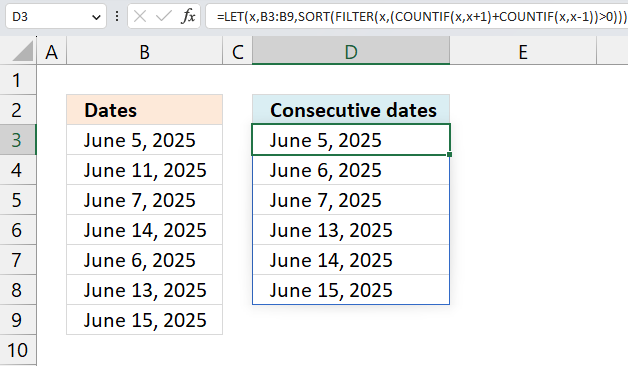
This article demonstrates formulas that display dates that follow each other in sequence. Dates June 5, 2025 and June 6, 2025 are consecutive dates, they are in a consecutive sequence.
I will be demonstrating formulas for both Excel 365 and earlier Excel versions. These formulas work fine with numerical values, not only Excel dates.
Table of Contents
- Find all sequences of consecutive dates - Excel 365
- List non consecutive dates - Excel 365
- Find all sequences of consecutive dates - earlier Excel versions
- List non consecutive dates - earlier Excel versions
- Highlight consecutive dates using Conditional Formatting
- List consecutive numbers
- List non consecutive numbers
- Get Excel file
1. Find all sequences of consecutive dates - Excel 365
The image above shows a formula that lists all dates in cell range B3:B9 that follow each other in sequence like for example January 1, 2025 and January 2, 2025 and so on.
Excel 365 dynamic array formula in cell D3:
1.1 Explaining formula
Excel stores dates as serial numbers that represent the number of days since January 1, 1900. For example, the date January 1, 2020 is stored as 43831, which means it is 43831 days after January 1, 1900. The serial numbers in the cells are formatted as dates based on your settings.
Step 1 - Add 1 to each date
The plus sign lets you add numbers in an Excel formula.
B3:B9+1
returns {45814;45820;... ;45824}
Step 2 - Count dates based on next date
The COUNTIF function calculates the number of cells that is equal to a condition.
Function syntax: COUNTIF(range, criteria)
COUNTIF(B3:B9,B3:B9+1)
returns {1;0;0;1;1;1;0}
Step 3 - Subtract 1 from each date
The minus sign lets you subtract numbers in an Excel formula.
B3:B9-1
returns {45812;45818;... ;45822}
Step 4 - Count dates based on previous date
The COUNTIF function calculates the number of cells that is equal to a condition.
Function syntax: COUNTIF(range, criteria)
COUNTIF(B3:B9,B3:B9-1)
returns {0;0;1;1;1;0;1}
Step 5 - Add arrays
COUNTIF(B3:B9,B3:B9+1)+COUNTIF(B3:B9,B3:B9-1)
returns {1;0;1;2;2;1;1}
Step 6 - Filter dates
The FILTER function extracts values/rows based on a condition or criteria.
Function syntax: FILTER(array, include, [if_empty])
FILTER(B3:B9,COUNTIF(B3:B9,B3:B9+1)+COUNTIF(B3:B9,B3:B9-1))
returns {45813;45815;... ;45823}
Step 7 - Sort dates from small to large
The SORT function sorts values from a cell range or array
Function syntax: SORT(array,[sort_index],[sort_order],[by_col])
SORT(FILTER(B3:B9,COUNTIF(B3:B9,B3:B9+1)+COUNTIF(B3:B9,B3:B9-1)))
returns {45813;45814; ... ;45823}
Step 8 - Shorten the formula
The LET function lets you name intermediate calculation results which can shorten formulas considerably and improve performance.
Function syntax: LET(name1, name_value1, calculation_or_name2, [name_value2, calculation_or_name3...])
SORT(FILTER(B3:B9,COUNTIF(B3:B9,B3:B9+1)+COUNTIF(B3:B9,B3:B9-1)))
B3:B9 is repeated 5 times.
x - B3:B9
LET(x,B3:B9,SORT(FILTER(x,COUNTIF(x,x+1)+COUNTIF(x,x-1))))
2. List all non consecutive dates - Excel 365
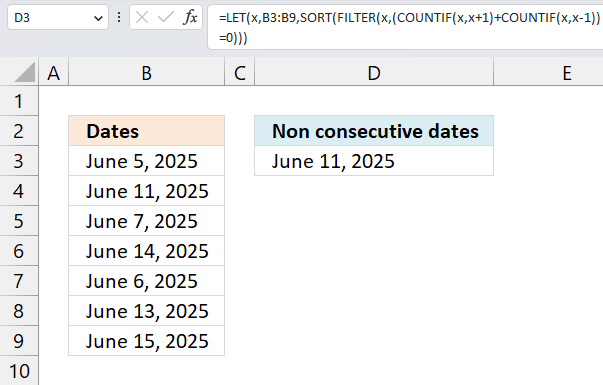
This formula lists all dates that have no following date in sequence or a previous date in sequence. In this example cell range B3:B9 contains random dates, only June 11, 2025 has no following consecutive date or a previous consecutive date. The remaining dates are all dates in consecutive sequence.
Excel 365 formula in cell D3:
This formula is so similar to the one in section 1 (above) that I am not going to explain it, the only difference is this part:
(COUNTIF(x,x+1)+COUNTIF(x,x-1))=0
compared to
COUNTIF(x,x+1)+COUNTIF(x,x-1)
in the section above. Dates that have a count of 0 (zero) have no following dates in sequence or previous dates in sequence. The equal sign lets you check for 0 (zeros) in the array, the result is TRUE or FALSE which the FILTER function needs to extract values.
(COUNTIF(x,x+1)+COUNTIF(x,x-1))=0
becomes
{1;0;1;2;2;1;1}=0
and returns
{FALSE;TRUE;FALSE;FALSE;FALSE;FALSE;FALSE}
3. Find all sequences of consecutive dates - earlier Excel versions
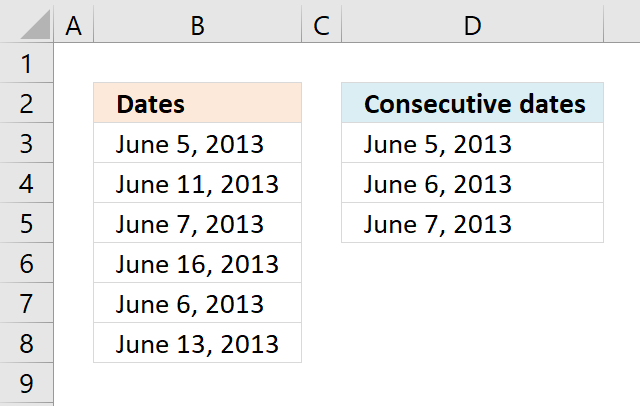
The image above shows a formula in cell D3 that extract dates from column B. Column B contains dates in random order.
The condition that must be met is that at least two dates is exactly one day a part from each other. Duplicate dates are repeated in the returned date sequence.
Array formula in cell D3:
This formula can be entered as a regular formula if you are an Excel 365 subscriber. Earlier versions must enter this formula as an array formula to make it work properly.
3.1 How to enter an array formula
- Copy array formula above (Ctrl + c).
- Doublepress with left mouse button on cell D3.
- Paste formula (Ctrl + v)
- Press and hold CTRL + SHIFT simulateously.
- Press Enter once.
- Release all keys.
The formula now begins with and ends with a curly bracket, like this: {=array_formula}. Don't enter these characters yourself, they appear automatically if you followed the steps above.
3.2 How to copy array formula
- Select cell D3.
- Copy cell (Ctrl + c).
- Select cell range D4:D5.
- Paste (Ctrl + v).
The relative cell refences in the formula changes automatically when you copy the cell (not the formula) and paste to cells below.
3.3 Explaining the formula in cell D3
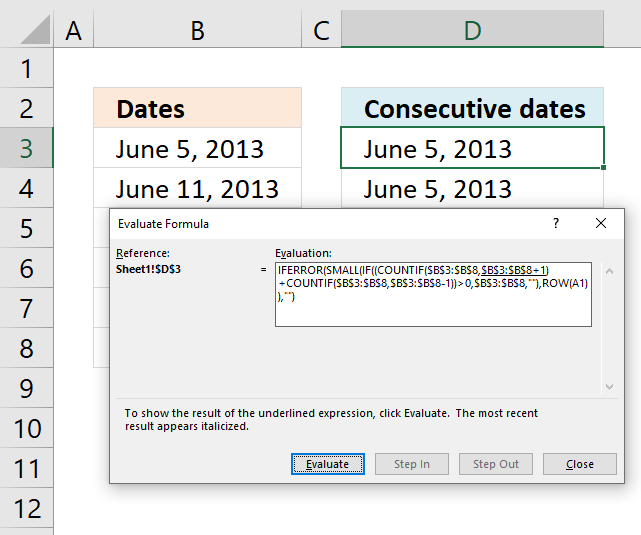
To understand formulas in greater detail I recommend you use the "Evaluate Formula" tool. Go to tab "Formulas" on the ribbon. Press with left mouse button on the "Evaluate Formula" button and a dialog box appears.
Press with left mouse button on the "Evaluate" button on the dialog box to show the next calculation step by step. Press with left mouse button on "Close" button to dismiss the dialog box.
Step 1 - Find dates that have a consecutive date except for the last consecutive date
The COUNTIF function counts cells based on a condition, however, we are going to use multiple conditions. The COUNTIF function will, in this case, return an array with values equal to the number of conditions. Their position in the array matches the position of each condition.
COUNTIF(range, criteria)
The formula is working with dates so I now need to explain how Excel handles dates. Excel dates are actually regular numbers, number 1 is equal to 1/1/1900 and number 36526 is 1/1/2000. There are 36525 days between 1/1/2000 and 1/1/1900. Excel basically formats cells containing numbers as dates.
You can check this yourself, type 1/1/1900 in a cell. Select the cell and press CTRL + 1 to open the "Format Cells" dialog box. Press with left mouse button on "General" and press the OK button. The selected cell now shows 1.
COUNTIF($B$3:$B$8,$B$3:$B$8+1)
returns {1; 0; 0; 0; 1; 0}. This array tells us which dates have a consecutive date, however it will not tell us which date is the last consecutive date. The next step will take care of that.
Step 2 - Find dates that have a consecutive date except the first consecutive date
COUNTIF($B$3:$B$8,$B$3:$B$8-1)
returns {0; 0; 1; 0; 1; 0}. This array shows us which dates are the last consecutive date for any given sequence.
Step 3 - Add arrays
To identify all consecutive dates we must add both arrays meaning we are applying OR logic.
COUNTIF($B$3:$B$8,$B$3:$B$8+1)+COUNTIF($B$3:$B$8,$B$3:$B$8-1)
returns {1;0;1;0;2;0}.
Step 4 - Find values in array larger than 0 (zero)
This step is actually not needed, the IF function will in the next step handle any number as the boolean value TRUE and 0 (zeros) as FALSE. There is really no need to convert the array to their boolean counterparts.
(COUNTIF($B$3:$B$8,$B$3:$B$8+1)+COUNTIF($B$3:$B$8,$B$3:$B$8-1))>0
returns {TRUE; FALSE; ... ; FALSE}.
Step 5 - Filter consecutive dates
The IF function returns the corresponding date if the logical expression returns TRUE and a blank if FALSE.
IF((COUNTIF($B$3:$B$8, $B$3:$B$8+1) + COUNTIF($B$3:$B$8, $B$3:$B$8-1))>0, $B$3:$B$8, "")
returns {41430; ""; 41432; ""; 41431; ""}.
Step 6 - Find the k-th smallest date
The SMALL function extracts the k-th smallest number using the ROWS function and absolute and relative cell references in order to return values in a cell each.
SMALL(IF((COUNTIF($B$3:$B$8, $B$3:$B$8+1) + COUNTIF($B$3:$B$8, $B$3:$B$8-1))>0, $B$3:$B$8, ""),ROWS($A$1:A1))
returns 41430 (June 5, 2013) in cell D3. The SMALL function will sort the output dates from smallest to largest.
4. Find non-consecutive dates in a set of dates
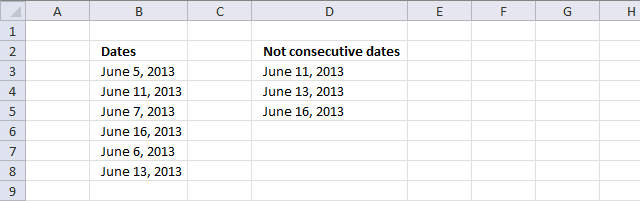
This example demonstrates a formula for Excel versions earlier than Excel 365. It extracts dates from cell range B3:B8 that are not consecutive dates meaning there are no following and previous date to that particular date.
The formula extracts June 11, 2013 June 13, 2013 and June 16, 2013 from cell range B3:B8, the remaining dates have dates in consecutive sequence.
Array formula in cell D3:
The formula in this section is almost the same as the one in section 1 (above), so I won’t explain it again. The only difference is that this part:
(COUNTIF($B$3:$B$8, $B$3:$B$8+1)+COUNTIF($B$3:$B$8, $B$3:$B$8-1))=0
compared to
COUNTIF($B$3:$B$8, $B$3:$B$8+1)+COUNTIF($B$3:$B$8, $B$3:$B$8-1)
This part checks if the dates have a count of 0 (zero), which means they are not part of a consecutive sequence. The equal sign compares the count to 0 (zero) and returns TRUE or FALSE, which the FILTER function uses to extract values.
(COUNTIF($B$3:$B$8, $B$3:$B$8+1)+COUNTIF($B$3:$B$8, $B$3:$B$8-1))=0
returns {FALSE;TRUE;FALSE;TRUE;FALSE;TRUE}.
5. Highlight consecutive dates using Conditional Formatting
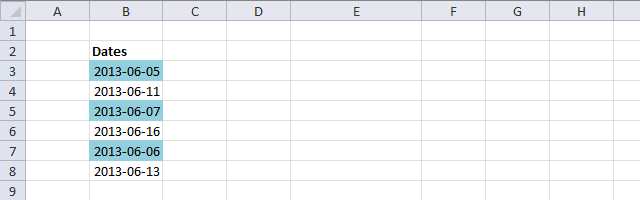
You can also highlight consecutive dates using Conditional formatting (CF). You need a custom Conditional Formatting formula to do this, it is not complicated to setup.
Make sure you enter the dollar signs correctly, they are important in order to highlight consecutive dates. $B$3:$B$8 is an absolute cell reference, it won't change. However, the B3 cell reference changes from cell to cell.
Conditional formatting formula:
As you can see, the formula has the same logic as the formulas in the sections above. The CF formula is applied to a cell range and the relative cell references change from cell to cell making this formula work.
5.1 How to apply conditional formatting
- Select cell range B3:B8.
- Go to "Home" tab on the ribbon.
- Press with left mouse button on the "Conditional formatting" button.
- Press with left mouse button on "New Rule...".
- Press with left mouse button on "Use a formula to determine which cells to format".
- Format values where this formula is TRUE:
=(COUNTIF($B$3:$B$8,B3+1)+COUNTIF($B$3:$B$8,B3-1))>0 - Press with left mouse button on "Format.." button.
- Press with mouse on the "Fill" tab to select it.
- Pick a color.
- Press with left mouse button on OK button.
- Press with left mouse button on OK button.
I am not going to explain the logic again, see section 1 for an explanation.
Read more about conditional formatting:
- Working with formulas in conditional formatting
- Search with conditional formatting
- How to use a table name in data validation lists and conditional formatting formulas
6. List consecutive numbers
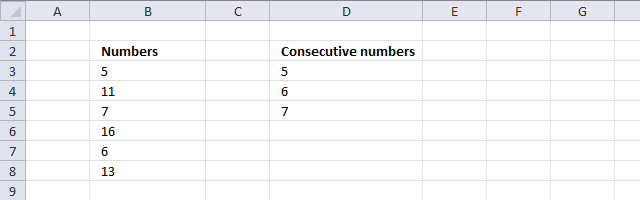
Since dates are numbers in Excel you can also use the same formulas to identify consecutive numbers. The image above demonstrates that the same formula works for numerical values.
List consecutive numbers - Excel 365
List consecutive numbers - earlier Excel versions
7. List non consecutive numbers
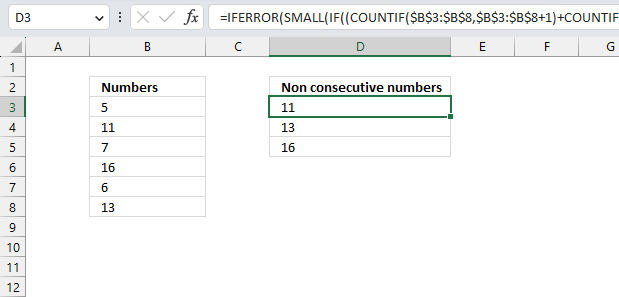
Since dates are numbers in excel you can also use the same array formulas to identify non consecutive numbers as well. The picture above shows that the same formula works for numbers.
List non consecutive numbers - Excel 365
List non consecutive numbers - earlier Excel versions
Recommended links
Using Excel to Find Sequences of Consecutive Dates in a Column
Consecutive Date Formula
Create a list of sequential dates

Dates category
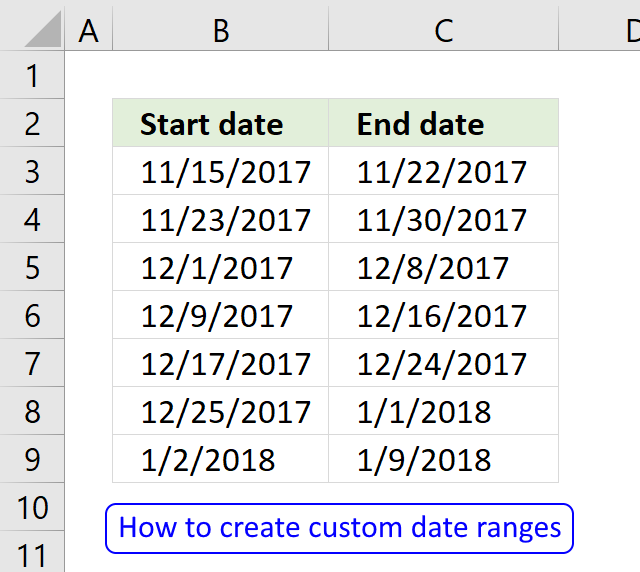
Question: I am trying to create an excel spreadsheet that has a date range. Example: Cell A1 1/4/2009-1/10/2009 Cell B1 […]
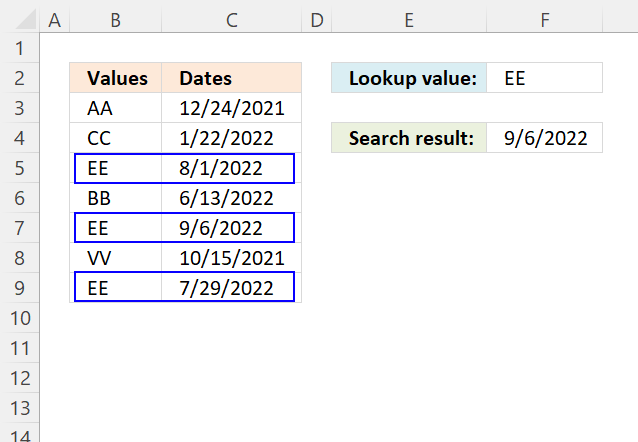
This article demonstrates how to return the latest date based on a condition using formulas or a Pivot Table. The […]
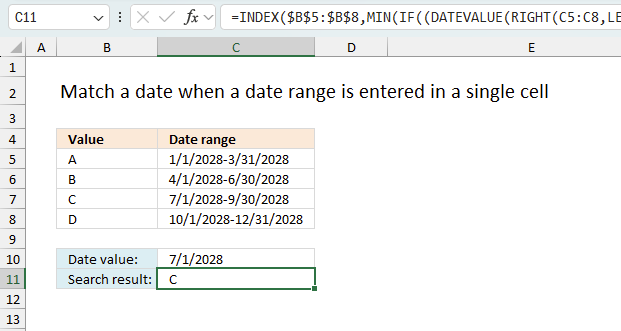
This article explains how to search for a specific date and identify a date range in which it falls between […]
Excel categories
3 Responses to “Find all sequences of consecutive dates”
Leave a Reply
How to comment
How to add a formula to your comment
<code>Insert your formula here.</code>
Convert less than and larger than signs
Use html character entities instead of less than and larger than signs.
< becomes < and > becomes >
How to add VBA code to your comment
[vb 1="vbnet" language=","]
Put your VBA code here.
[/vb]
How to add a picture to your comment:
Upload picture to postimage.org or imgur
Paste image link to your comment.

Very clever solution!
Thanks for sharing.
pmsocho,
Thank you for commenting!
I am wondering if there is a way to count the number of days between dates in consecutive rows of a spreadhseet in a pivot table. The use case is to find the number of days between human error incidents for a group of operators in a manufacturing environment. Simply put if you have col A as operator name(s), B as dates of human errors how would you count the days between human errors as an array? Any thoughts would be appreciated.