Split data across multiple sheets – VBA
Table of Contents
1. Split data across multiple sheets - VBA
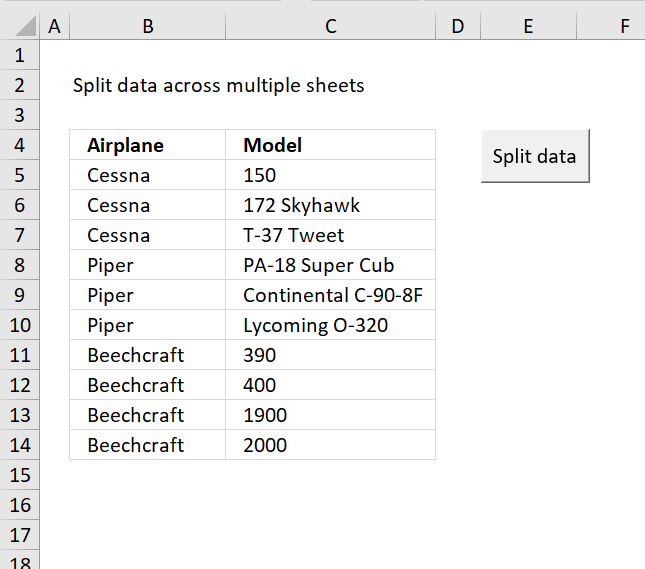
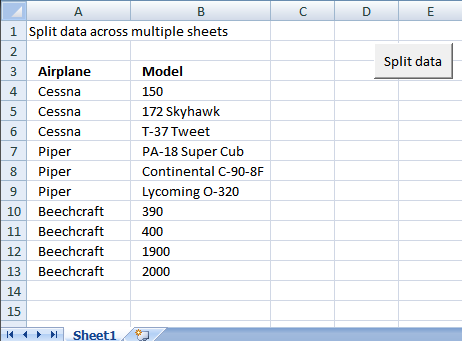
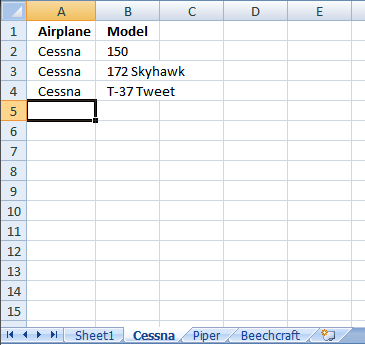
In this section I am going to show how to create a new sheet for each airplane using vba. The macro copies airplane and model values into each new sheet.
Before:
After:
The Code
Sub Splitdatatosheets()

' Splitdatatosheets Macro
Dim rng As Range
Dim rng1 As Range
Dim vrb As Boolean
Dim sht As Worksheet
Set rng = Sheets("Sheet1").Range("A4")
Set rng1 = Sheets("Sheet1").Range("A4:D4")
vrb = False
Do While rng <> ""
For Each sht In Worksheets
If sht.Name = Left(rng.Value, 31) Then
sht.Select
Range("A2").Select
Do While Selection <> ""
ActiveCell.Offset(1, 0).Activate
Loop
rng1.Copy ActiveCell
ActiveCell.Offset(1, 0).Activate
Set rng1 = rng1.Offset(1, 0)
Set rng = rng.Offset(1, 0)
vrb = True
End If
Next sht
If vrb = False Then
Sheets.Add After:=Sheets(Sheets.Count)
ActiveSheet.Name = Left(rng.Value, 31)
Sheets("Sheet1").Range("A3:B3").Copy ActiveSheet.Range("A1")
Range("A2").Select
Do While Selection <> ""
ActiveCell.Offset(1, 0).Activate
Loop
rng1.Copy ActiveCell
Set rng1 = rng1.Offset(1, 0)
Set rng = rng.Offset(1, 0)
End If
vrb = False
Loop
End Sub
Get excel tutorial file
Remember to enable macros and backup your excel file because you can´t undo macros.
Split-data-across-multiple-sheets.xls
(Excel 97-2003 Workbook *.xls)
Split Data Across Multiple Sheets Add-In
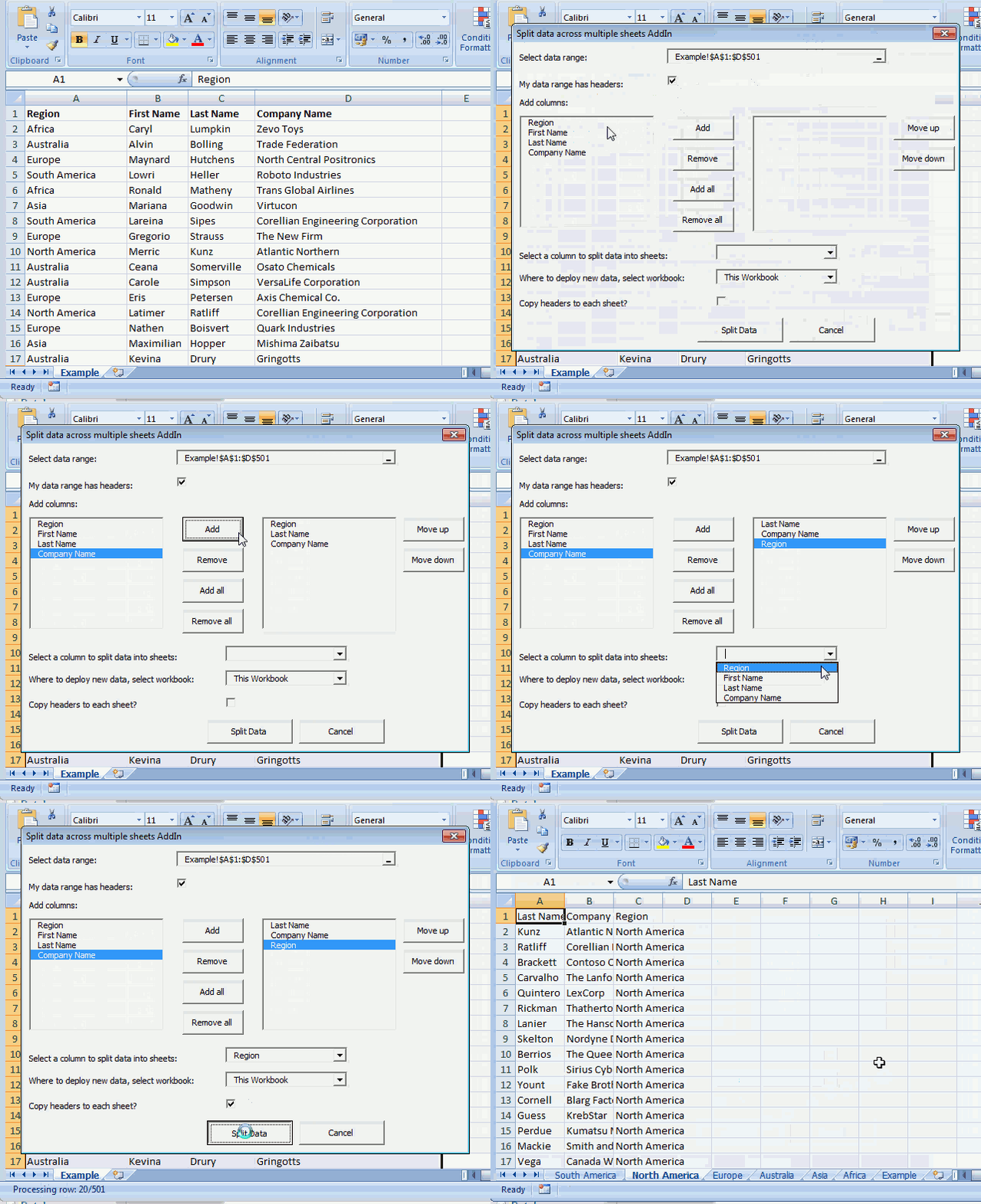
Split data across multiple sheets Add-In for Excel let´s you split/categorize data from a sheet across multiple new sheets.
Features
- Select any single range
- Select specific columns
- Arrange output columns in any order
- Categorize data across sheets in current workbook, new workbook or any open workbook
- Add column headers to each new sheet
What you get
- Split data across multiple sheets add-in for Excel *.xlam file.
- Instructions on how to install.
- Instructions on how to use.
- Excel *.xlsx example file.
- 2 licenses, home and office computer.
Questions:
Is there a money back guarantee?
Sure, you have unconditional money back guarantee for 14 days.
What about working with merged cells?
The add-in won't work with merged cells. Unmerge cells before usage.
I have more questions?
Use this contact form to let me know.
Purchase Split Data Across Multiple Sheets Add-In for Excel - Price $19 US



2. Add values to worksheets based on a condition - VBA
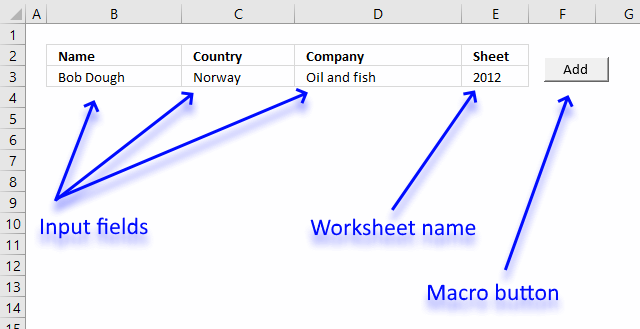
This tutorial shows you how to add a record to a particular worksheet based on a condition, the image above shows input fields name, country, company and sheet.
The sheet input field determines which worksheet to add the values to, the add button allows you to run the macro and place the values automatically.
I will also show you the macro code to accomplish this task, what each line does, and where to put the code.
This section is inspired by this question:
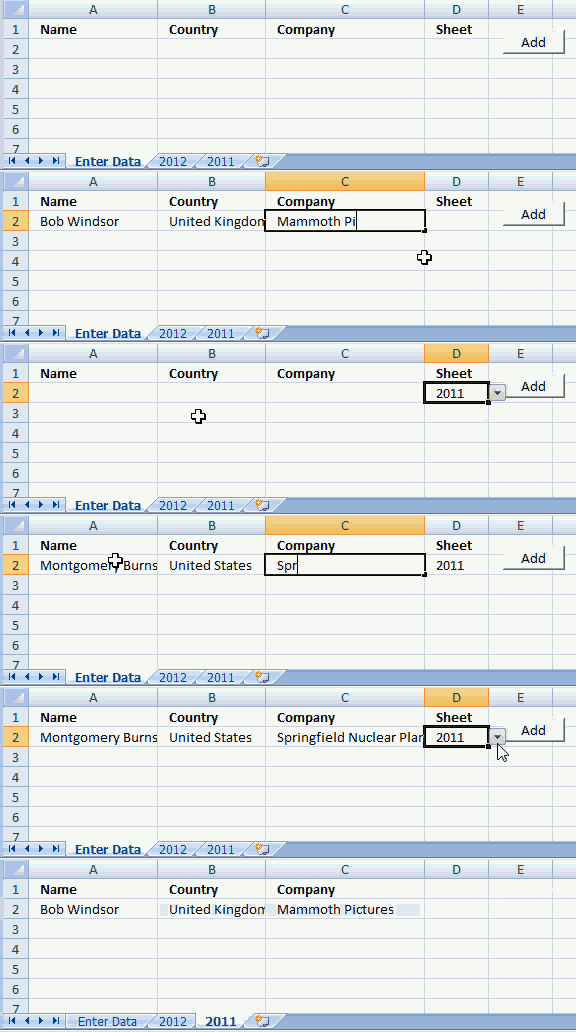
The animated image above demonstrates how to type input values and then cut values and paste to the given worksheet.
To make things easier a drop down list lets the user pick worksheet name in cell D2.
How to create a drop down list
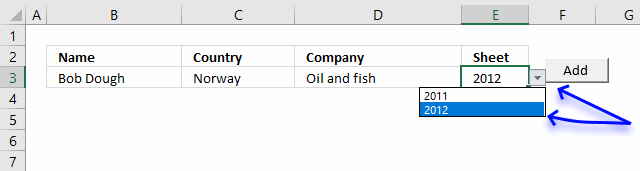
- Select cell E2.
- Go to tab "Data" on the ribbon.
- Press with left mouse button on "Data Validation" button.
- Go to "Settings" tab.
- Select List
- Type 2011, 2012 (sheet names) in Source:
- Press with left mouse button on OK
A black arrow appears next to cell E2, see image above. Press with left mouse button on the arrow to expand a list that allows you to select a worksheet name.
Where to put the code?
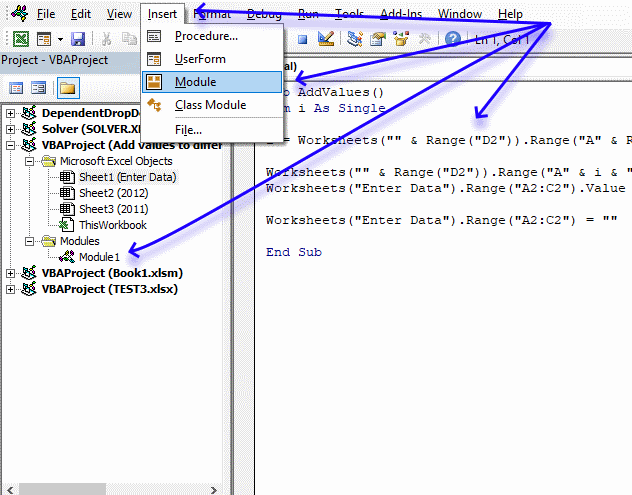
- Copy code below.
- Go to Excel and press Alt+ F11 to open the VB Editor (Visual Basic Editor).
- Select your workbook in the Project Explorer.
- Press with left mouse button on Insert on the menu.
- Press with left mouse button on Module to insert a module to the selected workbook.
- Paste macro code to the code module.
- Exit VB Editor.
VBA code
'Name macro
Sub AddValues()

'Dimension variable and declare data type
Dim i As Single

'Save row number of cell below last nonempty cell
i = Worksheets("" & Range("E3")).Range("A" & Rows.Count).End(xlUp).Row + 1

'Save input values to selected worksheet
Worksheets("" & Range("E3")).Range("A" & i & ":C" & i) = _
Worksheets("Enter Data").Range("B3:D3").Value

'Clear input cells
Worksheets("Enter Data").Range("A2:C2") = ""

'Stop macro
End Sub
Create a press with left mouse button onable button that runs a macro
- Go to "Developer" tab on the ribbon.
- Press with left mouse button on "Insert" button.
- Press with left mouse button on "Button" (Form Control).
- Press with left mouse button on and drag on worksheet to create button.
- Assign macro AddValues
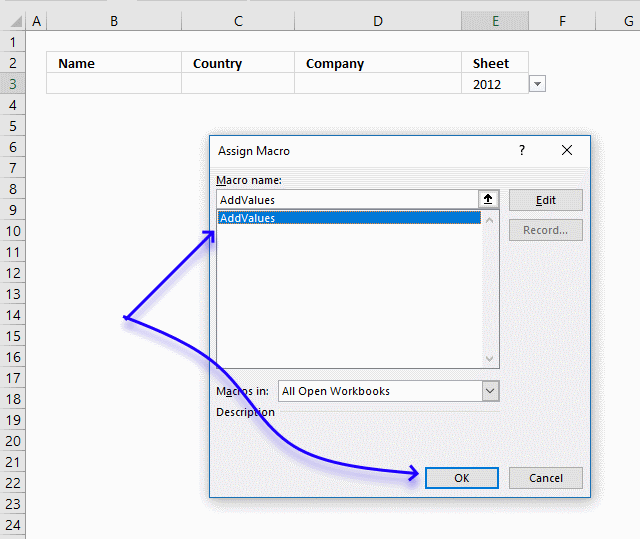
- Press with left mouse button on OK button.
Press with left mouse button on the button to run macro AddValues.

3. Basic data entry - VBA
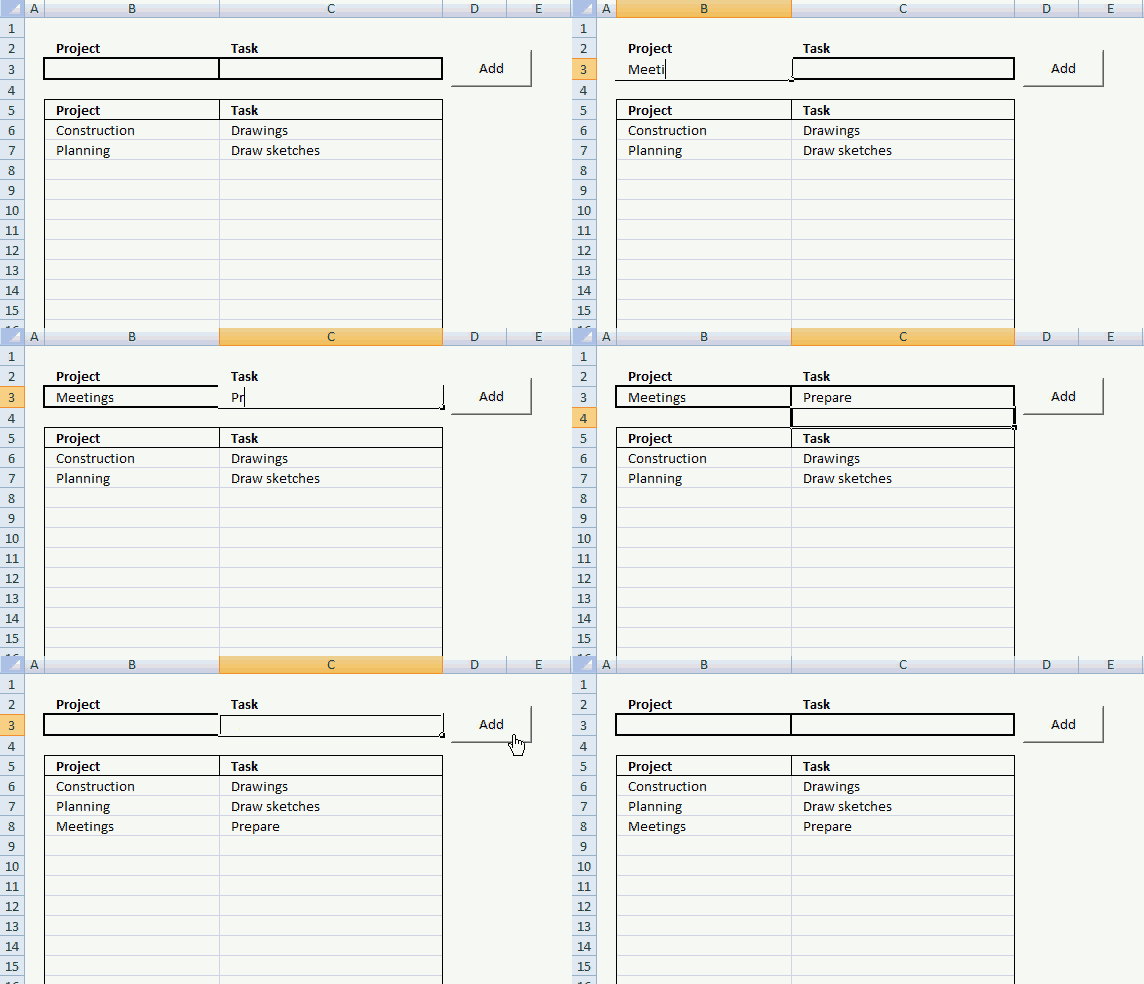
In this small tutorial, I am going to show you how to create basic data entry with a small amount of VBA code.
Cell B3 and C3 are input cells. When you press with left mouse button on button "Add", the data in cell B3 and C3 are copied to the first empty row in the list.
The last step in the code removes the values in cell B3 and C3, see the animated image above.
3.1. Data entry - VBA Macro
'Name macro
Sub AddText()

'Dimension variables and declare data types
Dim Lrow As Single

With Worksheets("Sheet1")
'Find last non-empty cell in column B
Lrow = .Range("B" & Rows.Count).End(xlUp).Row + 1

'Copy values
.Range("B" & Lrow & ":C" & Lrow) = .Range("B3:C3").Value

'Delete values
.Range("B3:C3").Value = ""
End With

End Sub
3.2. How to insert the VBA macro to your workbook
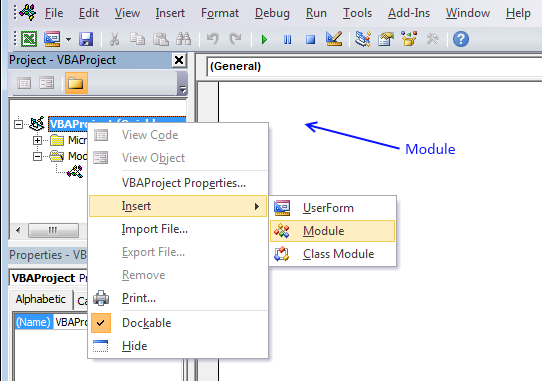
- Press Alt+F11 to open the VB Editor.
- Press with right mouse button on on your workbook name in the Project Explorer window.
- Press with left mouse button on "Insert".
- Press with left mouse button on "Module" to insert a code module to your workbook.
- Copy macro and paste to code module, see image above.
3.4. Simplify VBA code further
Worksheets("Sheet1") is repeated many times. The WITH and WITH END statement allows you to simplify the code.
Sub AddText()
Dim Lrow As Single
With Worksheets("Sheet1")
Lrow = .Range("B" & Rows.Count).End(xlUp).Row + 1
.Range("B" & Lrow & ":C" & Lrow) = .Range("B3:C3").Value
.Range("B3:C3").Value = ""
End With
End Sub
3.5. How to insert a button
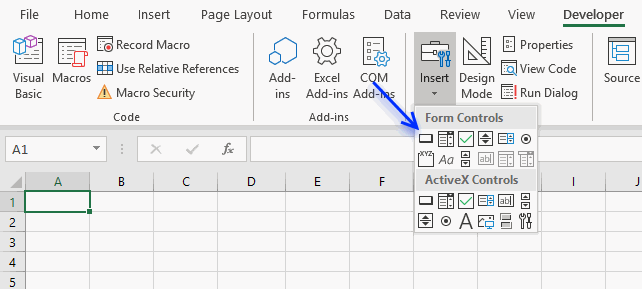
- Go to the Developer tab.
- Press with left mouse button on "Insert" button on the ribbon.
- Press with left mouse button on "Button" (Form Control).
- Press and hold with left mouse button on the worksheet.
- Drag with mouse to create the button then release the mouse button.
3.6. How to assign a macro to a button
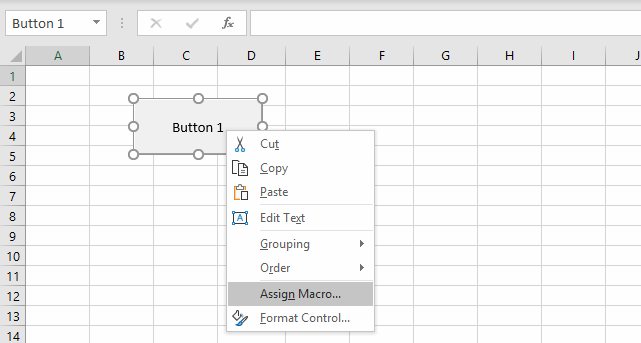
- Press with right mouse button on on your new button.
- Assign a macro.
- Select "AddText" macro.
Final note
There is a data entry form in Excel but it is not on the ribbon.
Add in category
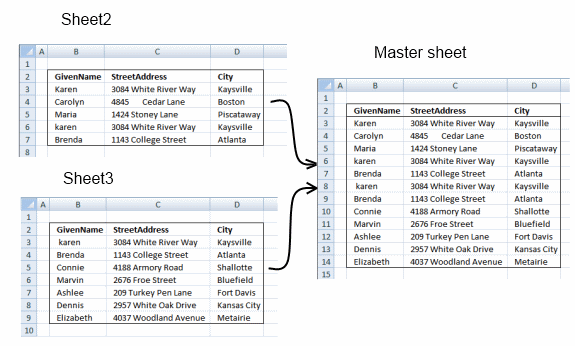
Merge Ranges is an add-in for Excel that lets you easily merge multiple ranges into one master sheet. The Master […]
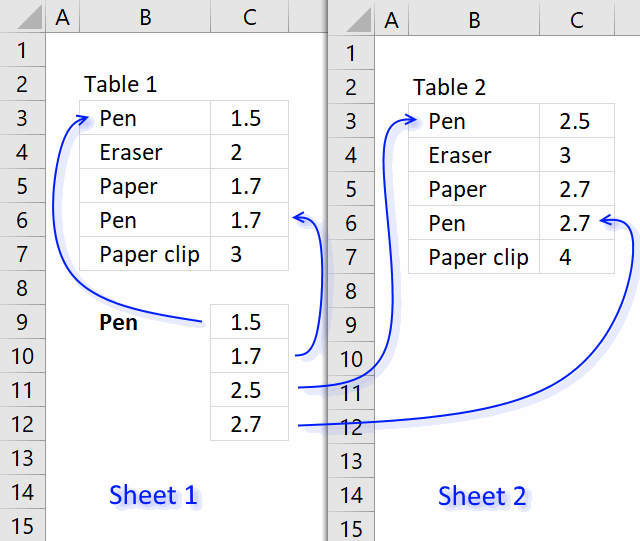
This article demonstrates an array formula that searches two tables on two different sheets and returns multiple results. Sheet1 contains […]
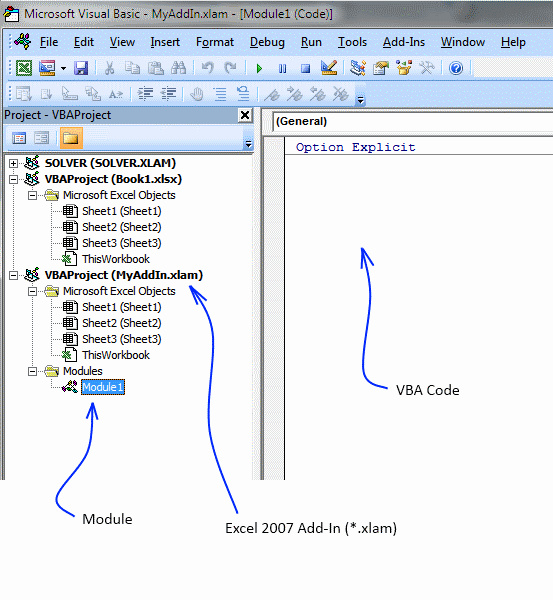
Table of Contents How to save custom functions and macros to an Add-In How to add a custom-made item to […]
Macro category
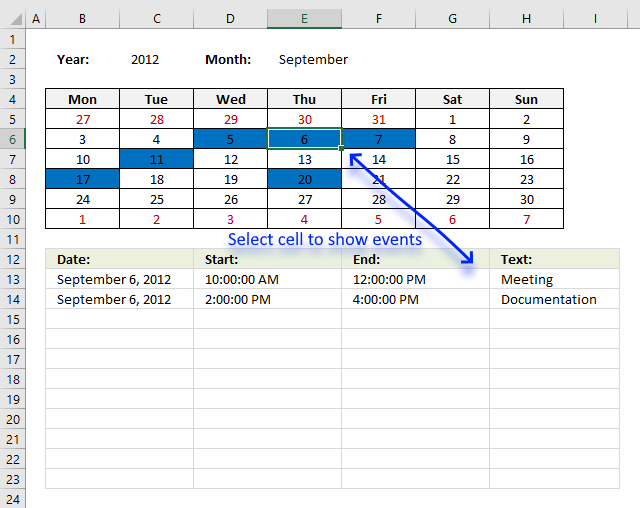
Table of Contents Excel monthly calendar - VBA Calendar Drop down lists Headers Calculating dates (formula) Conditional formatting Today Dates […]
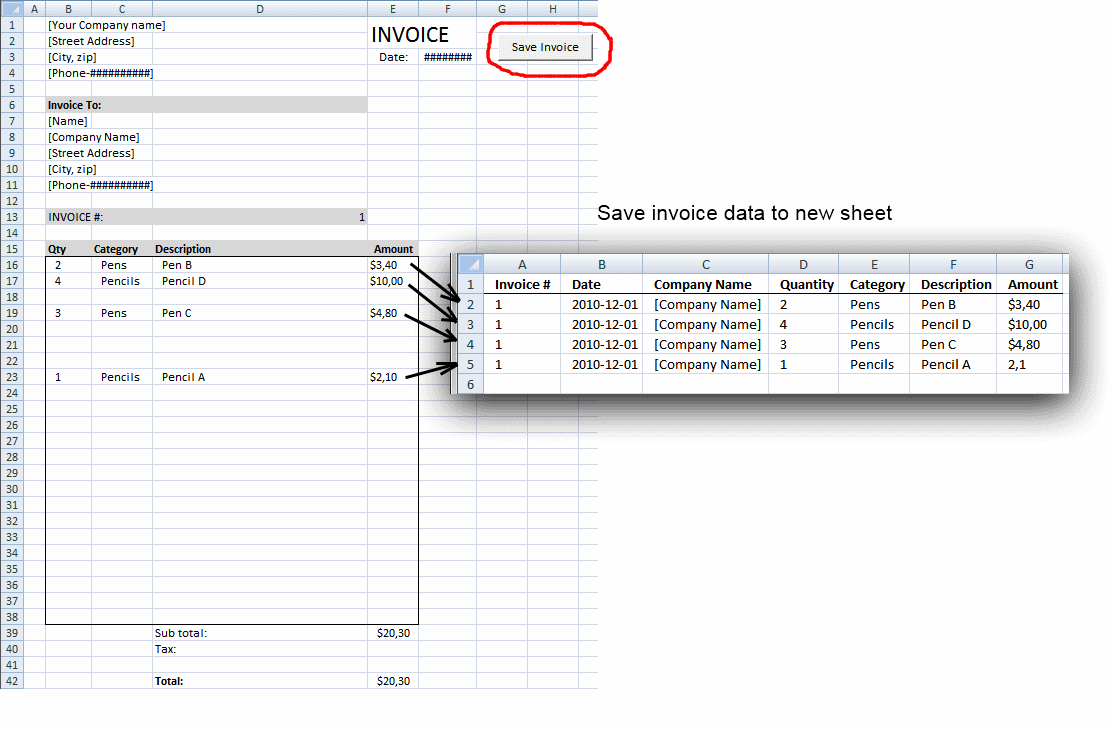
Table of contents Save invoice data - VBA Invoice template with dependent drop down lists Select and view invoice - […]
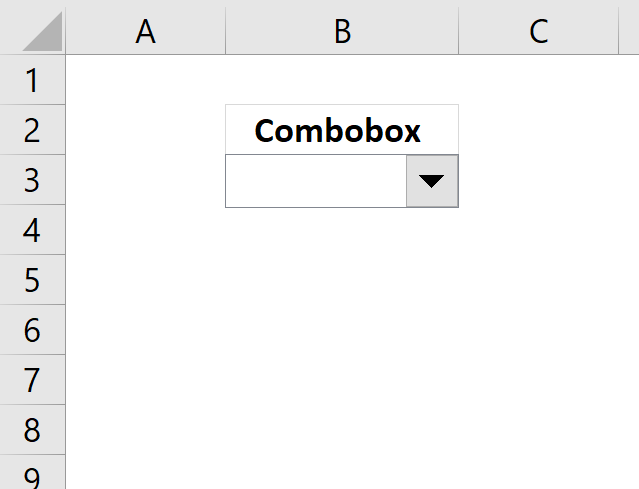
This blog post demonstrates how to create, populate and change comboboxes (form control) programmatically. Form controls are not as flexible […]
Split values category
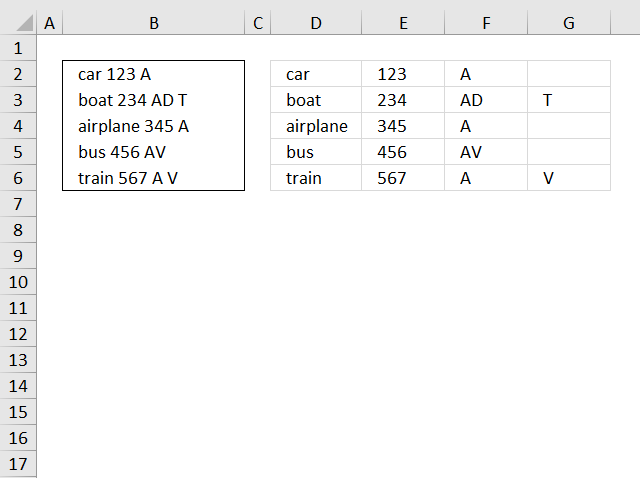
This blog article describes how to split strings in a cell with space as a delimiting character, like Text to […]
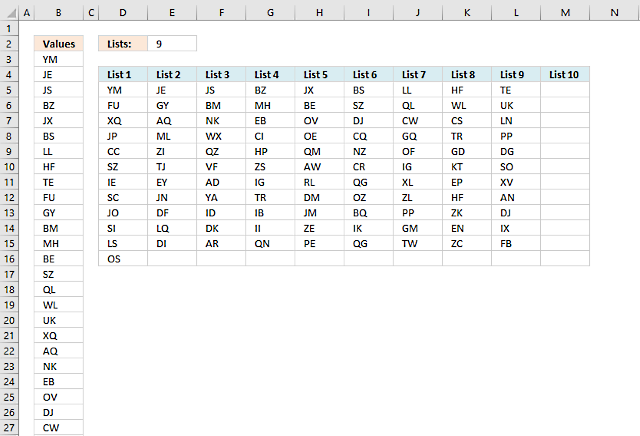
Table of Contents Split values equally into groups Rearrange values based on category - VBA 1. Split values equally […]
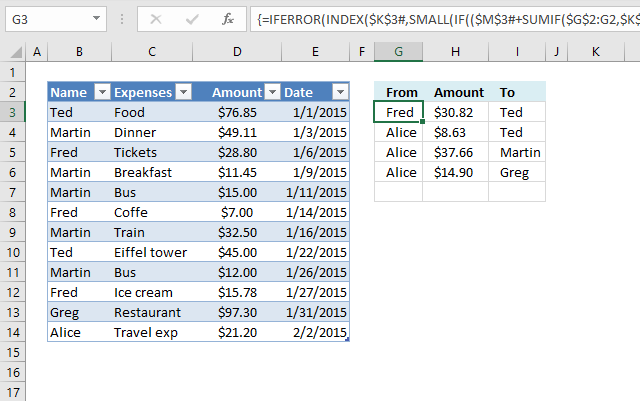
This article demonstrates two ways to calculate expenses evenly split across multiple people. The first one is a formula solution, […]
Excel categories
45 Responses to “Split data across multiple sheets – VBA”
Leave a Reply
How to comment
How to add a formula to your comment
<code>Insert your formula here.</code>
Convert less than and larger than signs
Use html character entities instead of less than and larger than signs.
< becomes < and > becomes >
How to add VBA code to your comment
[vb 1="vbnet" language=","]
Put your VBA code here.
[/vb]
How to add a picture to your comment:
Upload picture to postimage.org or imgur
Paste image link to your comment.

how would we print the sorted sheet into a new workbook rather than the same?
how do we set a range on the column. Say you only wanted to split the information between a4 and a10 rather than between a4 and the very end of the list.
Great - worked a charm.
“Split data across multiple sheets in excel (vba)”...
this code works well, but the prob is could not able to get the Merge cell as it is..
Thnx
Mashini,
I don´t have an answer right now.
I found this:
Excel often has problems copying ranges containing merged cells onto sheets with merged cells even if the merged areas are the same. The best solution is to not have merged cells. Next best is to unmerge all cells in the range that is to receive the copy before pasting in the new data.
from here
Hej.. works...problem is for a huge file.. doesn't. I have a 470k rows and is blocking at some point.
Alin,
Where does it halt and what does the row look like? You can use this contact form.
Awesome....
Thanks!
thnak you very much, its really helpful for me
It is really a nice article. I have used it in one of my automation but it goes into loop and never ends. I have to abruptly log off from the system to stop it. Need urgent help on it.
sujay,
can you provide an example of your sheet?
Hi,
I am new to Excel with VBA code.. I have 1 excel with 2 sheets ( A.xl contains 2 tabs Name and Rating ).
I want to read the datas from 2 sheets (Name and Rating) and appened the data in other excel file..
Can any one please help me to solve this...
Hi there!
This code is working perfectly for me besides the fact that the macro stops splitting my table into different sheets once it reaches a field name longer that 31 characters. Is there any way I can work around this?
Nice work...
Jojo,
Yes, I have uploaded a new file and changed the post.
Thanks for commenting!
Peter,
Thanks!
Lovely! Thanks so much Oscar.
Could you please show me the code to place the copied data into a different tab instead of below the input cells. Its annoying me and I'm rubbish at this. thanks.
phil,
see this post:
Add values to different sheets (vba)
dear sir
i have a file of 60000 row where i want to split in different sheet. each sheet will be 100 row i need a code in macro's.
[...] a previous post I described how to simplifiy data entry. Now it is time to put values in separate [...]
Thanks for this code its a great help.
One question though: if I was adding more items to the original list how can I get it to just add these to the tabs rather than relisting the entire inventory again which ends up repeating records? I've been trying to add a "ClearContent" command in but I can't get it to work.
Any ideas?
Many thanks
Tom
Tom,
I am not sure I understand. Upload your file here.
Sorry If I wasn't being clear. Take your example, if you added a few more planes to your original list, then hit the button again, it runs through the macro again but rather than adding only the new additions to appropriate lists, it will relist the whole list (with the new additions) after the original list on each worksheet.
I worked around this by adding a remove duplicates instruction at the end of the instruction before it loops through to the next tab, but it would be good to know where I could have added something like a Clear.Contents, or Delete function, before the sheet was repopulated on pressing the button again.
Does that make sense?
Thanks
Tom
hi this code helped me lot but one thing i noticed is that formatting in other sheets are not as the sheet1 could you please suggest me how to fix the formatting
From where can i get Split Data Across Multiple Sheets Add-In after selecting the data
Sub SplitSelectionToSheetsByColumn() Dim regionToSplit As Range Dim columnToSplitBy As String Dim currentRow As Range Dim dataToSplitBy As String Dim sht As Worksheet Dim destinationSheet As Worksheet Dim lastCellOfSheet As Range Set regionToSplit = Selection columnToSplitBy = InputBox("Enter column to split by") For Each currentRow In regionToSplit.Rows dataToSplitBy = currentRow.Range(columnToSplitBy & "1").Value Set destinationSheet = Nothing For Each sht In Worksheets If (sht.Name = dataToSplitBy) Then Set destinationSheet = sht End If Next sht If (destinationSheet Is Nothing) Then Sheets.Add After:=Sheets(Sheets.Count) ActiveSheet.Name = dataToSplitBy Set destinationSheet = ActiveSheet End If Set lastCellOfSheet = destinationSheet.Cells(destinationSheet.Rows.Count, "A").End(xlUp) currentRow.Copy lastCellOfSheet.Offset(1, 0) Next currentRow End SubLefteris,
Your macro works great! Thanks for posting!
Hi,
First of all thanks its a very great Macro.
But i would like to do a little modification.
What should i change, to copy the values, to the first row, and pushing down the other datas, and not after the last one?
i guess somewhere here:
.Range("B" & Lrow & ":C" & Lrow) = .Range("B3:C3").Value
Thanks:
Márton
you need to for i loop
Can you provide the code for Add values to different sheets (vba)
vivek,
It is already on this webpage, below the heading Macro code.
Here it is again:
Sub AddValues() Dim i As Single i = Worksheets("" & Range("D2")).Range("A" & Rows.Count).End(xlUp).Row + 1 Worksheets("" & Range("D2")).Range("A" & i & ":C" & i) = _ Worksheets("Enter Data").Range("A2:C2").Value Worksheets("Enter Data").Range("A2:C2") = "" End SubThis seems to be working for me but in our data files we always have the table starting with the header row first cell in A1. I haven't quite figured how to change the rages in the code to get it to properly copy the header row to each of the sheets it creates? It would seem this should only require changing the named ranges?
is it possible for add values to different workbooks like add values to different sheets (vba)? can you send me the example file. thanks.
[…] are great for doing repetitive tasks. Two years ago I wrote a post about transferring data to worksheets. It is about automatically moving data to a worksheet you […]
would love to see your post about transferring data to worksheets! I would like to parse out a huge data file into seperate tabs, automatically.
Hey, many thanks for this very useful macro, I have adjusted it to my work... whats the deal after this and why i need help in it?
Imagine that i just want to use all macro in the first time to create and divide multiple sheets
After that i just need to use it again in the same sheet, for example, for new data in f4:i4 and to split it for the sheets created in the first time.
sorry for my english and many thanks in advance.
Thank you for this. I am new to Excel and I have created a workbook that has no macros so far but I am looking for something very similar to this vba code and especially like how you included the dates and how the code gets copied to new rows on the year sheet each time the "Add" button is pressed on. I am wondering how to change the code slightly for the following application: Is there a way to copy different cells (not a range) in a single column ie: A2,A3,A4,A8,A10 on the "Enter Data" sheet to the year sheet in columns (ie: D3,D4,D5,D6,D7) rather than rows? Also, I see after the "Add" button is pressed it removes the values from the cells. Can the code be updated to not clear the cells? Thanks ny information you can provide.
Oops, I made 1 mistake in my last comment. I would like to copy a date from f12 along with data from A2,A3,A4,A8,A10 but want the date transferred to the year sheet in the same column as the date D3(Date),D4,D5,D6,D7,D8.
when i clik on split every time it split
i want to slip/updata data only once but here every time data slpt which already slipt
Hi
I have a worksheet, I want to add a value to first data of first column my worksheet and then to split data upon on this operation into other worksheets.
Thank you, Mr. Oscar for the code!
You save our life and you make our life easier because we almost fall into the trap of being manual excel labour.
XOXO
Wish you a healthy and happy life!
Rizka & Syafira
Thank you for commenting, I am happy it saved you time.
Hi Oscar,
first of all thank you for all the awesome and detailed tutorials.
I would like to add data to a table, using the method you describe. How can I, using vba, add an empty row at the end of the table and copy the new data there?
Thank you
Hii , in ur list there is 3 type of airplanes, and the split sheet do to all types
How can I split for 2 type that I choose of air plan and not 3
Thanks?