Working with comments – VBA
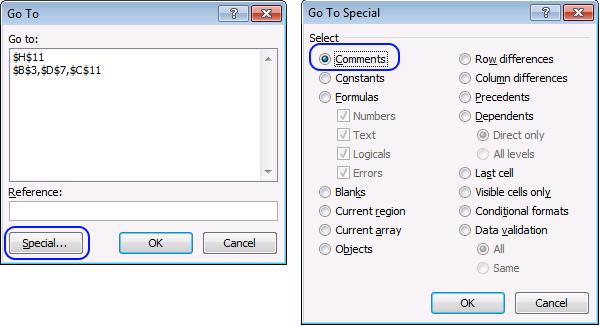
Did you know that you can select all cells containing comments in the current sheet? Press F5, press with left mouse button on "Special..." button, select "Comments" and then press with left mouse button on OK.
Table of Contents
- Introduction
- How to create a list of all comments in a worksheet?
- How to build a list of all comments from all worksheets in a workbook?
- How to build a list of all comments from all worksheets in all open workbooks?
- Where to put the code?
- How to build a list of all comments from all workbooks in a folder?
- Create comment if cell value is larger than column width
1. Introduction
What is a comment?
A comment in Excel is a feature that allows users to add remarks, explanations, or annotations to a cell. These comments are often used for collaboration, feedback, or additional context.
How to spot a comment in a worksheet?
A cell with a comment has a purple indicator (triangle) in the top-right corner. When you hover over the cell, the comment appears as a pop-up with the author's name.
What is the difference between a comment and a note?
A comment allows for threaded conversations in newer Excel versions. They show up as purple triangles and were introduced in Excel 2019.
A Note is a legacy feature which allows for simple annotations, they show up as red triangles and they lack reply feature.
What is a macro?
Macros are sequences of instructions or actions that can be recorded and replayed in Excel to automate repetitive tasks.
- Automate tasks such as formatting, calculations, data manipulation, or interacting with other workbooks.
- You can record macros using the built-in Excel Macro Recorder, which generates VBA (Visual Basic for Applications) code for the actions you perform in Excel.
- Alternatively, you can write macros manually in the VBA editor for more control and flexibility.
- Macros can be run from the Developer tab, assigned to a button, or triggered through custom VBA code.
What is VBA?
VBA (Visual Basic for Applications) is a programming language developed by Microsoft that is used for automating tasks in Microsoft Office applications such as Excel, Word, and Access. It allows users to create macros, automate repetitive tasks, and enhance Office functionality with custom scripts.
What is the "Developer" tab?
The Developer tab is an advanced feature in Microsoft Excel that provides tools for automation, coding, and customization. It includes:
- VBA (Visual Basic for Applications): Write, record and edit macros.
- ActiveX Controls & Form Controls: Create buttons, check boxes, and interactive elements.
- XML Tools: Work with XML maps and data.
- Add-ins Management: Enable and configure Excel Add-ins.
How to enable the "Developer tab"?
Here is how to enable the "Developer" tab if it is missing on the ribbon:
- Press with left mouse button on "File" located above the ribbon, a new pane appears.
- Press with mouse on the "Options" button to access Excel settings.
- Press with mouse on "Customize Ribbon" and then on the right side press with left mouse button on the checkbox next to the tab "Developer" to enable it.
- Press with left mouse button on "OK" button to apply changes.
The "Developer" tab is now visible on the ribbon. Here are instructions for Excel 2007, Excel 2010 and Excel 2013
How to record a macro?
What happens if we record a macro while performing these actions? Here is how you do that:
- Go to tab "Developer" on the ribbon. How to enable the Developer tab on the ribbon

- Press with left mouse button on the "Record macro" button. A dialog box appears.
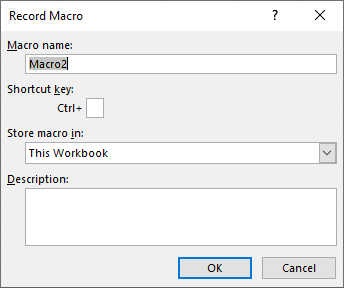
- Type a name if you don't want to use the default value.
- Press with left mouse button on OK button.
- Perform the actions you want to record.
- Press with left mouse button on "Stop recording" when finished.
This is what the macro recorder returns:
Sub Macro1()
Selection.SpecialCells(xlCellTypeComments).Select
End Sub
We can use this VBA code to retrieve all comments, their cell values, addresses, and so on.
Microsoft Docs: SpecialCells method
2. How to create a list of all comments in a worksheet?
The following VBA code iterates through each cell containing a comment and saves the cell value, comment and address to a new worksheet.
'Name macro
Sub Macro1()

'Dimension variables and declare data types
Dim WS As Worksheet
Dim Rng As Range
Dim cell As Variant
Dim i As Single

'The SET statement allows you to save an object reference to a variable
'Select all cells with comments
Set Rng = ActiveSheet.Cells.SpecialCells(xlCellTypeComments)

'Insert a new workshhet and save it to object WS
Set WS = Sheets.Add

'Save "Address" to cell A1 in worksheet WS
WS.Range("A1") = "Address"

'Save "Comment" to cell B1 in worksheet WS
WS.Range("B1") = "Comment"

'Save "Cell value" to cell C1 in worksheet WS
WS.Range("C1") = "Cell value"

'Save 2 to variable i
i = 2

'Iterate through all selected cells in Rng
For Each cell In Rng

    'Save cell address to a cell in column A
    WS.Range("A" & i) = cell.Address

    'Save cell comment to a cell in column B
    WS.Range("B" & i) = cell.Comment.Text

    'Save cell address to a cell in column A
    WS.Range("C" & i) = cell.Value

    'Add 1 to variable i
    i = i + 1

'Continue with next cell
Next cell
End Sub
3. How to build a list of comments from all worksheets in a workbook?
This VBA code checks all worksheets in the current workbook for comments and saves them to a new worksheet.
'Name macro
Sub Macro2()

'Dimension variables and declare data types
Dim WS As Worksheet, WoSh As Worksheet
Dim Rng As Range
Dim cell As Variant
Dim i As Single

'The SET statement allows you to save an object reference to a variable
'Insert a new workshhet and save it to object WS
Set WS = Sheets.Add

'Save "Sheet" to cell A1 in worksheet WS
WS.Range("A1") = "Sheet"

'Save "Address" to cell B1 in worksheet WS
WS.Range("B1") = "Address"
'Save "Comment" to cell C1 in worksheet WS
WS.Range("C1") = "Comment"

'Save "Cell value" to cell D1 in worksheet WS
WS.Range("D1") = "Cell value"

'Save 2 to variable i
i = 2

'Iterate through all worksheets in Active workbook
For Each WoSh In ActiveWorkbook.Worksheets

    'Enable error handling
    On Error Resume Next

    'The SET statement allows you to save an object reference to a variable
    'Select all cells with comments
    Set Rng = WoSh.Cells.SpecialCells(xlCellTypeComments)

    'Check if range is not empty
    If Not Rng Is Nothing Then

        'Iterate through all selected cells in Rng
        For Each cell In Rng

            'Save worksheet name to cell in column A
            WS.Range("A" & i) = WoSh.Name

            'Save cell address to cell in column B
            WS.Range("B" & i) = cell.Address

            'Save cell comment to cell in column C
            WS.Range("C" & i) = cell.Comment.Text

            'Disable wrap text
            WS.Range("C" & i).WrapText = False

            'Save cell value to cell in column D
            WS.Range("D" & i) = cell.Value

            'Add 1 to variable i
            i = i + 1

        'Continue with next cell
        Next cell
    End If

    'Clear object Rng
    Set Rng = Nothing
Next WoSh

End Sub
4. How to build a list of comments from all worksheets in all open workbooks?
This VBA code checks all open workbooks for comments and saves them to a new worksheet.
'Name macro
Sub Macro3()

'Dimension variables and declare data types
Dim WS As Worksheet, WoSh As Worksheet
Dim WB As Workbook
Dim Rng As Range
Dim cell As Variant
Dim i As Single

'Insert a new worksheet and save to object WS
Set WS = Sheets.Add

'Save "Workbook" to cell A1 in worksheet WS
WS.Range("A1") = "Workbook"

'Save "Sheet" to cell B1 in worksheet WS
WS.Range("B1") = "Sheet"

'Save "Address" to cell C1 in worksheet WS
WS.Range("C1") = "Address"

'Save "Comment" to cell D1 in worksheet WS
WS.Range("D1") = "Comment"

'Save "Cell value" to cell E1 in worksheet WS
WS.Range("E1") = "Cell value"

'Save 2 to variable i
i = 2

'Iterate through all open workbooks using variable WB
For Each WB In Workbooks

    'Iterate through all worksheets in workbook WB
    For Each WoSh In WB.Worksheets

        'Enable error handling
        On Error Resume Next

        'Select all cells with comments
        Set Rng = WoSh.Cells.SpecialCells(xlCellTypeComments)

        'Check if RNG is not empty
        If Not Rng Is Nothing Then

            'Iterate through all selected cells
            For Each cell In Rng

                'Save workbook name to a cell in column A
                WS.Range("A" & i) = WB.Name

                'Save worksheet name to a cell in column B
                WS.Range("B" & i) = WoSh.Name

                'Save cell address to a cell in column C
                WS.Range("C" & i) = cell.Address

                'Save cell address to a cell in column D
                WS.Range("D" & i) = cell.Comment.Text

                'Disable wrap text
                WS.Range("D" & i).WrapText = False

                'Save cell value to a cell in column E
                WS.Range("E" & i) = cell.Value

                'Add 1 to variable i
                i = i + 1

            'Continue witrh next cell
            Next cell
        End If

        'Clear object Rng
        Set Rng = Nothing

    'Continue with next worksheet
    Next WoSh

'Continue with next workbook
Next WB

'Resize column widths to text
Columns("A:E").AutoFit
End Sub

5. How to build a list of comments from all workbooks in a folder?
I have reused some code from this macro: Search all workbooks in a folder
'Name macro
Sub Macro4()

'Dimension variables and declare data types
Dim WS As Worksheet
Dim myfolder As String
Dim Str As String
Dim a As Single
Dim sht As Worksheet
Dim c As Range

'Insert a new worksheet
Set WS = Sheets.Add

'Show dialog box and ask for a Folder
With Application.FileDialog(msoFileDialogFolderPicker)
    .Show
    myfolder = .SelectedItems(1) & "\"
End With

'Save "Workbook" to cell A1 in worksheet WS
WS.Range("A1") = "Workbook"

'Save "Sheet" to cell B1 in worksheet WS
WS.Range("B1") = "Sheet"

'Save "Address" to cell C1 in worksheet WS
WS.Range("C1") = "Address"

'Save "Comment" to cell D1 in worksheet WS
WS.Range("D1") = "Comment"

'Save "Cell value" to cell E1 in worksheet WS
WS.Range("E1") = "Cell value"

'Save 0 (zero) to variable i
a = 0

'Returns a String representing the name of a file, directory, or folder that matches a specified pattern or file attribute, or the volume label of a drive.
Value = Dir(myfolder)

'Keep iterating until folder is empty
Do Until Value = ""

    'Check that file name is not . or ..
    If Value = "." Or Value = ".." Then
    Else

        'Check that file name is an Excel file with fiel extensions xls, xlsx or xlsm
        If Right(Value, 3) = "xls" Or Right(Value, 4) = "xlsx" Or Right(Value, 4) = "xlsm" Then

            'Enable error handling
            On Error Resume Next

            'Check if workbook is password protected
            Workbooks.Open Filename:=myfolder & Value, Password:="zzzzzzzzzzzz"

            'Check if an error has occured (meaning the workbook is password protected)
            If Err.Number > 0 Then

                'Save to cell in column A workbook password protected
                WS.Range("A2").Offset(a, 0).Value = Value & " : Password protected"

                'Add 1 to variable i
                a = a + 1

            'Continue here if no error has happened
            Else

                'Disable error handling
                On Error GoTo 0

                'Iterate through all worksheets in workbook
                For Each sht In ActiveWorkbook.Worksheets

                        ' Enable error handling
                        On Error Resume Next

                        'Select all cells with comments and save to object c
                        Set c = sht.Cells.SpecialCells(xlCellTypeComments)

                        'Check if c is not empty
                        If Not c Is Nothing Then

                            'Iterate through each cell in c
                            For Each cell In c

                                'Save folder path to cell in column A
                                WS.Range("A2").Offset(a, 0).Value = Value

                                'Save worksheet name to a cell in column B
                                WS.Range("B2").Offset(a, 0).Value = sht.Name

                                'Save cell address to cell in column C
                                WS.Range("C2").Offset(a, 0).Value = cell.Address

                                'Save cell comment to a cell in column D
                                WS.Range("D2").Offset(a, 0).Value = cell.Comment.Text

                                'Disable wrap text
                                WS.Range("D2").Offset(a, 0).WrapText = False

                                'Add 1 to variable a
                                a = a + 1

                            'Continue with next cell
                            Next cell
                        End If

                        'Clear object c
                        Set c = Nothing

                'Continue with next worksheet
                Next sht
            End If

            'Close active workbook
            Workbooks(Value).Close False

            'Disable error handling
            On Error GoTo 0
        End If
    End If
    Value = Dir

'Continue witrh next file
Loop

'Resize column widths
Cells.EntireColumn.AutoFit
End Sub
6. Where to put the VBA code?
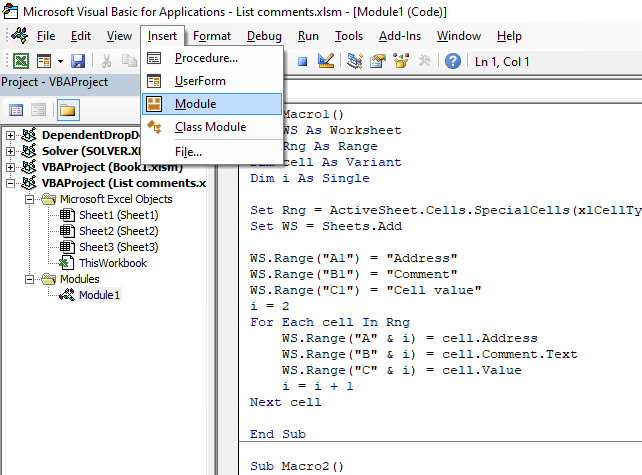
- Press Alt + F11 to open the Visual Basic Editor (VBE).
- Press with left mouse button on "Insert" on the top menu.
- Press with left mouse button on "Module" to insert a new module.
- Copy VBA code.
- Paste to code window.
- Return to Excel.
Interesting articles you must read
List all open workbooks and corresponding sheets (vba)
Extract cell references from all cell ranges populated with values in a sheet

7. Create comment if cell value is larger than column width
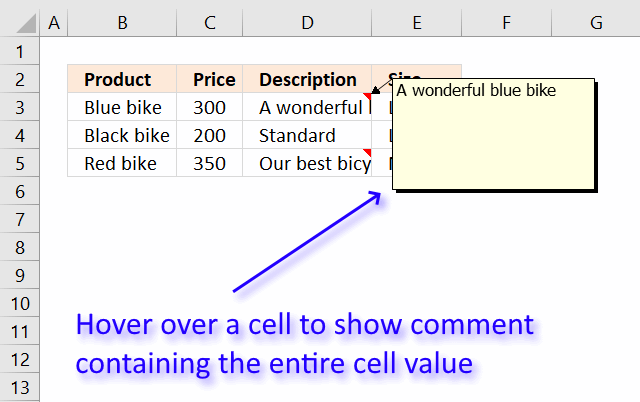
It can sometimes be helpful having a large cell value in a comment. You can then easily hover over cell and read the value instead of resizing column widths.
7.1 How to run macro?
- Press Alt + F8 to open the Macro dialog box.
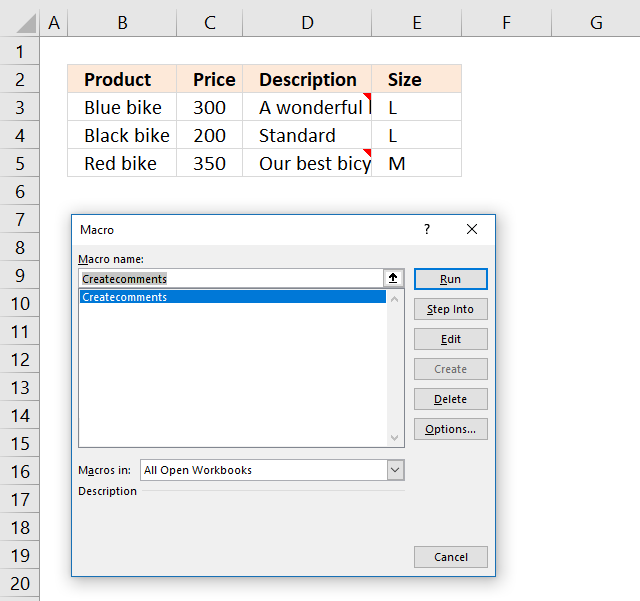
- Press with mouse on macro Createcomments to select it.
- Press with left mouse button on "Run" button to run the selected macro.
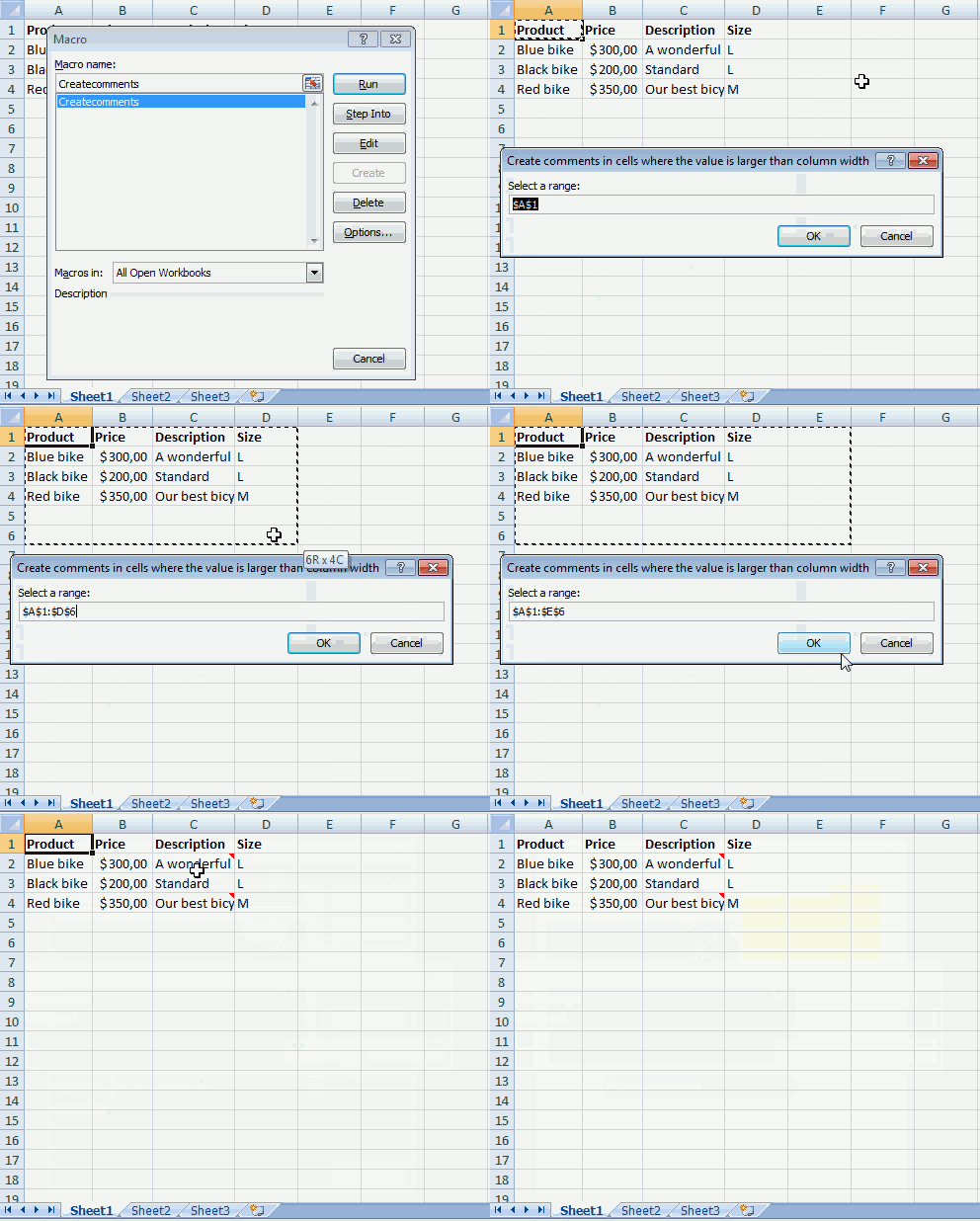
- An input box shows up on your screen asking for a cell range that you want to apply comments to.
Only cells containing values that don't fit will get a comment. - Press with left mouse button on OK button.
- The macro adds comments.
- The macro ends.
The animated image below shows what happens when you run macro Createcomments.
7.2 VBA Code
The following subroutine adds a comment to cells where the value exceeds the column width.
'Name macro
Sub Createcomments()

'Dimension variables and declare data types
Dim rng As Range
Dim Cell As Variant

'Enable error handling
On Error Resume Next

'Show inputbox and save input value to object variable rng
Set rng = Application.InputBox(Prompt:="Select a range:", _
Title:="Create comments in cells where the value is larger than column width", _
Default:=Selection.Address, Type:=8)

'Disable error handling
On Error GoTo 0

'Check if variable rang is empty
If rng Is Nothing Then

'Continue if variable rng is not empty
Else

    'Iterate through cells in object rng
    For Each Cell In rng

        'Check if characters in cell value is wider than column width
        If Len(Cell) * 0.9 > Cell.ColumnWidth Then

            'Check that there is no comment to prevent overwriting older comments
            If Cell.Comment Is Nothing Then

                'Add value to cell comment
                Cell.AddComment Cell.Value
            End If
        End If
    Next Cell
End If
End Sub
7.3 Where to put the code?
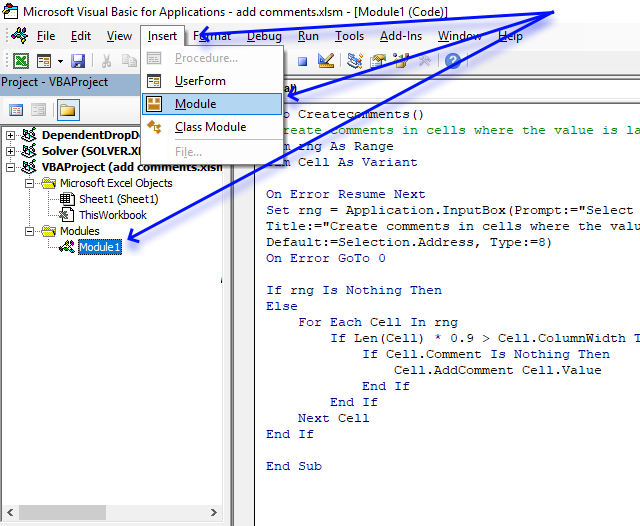
- Copy above VBA code.
- Press Alt+F11 to open the VB Editor.
- Select your workbook in the Project Explorer.
- Press with mouse on "Insert" on the menu.
- Press with mouse on "Module" to insert a code module to your workbook.
- Paste VBA code to code module.
- Exit VB Editor and return to Excel.
For next statement category

What's on this page Introduction Finding the shortest path - A * pathfinding Optimize pick path in a warehouse A […]
If then else statement category
Table of Contents Excel monthly calendar - VBA Calendar Drop down lists Headers Calculating dates (formula) Conditional formatting Today Dates […]
This article explains how to hide a specific image in Excel using a shape as a button. If the user […]
This article demonstrates how to run a VBA macro using a Drop Down list. The Drop Down list contains two […]
Macro category
Table of Contents How to create an interactive Excel chart How to filter chart data How to build an interactive […]
Table of Contents Excel monthly calendar - VBA Calendar Drop down lists Headers Calculating dates (formula) Conditional formatting Today Dates […]
Table of Contents Split data across multiple sheets - VBA Add values to worksheets based on a condition - VBA […]
Excel categories
10 Responses to “Working with comments – VBA”
Leave a Reply
How to comment
How to add a formula to your comment
<code>Insert your formula here.</code>
Convert less than and larger than signs
Use html character entities instead of less than and larger than signs.
< becomes < and > becomes >
How to add VBA code to your comment
[vb 1="vbnet" language=","]
Put your VBA code here.
[/vb]
How to add a picture to your comment:
Upload picture to postimage.org or imgur
Paste image link to your comment.

The starting point of a Circular reference errors isn't always so easy to find.
https://www.extendoffice.com/documents/excel/1049-excel-identify-locate-circular-reference.html
It's a pleasure to watch you work. Brilliant...
Zoran Grujić
thank you!
Thank you for the clear explanation of code....While extracting comments from excel when i execute second time the comments are getting relaced by new comments....but i want the new comments to get appended from next availabel cell or row
sree,
Replace the following line:
i = 2
with:
i = WS.Range("A" & Rows.Count).End(xlUp).Row + 1
This should place new comments below existing values.
Hi, it doesnt work...
Thank you so much for such a clear explanation. I actually was looking for code to resize a column if cell contents were beyond a certain size, and your explanation was so clear, it made it easy for me (a beginner) to modify it for my purposes. Really appreciate it!
I used this and it worked great! Only question is how do I refresh the data. I am using this code on a dynamic excel sheet that is updated daily and I want the comments to update accordingly?
Hello - how could I modify #5 (How to build a list of comments from all workbooks in a folder?) to include files in all subfolders rather than just one folder at a time? This would be huge help, thank you!
What's the difference between Excel Comments and Notes, and how can macros help automate comment-related tasks in worksheets?
Regard Perpustakaan Online