Working with date ranges
Table of Contents
1. Find date range based on a date
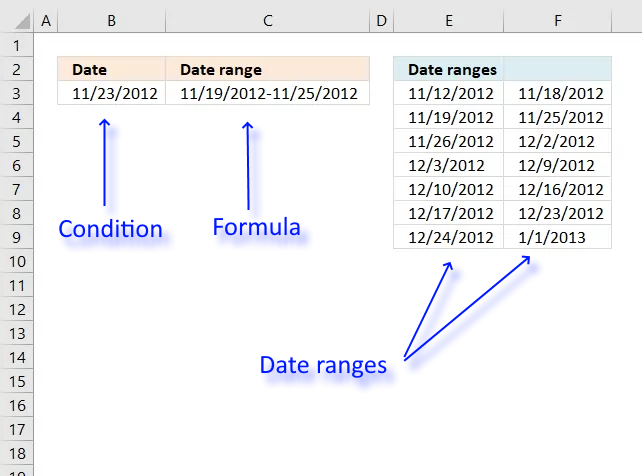
This article demonstrates a formula that returns a date range that a date falls under, cell C3 above contains the formula.
Cell B3 contains the condition and column E and F contain the date ranges.
I need to figure out the date range of a cell. So if cell "E2" has a date of 11/23/2012 then that would need to fall under date range of "11/19 - 11/25".
I have the following date range I need to identify:
"11/12 - 11/18", "11/19 - 11/25", "11/26 - 12/2", "12/3 - 12/9", "12/10 - 12/16", "12/17 - 12/23", "12/24 - 1/1/2013".
I tried the formula below but I keep getting a result of "False".
I appreciate any help I can get. Thank you
Answer:
The formula in cell C3 returns the correct date range from the lookup table based on the date in cell B3.
Array formula in cell C3:
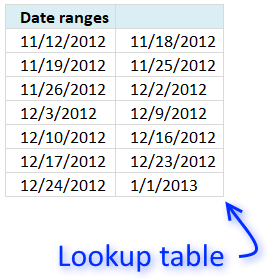
The lookup table consists of dates beginning with Monday and ends with Sundays.
For example, 11/12/2012 is a Monday and 11/18/2012 is a Sunday.
There are no gaps between the end and start date so the LOOKUP function only needs the first column for it to work.
The following formula calculates the dates if you don't want to use a lookup table.
This formula works only if the date range starts with a Monday and ends with a Sunday.
Recommended article
Recommended articles
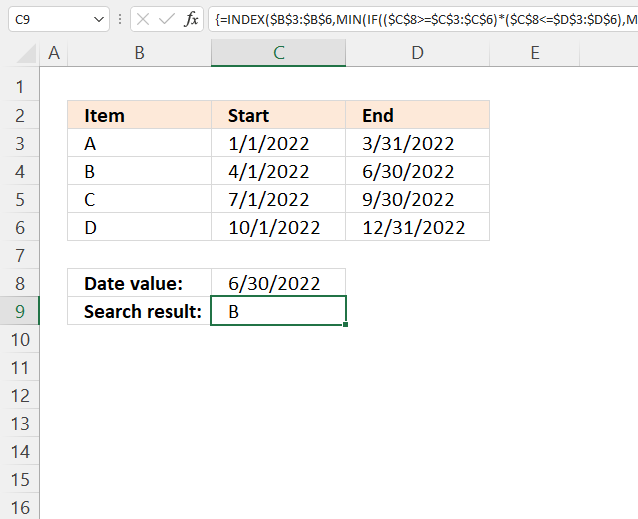
This article demonstrates how to match a specified date to date ranges. The image above shows a formula in cell […]
Explaining array formula in cell C3
Step 1 - Find the matching start date
The LOOKUP function allows you to search for a value and return the largest value that is smaller than the lookup value.
For this to work the table must be sorted from small to large, this is important. You will get unreliable results if this requirement is not met.
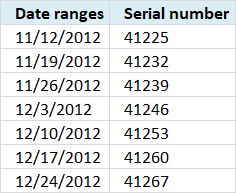
Excel dates are actually numbers, 1/1/1900 is 1 and 1/1/2018 is 43101.
Since dates are numbers in Excel you can easily use the LOOKUP function in this case.
 LOOKUP(B3,E3:E9)
becomes
LOOKUP(41236, {41225; 41232; 41239; 41246; 41253; 41260; 41267})
and returns 41232.
41232 is the largest number that is smaller than 41236 in the array.
Step 2 - Convert serial number to Excel date
The TEXT function allows you to convert the serial number to a date. The second argument in the TEXT function lets you specify how the date shall look like.
TEXT(LOOKUP(B3,E3:E9),"MM/DD/YYYY")
becomes
TEXT(41232,"MM/DD/YYYY")
and returns 11/19/2012.
Step 3 - Find the matching end date
The LOOKUP function lets you also to return a corresponding value on the same row if you enter the third argument in the LOOKUP function.
LOOKUP(B3,E3:E9,F3:F9)
becomes
LOOKUP(41236,{41225; 41232; 41239; 41246; 41253; 41260; 41267},{41231; 41238; 41245; 41252; 41259; 41266; 41275})
and returns 41238 which is 11/25/2012.
The TEXT function converts the serial number to an Excel date, see step 2 again if you need to see the details again.
Step 4 - Concatenate the two Excel dates
The & ampersand allows you to concatenate two values in one cell.
TEXT(B3-WEEKDAY(B3,2)+1,"MM/DD/YYYY")&"-"&TEXT(B3-WEEKDAY(B3,2)+7,"MM/DD/YYYY")
becomes
11/19/2012&"-"&11/25/2012
and returns 11/19/2012-11/25/2012 in cell C3.

2. Sort dates within a date range
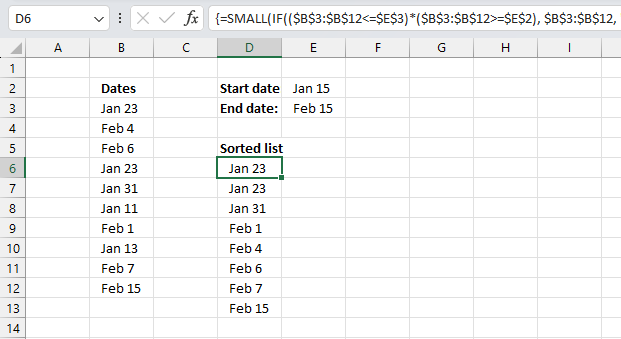
Array formula in D6:
Excel 365 dynamic array formula in cell D6:
How to create an array formula
- Copy array formula
- Select cell D6
- Paste formula in formula bar
- Press and hold Ctrl + Shift
- Press Enter
How to copy array formula
- Select cell D5
- Copy (Ctrl + c)
- Select cell range D6:D15
- Paste (Ctrl + v)
Explaining formula in cell D5
Step 1 - Comparison end date
The less than sign and the equal sig allows you to check if values in cell range are less than or equal to the end date.
($B$3:$B$12<=$E$3)
becomes
{39836;39848;39850;39836;39844;39824;39845;39826;39851;39859}<=39859
and returns
{TRUE; TRUE;TRUE; TRUE;TRUE; TRUE;TRUE; TRUE;TRUE; TRUE}.
Step 2 - Comparison start date
The greater than sign and the equal sig allows you to check if values in cell range are greater than or equal to the start date.
($B$3:$B$12>=$E$2)
becomes
{39836;39848;39850;39836;39844;39824;39845;39826;39851;39859}>=39828
and returns
{TRUE;TRUE; TRUE; TRUE;TRUE;FALSE;TRUE; FALSE;TRUE; TRUE}
Step 3 - Multiply arrays
Both conditions must evaluate to TRUE.
($B$3:$B$12<=$E$3)*($B$3:$B$12>=$E$2)
becomes
{TRUE; TRUE;TRUE; TRUE;TRUE; TRUE;TRUE; TRUE;TRUE; TRUE}*{TRUE;TRUE; TRUE; TRUE;TRUE;FALSE;TRUE; FALSE;TRUE; TRUE}
and returns
{1;1;1;1;1;0;1;0;1;1}
| Boolean | Boolean | Multiply |
| FALSE | FALSE | 0 |
| TRUE | FALSE | 0 |
| TRUE | TRUE | 1 |
Step 4 - Replace TRUE with the corresponding date
The IF function replaces TRUE values with the corresponding dates and FALSE with "A".
IF(($B$3:$B$12<=$E$3)*($B$3:$B$12>=$E$2), $B$3:$B$12, "A")
becomes
IF({1;1;1;1;1;0;1;0;1;1}, {39836;39848;39850;39836;39844;39824;39845;39826;39851;39859}, "A")
and returns
{39836; 39848; 39850; 39836; 39844; "A"; 39845; "A"; 39851; 39859}
Step 5 - Sort numbers (dates)
The SMALL function extracts the k-th smallest number and ignores text values like "A".
SMALL(IF(($B$3:$B$12<=$E$3)*($B$3:$B$12>=$E$2), $B$3:$B$12, "A"), ROWS($A$1:A1))
becomes
SMALL({39836; 39848; 39850; 39836; 39844; "A"; 39845; "A"; 39851; 39859}, ROWS($A$1:A1))
The ROWS function counts rows in a cell reference, this cell reference $A$1:A1 expands as the formula is copied to cells below. This will extract a new value in each cell.
SMALL({39836; 39848; 39850; 39836; 39844; "A"; 39845; "A"; 39851; 39859}, ROWS($A$1:A1))
becomes
SMALL({39836; 39848; 39850; 39836; 39844; "A"; 39845; "A"; 39851; 39859}, 1)
and returns "1/23/2009" in cell D6.
Get Excel *.xlsx file
Sort dates within a date range using excel array formulav3.xlsx
Dates category
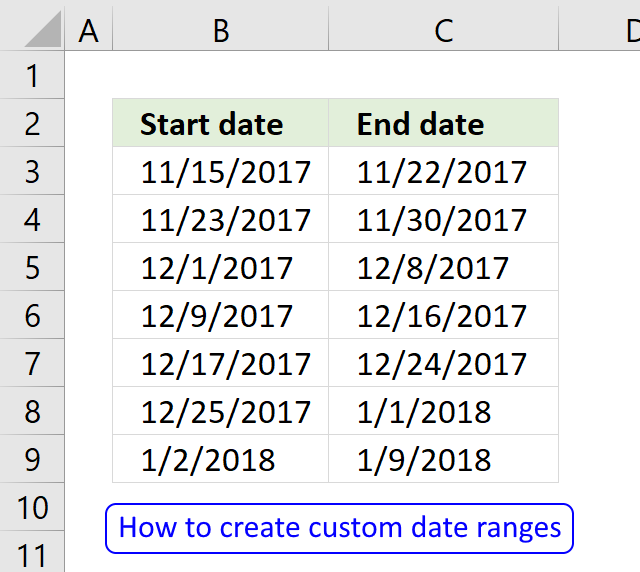
Question: I am trying to create an excel spreadsheet that has a date range. Example: Cell A1 1/4/2009-1/10/2009 Cell B1 […]
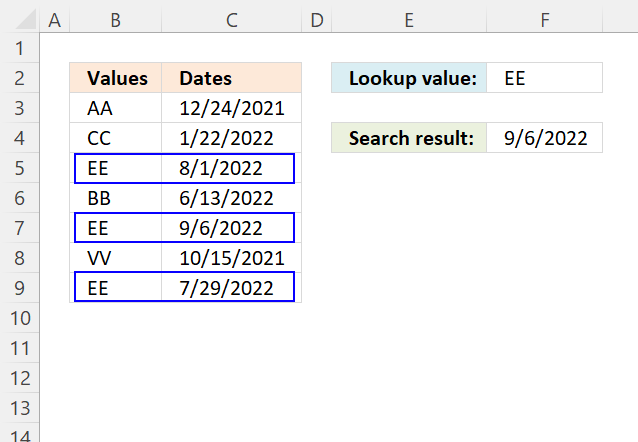
This article demonstrates how to return the latest date based on a condition using formulas or a Pivot Table. The […]
This article demonstrates how to match a specified date to date ranges. The image above shows a formula in cell […]
Excel categories
28 Responses to “Working with date ranges”
Leave a Reply
How to comment
How to add a formula to your comment
<code>Insert your formula here.</code>
Convert less than and larger than signs
Use html character entities instead of less than and larger than signs.
< becomes < and > becomes >
How to add VBA code to your comment
[vb 1="vbnet" language=","]
Put your VBA code here.
[/vb]
How to add a picture to your comment:
Upload picture to postimage.org or imgur
Paste image link to your comment.

I am trying to create an excel spreadsheet that has a date range. Example: Cell A1 1/4/09-1/10/09
Cell B1 1/11/09-1/17/09
Cell C1 1/18/09-1/24/09
How do I create a formula to do this?
See this blog post: https://www.get-digital-help.com/create-a-date-range-using-excel-formula/
I have a very similar problem with dates but my dates are in a matrix (an array). So columns A through J (A2:J60) have dates and I want to put the entire range of dates into one column say column A in sheet 2 but I want them in ascending order. Any chance you can help with that.
Kind Thanks,
Eddie
Eddie G,
Array formula in cell A1, sheet2:
=SMALL(Sheet1!$A$2:$J$60, ROW(A1))
Thanks for bringing this post to my attention. I have now simplified the formula in this post.
This formula should work for any date...
=TEXT(A1-WEEKDAY(A1,3),"mm/dd-")&TEXT(A1-WEEKDAY(A1,3)+6,"mm/dd")
Rick Rothstein (MVP - Excel),
Thanks!
Hi Oscar, found your website. I am complete Excel novice, and have been asked to setup a 'Calendar type' list which identifies alternate wks of the year as 'wk1 & wk2' for work planning purposes. The idea I think will be that this 'calendar list' will be a link/or dropdown to a planning tool, for staff to check whether they are in a wk1 or wk2! No idea where to start really, can you make any suggestions, simple pse as only used to filling in spreadsheet for work not actually setting them up!
Any suggestions gratefully received.
Karen.
@Karen,
Some questions...
1) What day of the week does your wk1 or wk2 start on (Mon, Tue, etc.)?
2) Show us an actual date that would be identified as being in wk1 (need that to orient your work calendar to the real calendar).
3) Are you seeking a VBA or Excel Formula solution?
3)
I'm using a formula to get a report that bring me the total persons from a specific colum in a determinated date:
{SUM(IF((DATE>=FirstDate)*(DATE<=LastDate)*(TYPE=TypeName)*(SUBTYPE=SubtypeName),NameColum2,0))}
When I want to get the result from the "Name Colum2" it works well, but when I change the colum ("NameColum3") it appears an #NAME? error.
I have an excel spreadsheet that has different colums:
TYPE,SUBTYPE,DATE,NameColum2,NameColum3,etc.
Could you help me?
Thanks
Ed
Ed,
You have probably misspelled the column name.
https://www.exceldigest.com/myblog/2009/03/02/how-to-correct-or-clear-a-name-error-in-a-formula/
Thank you very much! Now it is working very well.
Hi I am trying to apply this formula to a search I need to run. I have 4 types of searches, in a dropdown box with conditional formatting showing the user where to enter the specific data that needs to be searched for. I have been able to complete two the search if statements (bill number and file number) however I can not complete the other two which is invoice number and date range.
I would like the formula to always return the applicable bill num if the start and end date of the invoice falls in the specified range .
the formula is getting so long that I am lost. here is the link ...
https://www.dropbox.com/s/5o3n2kln2u8v7yn/invoice%20for%20lily%20%28Autosaved%29.xlsx
many thanks in advance ...
Juliana,
Get the Excel *.xlsx file
invoice-for-lily.xlsx
Hi Pro, i want to find day if given date and week, for example : if given Tuesday, 32th week, 2015 >>> how to use function to point out 4/8/2015 ?
Pls help me!
La Thăng,
Read this:
https://www.get-digital-help.com/2015/08/06/find-date-given-day-and-week/
[…] La Thăng asks: […]
Thanks so much Pro :) if you have chance to VietNam visit, pls tell me know ^^
If I want to search a certain criteria in two dates in above example. For an example, machine A within two dates.How I do it?
Pls help
i have A1 to A300 employee names
B1 to B300 start date of vacation
C1 to C300 end date of vacation
need to count how many employees are absent from work for each day in a year to create a chart (ex: 05.05.2016. 55 are absent, 06.05.2016. 59 are absent... and so on)
and, if its possible to make list of their names... but that is a separate question.
Hi Oscar
Really love your website. Its very useful. I'm using this formula but need help. I have a table with Dates, Codes, Description etc. These table is used to input data which may or may not be in date order.
I then need to copy this data into another area but I want it sorted by date order, which I have successfully done. However, I also want the Codes, Description etc linked to the date to also come across to the sorted date formula used above.
Is this possible?
Hi,
What I have to take on the place of list in this formula??
Pls Help
I am getting Num! Error in this Date Sorting Formula
Did you enter it as an array formula?
I have used in this way
=SMALL(IF((K5:K24=$L$1),K5:K24,""),K5:K24)
Lokesh
You need to use absolute cell refs except the last one, like this:
=SMALL(IF(($A$1:$A$10<=$E$2)*($A$1:$A$10>=$E$1), List, ""), ROW(A1))
Row(A1) returns a number that changes when you copy/paste the formula to cells below. That way you can get the smallest value and then the second smallest value and so on.
Hello Sir,
I have Got the Answer but I didn't understand the presence of Row(A1)in this Formula. Could u pls help me understand that
I need help to convert the list of dates into date range based on a criteria for a grouping by the employee id for example:
Data is as below:
EMPLOYEE ID Dates
24900002 2/27/2017
24900002 3/20/2017
24900005 3/3/2017
24900011 3/13/2017
24900014 3/9/2017
24900022 3/13/2017
24900023 2/25/2017
24900024 2/21/2017
24900024 2/22/2017
24900024 2/23/2017
24900024 2/24/2017
24900024 2/27/2017
24900024 2/28/2017
outcome required is as below:
Start Date End Date
24900002 2/27/2017 2/27/2017
24900002 3/20/2017 3/20/2017
24900005 3/3/2017 3/3/2017
24900011 3/13/2017 3/13/2017
24900014 3/9/2017 3/9/2017
24900022 3/13/2017 3/13/2017
24900023 2/25/2017 2/25/2017
24900024 2/21/2017 2/24/2017
24900024 2/27/2017 2/28/2017