Create a random playlist
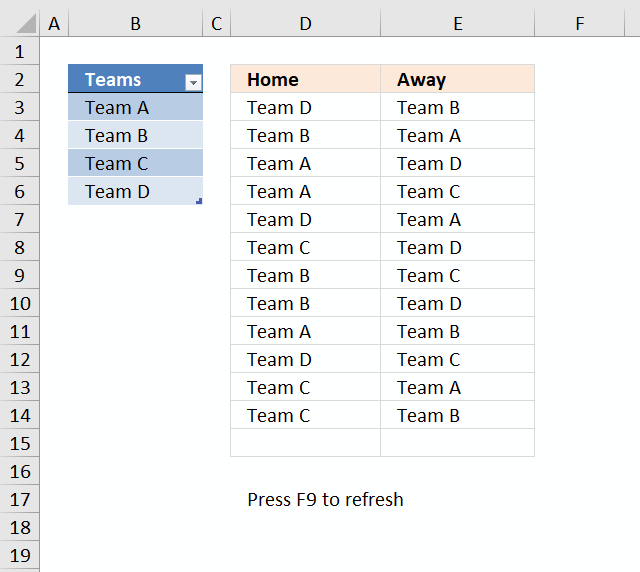
This article describes how to create a random playlist based on a given number of teams using an array formula. Column A contains four teams. Each team plays matches both "Home" against all remaining teams and "Away" against all remaining teams.
The teams are entered in an Excel defined table, this allows you to add or delete teams without the need to adjust cell references in the formulas. The calculation also takes into account the number of teams so the only thing for you to do is to extend the formulas down as far as needed.
Example:
Team A plays "Home" against Team B, Team C and Team D.
Team A- Team B
Team A - Team C
Team A - Team D
Team A plays also "Away" against Team B, Team C and Team D.
Team B - Team A
Team C - Team A
Team D - Team A
Column C and Column D contain a random playlist. Press F9 to refresh.
Array formula in D3:
To enter an array formula, type the formula in a cell then press and hold CTRL + SHIFT simultaneously, now press Enter once. Release all keys.
The formula bar now shows the formula with a beginning and ending curly bracket telling you that you entered the formula successfully. Don't enter the curly brackets yourself.
If column A contains five teams, change ROW($1:$4) to ROW($1:$5) and bolded 3's to 4 in the above formula. Don't forget to adjust cell references.
Array formula i E3:
If column A contains five teams, change ROW($1:$4) to ROW($1:$5) and bolded 3's to 4 in the above formula. Don't forget to adjust cell references accordingly as well.
Explaining formula in cell D3
There is an explanation to this formula in this post: Team generator
Explaining formula in cell E3
Step 1 - Count previous teams in cells above
The COUNTIF function counts values based on a condition or criteria, the first argument contains an expanding cell reference, it grows when the cell is copied to cells below. This makes the formula aware of values displayed in cells above. 0 (zero) indicates values that not yet have been displayed.
COUNTIF($E$2:E2,Table1[Teams])
becomes
COUNTIF($E$2:E2,$B$3:$B$6)
becomes
COUNTIF("Away",{"Team A"; "Team B"; "Team C"; "Team D"})
and returns {0;0;0;0}.
Step 2 - Count non-empty cells
The COUNTA function counts cells that are not empty based on a given cell range.
COUNTA(Table1[Teams])-1
becomes
COUNTA($B$3:$B$6)-1
becomes
COUNTA({"Team A"; "Team B"; "Team C"; "Team D"})-1
becomes
4-1
and returns 3.
Step 3 - Compare array with the number of teams - 1
COUNTIF($E$2:E2, Table1[Teams])<(COUNTA(Table1[Teams])-1)
becomes
{0;0;0;0}<3
and returns
{TRUE; TRUE; TRUE; TRUE}
Step 4 - Prevent home team from being selected again
COUNTIF(D3,Table1[Teams])=0
becomes
COUNTIF("Team D",{"Team A"; "Team B"; "Team C"; "Team D"})=0
becomes
{0;0;0;1}=0
and returns
{TRUE; TRUE; TRUE; FALSE}
Step 5 - Prevent duplicate matches
This step makes sure that the same team is not being in the list more than once against a given Home team. There are two expanding cell references that grow when the cell is copied to cells below.
ISERROR(MATCH(Table1[Teams], IF(D3=$D$2:D2, $E$2:E2, ""), 0))
becomes
ISERROR(MATCH(Table1[Teams], IF("Team D"="Home", "Away", ""), 0))
becomes
ISERROR(MATCH(Table1[Teams], "", 0))
becomes
ISERROR(MATCH({"Team A"; "Team B"; "Team C"; "Team D"}, "", 0))
becomes
ISERROR({#VALUE!; #VALUE!; #VALUE!; #VALUE!})
and returns
{TRUE; TRUE; TRUE; TRUE}
Step 6 - Multiply arrays
This step applies and logic between the arrays meaning all conditions must be TRUE. TRUE * TRUE = TRUE, TRUE * FALSE = FALSE and FALSE * FALSE = FALSE. TRUE is 1 and FALSE is 0 (zero).
(COUNTIF($E$2:E2,Table1[Teams])<(COUNTA(Table1[Teams])-1))*(COUNTIF(D3,Table1[Teams])=0)*(ISERROR(MATCH(Table1[Teams],IF(D3=$D$2:D2,$E$2:E2,""),0)))*ROW($1:$4)
becomes
{TRUE; TRUE; TRUE; TRUE}* {TRUE; TRUE; TRUE; FALSE}* {TRUE; TRUE; TRUE; TRUE}* ROW($1:$4)
becomes
{1; 1; 1; 0}* ROW($1:$4)
The array is the multiplied to a sequence of row numbers.
{1; 1; 1; 0}* ROW($1:$4)
becomes
{1; 1; 1; 0}* {1; 2; 3; 4}
and returns {1; 2; 3; 0}
Step 6 - Extract random row number
The LARGE function returns the k-th largest number, LARGE( array , k). The second argument k is a random number from 1 to n.
LARGE((COUNTIF($D$2:D2, Table1[Teams])<(COUNTA(Table1[Teams])-1))*ROW($1:$4), RANDBETWEEN(1, SUMPRODUCT(--((ISERROR(MATCH(Table1[Teams], IF(D3=$D$2:D2, $E$2:E2, ""), 0)))*(COUNTIF($E$2:E2, Table1[Teams])<(COUNTA(Table1[Teams])-1))*(COUNTIF(D3, Table1[Teams])=0))))))
becomes
LARGE({1; 2; 3; 0}, RANDBETWEEN(1, SUMPRODUCT(--((ISERROR(MATCH(Table1[Teams], IF(D3=$D$2:D2, $E$2:E2, ""), 0)))*(COUNTIF($E$2:E2, Table1[Teams])<(COUNTA(Table1[Teams])-1))*(COUNTIF(D3, Table1[Teams])=0)))))
The RANDBETWEEN function returns a random number based on the two arguments.
LARGE({1; 2; 3; 0}, RANDBETWEEN(1, SUMPRODUCT(--({TRUE; TRUE; TRUE; TRUE}*(COUNTIF($E$2:E2, Table1[Teams])<(COUNTA(Table1[Teams])-1))*(COUNTIF(D3, Table1[Teams])=0)))))
becomes
LARGE({1; 2; 3; 0}, RANDBETWEEN(1, SUMPRODUCT(--({TRUE; TRUE; TRUE; TRUE}*{TRUE; TRUE; TRUE; TRUE}*(COUNTIF(D3, Table1[Teams])=0)))))
becomes
LARGE({1; 2; 3; 0}, RANDBETWEEN(1, SUMPRODUCT(--({TRUE; TRUE; TRUE; TRUE}*{TRUE; TRUE; TRUE; TRUE}*{TRUE; TRUE; TRUE; FALSE}))))
becomes
LARGE({1; 2; 3; 0}, RANDBETWEEN(1, SUMPRODUCT({1; 1; 1; 0})))
becomes
LARGE({1; 2; 3; 0}, RANDBETWEEN(1, 3))
becomes
LARGE({1; 2; 3; 0}, 2)
and returns 2. This is a random value between 1 and 3.
Step 7 - Return value
The INDEX function returns a value based on a cell reference and column/row numbers.
INDEX(Table1[Teams], LARGE((COUNTIF($E$2:E2, Table1[Teams])<(COUNTA(Table1[Teams])-1))*(COUNTIF(D3, Table1[Teams])=0)*(ISERROR(MATCH(Table1[Teams], IF(D3=$D$2:D2, $E$2:E2, ""), 0)))*ROW($A$1:INDEX($A$1:$A$1000, COUNTA(Table1[Teams]))), RANDBETWEEN(1, SUMPRODUCT(--((ISERROR(MATCH(Table1[Teams], IF(D3=$D$2:D2, $E$2:E2, ""), 0)))*(COUNTIF($E$2:E2, Table1[Teams])<(COUNTA(Table1[Teams])-1))*(COUNTIF(D3, Table1[Teams])=0))))))
becomes
INDEX(Table1[Teams], 2)
and returns "Team B" in cell D3.

Random category
Table of Contents Team Generator Dynamic team generator 1. Team Generator This section describes how to create teams randomly. There […]
This article demonstrates macros that create different types of round-robin tournaments. Table of contents Basic schedule - each team plays […]
JD asks in this post: Dynamic team generator Hi, what if we have different number of people per team? So in […]
Excel categories
10 Responses to “Create a random playlist”
Leave a Reply
How to comment
How to add a formula to your comment
<code>Insert your formula here.</code>
Convert less than and larger than signs
Use html character entities instead of less than and larger than signs.
< becomes < and > becomes >
How to add VBA code to your comment
[vb 1="vbnet" language=","]
Put your VBA code here.
[/vb]
How to add a picture to your comment:
Upload picture to postimage.org or imgur
Paste image link to your comment.

Can this example be modified to create a true round robin draw? i.e. using a 6 team scenario, for any round there will be three games/matches, but obviously Team A could not compete against say Team B and Team C during that round as can occur using the above formula.
This is a really good question. I hope I can post an answer soon.
Thanks for commenting!
Mark G,
See this post: Create a random playlist in excel – True round-robin tournament
Hi,
I have a question?
I am tryng to list the people with the highest scores based on certain criteria.
My data:
column
A B C D
Mike 207 Yes Life
Greg 207 Yes Life
Sid 207 Yes Life
Greg 207 Yes Life
Greg 207 Yes Life
Sid 207 Yes Life
Greg 207 No Life
Sid 204 No Health
criteria
countif b= 207 and column c= yes and column d= Life
and it then needs to arange it from the highest to the lowest
(Large)
and then match it with the name eg, Greg Sid or Mike
so what i am looking for is eg.
Greg 3
Sid 2
Mike 1
but it has to be in one formula.
can you maybe help?
Andre.
Andre,
Read this post: List people with the highest scores based on criteria in excel
Hi Oscar
I got your home & away generator for 4 teams which is exactly what I am looking for. Do you however have a similar spreadsheet for 3, 5 and 6 teams? If you do please could you e-mail me links?
Cheers
Dale
Dale,
See attached file:
random-plays-teams.xls
You are a star. I need to insert some rows at the top but it seems to muck up the formulas. Is there any easy way to fix this?
Cheers
Dale
Dale,
I think you´ll have to move the cell references accordingly in both formulas.
Hi Oscar,
I am looking for a tournement-schedule with the following criteria:
16 tennis players
26 weeks (=13 matches) and/or 24 weeks (=12 matches)
2 courts with 4 teams (1 and 2 against 3 and 4 / 5 and 6 against 7 and 8)
Preferences:
intention to play once in 2 weeks
intention to play with the same player 2 times at most
intention to play against the same player 2 times at most
each player is playing 13 (26 weeks) or 12 (24 weeks) times
I hope there is a possibilty to create such a scheduler.
Regards,
Jacques