Extract dates from overlapping date ranges
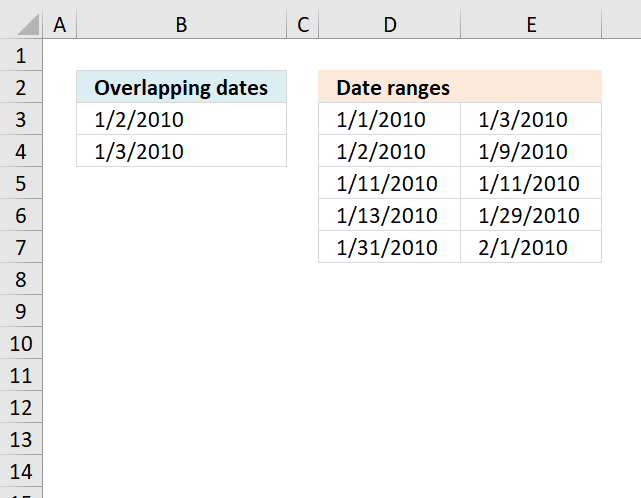
The array formula in cell B3 extracts overlapping dates based on the date ranges in columns D and E.
What's on this page
1. Extract dates from overlapping date ranges
Array formula in B3:
New smaller formula:
You can find an explanation for the new formula in this article: Convert date ranges into dates The only difference is that this formula extracts dates that exist in more than one date range.
How does this (old) formula work?
Step 1 - Create dates and check if they are smaller or equal to dates in cell range $D$2:$D$6
(MIN(Start)+COLUMN(OFFSET($A$1, , 0, , MAX(End)-MIN(Start)+1))-1<=End
becomes
{40179, 40180, 40181, 40182, 40183, 40184, 40185, 40186, 40187, 40188, 40189, 40190, 40191, 40192, 40193, 40194, 40195, 40196, 40197, 40198, 40199, 40200, 40201, 40202, 40203, 40204, 40205, 40206, 40207, 40208, 40209, 40210}<=End
becomes
{40179, 40180, 40181, 40182, 40183, 40184, 40185, 40186, 40187, 40188, 40189, 40190, 40191, 40192, 40193, 40194, 40195, 40196, 40197, 40198, 40199, 40200, 40201, 40202, 40203, 40204, 40205, 40206, 40207, 40208, 40209, 40210}<={40181;40187;40189;40207;40210}
and returns
{TRUE, TRUE, TRUE, FALSE, FALSE, FALSE, FALSE, FALSE, FALSE, FALSE, FALSE, FALSE, FALSE, FALSE, FALSE, FALSE, FALSE, FALSE, FALSE, FALSE, FALSE, FALSE, FALSE, FALSE, FALSE, FALSE, FALSE, FALSE, FALSE, FALSE, FALSE, FALSE;TRUE, TRUE, TRUE, TRUE, TRUE, TRUE, TRUE, TRUE, TRUE, FALSE, FALSE, FALSE, FALSE, FALSE, FALSE, FALSE, FALSE, FALSE, FALSE, FALSE, FALSE, FALSE, FALSE, FALSE, FALSE, FALSE, FALSE, FALSE, FALSE, FALSE, FALSE, FALSE;TRUE, TRUE, TRUE, TRUE, TRUE, TRUE, TRUE, TRUE, TRUE, TRUE, TRUE, FALSE, FALSE, FALSE, FALSE, FALSE, FALSE, FALSE, FALSE, FALSE, FALSE, FALSE, FALSE, FALSE, FALSE, FALSE, FALSE, FALSE, FALSE, FALSE, FALSE, FALSE;TRUE, TRUE, TRUE, TRUE, TRUE, TRUE, TRUE, TRUE, TRUE, TRUE, TRUE, TRUE, TRUE, TRUE, TRUE, TRUE, TRUE, TRUE, TRUE, TRUE, TRUE, TRUE, TRUE, TRUE, TRUE, TRUE, TRUE, TRUE, TRUE, FALSE, FALSE, FALSE;TRUE, TRUE, TRUE, TRUE, TRUE, TRUE, TRUE, TRUE, TRUE, TRUE, TRUE, TRUE, TRUE, TRUE, TRUE, TRUE, TRUE, TRUE, TRUE, TRUE, TRUE, TRUE, TRUE, TRUE, TRUE, TRUE, TRUE, TRUE, TRUE, TRUE, TRUE, TRUE}
Step 2 - Create dates and check if they are larger or equal to dates in cell range $C$2:$C$6
(MIN(Start)+COLUMN(OFFSET($A$1, , 0, , MAX(End)-MIN(Start)+1))-1>=Start
becomes
{40179, 40180, 40181, 40182, 40183, 40184, 40185, 40186, 40187, 40188, 40189, 40190, 40191, 40192, 40193, 40194, 40195, 40196, 40197, 40198, 40199, 40200, 40201, 40202, 40203, 40204, 40205, 40206, 40207, 40208, 40209, 40210}<=Start
becomes
{40179, 40180, 40181, 40182, 40183, 40184, 40185, 40186, 40187, 40188, 40189, 40190, 40191, 40192, 40193, 40194, 40195, 40196, 40197, 40198, 40199, 40200, 40201, 40202, 40203, 40204, 40205, 40206, 40207, 40208, 40209, 40210}<={40179;40180;40189;40191;40209}
and returns
{TRUE, TRUE, TRUE, TRUE, TRUE, TRUE, TRUE, TRUE, TRUE, TRUE, TRUE, TRUE, TRUE, TRUE, TRUE, TRUE, TRUE, TRUE, TRUE, TRUE, TRUE, TRUE, TRUE, TRUE, TRUE, TRUE, TRUE, TRUE, TRUE, TRUE, TRUE, TRUE;FALSE, TRUE, TRUE, TRUE, TRUE, TRUE, TRUE, TRUE, TRUE, TRUE, TRUE, TRUE, TRUE, TRUE, TRUE, TRUE, TRUE, TRUE, TRUE, TRUE, TRUE, TRUE, TRUE, TRUE, TRUE, TRUE, TRUE, TRUE, TRUE, TRUE, TRUE, TRUE;FALSE, FALSE, FALSE, FALSE, FALSE, FALSE, FALSE, FALSE, FALSE, FALSE, TRUE, TRUE, TRUE, TRUE, TRUE, TRUE, TRUE, TRUE, TRUE, TRUE, TRUE, TRUE, TRUE, TRUE, TRUE, TRUE, TRUE, TRUE, TRUE, TRUE, TRUE, TRUE;FALSE, FALSE, FALSE, FALSE, FALSE, FALSE, FALSE, FALSE, FALSE, FALSE, FALSE, FALSE, TRUE, TRUE, TRUE, TRUE, TRUE, TRUE, TRUE, TRUE, TRUE, TRUE, TRUE, TRUE, TRUE, TRUE, TRUE, TRUE, TRUE, TRUE, TRUE, TRUE;FALSE, FALSE, FALSE, FALSE, FALSE, FALSE, FALSE, FALSE, FALSE, FALSE, FALSE, FALSE, FALSE, FALSE, FALSE, FALSE, FALSE, FALSE, FALSE, FALSE, FALSE, FALSE, FALSE, FALSE, FALSE, FALSE, FALSE, FALSE, FALSE, FALSE, TRUE, TRUE}
Step 3 - Add arrays and check if they are larger than 1
(MIN(Start)+COLUMN(OFFSET($A$1, , 0, , MAX(End)-MIN(Start)+1))-1<=End)+(MIN(Start)+COLUMN(OFFSET($A$1, , 0, , MAX(End)-MIN(Start)+1))-1>=Start)>1
becomes
{2, 2, 2, 1, 1, 1, 1, 1, 1, 1, 1, 1, 1, 1, 1, 1, 1, 1, 1, 1, 1, 1, 1, 1, 1, 1, 1, 1, 1, 1, 1, 1;1, 2, 2, 2, 2, 2, 2, 2, 2, 1, 1, 1, 1, 1, 1, 1, 1, 1, 1, 1, 1, 1, 1, 1, 1, 1, 1, 1, 1, 1, 1, 1;1, 1, 1, 1, 1, 1, 1, 1, 1, 1, 2, 1, 1, 1, 1, 1, 1, 1, 1, 1, 1, 1, 1, 1, 1, 1, 1, 1, 1, 1, 1, 1;1, 1, 1, 1, 1, 1, 1, 1, 1, 1, 1, 1, 2, 2, 2, 2, 2, 2, 2, 2, 2, 2, 2, 2, 2, 2, 2, 2, 2, 1, 1, 1;1, 1, 1, 1, 1, 1, 1, 1, 1, 1, 1, 1, 1, 1, 1, 1, 1, 1, 1, 1, 1, 1, 1, 1, 1, 1, 1, 1, 1, 1, 2, 2}>1
and returns
{TRUE, TRUE, TRUE, FALSE, FALSE, FALSE, FALSE, FALSE, FALSE, FALSE, FALSE, FALSE, FALSE, FALSE, FALSE, FALSE, FALSE, FALSE, FALSE, FALSE, FALSE, FALSE, FALSE, FALSE, FALSE, FALSE, FALSE, FALSE, FALSE, FALSE, FALSE, FALSE;FALSE, TRUE, TRUE, TRUE, TRUE, TRUE, TRUE, TRUE, TRUE, FALSE, FALSE, FALSE, FALSE, FALSE, FALSE, FALSE, FALSE, FALSE, FALSE, FALSE, FALSE, FALSE, FALSE, FALSE, FALSE, FALSE, FALSE, FALSE, FALSE, FALSE, FALSE, FALSE;FALSE, FALSE, FALSE, FALSE, FALSE, FALSE, FALSE, FALSE, FALSE, FALSE, TRUE, FALSE, FALSE, FALSE, FALSE, FALSE, FALSE, FALSE, FALSE, FALSE, FALSE, FALSE, FALSE, FALSE, FALSE, FALSE, FALSE, FALSE, FALSE, FALSE, FALSE, FALSE;FALSE, FALSE, FALSE, FALSE, FALSE, FALSE, FALSE, FALSE, FALSE, FALSE, FALSE, FALSE, TRUE, TRUE, TRUE, TRUE, TRUE, TRUE, TRUE, TRUE, TRUE, TRUE, TRUE, TRUE, TRUE, TRUE, TRUE, TRUE, TRUE, FALSE, FALSE, FALSE;FALSE, FALSE, FALSE, FALSE, FALSE, FALSE, FALSE, FALSE, FALSE, FALSE, FALSE, FALSE, FALSE, FALSE, FALSE, FALSE, FALSE, FALSE, FALSE, FALSE, FALSE, FALSE, FALSE, FALSE, FALSE, FALSE, FALSE, FALSE, FALSE, FALSE, TRUE, TRUE}
Step 4 - Filter overlapping dates
The IF function returns one value if the logical test is TRUE and another value if the logical test is FALSE.
Function syntax: IF(logical_test, [value_if_true], [value_if_false])
IF((MIN(Start)+COLUMN(OFFSET($A$1, , 0, , MAX(End)-MIN(Start)+1))-1<=End)+(MIN(Start)+COLUMN(OFFSET($A$1, , 0, , MAX(End)-MIN(Start)+1))-1>=Start)>1, MIN(Start)+COLUMN(OFFSET($A$1, , 0, , MAX(End)-MIN(Start)+1))-1, "")
becomes
IF({TRUE, TRUE, TRUE, FALSE, FALSE, FALSE, FALSE, FALSE, FALSE, FALSE, FALSE, FALSE, FALSE, FALSE, FALSE, FALSE, FALSE, FALSE, FALSE, FALSE, FALSE, FALSE, FALSE, FALSE, FALSE, FALSE, FALSE, FALSE, FALSE, FALSE, FALSE, FALSE;FALSE, TRUE, TRUE, TRUE, TRUE, TRUE, TRUE, TRUE, TRUE, FALSE, FALSE, FALSE, FALSE, FALSE, FALSE, FALSE, FALSE, FALSE, FALSE, FALSE, FALSE, FALSE, FALSE, FALSE, FALSE, FALSE, FALSE, FALSE, FALSE, FALSE, FALSE, FALSE;FALSE, FALSE, FALSE, FALSE, FALSE, FALSE, FALSE, FALSE, FALSE, FALSE, TRUE, FALSE, FALSE, FALSE, FALSE, FALSE, FALSE, FALSE, FALSE, FALSE, FALSE, FALSE, FALSE, FALSE, FALSE, FALSE, FALSE, FALSE, FALSE, FALSE, FALSE, FALSE;FALSE, FALSE, FALSE, FALSE, FALSE, FALSE, FALSE, FALSE, FALSE, FALSE, FALSE, FALSE, TRUE, TRUE, TRUE, TRUE, TRUE, TRUE, TRUE, TRUE, TRUE, TRUE, TRUE, TRUE, TRUE, TRUE, TRUE, TRUE, TRUE, FALSE, FALSE, FALSE;FALSE, FALSE, FALSE, FALSE, FALSE, FALSE, FALSE, FALSE, FALSE, FALSE, FALSE, FALSE, FALSE, FALSE, FALSE, FALSE, FALSE, FALSE, FALSE, FALSE, FALSE, FALSE, FALSE, FALSE, FALSE, FALSE, FALSE, FALSE, FALSE, FALSE, TRUE, TRUE}, {40179, 40180, 40181, 40182, 40183, 40184, 40185, 40186, 40187, 40188, 40189, 40190, 40191, 40192, 40193, 40194, 40195, 40196, 40197, 40198, 40199, 40200, 40201, 40202, 40203, 40204, 40205, 40206, 40207, 40208, 40209, 40210}, "")
and returns
{40179, 40180, 40181, "", "", "", "", "", "", "", "", "", "", "", "", "", "", "", "", "", "", "", "", "", "", "", "", "", "", "", "", "";"", 40180, 40181, 40182, 40183, 40184, 40185, 40186, 40187, "", "", "", "", "", "", "", "", "", "", "", "", "", "", "", "", "", "", "", "", "", "", "";"", "", "", "", "", "", "", "", "", "", 40189, "", "", "", "", "", "", "", "", "", "", "", "", "", "", "", "", "", "", "", "", "";"", "", "", "", "", "", "", "", "", "", "", "", 40191, 40192, 40193, 40194, 40195, 40196, 40197, 40198, 40199, 40200, 40201, 40202, 40203, 40204, 40205, 40206, 40207, "", "", "";"", "", "", "", "", "", "", "", "", "", "", "", "", "", "", "", "", "", "", "", "", "", "", "", "", "", "", "", "", "", 40209, 40210}
Step 5 - Calculate how often values occur
The FREQUENCY function calculates how often values occur within a range of values and then returns a vertical array of numbers.
Function syntax: FREQUENCY(data_array, bins_array)
FREQUENCY(IF((MIN(Start)+COLUMN(OFFSET($A$1, , 0, , MAX(End)-MIN(Start)+1))-1<=End)+(MIN(Start)+COLUMN(OFFSET($A$1, , 0, , MAX(End)-MIN(Start)+1))-1>=Start)>1, MIN(Start)+COLUMN(OFFSET($A$1, , 0, , MAX(End)-MIN(Start)+1))-1, ""), MIN(Start)+COLUMN(OFFSET($A$1, , 0, , MAX(End)-MIN(Start)+1))-1)
becomes
FREQUENCY({40179, 40180, 40181, "", "", "", "", "", "", "", "", "", "", "", "", "", "", "", "", "", "", "", "", "", "", "", "", "", "", "", "", "";"", 40180, 40181, 40182, 40183, 40184, 40185, 40186, 40187, "", "", "", "", "", "", "", "", "", "", "", "", "", "", "", "", "", "", "", "", "", "", "";"", "", "", "", "", "", "", "", "", "", 40189, "", "", "", "", "", "", "", "", "", "", "", "", "", "", "", "", "", "", "", "", "";"", "", "", "", "", "", "", "", "", "", "", "", 40191, 40192, 40193, 40194, 40195, 40196, 40197, 40198, 40199, 40200, 40201, 40202, 40203, 40204, 40205, 40206, 40207, "", "", "";"", "", "", "", "", "", "", "", "", "", "", "", "", "", "", "", "", "", "", "", "", "", "", "", "", "", "", "", "", "", 40209, 40210}, MIN(Start)+COLUMN(OFFSET($A$1, , 0, , MAX(End)-MIN(Start)+1))-1)
becomes
FREQUENCY({40179, 40180, 40181, "", "", "", "", "", "", "", "", "", "", "", "", "", "", "", "", "", "", "", "", "", "", "", "", "", "", "", "", "";"", 40180, 40181, 40182, 40183, 40184, 40185, 40186, 40187, "", "", "", "", "", "", "", "", "", "", "", "", "", "", "", "", "", "", "", "", "", "", "";40179, 40180, "", "", "", "", "", "", "", "", "", "", "", "", "", "", "", "", "", "", "", "", "", "", "", "", "", "", "", "", "", "";"", "", "", "", "", "", "", "", "", "", "", "", 40191, 40192, 40193, 40194, 40195, 40196, 40197, 40198, 40199, 40200, 40201, 40202, 40203, 40204, 40205, 40206, 40207, "", "", "";"", "", "", "", "", "", "", "", "", "", "", "", "", "", "", "", "", "", "", "", "", "", "", "", "", 40204, 40205, 40206, 40207, 40208, 40209, 40210}, {40179, 40180, 40181, 40182, 40183, 40184, 40185, 40186, 40187, 40188, 40189, 40190, 40191, 40192, 40193, 40194, 40195, 40196, 40197, 40198, 40199, 40200, 40201, 40202, 40203, 40204, 40205, 40206, 40207, 40208, 40209, 40210})
and returns
{1; 2; 2; 1; 1; 1; 1; 1; 1; 0; 1; 0; 1; 1; 1; 1; 1; 1; 1; 1; 1; 1; 1; 1; 1; 1; 1; 1; 1; 0; 1; 1; 0}
Step 6 - Check if vaues are larger than 1
IF(FREQUENCY(IF((MIN(Start)+COLUMN(OFFSET($A$1, , 0, , MAX(End)-MIN(Start)+1))-1<=End)+(MIN(Start)+COLUMN(OFFSET($A$1, , 0, , MAX(End)-MIN(Start)+1))-1>=Start)>1, MIN(Start)+COLUMN(OFFSET($A$1, , 0, , MAX(End)-MIN(Start)+1))-1, ""), MIN(Start)+COLUMN(OFFSET($A$1, , 0, , MAX(End)-MIN(Start)+1))-1)>1, MIN(Start)+ROW(OFFSET($A$1, , 0, MAX(End)-MIN(Start)))-1, "")
becomes
IF({1; 2; 2; 1; 1; 1; 1; 1; 1; 0; 1; 0; 1; 1; 1; 1; 1; 1; 1; 1; 1; 1; 1; 1; 1; 1; 1; 1; 1; 0; 1; 1; 0}>1, MIN(Start)+ROW(OFFSET($A$1, , 0, MAX(End)-MIN(Start)))-1, "")
becomes
IF({1; 2; 2; 1; 1; 1; 1; 1; 1; 0; 1; 0; 1; 1; 1; 1; 1; 1; 1; 1; 1; 1; 1; 1; 1; 1; 1; 1; 1; 0; 1; 1; 0}>1, {40179; 40180; 40181; 40182; 40183; 40184; 40185; 40186; 40187; 40188; 40189; 40190; 40191; 40192; 40193; 40194; 40195; 40196; 40197; 40198; 40199; 40200; 40201; 40202; 40203; 40204; 40205; 40206; 40207; 40208; 40209}, "")
and returns
{"";40180;40181;"";"";"";"";"";"";"";"";"";"";"";"";"";"";"";"";"";"";"";"";"";"";"";"";"";"";"";"";"";""}
Step 7 - Return the k-th smallest value
The SMALL function returns the k-th smallest value from a group of numbers.
Function syntax: SMALL(array, k)
SMALL(IF(FREQUENCY(IF((MIN(Start)+COLUMN(OFFSET($A$1, , 0, , MAX(End)-MIN(Start)+1))-1<=End)+(MIN(Start)+COLUMN(OFFSET($A$1, , 0, , MAX(End)-MIN(Start)+1))-1>=Start)>1, MIN(Start)+COLUMN(OFFSET($A$1, , 0, , MAX(End)-MIN(Start)+1))-1, ""), MIN(Start)+COLUMN(OFFSET($A$1, , 0, , MAX(End)-MIN(Start)+1))-1)>1, MIN(Start)+ROW(OFFSET($A$1, , 0, MAX(End)-MIN(Start)))-1, ""), ROW(A1))
becomes
SMALL({"";40180;40181;"";"";"";"";"";"";"";"";"";"";"";"";"";"";"";"";"";"";"";"";"";"";"";"";"";"";"";"";"";""}, ROW(A1))
and returns 40180 (2-Jan-2010) in cell A2.

2. Extract dates from overlapping date ranges - Excel 365
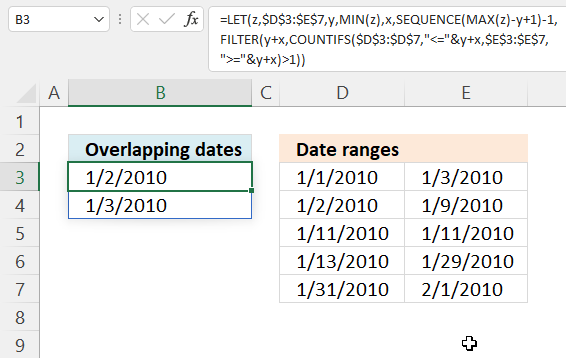
Excel 365 formula in cell B3:
Explaining formula
Step 1 - Get largest number (date)
The MAX function calculate the largest number in a cell range.
Function syntax: MAX(number1, [number2], ...)
MAX($D$3:$E$7)
becomes
MAX({40179,40181; 40180,40187; 40189,40189; 40191,40207; 40209,40210})
and returns 40210.
Step 2 - Get smallest number (date)
The MIN function returns the smallest number in a cell range.
Function syntax: MIN(number1, [number2], ...)
MIN($D$3:$E$7)
becomes
MAX({40179,40181; 40180,40187; 40189,40189; 40191,40207; 40209,40210})
and returns 40179.
Step 3 - Calculate days between the earliest and latest date
The minus operator lets you subtract numbers in an Excel formula.
MAX($D$3:$E$7)-MIN($D$3:$E$7)+1
becomes
40210 - 40179 + 1 equals 32.
Step 4 - Create a sequence of numbers
The SEQUENCE function creates a list of sequential numbers.
Function syntax: SEQUENCE(rows, [columns], [start], [step])
SEQUENCE(MAX($D$3:$E$7)-MIN($D$3:$E$7)+1)-1
becomes
SEQUENCE(32)-1
becomes
{1; 2; 3; 4; 5; 6; 7; 8; 9; 10; 11; 12; 13; 14; 15; 16; 17; 18; 19; 20; 21; 22; 23; 24; 25; 26; 27; 28; 29; 30; 31; 32} - 1
and returns
{0; 1; 2; 3; 4; 5; 6; 7; 8; 9; 10; 11; 12; 13; 14; 15; 16; 17; 18; 19; 20; 21; 22; 23; 24; 25; 26; 27; 28; 29; 30; 31}
Step 5 - Create a sequence of dates
The plus operator lets you add numbers in an Excel formula.
MIN($D$3:$E$7)+SEQUENCE(MAX($D$3:$E$7)-MIN($D$3:$E$7)+1)-1
becomes
40179 + {0; 1; 2; 3; 4; 5; 6; 7; 8; 9; 10; 11; 12; 13; 14; 15; 16; 17; 18; 19; 20; 21; 22; 23; 24; 25; 26; 27; 28; 29; 30; 31}
and returns
{40179; 40180; 40181; 40182; 40183; 40184; 40185; 40186; 40187; 40188; 40189; 40190; 40191; 40192; 40193; 40194; 40195; 40196; 40197; 40198; 40199; 40200; 40201; 40202; 40203; 40204; 40205; 40206; 40207; 40208; 40209; 40210}
Step 6 - Calculate overlapping dates
The COUNTIFS function calculates the number of cells across multiple ranges that equals all given conditions.
Function syntax: COUNTIFS(criteria_range1, criteria1, [criteria_range2, criteria2]…)
COUNTIFS($D$3:$D$7,"<="&MIN($D$3:$E$7)+SEQUENCE(MAX($D$3:$E$7)-MIN($D$3:$E$7)+1)-1,$E$3:$E$7,">="&MIN($D$3:$E$7)+SEQUENCE(MAX($D$3:$E$7)-MIN($D$3:$E$7)+1)-1)>1
becomes
COUNTIFS($D$3:$D$7,"<="&{40179; 40180; 40181; 40182; 40183; 40184; 40185; 40186; 40187; 40188; 40189; 40190; 40191; 40192; 40193; 40194; 40195; 40196; 40197; 40198; 40199; 40200; 40201; 40202; 40203; 40204; 40205; 40206; 40207; 40208; 40209; 40210},$E$3:$E$7,">="&{40179; 40180; 40181; 40182; 40183; 40184; 40185; 40186; 40187; 40188; 40189; 40190; 40191; 40192; 40193; 40194; 40195; 40196; 40197; 40198; 40199; 40200; 40201; 40202; 40203; 40204; 40205; 40206; 40207; 40208; 40209; 40210})>1
becomes
{1; 2; 2; 1; 1; 1; 1; 1; 1; 0; 1; 0; 1; 1; 1; 1; 1; 1; 1; 1; 1; 1; 1; 1; 1; 1; 1; 1; 1; 0; 1; 1}>1
The larger than character lets you compare values in an Excel formula, boolean value TRUE is returned if condition is met and FALSE if not.
{1; 2; 2; 1; 1; 1; 1; 1; 1; 0; 1; 0; 1; 1; 1; 1; 1; 1; 1; 1; 1; 1; 1; 1; 1; 1; 1; 1; 1; 0; 1; 1}>1
and returns
{FALSE; TRUE; TRUE; FALSE; FALSE; FALSE; FALSE; FALSE; FALSE; FALSE; FALSE; FALSE; FALSE; FALSE; FALSE; FALSE; FALSE; FALSE; FALSE; FALSE; FALSE; FALSE; FALSE; FALSE; FALSE; FALSE; FALSE; FALSE; FALSE; FALSE; FALSE; FALSE}
Step 7 - Extract overlapping dates
The FILTER function extracts values/rows based on a condition or criteria.
Function syntax: FILTER(array, include, [if_empty])
FILTER(MIN($D$3:$E$7)+SEQUENCE(MAX($D$3:$E$7)-MIN($D$3:$E$7)+1)-1,COUNTIFS($D$3:$D$7,"<="&MIN($D$3:$E$7)+SEQUENCE(MAX($D$3:$E$7)-MIN($D$3:$E$7)+1)-1,$E$3:$E$7,">="&MIN($D$3:$E$7)+SEQUENCE(MAX($D$3:$E$7)-MIN($D$3:$E$7)+1)-1)>1)
becomes
FILTER({40179; 40180; 40181; 40182; 40183; 40184; 40185; 40186; 40187; 40188; 40189; 40190; 40191; 40192; 40193; 40194; 40195; 40196; 40197; 40198; 40199; 40200; 40201; 40202; 40203; 40204; 40205; 40206; 40207; 40208; 40209; 40210}, {FALSE; TRUE; TRUE; FALSE; FALSE; FALSE; FALSE; FALSE; FALSE; FALSE; FALSE; FALSE; FALSE; FALSE; FALSE; FALSE; FALSE; FALSE; FALSE; FALSE; FALSE; FALSE; FALSE; FALSE; FALSE; FALSE; FALSE; FALSE; FALSE; FALSE; FALSE; FALSE})
and returns {40180; 40181}.
Step 8 - Shorten formula
The LET function lets you name intermediate calculation results which can shorten formulas considerably and improve performance.
Function syntax: LET(name1, name_value1, calculation_or_name2, [name_value2, calculation_or_name3...])
FILTER(MIN($D$3:$E$7)+SEQUENCE(MAX($D$3:$E$7)-MIN($D$3:$E$7)+1)-1,COUNTIFS($D$3:$D$7,"<="&MIN($D$3:$E$7)+SEQUENCE(MAX($D$3:$E$7)-MIN($D$3:$E$7)+1)-1,$E$3:$E$7,">="&MIN($D$3:$E$7)+SEQUENCE(MAX($D$3:$E$7)-MIN($D$3:$E$7)+1)-1)>1)
$D$3:$E$7 is repeated multiple times, let's name it z.
MIN(z) is repeated multiple times, let us name it y.
SEQUENCE(MAX(z)-y+1)-1 is also repeated, I am naming it x. The formula becomes:
LET(z, $D$3:$E$7, y, MIN(z), x, SEQUENCE(MAX(z)-y+1)-1, FILTER(y+x, COUNTIFS($D$3:$D$7, "<="&y+x, $E$3:$E$7, ">="&y+x)>1))
Dates category
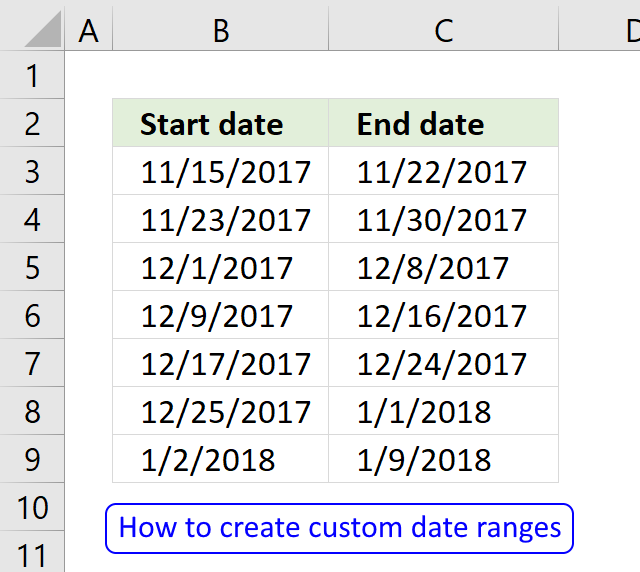
Question: I am trying to create an excel spreadsheet that has a date range. Example: Cell A1 1/4/2009-1/10/2009 Cell B1 […]
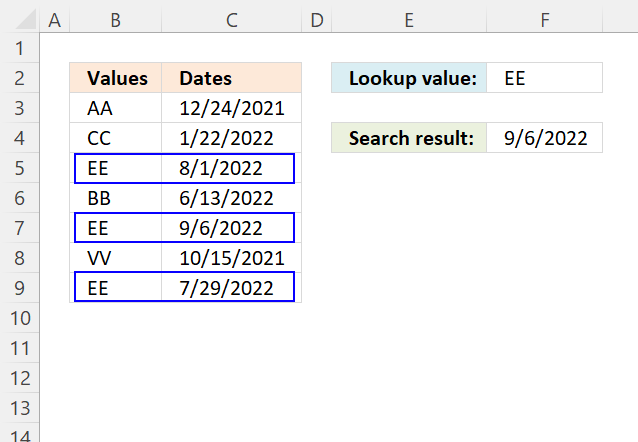
This article demonstrates how to return the latest date based on a condition using formulas or a Pivot Table. The […]
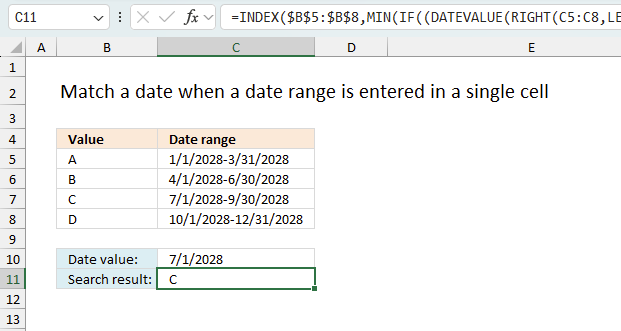
This article explains how to search for a specific date and identify a date range in which it falls between […]
Excel categories
Leave a Reply
How to comment
How to add a formula to your comment
<code>Insert your formula here.</code>
Convert less than and larger than signs
Use html character entities instead of less than and larger than signs.
< becomes < and > becomes >
How to add VBA code to your comment
[vb 1="vbnet" language=","]
Put your VBA code here.
[/vb]
How to add a picture to your comment:
Upload picture to postimage.org or imgur
Paste image link to your comment.
