Identify numbers in sum using Excel solver
Table of Contents
1. Identify numbers in sum using Excel solver
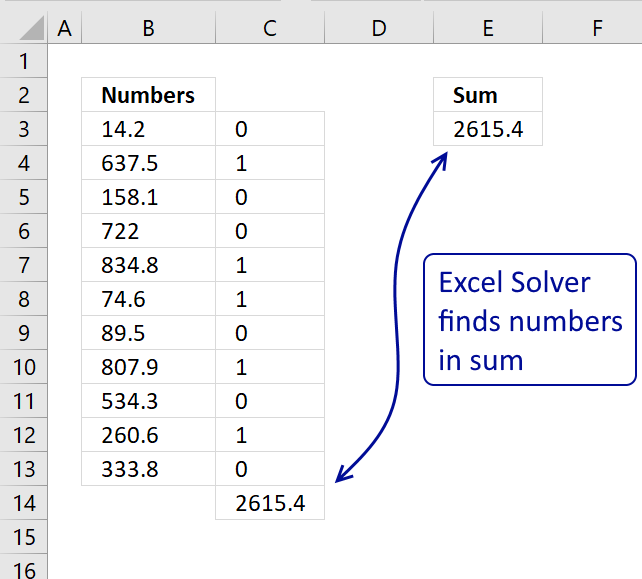
Here is a useful feature I recently found googling for Excel solver examples.
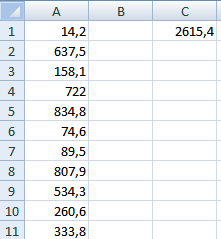
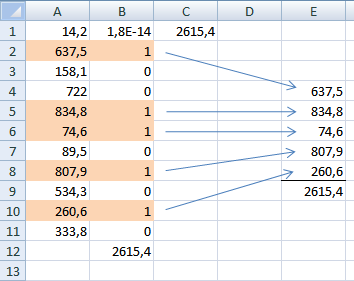
I have summed some random values from the list A1:A11 in cell C1.
How do I find those summed numbers in C1?
I am going to use Excel Solver. Using more than 20 values (Column A) is not recommended unless you have a lot of spare time.
Watch a video
Install Solver add-in
- Press with left mouse button on Office button
- Press with left mouse button on Excel Options
- Press with left mouse button on add-ins
- Install Solver
- Press with left mouse button on OK
Interested in what other things Excel Solver can do? See category for Solver.
Setup formula
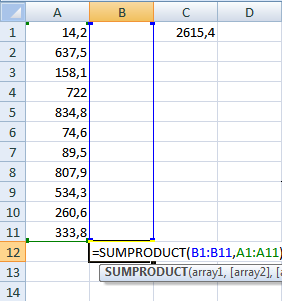
- Double press with left mouse button on B12
- Type =SUMPRODUCT(B1:B11,A1:A11) + ENTER
Recommended reading:
Recommended articles
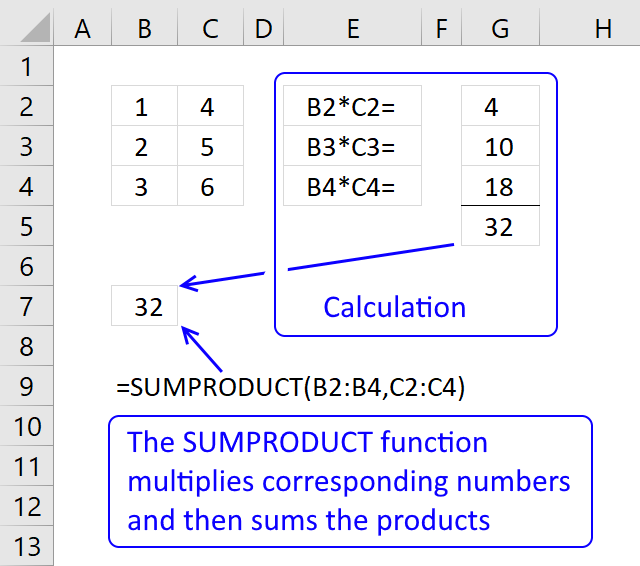
The SUMPRODUCT function calculates the product of corresponding values and then returns the sum of each multiplication.
Start Excel 2007 Solver
- Press with left mouse button on "Data" in the Ribbon
- Press with left mouse button on "Solver"
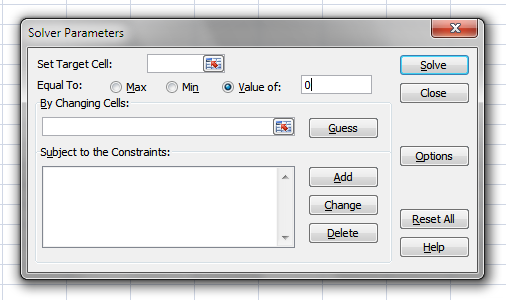
- Press with left mouse button on "Set Target Cell:" button
- Press with left mouse button on B12
- Type in "Value of:" window the summed value 2615,4
- Press with left mouse button on "By Changing Cells:" button and select B1:B11.
- Press with left mouse button on "Add" button
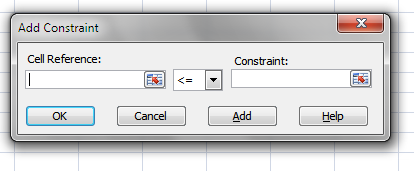
- Press with left mouse button on "Cell Reference:" button and select B1:B11
- Select "bin" in drop down menu (triangle)
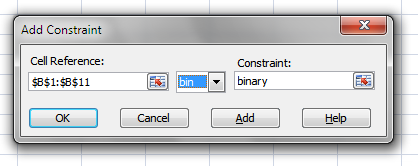
- Press with left mouse button on "OK"
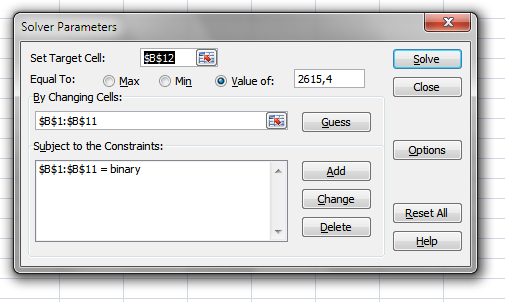
- Press with left mouse button on "Options"
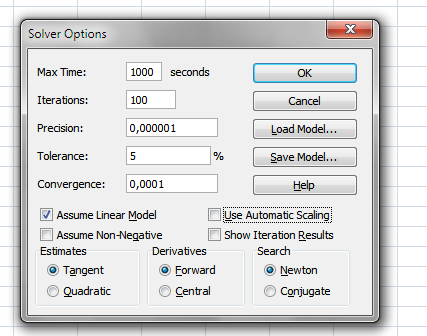
- Enable "Assume Linear Model"
If you have a newer Excel version and can't find "Assume Linear Model", select Simplex LP in "Select s Solving Method" drop down list.
Then press with left mouse button on "Solve"button.
You are ready, ignore steps below. - I changed "Max Time:" to 1000 seconds
- Press with left mouse button on OK
- Press with left mouse button on "Solve"A couple of minutes later.
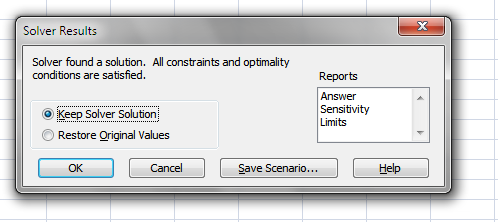
- Press with left mouse button on OK!
Recommended articles
Recommended articles
This article describes how to find a sum from a range of numbers using a user defined function. Let´s see […]
Recommended articles
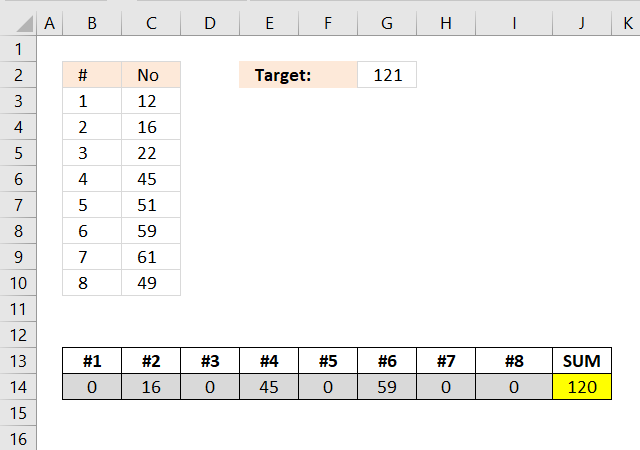
Excelxor is such a great website for inspiration, I am really impressed by this post Which numbers add up to […]
Recommended articles
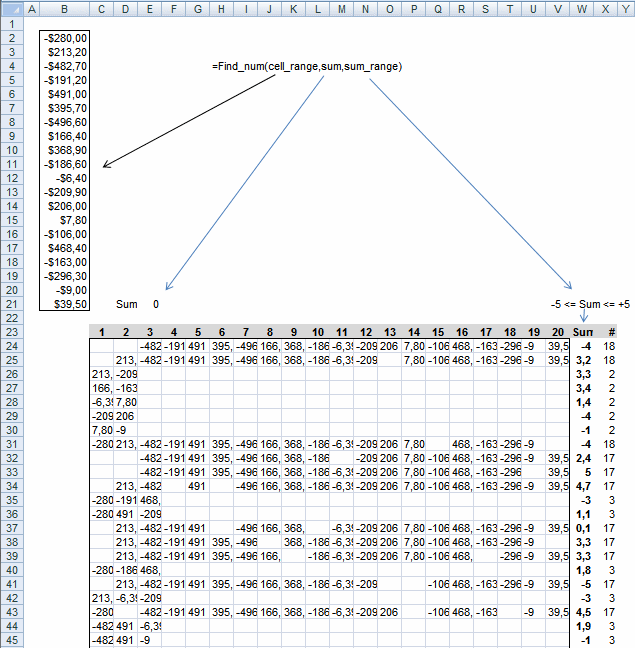
Question:I would like to reduce the number of open items by identifying positive and negative amounts that net to zero […]
2. Find numbers in sum - UDF
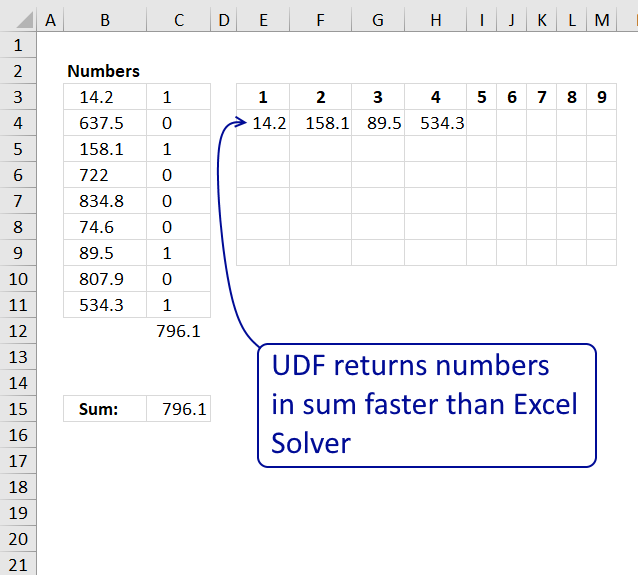
This article describes how to find a sum from a range of numbers using a user defined function.
Let´s see how quickly excel solver finds the numbers using the instructions from this post: Identify numbers in sum using solver in excel.
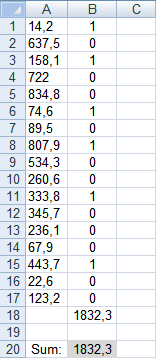
The sum is 1832,3 and it takes around 15 seconds to find the numbers.
With my beginner vba skills I created an user defined function to find numbers in a sum. See picture below.
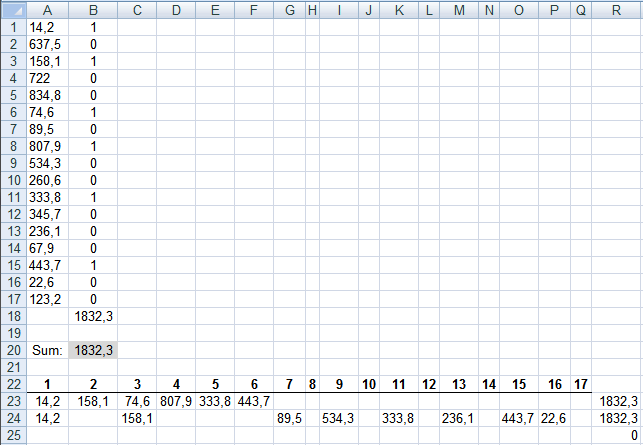
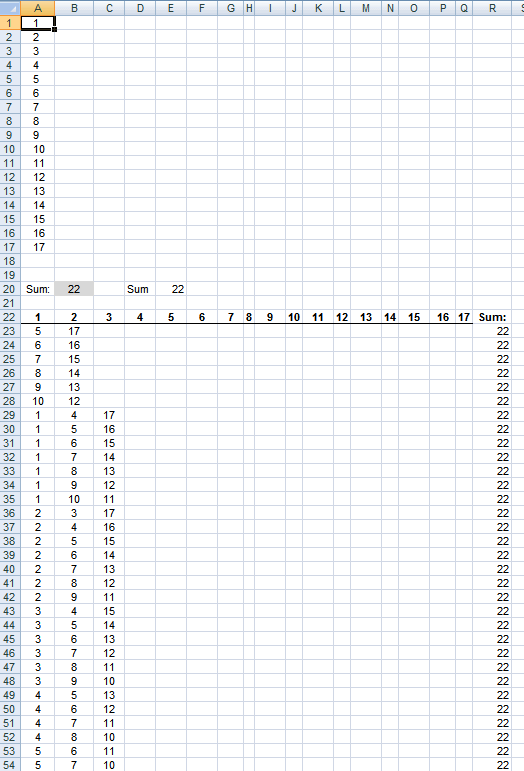
The udf finds two sets of numbers in a second.
UDF in A23:Q25:
To enter an array formula, type the formula in a cell then press and hold CTRL + SHIFT simultaneously, now press Enter once. Release all keys.
The formula bar now shows the formula with a beginning and ending curly bracket telling you that you entered the formula successfully. Don't enter the curly brackets yourself.
Formula in R23 sums the numbers. Here is another example:
User defined function:
Function Find_num(rng As Range, cell As Range)

Dim com() As Single, c As Single, i As Single
Dim s As Single, d As Single, u As Single, v As Single
Dim arr() As String, r As Single, p As Single, t As Single
Dim sum_cells As Single, j As Single, k As Single, l As Single

sum_cells = Application.WorksheetFunction.Sum(rng)
c = rng.Rows.Count
ReDim arr(1 To 1000, 1 To c)
r = 1

For i = 0 To Int(c / 2)
  If i <> Int(c / 2) - 1 Then
    t = WorksheetFunction.Combin(c, i + 1)
  Else
    t = WorksheetFunction.Combin(c, i + 1) / 2
  End If
  ReDim com(i)
  For j = 0 To i
    com(j) = j + 1
  Next
  k = i
  For s = 1 To t
    If com(k) > c And i > 0 Then
      p = 0

      Do Until com(k) <= c - p
        com(k - 1) = com(k - 1) + 1
        k = k - 1
        p = p + 1
      Loop

      Do Until k >= i
        k = k + 1
        com(k) = com(k - 1) + 1
      Loop

    End If
    d = 0

    For j = 0 To i
      d = d + rng(com(j))
    Next j

    If d = cell Then

      For j = 1 To i + 1
        arr(r, j) = rng(com(j - 1))
      Next j

      r = r + 1
    End If

    If sum_cells - d = cell Then

      For j = 1 To c
        v = 0

        For u = 0 To i
          If rng(com(u)) = rng(j) Then v = 1
        Next u

        If v = 0 Then
           arr(r, j) = rng(j)
        End If

      Next j
      r = r + 1

    End If
    com(k) = com(k) + 1
  Next s
Next i

Find_num = arr()

End Function
How to add the User defined Function to your workbook
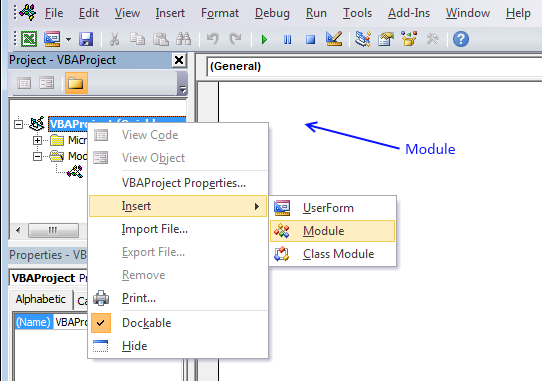
- Press Alt-F11 to open visual basic editor
- Press with left mouse button on Module on the Insert menu
- Copy code above
- Paste code to code module
- Exit visual basic editor and return to excel

3. Find positive and negative amounts that net to zero
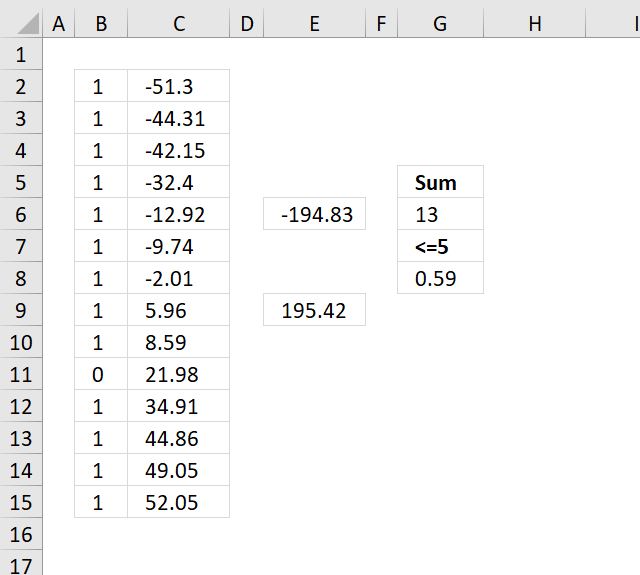
I found this excel question:
I am a Controller in a multinational company. We have many transactions (sales, credits, debits, etc.) with related parties but seldom send payments. Once in a while, I would like to reduce the number of open items by identifying positive and negative amounts that net to zero and clear those items.
Currently, I dump the open items into Excel, sort by value, and manually play with items until I get a combination that is nearly zero (it seems we never find a combination that is exactly zero).
Since my goal is to minimize the number of open items, not only do I need to net as close to zero as possible (a few dollars negative or positive can be simply written off), but I also try to include as many transactions as possible in the final answer. That is, netting two transactions for +5 and -5 is fine but netting four transactions for +1, +2, +2 and -5 is better.
Answer:
The following article solves this question using an array formula:
Recommended articles
Excelxor is such a great website for inspiration, I am really impressed by this post Which numbers add up to […]
The answer here uses the Excel Solver, here are some random numbers that will work as positive and negative amounts.
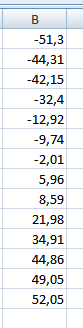
The maximum difference between possible sums is 5$ (G7). I want Excel solver to find the maximum number of positive and negative amounts that sums to almost zero. (G5).
Formula in E5:
Formula in E8:
Formula in G7:
Formula in G5:
If you already have Excel 2007 Solver add-in installed, skip next section.
Install Solver add-in
- Press with left mouse button on Office button
- Press with left mouse button on Excel Options
- Press with left mouse button on add-ins
- Install Solver
- Press with left mouse button on OK
Start Excel 2007 Solver
- Press with left mouse button on "Data" in the Ribbon
- Press with left mouse button on "Solver"
- Press with left mouse button on "Set Target Cell:" button
- Press with left mouse button on G7
- Press with left mouse button on Max in "Equal to:".
- Press with left mouse button on "By Changing Cells:" button and select A1:A14.
- Press with left mouse button on "Add" button
- Press with left mouse button on "Cell Reference:" button and select A1:A14
- Select "bin" in drop down menu (triangle)
- Press with left mouse button on Add.
- Press with left mouse button on "Cell Reference:" button and select G5
- Type 5 in "Constraint:" window
- Press with left mouse button on OK!
- Press with left mouse button on Solve.
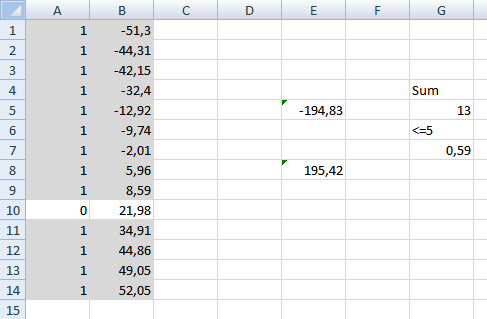
Get excel sample file for this article.
Sum two columns.xls
(Excel 97-2003 Workbook *.xls)
4. Find positive and negative amounts that net to zero - UDF
Question:I would like to reduce the number of open items by identifying positive and negative amounts that net to zero and clear those items
Criteria:
- Minimze the number of open items
- include as many transactions as possible
- net as close to zero as possible
This section describes a UDF (custom function) that finds positive and negative numbers that net to approximately zero. The UDF lets you specify the range to use around 0 (zero).
I created/modified an UDF to solve his question: Find positive and negative amounts that net to zero in excel
Array formula in cell range c23:V55:
To enter an array formula, type the formula in a cell then press and hold CTRL + SHIFT simultaneously, now press Enter once. Release all keys.
The formula bar now shows the formula with a beginning and ending curly bracket telling you that you entered the formula successfully. Don't enter the curly brackets yourself.
The udf processes these 20 numbers in around 30 seconds. There are 18 numbers found in row 24 and also in row 25 and 31. Formula in column W sums values in each particular row. Formula in column X counts values.
How to add the User defined Function to your workbook
- Press Alt-F11 to open visual basic editor
- Press with left mouse button on Module on the Insert menu
- Copy and paste the belowuser defined function
- Exit visual basic editor
VBA code
Function Find_num(rng As Range, cell As Range, num_range As Single)
Dim com() As Single, c As Single, i As Single
Dim s As Single, d As Single, u As Single, v As Single
Dim arr() As String, r As Single, p As Single, t As Single
Dim sum_cells As Single, j As Single, k As Single, l As Single
sum_cells = Application.WorksheetFunction.Sum(rng)
c = rng.Rows.Count
ReDim arr(1 To 10000, 1 To c)
r = 1
For i = 0 To Int(c / 2)
  If i <> Int(c / 2) - 1 Then
    t = WorksheetFunction.Combin(c, i + 1)
  Else
    t = WorksheetFunction.Combin(c, i + 1) / 2
  End If
  ReDim com(i)
  For j = 0 To i
    com(j) = j + 1
  Next
  k = i
  For s = 1 To t
    If com(k) > c And i > 0 Then
      p = 0
      Do Until com(k) <= c - p
        com(k - 1) = com(k - 1) + 1
        k = k - 1
        p = p + 1
      Loop
      Do Until k >= i
        k = k + 1
        com(k) = com(k - 1) + 1
      Loop
    End If
    d = 0
    For j = 0 To i
      d = d + rng(com(j))
    Next j
    If d <= cell + num_range And d >= cell - num_range Then
      For j = 1 To i + 1
        arr(r, j) = rng(com(j - 1))
      Next j
      r = r + 1
    End If
    If sum_cells - d <= cell + num_range And sum_cells - d >= cell - num_range Then
      For j = 1 To c
        v = 0
        For u = 0 To i
          If rng(com(u)) = rng(j) Then v = 1
        Next u
        If v = 0 Then
           arr(r, j) = rng(j)
        End If
      Next j
      r = r + 1
    End If
    com(k) = com(k) + 1
  Next s
Next i
Find_num = arr()
End Function
Combinations category
Find numbers in sum category
Excelxor is such a great website for inspiration, I am really impressed by this post Which numbers add up to […]
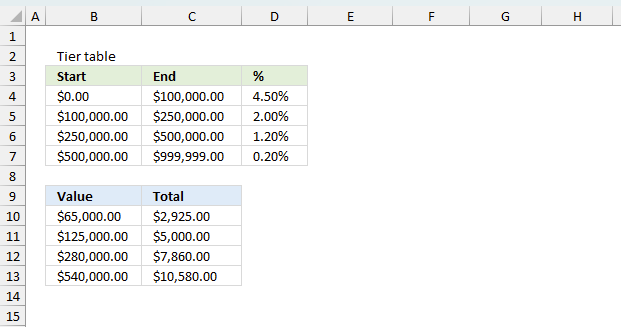
The image above demonstrates a formula that calculates tiered values based on a tier table and returns a total. This […]
Solver category
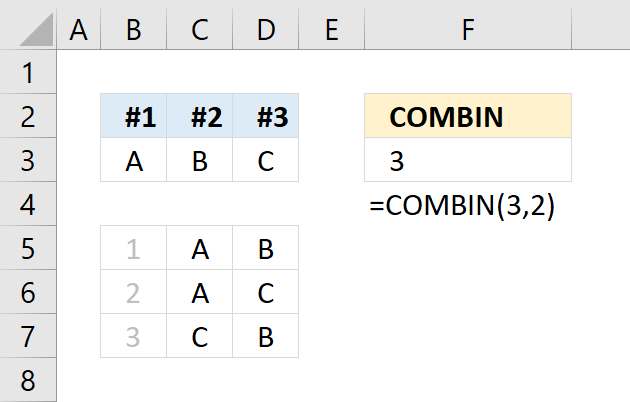
The COMBIN function returns the number of combinations for a specific number of elements out of a larger number of […]
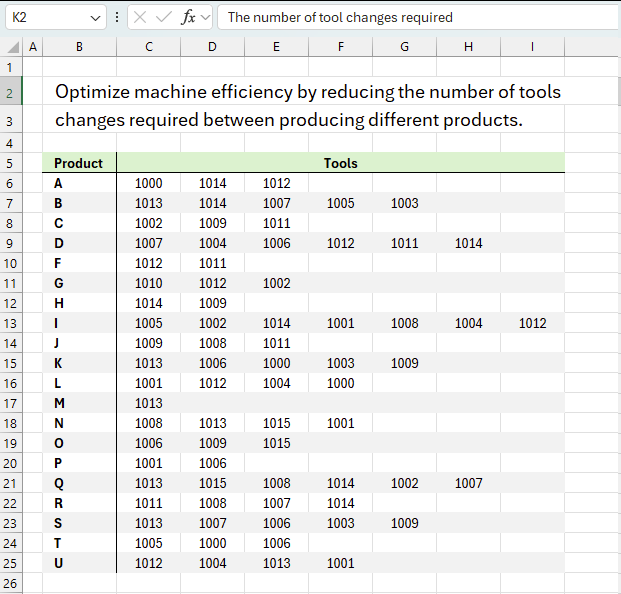
This article demonstrates solver in Excel. Table of Contents Introduction Optimize machine efficiency Using Excel Solver to schedule employees Cash […]
This article demonstrates how to solve simultaneous linear equations using formulas and Solver. The variables have the same value in […]
Excel categories
64 Responses to “Identify numbers in sum using Excel solver”
Leave a Reply
How to comment
How to add a formula to your comment
<code>Insert your formula here.</code>
Convert less than and larger than signs
Use html character entities instead of less than and larger than signs.
< becomes < and > becomes >
How to add VBA code to your comment
[vb 1="vbnet" language=","]
Put your VBA code here.
[/vb]
How to add a picture to your comment:
Upload picture to postimage.org or imgur
Paste image link to your comment.

Above example is very useful. But i want to know how to get a combination that nets exactly to zero and not close to zero.
MITH,
I think this page can be helpful: https://www.tushar-mehta.com/excel/templates/match_values/index.html
VBA code to find multiple matching combinations
I found this solution of idendtify number in sum using solver in excel. its great. but i couldnt find excel solver in my office 2010.
i have did the same to install solver add in in excel option and then press with left mouse button on the solver add in and then okay.
but later i went to Data ribbon and couldnt find Solver option.
Could you please tell me what is the problem in my office 2010
It's in DATA section
I found this:
https://www.addictivetips.com/windows-tips/microsoft-office-excel-2010-solver-add-in/
Solver is located under the Data tab as shown in the screenshot below.
There seems to be something wrong with your excel version. I am using excel 2007 and I have no clue.
Sir;
many many thanks for your unmatched articles provided to the public, you saved my previous time at all
Once again i am thankful to you and my best wishes to you always
Thanks for covering this topic (I've been looking for something like this for six months and had just about given up hope). Unfortunately, I'm having implementing it. Am I just supposed to have my amounts entered in column B, and then only to follow the "How to use user defined function in Excel", or do I have to also enter the formulas also. If so, in what cell do I enter =FIND_num(B2:B21, E21,5) + CTRL + SHIFT + ENTER ? Do I also need to enter any formulas in any other cells (if so, what do I enter and which cell(s) do I enter it. Thanks!
Mike,
You enter the =FIND_num(B2:B21, E21,5) in your cell range.
Example
1. Select your cell range (C23:V55 in the example above)
2. Paste user defined function the in formula bar
3. Press and hold Ctrl + Shift
4. Press Enter
=Find_num(cellrange, sum, range)
See the explaining picture above.
Thanks for the quick response, Oscar. I pressed alt-F11 to open vba editor, pressed with left mouse button on Module on the Insert menu, copy and pasted the udf, exited vba editor, selected cell range of C23:V55, pasted the udf function in the formla bar, pressed and held Ctrl + Shift, and pressed enter. The function ran (which was very exciting!) and the results showed in columns C24 thru V55, but there weren't any results in column W or X. Please advise. Thanks.
Mike,
I added formulas in colummns W and X to show that the sum is in the specified range (-5 to 5) and how many numbers were found.
=FIND_num(B2:B21, E21, 5)
B2:B21 - Numbers
Cell E21 contains the sum value
5 is the range
Hello Oscar,
it is great tool you presented. I need to search inbetween of plenty items (1000 and more lines) I tried to exted formulas and matrix in file however when I try with more than 25 items I receive #VALUE error as an example. Do you have any idea what that is?
Thank you in advance for help.
Thank you! My data set is 362 cells. It errors me with 'too many variable cells!'
Melynda,
Yes, it would take (almost) forever to calculate 362 cells.
You cannot use more than 100 variables when trying to find the sum of variables using solver. Also cannot have more than 200 constraints.
Thank you so much for sharing this!
It helped me a great deal instead of having to find all the possible combinations to get the value i require.
Thanks!
Sherlyn,
Thank you for commenting!
Fantastic solution, thanks!
is there any other formula to this operation?
Rey,
Only a custom function:
Excel udf: Find numbers in sum
There is now, see this post:
https://excelxor.com/2015/02/10/which-numbers-add-up-to-total-2-multiple-solutions/
Thank you so much! This is exactly what I was looking for. What a time saver! Would love to have this run with a press of a button with some VBA, looks like my next see if its feasible project.
Very Handy.
Thanks a lot! It is indeed a time saver...
I am happy you like it!
To be completely honest, I didn’t like it! I simply LOVE IT!
I always knew that Excel should be able to do this, but never realized how I could do it on Excel, so thanks a lot for sharing it!
I’m still trying to figure it out a way to have this method on a template, where I won’t need to call and setup the solver, whenever I need to use it.
Anyway thank you very much for the time you took to share with the community.
Cheers from Portugal
Ricardo,
Thank you for your kind words!
I’m still trying to figure it out a way to have this method on a template, where I won’t need to call and setup the solver, whenever I need to use it.
Read this post:
Excel udf: Find numbers in sum
Hello,
I have a range with around 100 cells. Is there anyway to do a range that large?
David,
Not that I know of.
I have data in 43 cells and still it is taking forever..is there any wayarouond any macro to help me with this
Vivek Singh,
No, not that I know of.
You can use Excel add-in called SumMatch. It will show all possible combinations, not just one.
[…] udf that I think could be converted into a macro to do what I want to do. The udf can be found at: Excel udf: Find numbers in sum | Get Digital Help - Microsoft Excel resource The code for the udf: Function Find_num(rng As Range, cell As Range) Dim com() As Single, c As […]
[…] target match, summatch.com, and they won't work with values like: 0.3157907543. I found a udf here: Excel udf: Find numbers in sum | Get Digital Help - Microsoft Excel resource but I need to convert it to a macro to work with the values I have like: 0.3157907543. There are 42 […]
Hi, Thanx for the informative article. However, the one major problem in using this solver function is that it takes a lot of time for finding the optimum solution if the quantum of data is huge.
In my field of work there are upto 10,000 rows and 5,000 colomns.. Hence finding a particular amount from such a huge database become difficult for excel.
Abhijit,
Yes, you are right.
Too Many adjustable cell... error said.
what to do next sir?
Hi Hope all are good.
I have upgraded to Excel 2010. The file I was working on earlier version now gives different result. The Solver also looks very different. Can any body help me understand the new solver.
[…] Hope this helps: Identify numbers in sum using solver in excel | Get Digital Help - Microsoft Excel resource […]
Thank-you for this fantastic solution. You just saved me a ton of time trying to figure out variables that don't work for a solution. I tested this with numbers I knew would work and it's perfect! Finally, a use for Solver in my work.
Hi oscar
Im using excel 2010, my main problem is that whenever i set the solver and it validates a range of around 20 cells the number i get after i hit solve is not the exact target number i put. Concerning the binaries that give us the ability to identify the combination of numbers is giving me 0.27 for some numbers. I can't identify the problem, can it be that our client just paid wrong invoices? Or maybe a mistake have happened?
Than you in advance
Hi,
This is a neat solution to finding values used in a SUM function, but it does not take into account if there are 2 or more possible combinations of values which can be used to achieve the SUM amount. I'm very interested to find out if there is a method of identifying all possible combinations of values. Also, what happens using this method if there are duplicate values in the list of numbers.
Ron,
read this post: https://www.get-digital-help.com/excel-udf-find-positive-and-negative-amounts-that-net-to-zero/
thank you very much!
I need a method, So when the sum of the values is not equal to the value in "Value of", then it gives me the sum of values less than the value in "value of"
Thank You..
I need to help to try to solve a problem using Excel Solver.
I work for a manufacturing company and we make cores in heights totalling from 10 to 300mm.
We can make individual cores in the following heights
10
15
20
25
30
35
40
50mm
If we receive an order for a core of over 50mm in height, say 75mm height, then we can "stack" two or more cores with say a 50 & 25mm or 40 and 35mm.
I would like to use solver to identify possible combinations using the fewest number of cores to produce the stack.
The only other constraint is that as well as wishing to use as few cores as possible, I would then also like to minimize the different combinations. So to achieve a core of 105mm in height I could use 2 x 40mm cores plus 1 x 25mm but I would prefer using 3 x 35mm as it means I am using all the same size.
Similarly for larger cores it would be better to use two different types and three etc.
Hope this makes sense.
Thanks
Ian
Ian,
Interesting question, unfortunately excel hangs after a while. I have tried multiple excel versions and computers. I don't know why.
I tried this:
Formula in cell D2: =C2*B2
Copy cell D2 and paste to cell range D3:D9
Formula in cell E2: =(C2>0)*1
Copy cell E2 and paste to cell range E3:E9
Formula in cell D10: =SUM(D2:D9)
Formula in cell E10: =SUM(E2:E9)
These are my settings in Solver:
Oscar
Thanks so much for taking the time to look at this. I replicated all your entries but I got the following warning message:
"Lower and upper bounds on variables allow no feasible solutionSome upper bound on a Variable Cell is smaller than a lower bound on that same Variable Cell."
Any ideas?
NB Wasn't sure why "Value Of: 70" although like you I then selected "Min"
Ian,
I replicated all your entries but I got the following warning message:
"Lower and upper bounds on variables allow no feasible solutionSome upper bound on a Variable Cell is smaller than a lower bound on that same Variable Cell."
I think you got the less than and greater than signs wrong? Check these constraint lines again.
$C$2:$C$9 <= 10 $C$2:$C$9 >= 0
NB Wasn't sure why "Value Of: 70" although like you I then selected "Min"
Sorry, that was an old value I forgot to delete.
I tried with a solution I know works but it is not the optimal solution and let the solver work from there. It then finds another solution but unfortunately not the best solution.
If I try again, it tells me:
Solver has performed 5 iterations for which the objective did not move significantly. Try a smaller convergence setting, or a different starting point.
Unfortunately it won't find the best solution.
The solver displays a message on the statusbar for each iteration, this slows down the calculations considerably and I believe it was done on purpose. They want you to buy their products.
Thanks again Oscar.
I re-typed my formula's to make sure I input them correctly.
I input 250 in d12 and hit solver expecting solver to tell me 5x50 i.e. 5 in C9. Is that correct?
But solver runs and after 28K+ subproblems, simply tells me
"Solver cannot improve the current solution. All constraints are satisfied."
Ian,
I input 250 in d12 and hit solver expecting solver to tell me 5x50 i.e. 5 in C9. Is that correct?
Yes, this is what I get:
Not the optimal solution.
I am using solver method: Evolutionary
However, if I change to solver method: GRG NonLinear
and start with zeros in cell range C2:C9
I get the optimal solution, cell C9 = 5
If I input 105 in d12 I also get the optimal solution, c7 = 3, solver method: GRG NonLinear
I also tried 115 and 160 in d12 and they all return the optimal solution, if I use GRG NonLinear.
I tried 125 and got this:
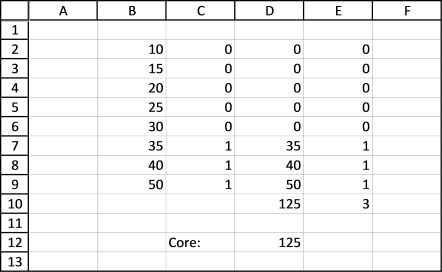
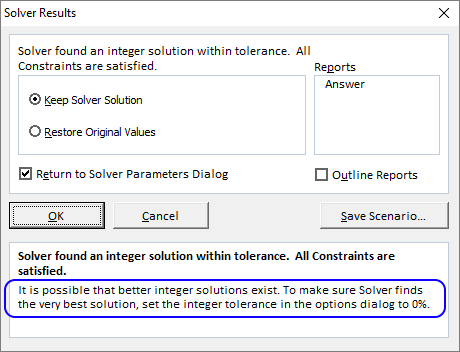
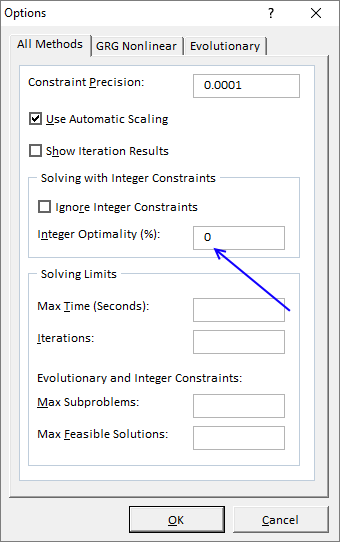

and this telling me to change integer tolerance to 0% in the options.
https://www.solver.com/excel-solver-integer-constraints-and-integer-optimality-tolerance
I changed that option.
but solver returned the same solution, not the optimal solution.
The optimal solution is 2x50 + 25 or 3x35 + 20, there are perhaps more.
Great solution, very useful.
Hi! Thank you so much for sharing thia. It helps me a lot. I want to ask, do excel solver can generate more than one combination of numbers for certain value?
This article shows you how to find multiple combinations, however it uses array formulas:
https://excelxor.com/2015/02/10/which-numbers-add-up-to-total-2-multiple-solutions/
I tweaked his formula to find numbers closest to sum:
https://www.get-digital-help.com/find-numbers-closest-to-sum/
This user defined function is a lot quicker than solver, it also outputs all combinations:
https://www.get-digital-help.com/excel-udf-find-positive-and-negative-amounts-that-net-to-zero/
clever solution. Thanks, it helped me a lot in my work
Hi. I tried this by using a target of the number 10. In my column, I used the numbers:
5
5
8
2
7
3
1
2
6
4
I was trying to see the various possibilities that can equal 10. Just by looking at it you can see there are several. However, the tactic in the instructions returned zeros next to all numbers except 6 and 4, next to which were the number one. Is this instruction not meant for this application?
I need this for something more large scale, but I used smaller number for easy head math. If this is not the right procedure for what I am trying to accomplish, does anyone know what is?
HelpMe
I recommend you read this post if you want to find all possible solutions using an array formula:
https://excelxor.com/2015/02/10/which-numbers-add-up-to-total-2-multiple-solutions/
or this post if you want to use a UDF:
https://www.get-digital-help.com/excel-udf-find-numbers-in-sum/
Hi Oscar,
I am trying to follow your steps, but I get stuck at step 11. That dialog box doesn't pop up. What pops up is the same options box from your December 21, 2016 at 9:03 am post. (sorry couldn't post an image) I don't see anywhere to tick "assume linear model" Could you please provide instructions from step 11 with this other dialog box?
Gman,
You are right, it (assume linear model) seems to be missing in later excel versions.
I am receiving an "Syntax" Error related to the Do Until line
ALISTAIR JONES,
This line
Do Until com(k) <= c - p com(k - 1) = com(k - 1) + 1 k = k - 1 p = p + 1 Loop Do Until k >= i
should look like this
Do Until com(k) <= c - p
com(k - 1) = com(k - 1) + 1
k = k - 1
p = p + 1
Loop
Do Until k >= i
Thanks for telling me, I have changed the article.
if there more rows like 100 row .. it is not working
It's not working in excel 2010
R D Veeramani
I do believe it works in Excel 2010, can you explain in greater detail what error message you get?
greetings Guru Oscar is it possible for me to ask you to email me the sample of your Identify numbers in sum using Excel solver ( https://www.get-digital-help.com/identify-numbers-in-sum-using-solver-in-excel/ ) if its still available. very impressive what you have done. thank you
I need help on an excel template am working on. I need a macro to populate combination of number that gives closest sum. My template is about 800 lines.