How to use Pivot Tables – Excel’s most powerful feature and also least known

This article explains the basics of Excel's pivot table, I have included VBA code for the most common actions.
What's on this page
- What is an Excel Pivot Table?
- Prepare source data
- Rearrange values
- Use an Excel defined Table as a Pivot Table data source
- How to build a pivot table
- How to configure a Pivot Table
- How to move a column header to the Filters area programmatically - Pivot Table
- How to move a column header to the Columns area programmatically - Pivot Table
- How to move a column header to the Rows area programmatically - Pivot Table
- How to move a column header to the Values area programmatically - Pivot Table
- How to use Pivot Table Report Filters
- How to manipulate the Report Filter programmatically
- How to add fields to Pivot Table Column Labels
- How to add fields to Pivot Table Row Labels
- How to add fields to Values area
- Pivot table features
- How to insert a pivot chart
- How to insert Slicers
- How to refresh a Pivot Table
- Copy a Pivot Table without source data
- Customize the layout
- Consolidate data from multiple cell ranges
- Get the Excel File here
- Create monthly time sheet using a Pivot Table
- Change PivotTable data source using a drop-down list
- Use hyperlinks in a pivot table
- Normalize data - VBA
- Disable autofit column widths for Pivot table
1. What is a Pivot Table?
A pivot table allows you to summarize huge amounts of values amazingly fast in groups and sub-groups you specify. You can then analyze the data with ease, compare values by date or by group and see important trends. It is one of the best and most powerful Excel features and also one of the least known.
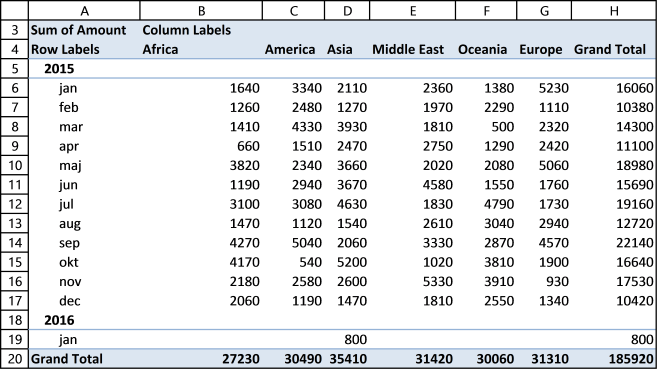
Pivot table charts is a great tool for visualizing your data.
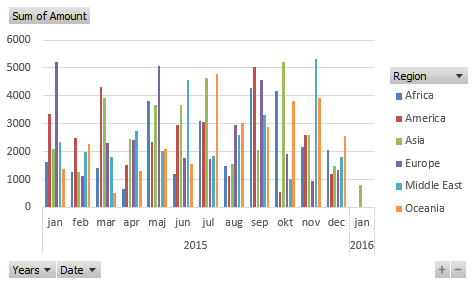
Slicers allow you to quickly filter data, however, the report filter has the same functionality but perhaps not as elegant.
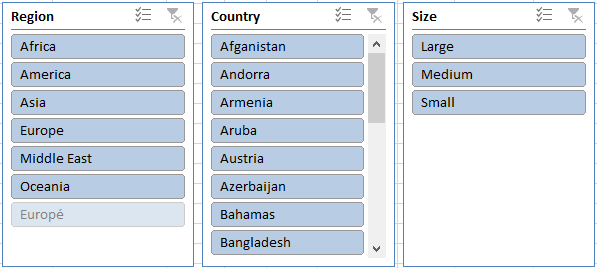
The following article shows you how to analyze pivot table data:
Recommended articles
Table of Contents Introduction to pivot tables Create pivot table Group data Analyze data (pivot table) Compare performance, year to […]
2. Prepare source data
Before you build your first pivot table make sure your data source table follows some simple rules.
- Use unique header names for all your columns.
- Make sure you have no blank cells.
- Check your spelling. If you have one cell "West" and another "Westt" they will both show up in the pivot table. You can correct this later.
- Convert your data source to an excel defined table (optional).
3. Rearrange values
This picture below shows you a table with bad data structure, you can't use it in a pivot table.
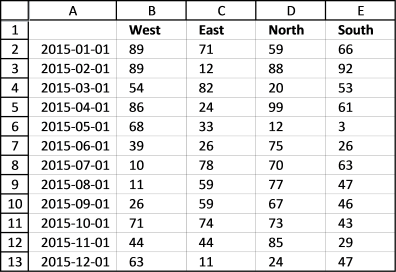
The table below is much better, all values in this table are not shown for obvious reasons. A couple of things are missing though, can you see it? Unique table header names and the data table is not an excel defined table.
You don't have to use an excel defined table but it will make it a lot easier if you add more values later on to your table. An excel defined table is dynamic and it will save you time not needing to adjust the pivot table source range.
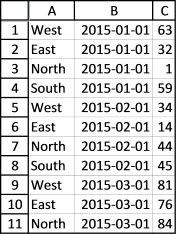
I have made a macro/udf that can help you rearrange your data, see these posts:
Recommended articles
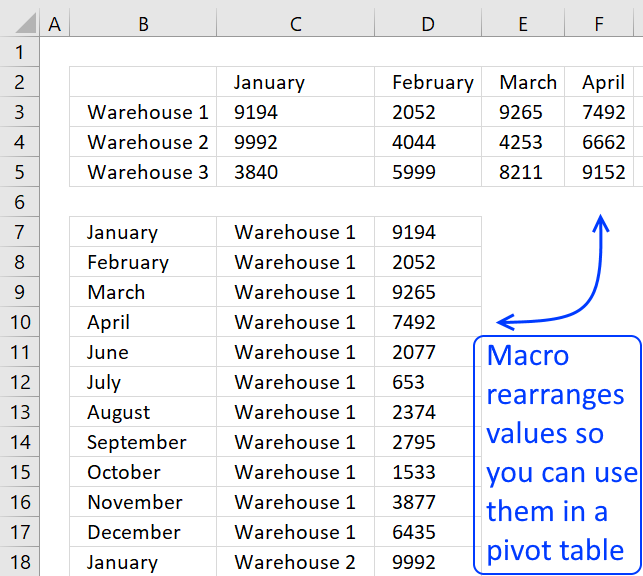
To be able to use a Pivot Table the source data you have must be arranged in way that a […]
Recommended articles
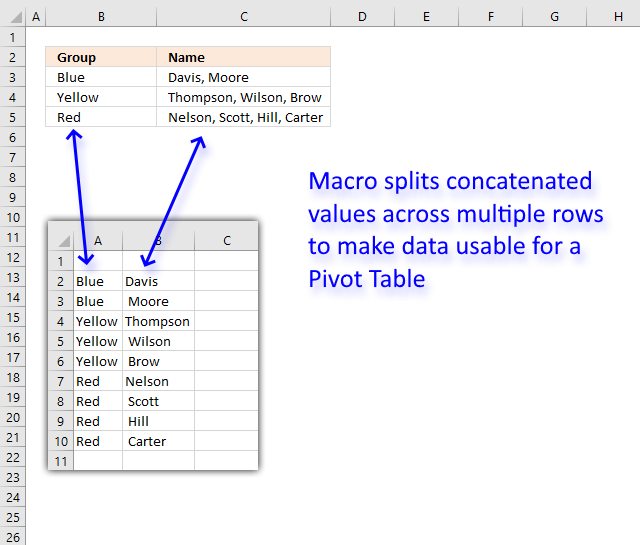
This article demonstrates a macro that allows you to rearrange and distribute concatenated values across multiple rows in order to […]
4. Use an Excel Table as a data source
Why do you want to use an Excel Table as a data source to your pivot table? You don't have to but it will make your life easier whenever you want to add or delete records to your data set.
The Excel table adjusts automatically to new data and this saves you time since you don't need to update the data source cell reference each time.
Here is how you convert a generic data set to an excel defined table:
- Select a cell in your data table.
- Go to tab "Insert" on the ribbon.
- Press with left mouse button on "Table" button.
You can also use these shortcut keys: CTRL + T
This dialog box shows up.
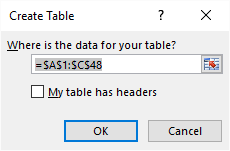
Excel finds the entire data table automatically =$A$1:$C$48, do make sure this is correct.
My table does not have table headers so I don't select the "My table has headers" check box.
Press with left mouse button on the OK button.
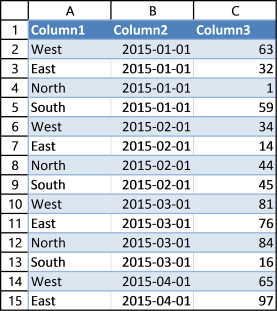
Excel has now converted your data table to an excel defined table. It has also inserted new column headers, see picture above. I don't want to use these table header names as they are not descriptive of each column.
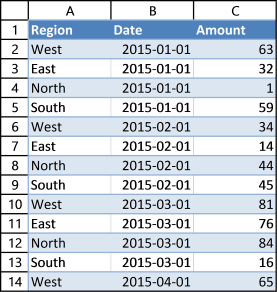
This table is much better, later on these table header names will make it much easier for us when working with the pivot table.
Learn how to change data source with a drop-down list:
Recommended articles
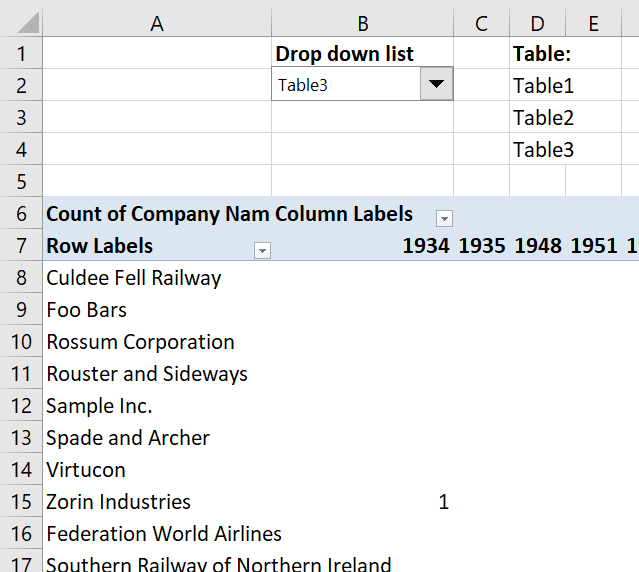
In this article, I am going to show you how to quickly change Pivot Table data source using a drop-down […]
Learn more about excel tables:
Recommended articles
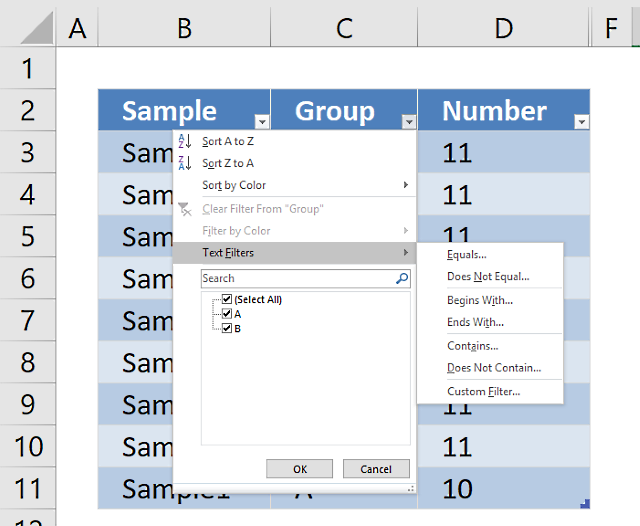
An Excel table allows you to easily sort, filter and sum values in a data set where values are related.
5. How to build a pivot table
- Select a cell in your data table.
- Go to tab "Insert" on the ribbon.
- Press with left mouse button on the "Pivot table" button.
This dialog box appears.
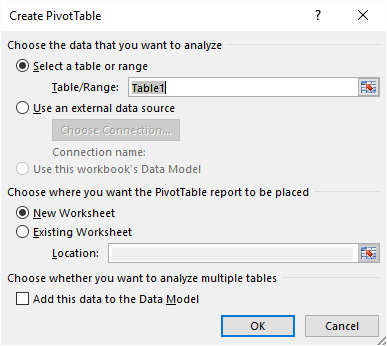
It uses the excel defined table name in the first field, very good. It also allows you to choose where you want your new pivot table. I am going to place the pivot table on a new sheet. Press with left mouse button on the OK button.
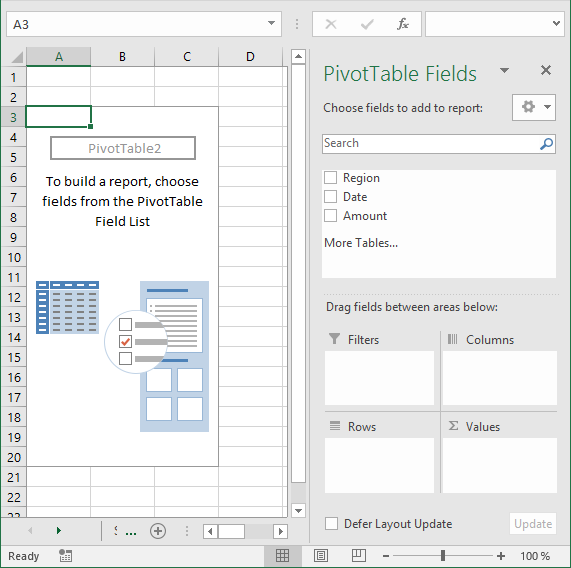
Excel creates a blank pivot table for us on a new worksheet, see picture above.
5.1 How to insert a Pivot Table programmatically
This is what the macro recorder returns while inserting a pivot table.
Sheets.Add
ActiveWorkbook.PivotCaches.Create(SourceType:=xlDatabase, SourceData:= _
"Source data!R1C1:R365C7", Version:=6).CreatePivotTable TableDestination:= _
"Sheet17!R3C1", TableName:="PivotTable7", DefaultVersion:=6
Sheets("Sheet17").Select
Cells(3, 1).Select
The following article shows you how to refresh a pivot table automatically:
Recommended articles
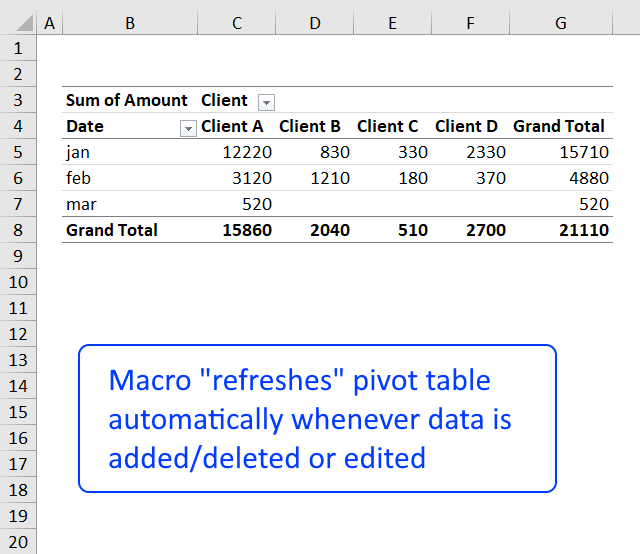
In a previous post: How to create a dynamic pivot table and refresh automatically I demonstrated how to refresh a pivot […]
6. How to configure a Pivot table
The pivot table on the worksheet is blank and it tells us "To build a report, choose fields from the PivotTable Field List".
You can find our fields in the blue box named 1, see picture below. The fields are Region, Date and Amount the same as your header names in your data source table, now you understand why it is important to name your data source headers.
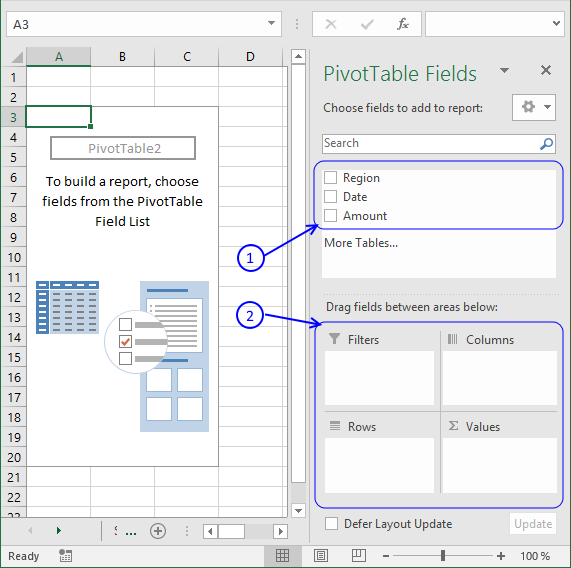
The way this works is that you can press and hold with left mouse button on one of the fields and then drag it to an area. The areas are Filters, Columns, Rows and Values and I have drawn a blue box around them with the name 2, see above picture.
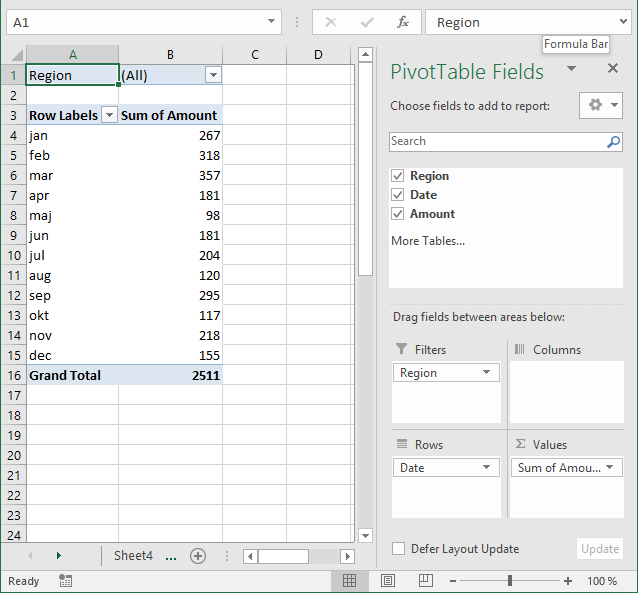
Drag Region to Filters, Date to Rows and Amount to Values, see picture below. Excel is trying to help me out here, it automatically grouped my dates into months se column "Row Labels". Don't worry, I will show you later on how to group and ungroup dates.
6.1 How to move a column header to the Filters area programmatically - Pivot Table
This is what the macro recorder returns when I drag Region to Filters area.
With ActiveSheet.PivotTables("PivotTable3").PivotFields("Region")
.Orientation = xlPageField
.Position = 1
End With
6.2 How to move a column header to the Columns area programmatically - Pivot Table
Here is the output when I drag Region to Columns area.
With ActiveSheet.PivotTables("PivotTable3").PivotFields("Region")
.Orientation = xlColumnField
.Position = 1
End With
6.3 How to move a column header to the Rows area programmatically - Pivot Table
This happens while recording Date to Rows area.
With ActiveSheet.PivotTables("PivotTable3").PivotFields("Date")
.Orientation = xlRowField
.Position = 1
End With
ActiveSheet.PivotTables("PivotTable3").PivotFields("Date").AutoGroup
6.4 How to move a column header to the Values area programmatically - Pivot Table
Finally Amount to Values area.
ActiveSheet.PivotTables("PivotTable3").AddDataField ActiveSheet.PivotTables( _
"PivotTable3").PivotFields("Amount"), "Sum of Amount", xlSum
Learn how to use hyperlinks in a pivot table:
Recommended articles
Sean asks: Basically, when I do a refresh of the data in the "pivotdata" worksheet, I need it to recognise […]
6.5 Report Filters
The report filter allows you to select a subset of your data. In this case I want to work with values in region "West". Simply press with left mouse button on the arrow and select a Region. Press with left mouse button on OK. See animated picture below.
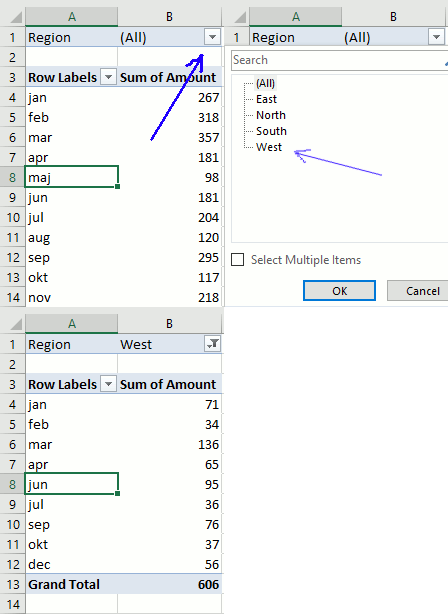
If you are interested in the vba code for this action here it is.
ActiveSheet.PivotTables("PivotTable3").PivotFields("Region").ClearAllFilters
ActiveSheet.PivotTables("PivotTable3").PivotFields("Region").CurrentPage = _
"West"
6.6 Column Labels
Press with left mouse button on and drag Region to Columns area.
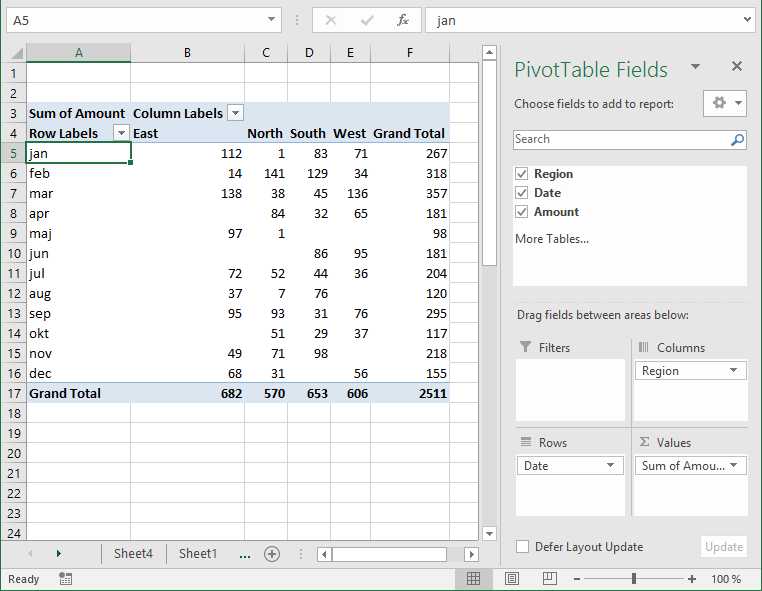
Unique values from column Region in your source data table shows up horizontally on the pivot table (cell range C4:E4, pic above).
6.7 Row Labels
The following picture shows Region in Rows area and Date in Filters area.
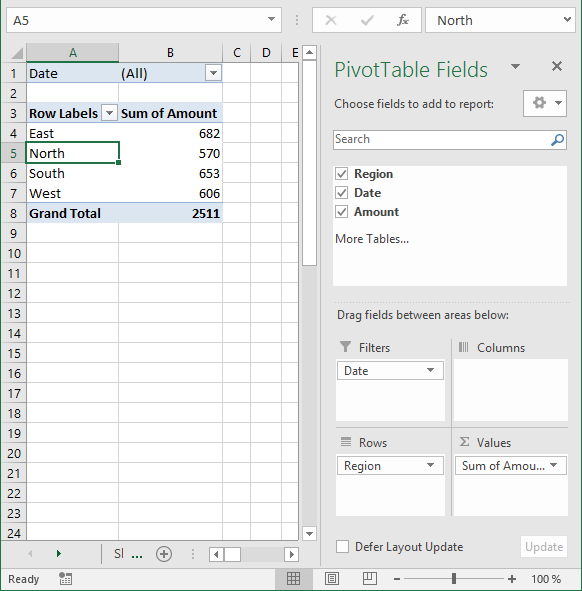
6.8 Values
The last area is Values. You are not limited to numbers (Amount) here, you can drag Dates or Region here also. Notice that you can't sum text values but you can count them.
Learn how to link a combo box with a pivot table:
Recommended articles
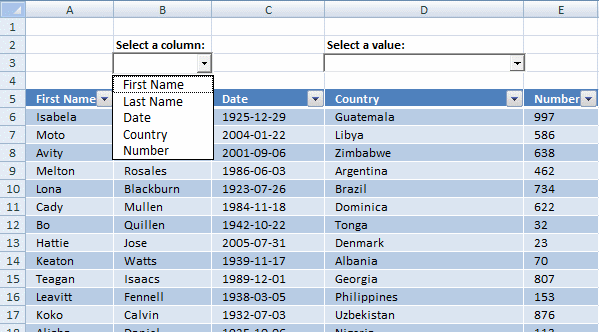
In this post I am going to demonstrate two things: How to populate a combobox based on column headers from […]
7. Pivot table features
Here is a list of the most used functionalities.
7.1 Summarize and analyze
The pivot table is phenomenal at processing huge amounts of data very quickly. Since calculations are done in almost no time you can easily drill down in every detail very quickly.
I have shown you earlier in this article that if you drag a field to Values area, the pivot table sums your values into groups depending on what specific fields you have in the Columns and Rows area.
It also allows you to see trends in your numbers, follow this example. Drag "Amount" once again to Values area, you should now have two "Amount" there.
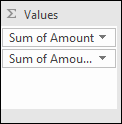
Left press with left mouse button on the down pointing arrow next to the second "Amount" and then press with left mouse button on "Value Field Settings...". Press with mouse on tab "Show Values As"
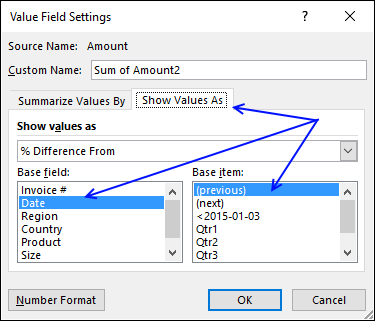
Select Date in Base field: and (previous) in Base item:, see picture above. Press with left mouse button on OK
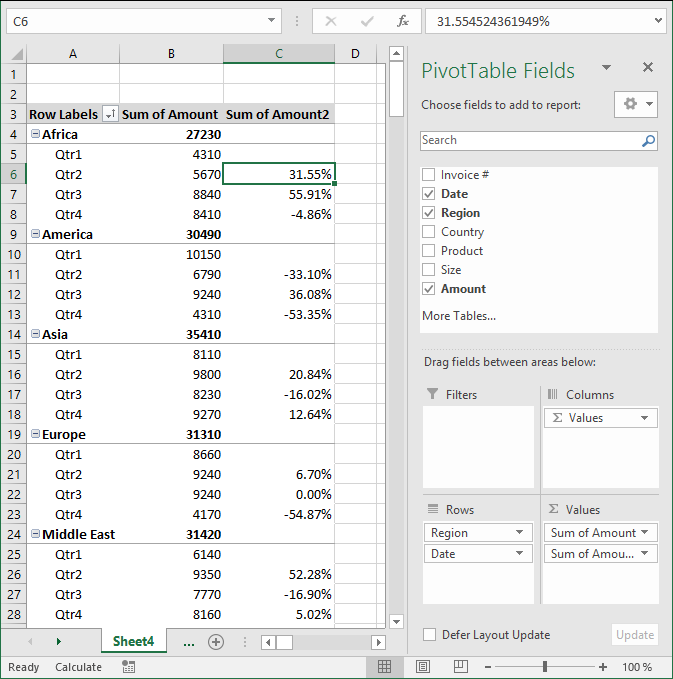
There is now a new column next to the sums. It shows the % difference compared to the previous values. The number in cell B8 compared to the number in cell B7 is -4.86% less. (8410/8840) -1 = -4.86%
Learn to build a pivot table calendar:
Recommended articles
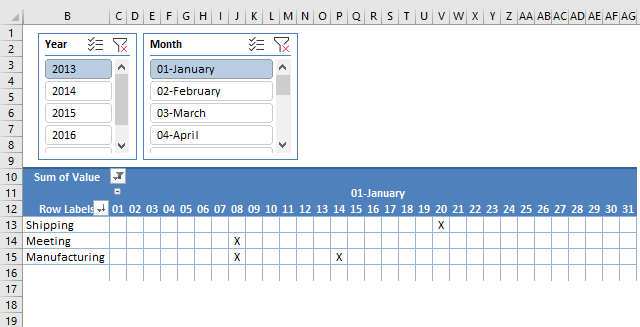
This article demonstrates how to build a calendar in Excel. The calendar is created as a Pivot Table which makes […]
7.2 Count
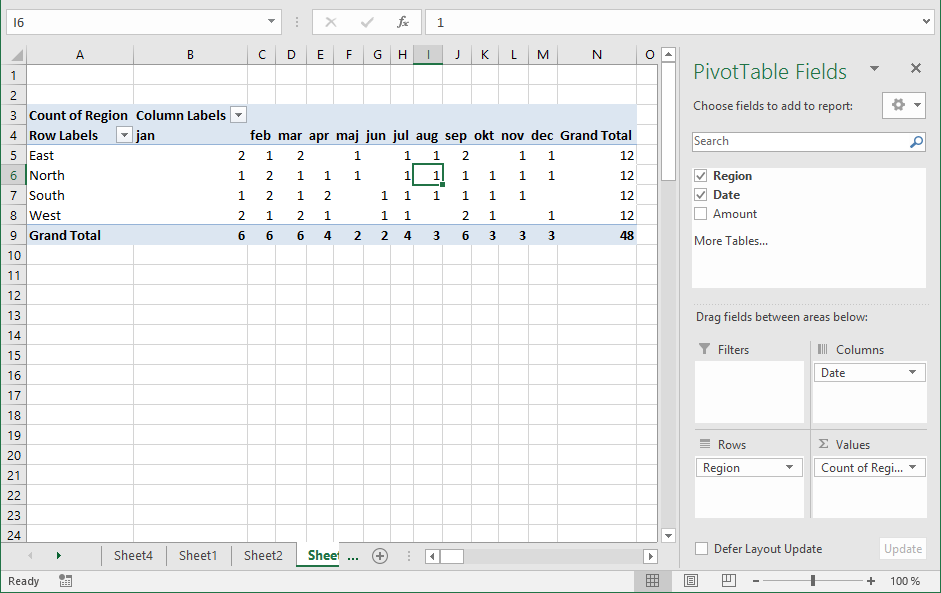
The following picture shows Region in both Values area and Rows area. Date in Columns area grouped by month.
7.3 Unique distinct list
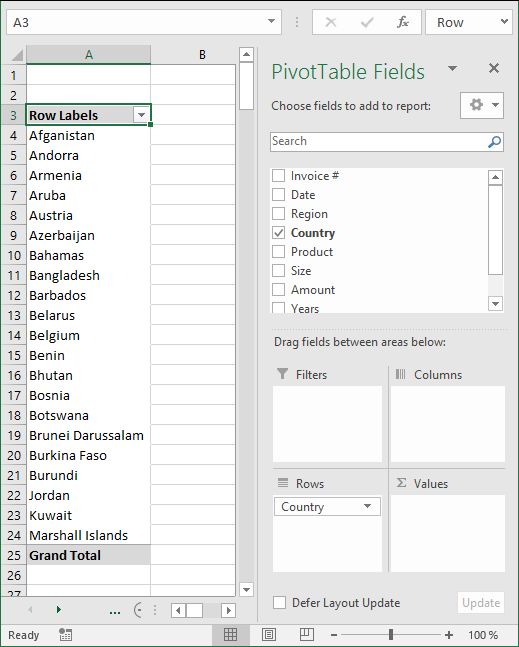
You can use the a pivot table to extract a unique distinct list from a column in a large list. The picture shows countries, simply drag Country to Rows area.
7.4 Extract unique distinct records
Here is a table with many duplicate records.
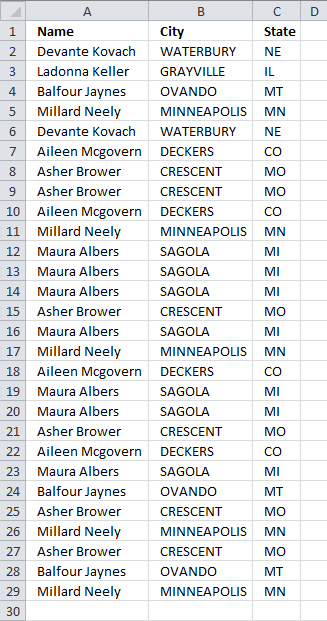
- Select a cell in the table above.
- Go to tab "Insert" and press with left mouse button on "Pivot table" button
- Place the pivot table somewhere on your worksheet/workbook.
- Drag "Name", "City" and "State" to "Row Labels" field
- Also drag "Name" to "Values" field
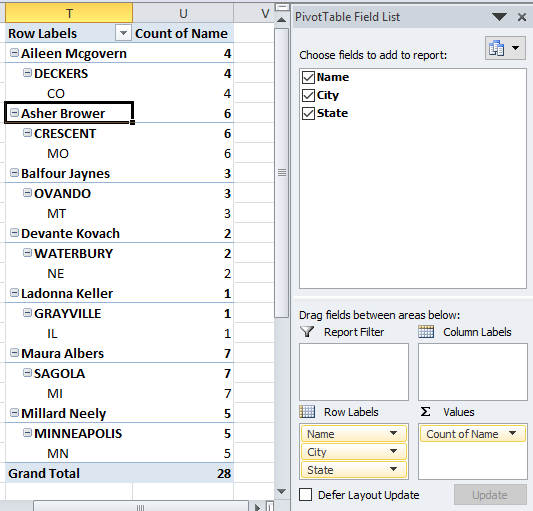
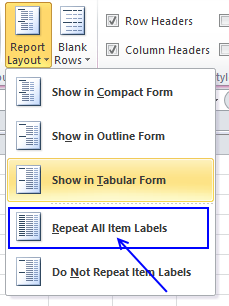
- Values are not on the same row which is confusing. Go to tab "Design" on the ribbon, press with left mouse button on "Report Layout" button and then "Show in tabular form"
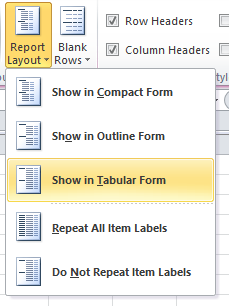
- To show all values, go to tab "Design" and press with left mouse button on "Report Layout". Then press with left mouse button on "Repeat All Item Labels"
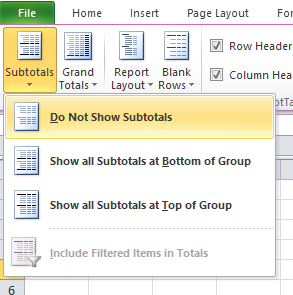
- The last thing to do is to hide "Subtotals", press with left mouse button on "Do Not Show Subtotals" button.
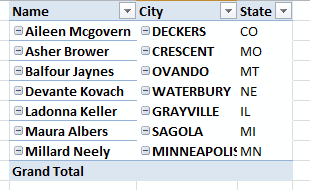
Here is a picture of the final table, it shows you unique distinct records. In other words, duplicate records are removed from the source data table.
It is possible to extract unique distinct records using a formula, read this post:
Recommended articles
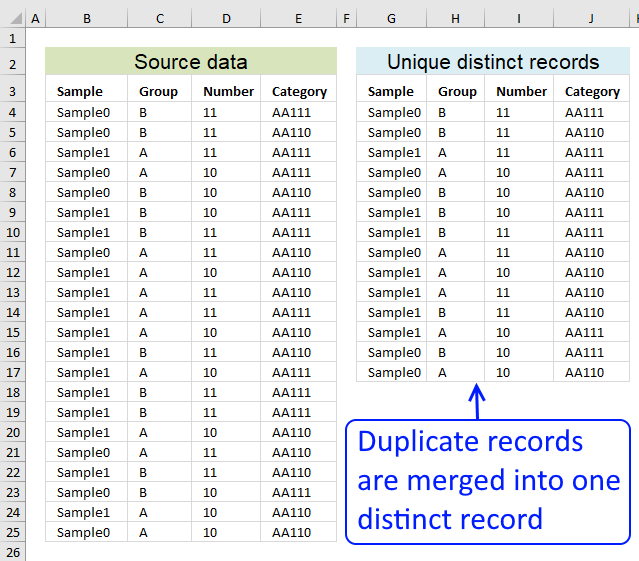
Table of contents Filter unique distinct row records Filter unique distinct row records but not blanks Filter unique distinct row […]
7.5 Count unique distinct values
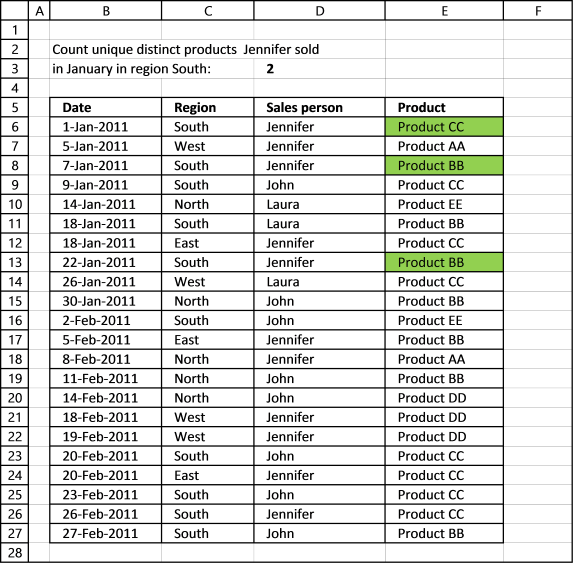
Excel 2013 and later versions allows you to count unique distinct values. The following picture shows you data table, the scenario is this:
How many unique distinct products did Jennifer sell in region "South" and in January 2011?
I have highlighted the values below that match above criteria.
For this to work you need to enable a check box before creating a new pivot table.
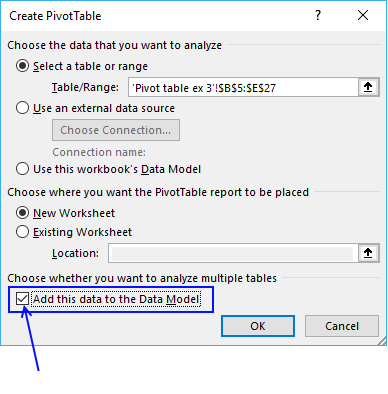
Press with left mouse button on OK button. To be able to filter month January and not individual dates only, drag "Date" to Rows area.
There are now two "Date" fields in Rows area, the other is "Date (Month)". Drag "Date (Month)" from Rows area to Filters area and drag "Date" back to top area. It now looks like this:
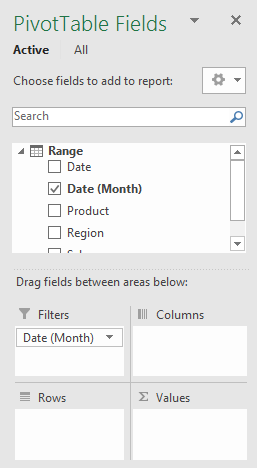
Drag "Region" and "Sales person" to Filters area. Drag "Product" to Rows and Values area.
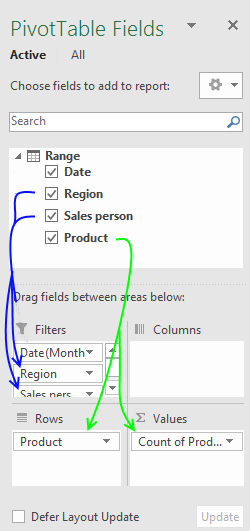
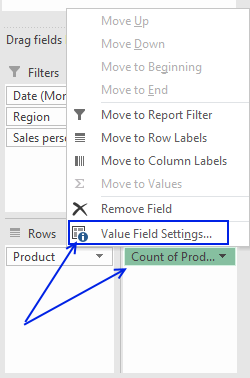
Press with mouse on "Count of Products" then press with left mouse button on "Value Field Settings..."
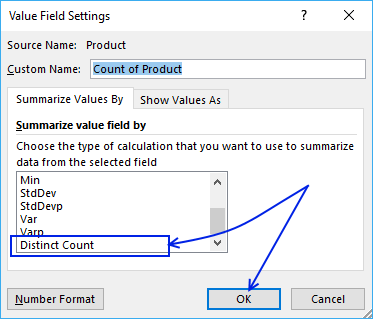
Select "Distinct Count" and press with left mouse button on "OK" button
Now let's filter the pivot table, press with left mouse button on filter "arrow" next to All and select "January", "South" and "Jennifer". Press with left mouse button on OK button.
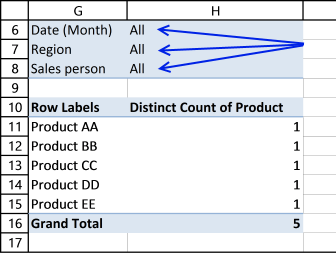
Here is the final pivot table:
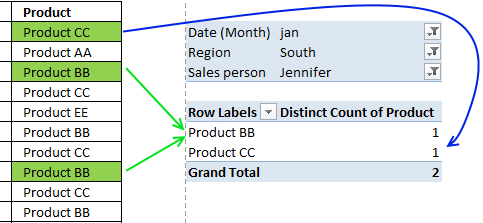
There are two unique distinct products shown next to "Grand Total".
7.5.1 Count unique distinct records (rows) in a Pivot Table
Excel versions earlier than 2013 need a different approach, the method demonstrated here uses formulas to count unique distinct records.
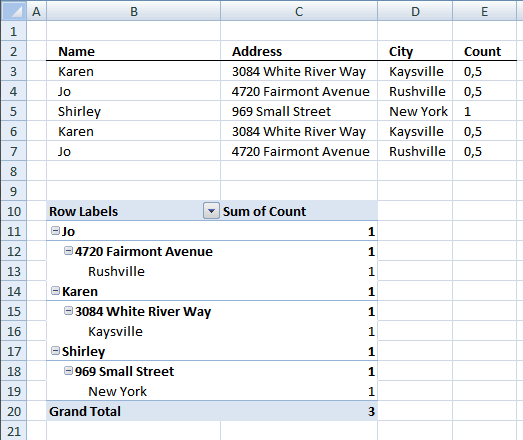
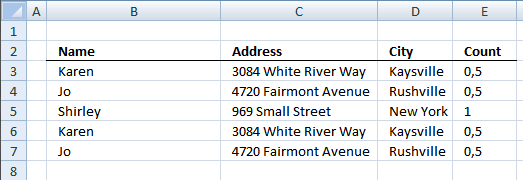
The table I am working with is in cell range B2:D7. I have then added another column (E) to count unique distinct rows.
Formula in cell E3:
Copy cell E3 and paste it down to cells below as far as needed.
7.5.2 Create pivot table
- Select cell range B2:D7
- Press with left mouse button on "Insert" tab on the ribbon
- Press with left mouse button on "Pivot table" button
- Choose where you want the pivot table to be placed.
- Press with left mouse button on OK.
7.5.3 Setup pivot table
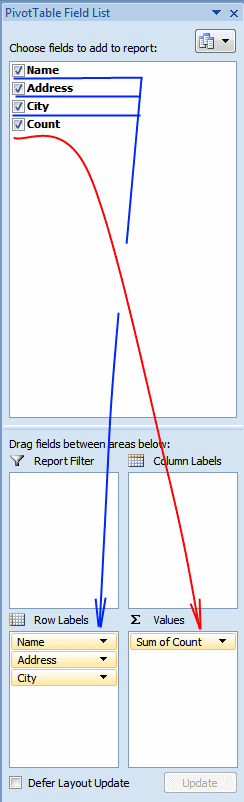
- Press with left mouse button on and drag Name, Address and City to row labels.
- Press with left mouse button on and drag Count to values.
There are three unique distinct rows (Grand Total)
7.5.4 Count duplicate records (rows) in a Pivot Table
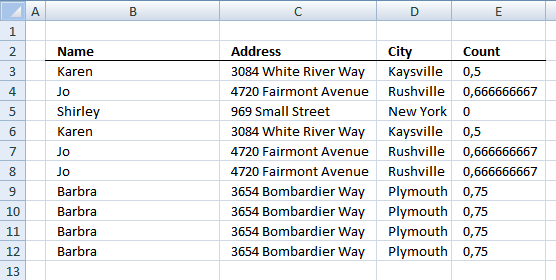
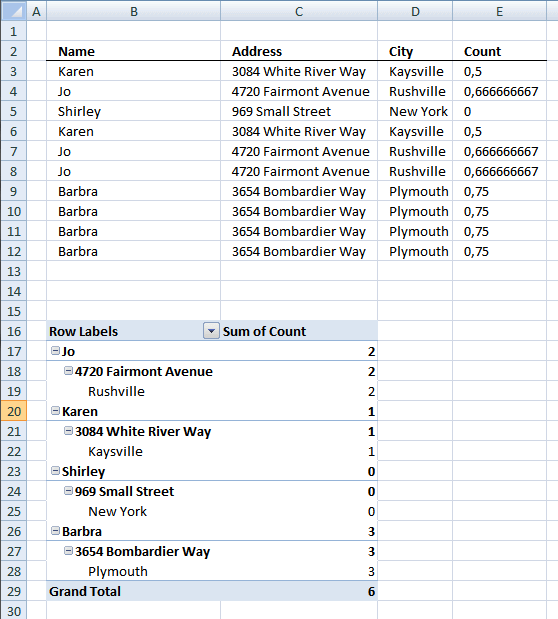
The table I am working with in this example is in cell range B2:D12. I have then added another column (E) to count duplicate rows.
Formula in cell E3:
Copy cell E3 and paste down to E12.
7.5.5 Create pivot table
- Select cell range B2:D12
- Press with left mouse button on "Insert" tab on the ribbon
- Press with left mouse button on "Pivot table" button
- Choose where you want the pivot table to be placed.
- Press with left mouse button on OK.
7.5.6 Setup pivot table
- Press with left mouse button on and drag Name, Address and City to row labels.
- Press with left mouse button on and drag Count to values.
There are six duplicate rows (Grand Total)

7.5.5 Count unique distinct values in an Excel Pivot Table
This section describes how to count unique distinct values in a Pivot Table using a prior to Excel version 2013.
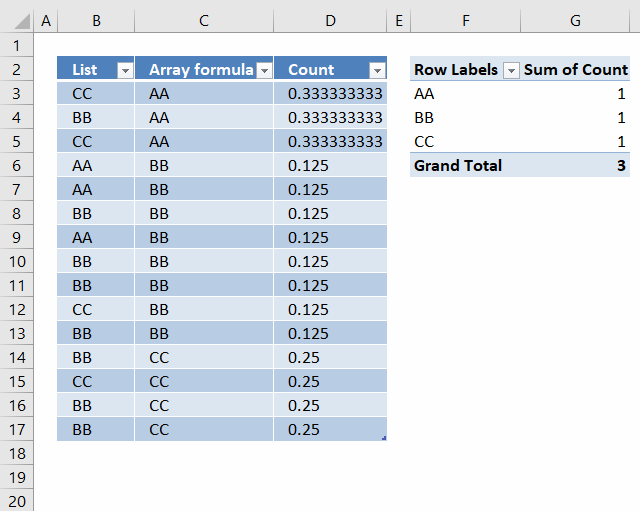
I have a small problem that I am not sure on how to solve.
I now have a list of 15 cells with 3 unique values (arr formula in all 15 cells). When I use this into a pivot table, I want to get the count as 3 since that is the unique count. But I am getting 15 as the value!
I am assuming that the pivot table is reading the formula as a value and counting it. Any way to circumvent that?
Answer:
Update: It is now possible to count unique distinct values in a Pivot Table. You need Excel 2013 or a later version.
I don´t think it is possible to count unique values in a pivot table unless you add another column to your table or use VBA: Improve your Excel Pivot Table to count unique values or items

Formula in D3:
Copy cell D3 (Ctrl + c). Paste (Ctrl+ v) on cell range D4:D17.
Setup pivot table
- Press with left mouse button on and drag Array formula to Row Labels
- Press with left mouse button on and drag Count to Values
How the formula in cell D3 works
Step 1 - Construct the COUNTIF function
COUNTIF(range,criteria) counts the number of cells within a range that meet the given condition.
Select cell D3.
Type =COUNTIF(
Select cell range C3:C17
Press F4. You have now created absolute cell references to cell range C3:C17.
=COUNTIF($C$3:$C$17
Now create a relativ cell reference to cell C3.
=COUNTIF($C$3:$C$17, C3)
=COUNTIF($C$3:$C$17, C3)
becomes
=COUNTIF({"AA"; "AA"; "AA"; "BB"; "BB"; "BB"; "BB"; "BB"; "BB"; "BB"; "BB"; "CC"; "CC"; "CC"; "CC"}, "AA")
and returns 3. There are three AA in the array.
Step 2 - Divide 1 with the number of counted values
=1/COUNTIF($C$3:$C$17, C3)
becomes
=1/3
and returns
0.333333333333333 in cell D3.
Count values in a pivot table using an Excel defined table as a data source
7.6 Sort data
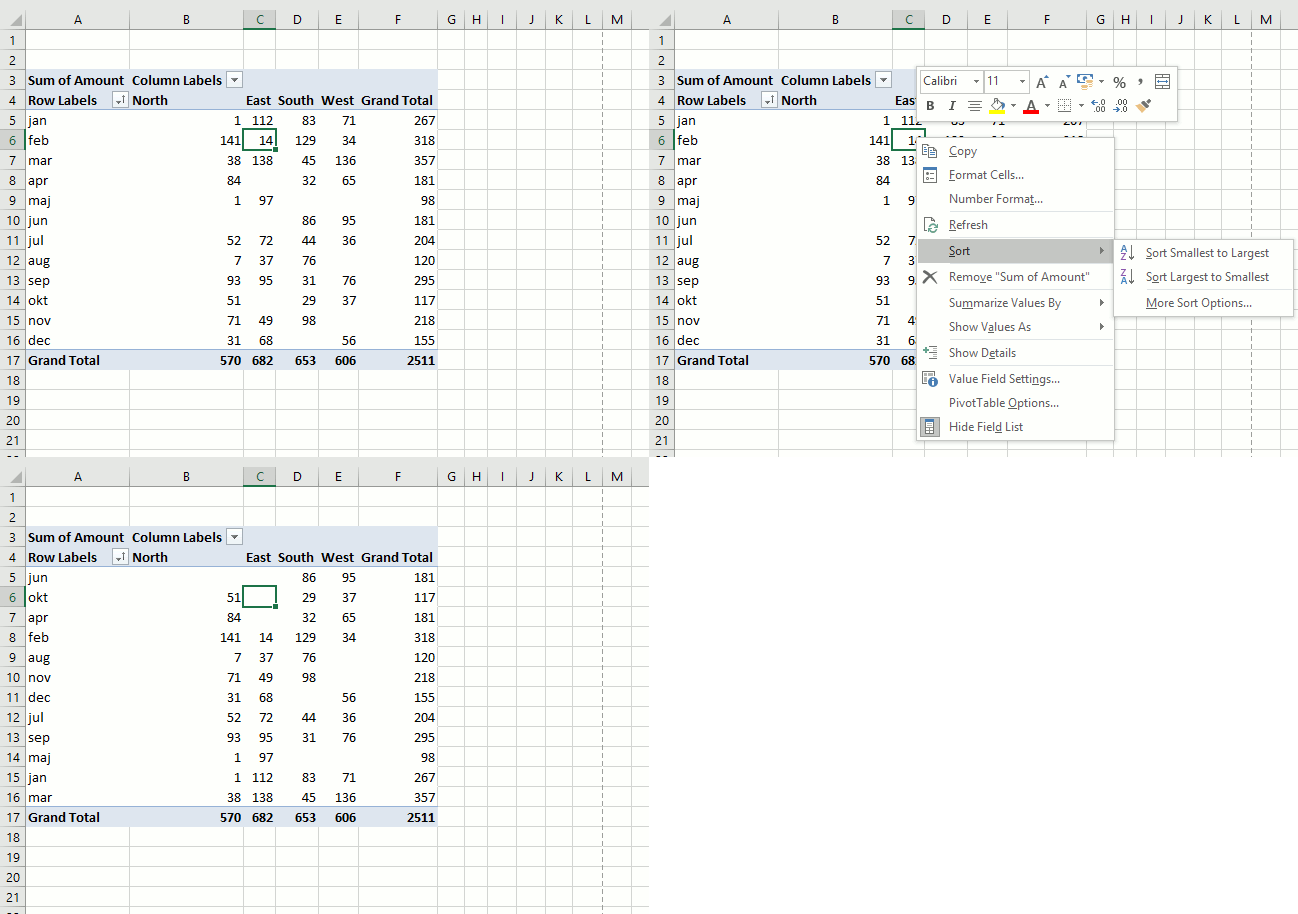
It is possible to sort almost anything with data in a pivot table. This picture shows a pivot table and I want to sort column East from smallest to largest. Press with right mouse button on on a cell in a column you want to sort. Press with mouse on "Sort" and then sort Smallest to Largest.
Recommended articles
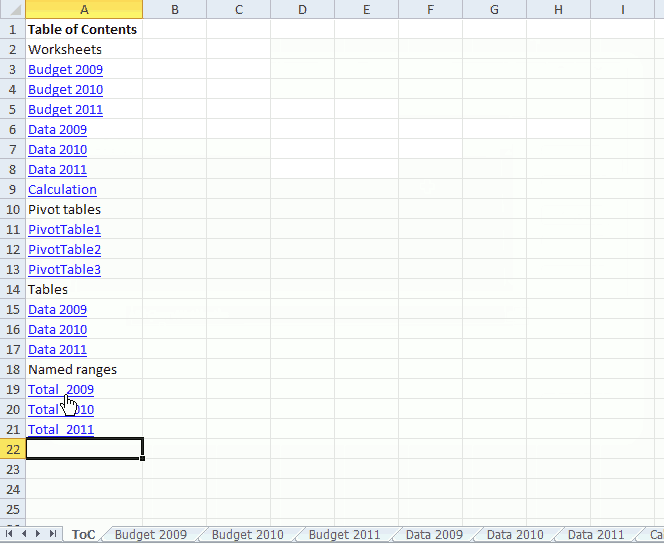
This article demonstrates a macro that automatically populates a worksheet with a Table of Contents, it contains hyperlinks to worksheets, […]
7.7 Group data
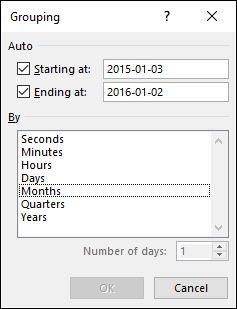
A pivot table allows you to group dates. You can group dates (and time) by seconds, minutes, hours, days, months, quarters and years.
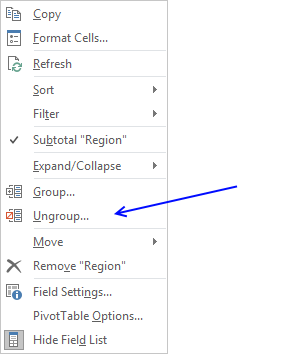
Press with right mouse button on on a column or row you want to group, then press with left mouse button on group and this dialog box appears.
Below Group is Ungroup and I don't think I have to explain that.
Recommended articles
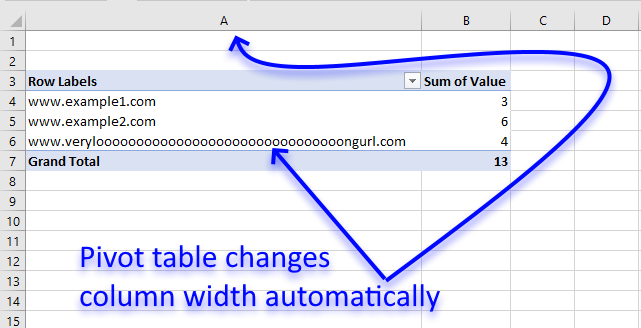
I read this interesting article Quick Trick: Resizing column widths in pivot tables on the Microsoft Excel blog. It is […]
7.8 Multiple levels
You can rearrange the pivot table so it has multiple levels on Rows area or Columns area or both. Drag more than one field to an area to create multiple levels.
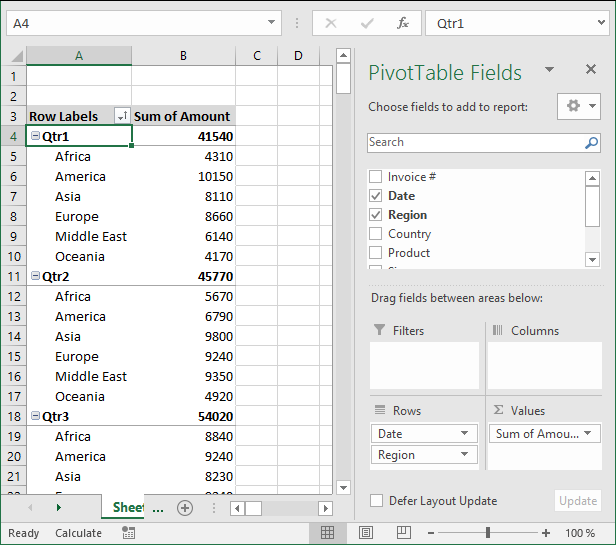
The picture shows you data grouped by quarter and then by region. You can also drag fields in an area to sort them, the order is important.
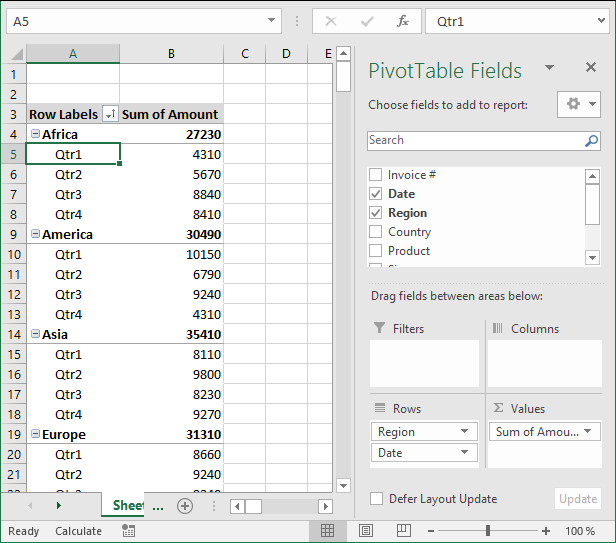
The Date and Region field switched places.
7.9 See data behind a pivot table cell
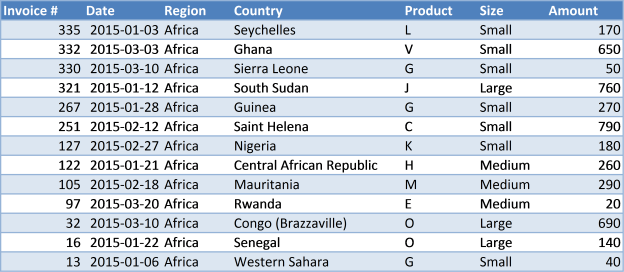
To see the data behind a pivot table cell just double press with left mouse button on a cell that interests you and excel creates a new sheet with the corresponding data shown.
7.10 Row and column grand totals
If you don't need the grand totals, turn them off by going to tab "Design", press with left mouse button on "Grand Totals" button and pick a setting you want. The choices are:
- Off for Rows and Columns
- On for Rows and Columns
- On for Rows only
- On for Columns only
8. Insert a pivot chart
A pivot chart helps you visualize Pivot Table data.
- Make sure you have any cell selected on your Pivot Table
- Go to tab "Analyze" on the ribbon.
- Press with left mouse button on "Pivot chart" button.
From here you can pick a variety of charts, the preview helps you in your decision.
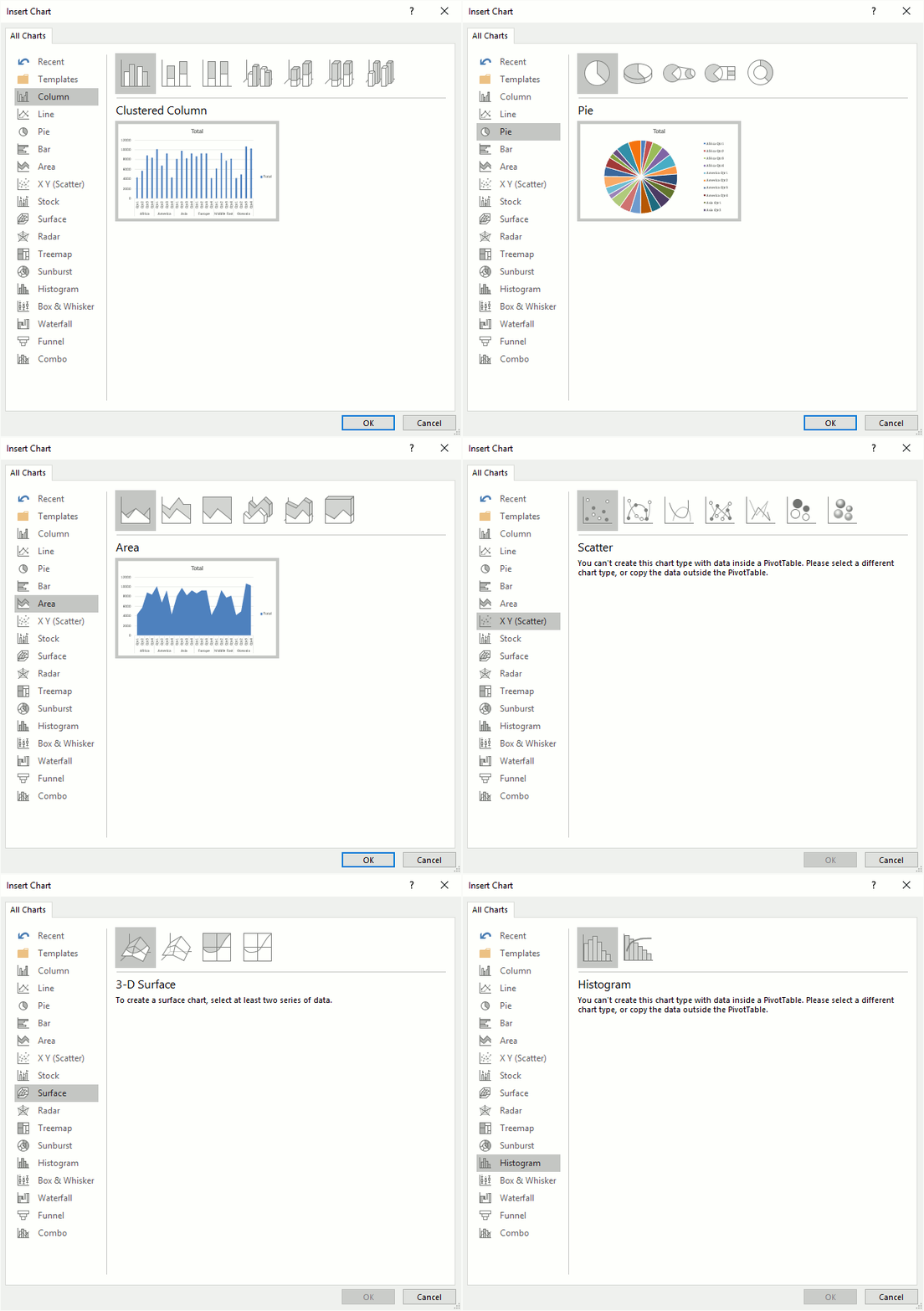
The chart will change if you apply a filter or sort pivot table.

9. Slicers
Excel 2010 and later excel versions lets you insert slicers, they are no different than the Report Filter except that they look different and take up more space on your worksheet.
Go to tab "Insert" on the ribbon and press with left mouse button on the "Slicers" button.
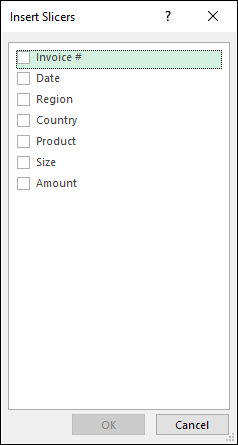
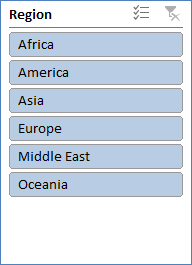
From here you can pick a field, I will select Region and then press OK button. The slicer appears on your worksheet, you may need a new location for it.
10. Refresh a pivot table
If you add, remove or edit values in your source data table you must update the pivot table to reflect the changes made, every time. This is easy to forget, here is how to do it.
Press with right mouse button on on a pivot table cell.
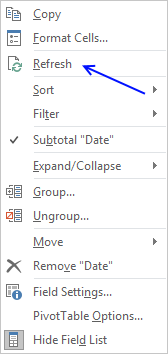
Press with left mouse button on "Refresh".
You can automate this with a macro.
Private Sub Worksheet_Activate()
Sheets("Pivot table").PivotTables("PivotTable1").RefreshTable
End Sub
Put it in your worksheet code module, see this post for more details.
11. Copy a pivot table without
If you want to share your pivot table but not the source data, follow these steps.
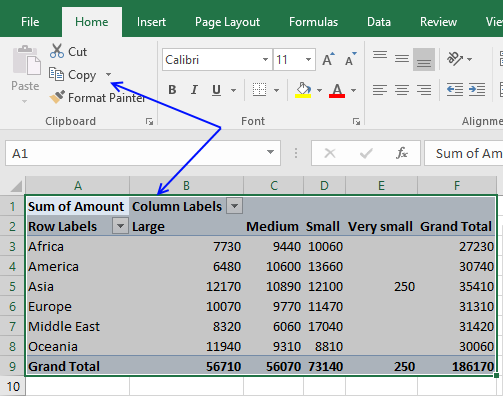
- Select the pivot table you want to copy
- Press Ctrl +C or press copy button on tab "Home" on the ribbon
- Press with right mouse button on on a cell where you want to paste the pivot table
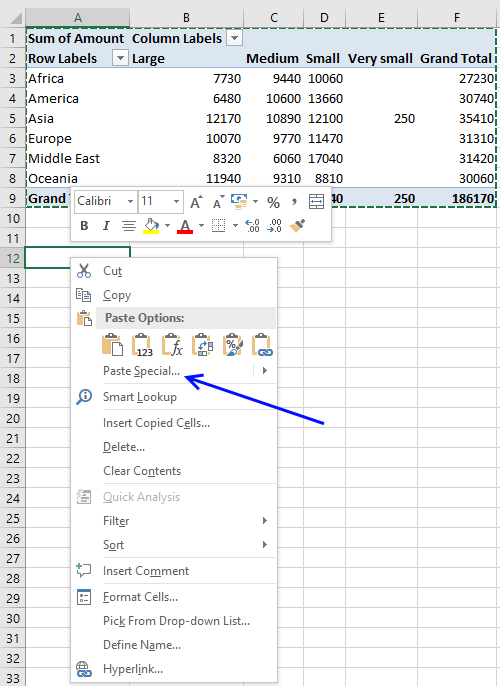
- Press with mouse on "Paste Special..."
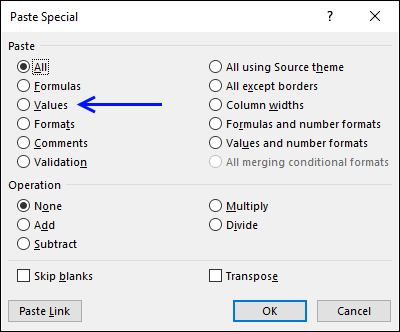
- Select "Values"
- Press with left mouse button on OK button
- Repeat step 3 and 4 and then select "Formats"
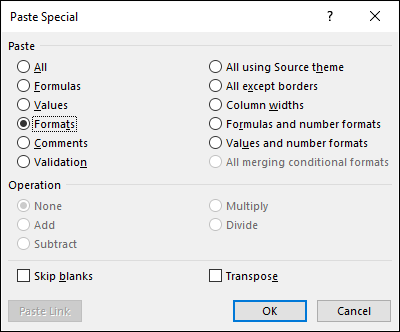
- Press with left mouse button on OK button
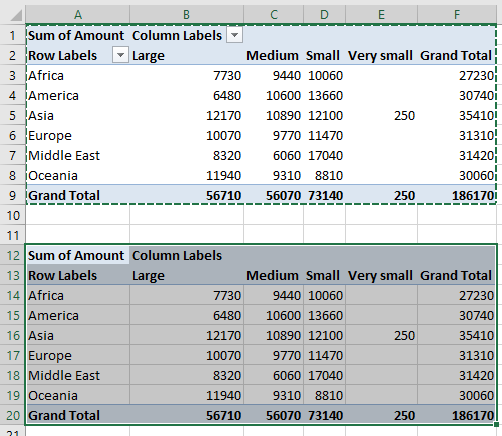
You can tell that the copy has no link to source data by first selecting a single cell in the copied pivot table and then a single cell in the original pivot table. The are two more tabs (Analyze and Design) on the ribbon if the original pivot table is selected
12. Customize the layout
You can easily change the pivot table layout with one of the pivot table styles or create a entirely new one.
Select a cell in the pivot table. Go to tab design. Press with mouse on a style and the pivot table is instantly changed. You can hover with mouse pointer over different styles and see the changes to your pivot table change before you make up your mind.
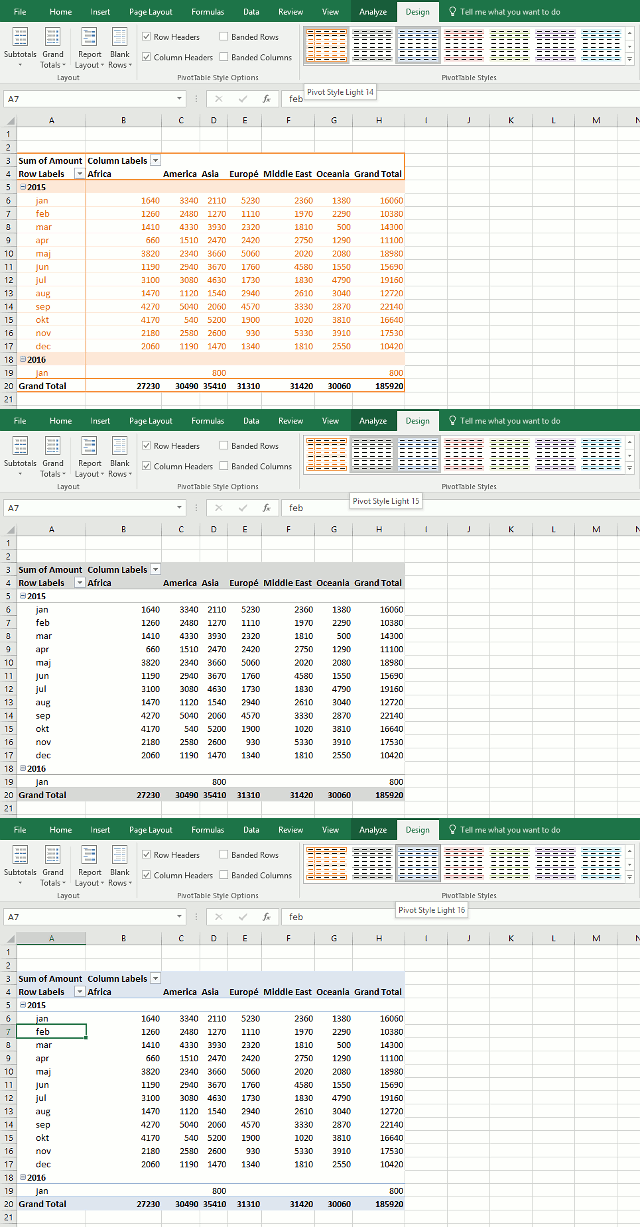
What happens if I record a macro while changing pivot table style?
Sub Macro2()
ActiveSheet.PivotTables("PivotTable1").TableStyle2 = "PivotStyleLight14"
End Sub
To create a new pivot table style, go to tab Design. Press with left mouse button on the arrow in the lower right corner of pivottable styles window, see picture below.
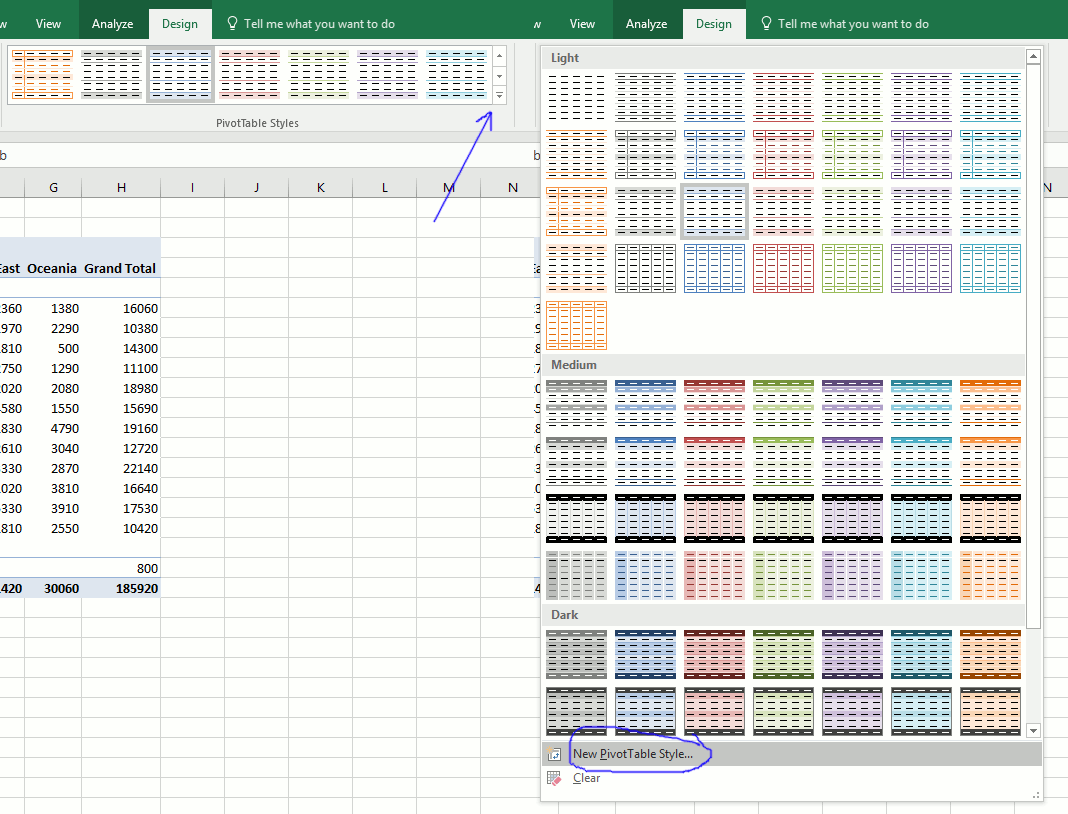
Select a table element and press with left mouse button on "Format" button.
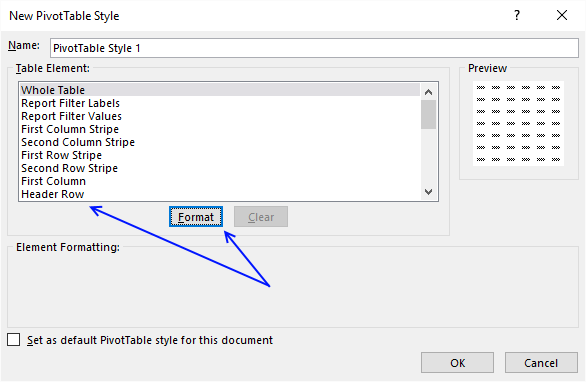
Change formatting and press with left mouse button on OK button.
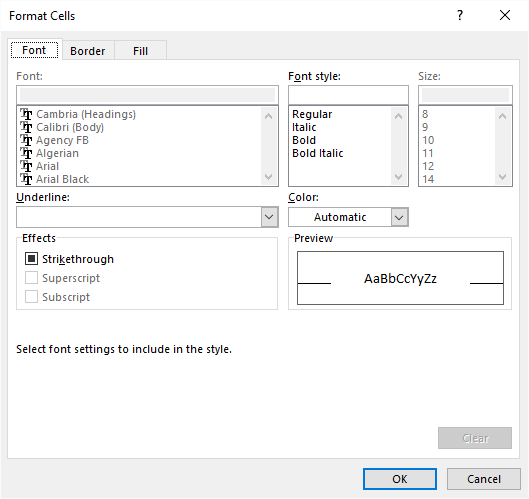
Repeat with the remaining table elements you want to change.
13. Consolidate data from multiple cell ranges
Excel has a feature that lets you consolidate data from multiple pivot tables or cell ranges.
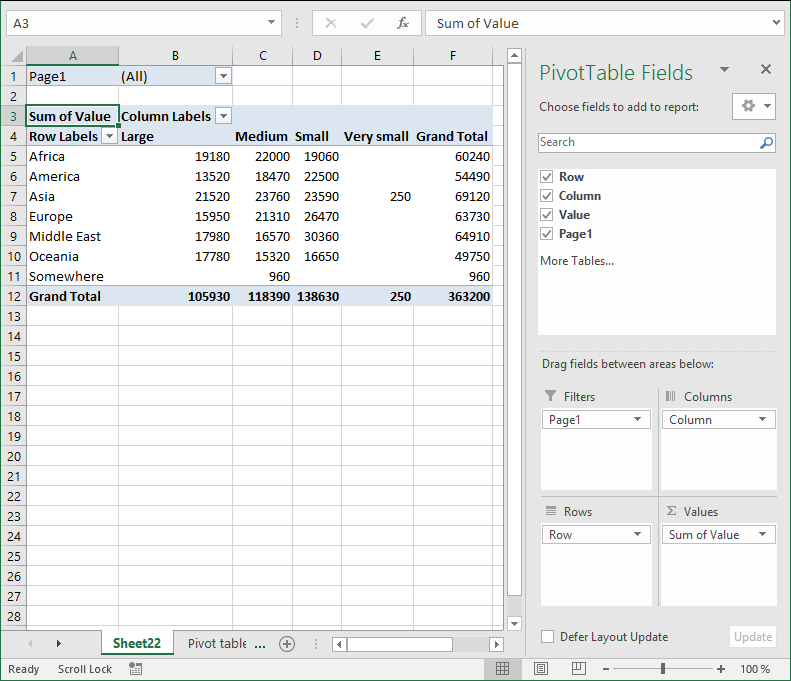
Here are my two pivot tables for 2015 and 2014. I want to consolidate both pivot tables into one, notice that they share the same structure
Pivot table 1 - 2015
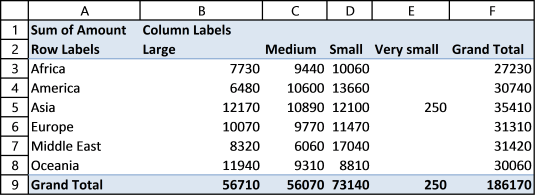
Pivot table 2 - 2014
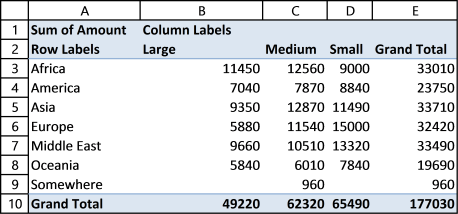
Here is how to do it.
- Press Alt + D + P (This opens the pivot table and pivot chart wizard)
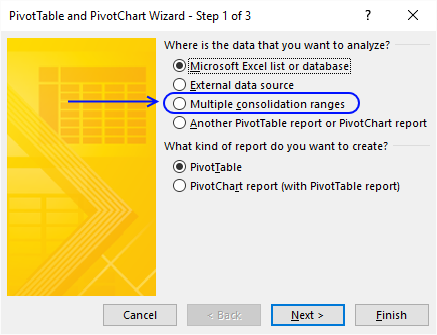
- Press with mouse on "Multiple consolidation ranges"
- Press with left mouse button on Next
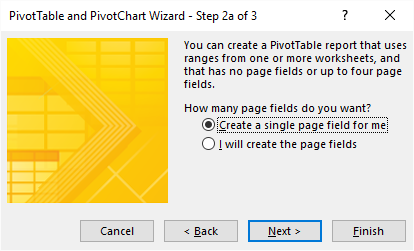
- Select "Create a single page field for me"
- Press with left mouse button on Next button
- Select the first worksheet range you want to consolidate
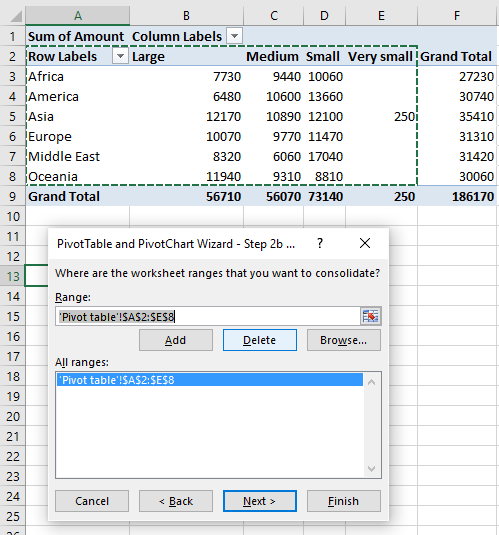
Notice that I select the row and column labels as well but not the grand totals. - Press with left mouse button on Add button
- Repeat step 6 and 7 with your remaining ranges.
- Press with left mouse button on Next button
- Select if you want to create a new pivot table on an existing sheet or a new worksheet
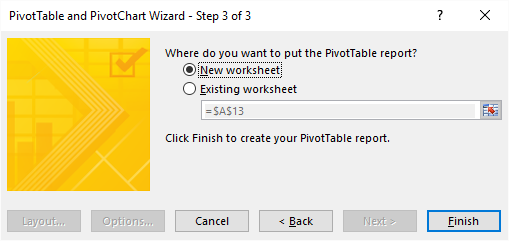
- Press with left mouse button on Finish
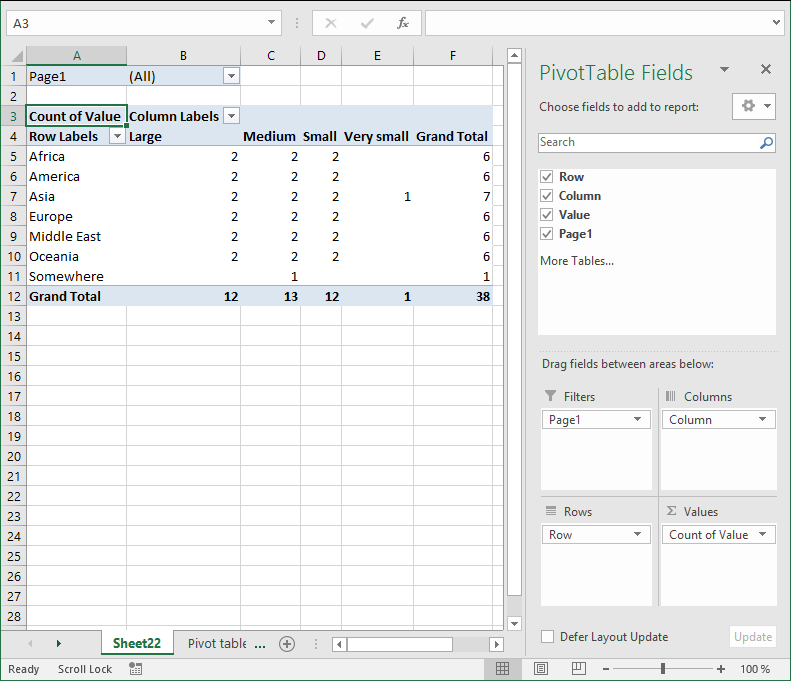
- Left press with left mouse button on arrow next to Count of Value
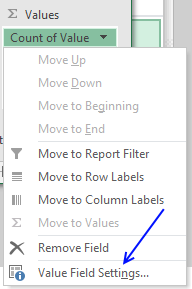
- Press with left mouse button on "Value Field Settings..."
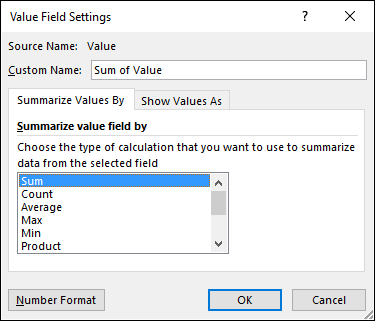
- Press with left mouse button on "Sum"
- Press with left mouse button on OK
15. Create monthly time sheet using a Pivot Table
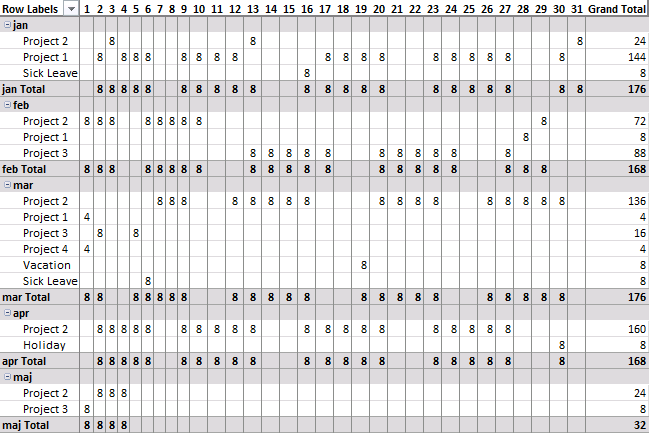
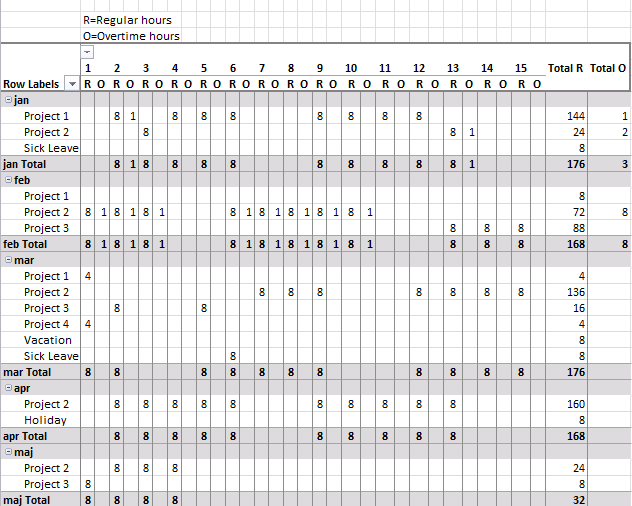
Today I am going to demonstrate how amazing pivot tables are! Take a look at this time sheet.
You can expand each month and see time spend on each project. The pivot table also shows a summary of both months and projects.
I made the pivot table from a simple table containing fake project time data.
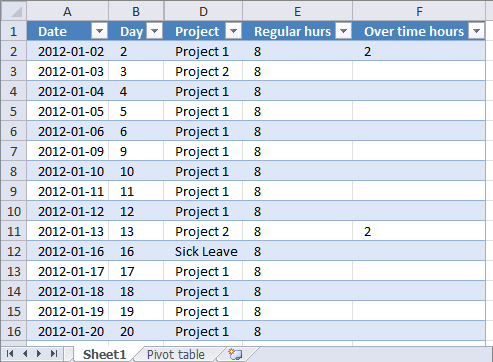
This table can have duplicate dates, as you may be working on multiple projects in a single day.
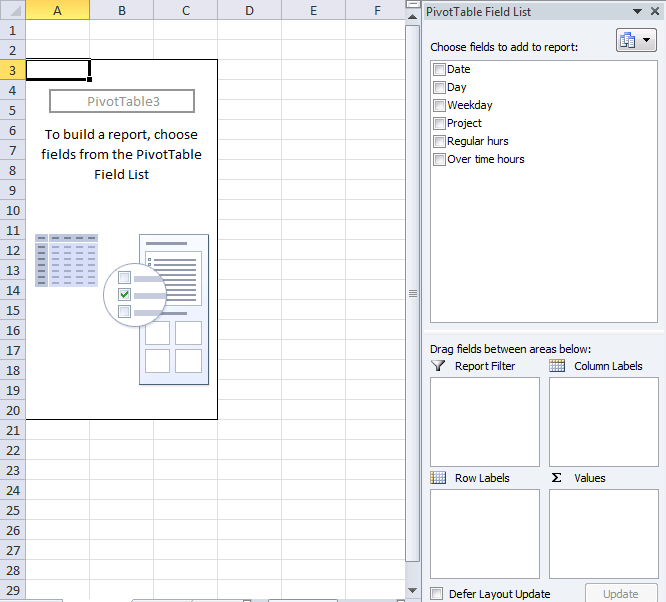
How I created the Pivot Table
- Select a cell in your table.
- Go to tab "Insert".
- Press with left mouse button on "Pivot table" button.
- Press with left mouse button on OK.
Arrange data
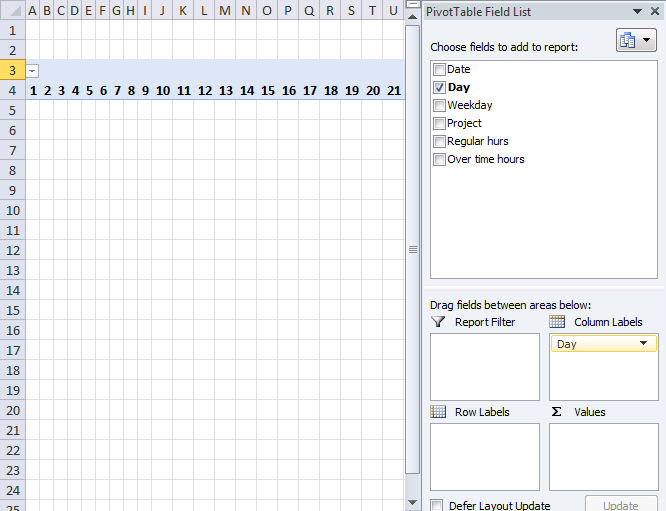
- Press with left mouse button on and drag "Day" from "Pivot table Field List" to "Column Labels" area.
- Resize pivot table columns widths.
- Press with left mouse button on and drag "Date" to "Row Labels" area.
- Press with right mouse button on on a date and select "Group".
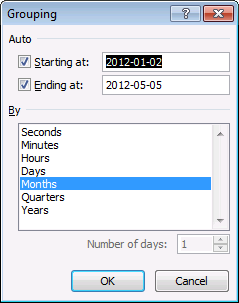
- Select months and press with left mouse button on OK.
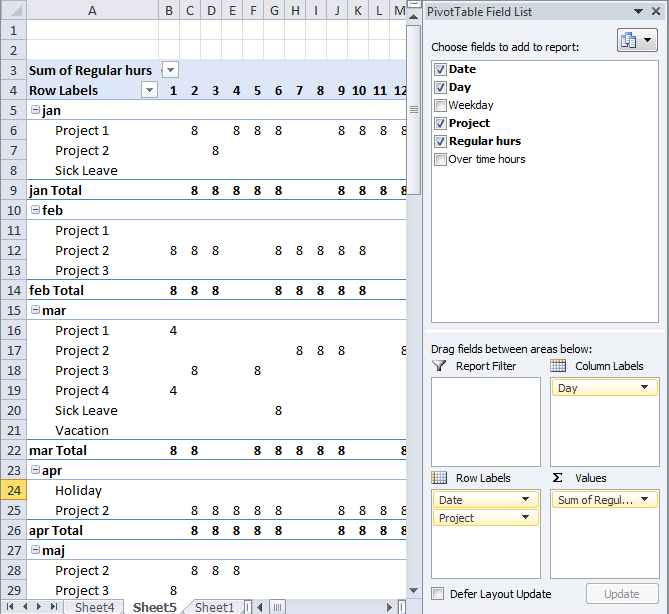
- Press with left mouse button on and drag "Project" to "Row Labels" area.
- Press with left mouse button on and drag "Regular hours" to "Values" area.
- Go to tab "Design".
- Press with left mouse button on "Subtotals" button.
- Press with left mouse button on "Show all subtotals at bottom of group".
- Press with left mouse button on and drag overtime hours to "Values" area.
- Change headers "Sum of Regular hours" to R and "Sum of overtime hours" to O.
Picture of a monthly timesheet by project with overtime hours.
Recommended articles
16. Change PivotTable data source using a drop-down list
In this article, I am going to show you how to quickly change Pivot Table data source using a drop-down list. The tutorial workbook contains three different tables (Table1, Table2 and Table3) with identical column headers.
In this tutorial:
- Create a combo box (form control)
- Select input range
- Add vba code to your workbook
- Assign a macro to drop down list
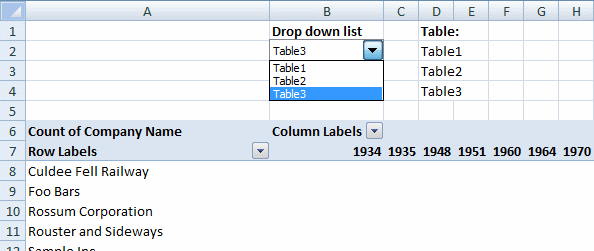
Create a Combo Box (Form Control)
- Go to the developer tab
- Press with left mouse button on "Insert" button
- Press with left mouse button on combo box (form control)
- Create a combo box
Want to learn more about Combo Boxes? Read this article:
Recommended articles
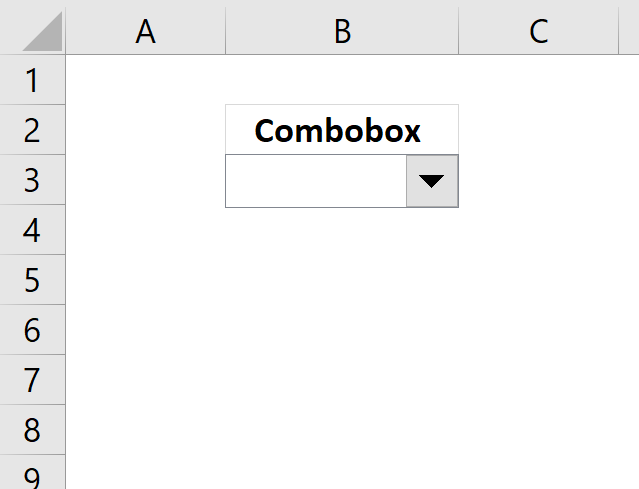
This blog post demonstrates how to create, populate and change comboboxes (form control) programmatically. Form controls are not as flexible […]
Select input range
- Press with right mouse button on on combo box
- Press with left mouse button on "Format control..."
- Go to "Control" tab
- Select an input range (D2:D4)
- Press with left mouse button on OK
Cell range D2:D4 contains the table names, you probably need to change these names.
Add VBA code to your workbook
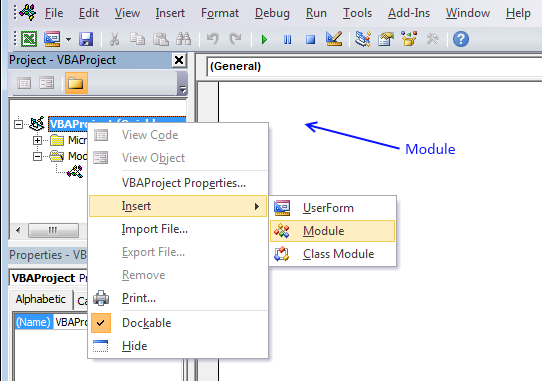
- Press Alt+F11.
- Press with right mouse button on on your workbook in the project explorer window.
- Press with left mouse button on "Insert".
- Press with left mouse button on "Module".
- Copy the code shown below and paste to code module, see image above.
- Return to Excel.
Sub ChangeDataSource()

With ActiveSheet.Shapes(Application.Caller).ControlFormat
    ActiveSheet.PivotTables("PivotTable1").PivotTableWizard SourceType:=xlDatabase, SourceData:= _
    .List(.Value)
End With

End Sub
For this code to work you need to change pivot table name (bolded) in vba code: PivotTables("PivotTable1") to the name of your specific pivot table.
Assign a macro
- Press with right mouse button on combo box
- Select "Assign macro..."
- Select ChangeDataSource macro
- Press with left mouse button on OK!
17. Use hyperlinks in a pivot table
Basically, when I do a refresh of the data in the "pivotdata" worksheet, I need it to recognise the cell is a hyperlink. In addition, when I update the indivital pivot tables, it looks at the data in the "Notes" field and recognise it as a hyperlink.
Answer:
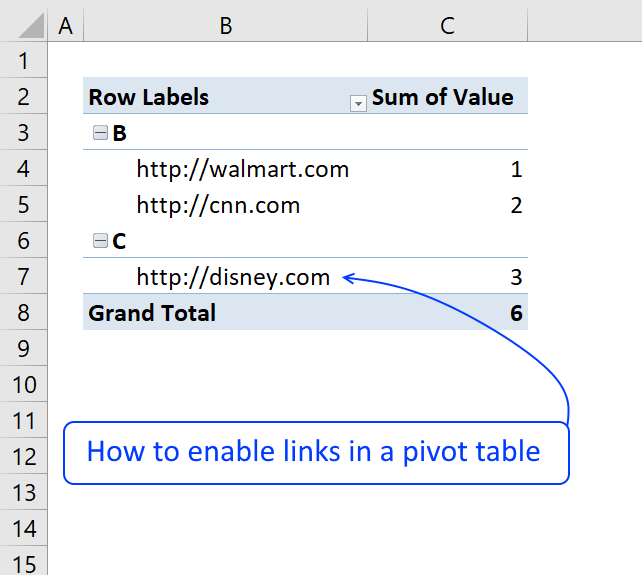
The image below shows a very simple PivotTable containing a few hyperlinks, they look like they don't work if you press with left mouse button on them because they miss the blue underline.
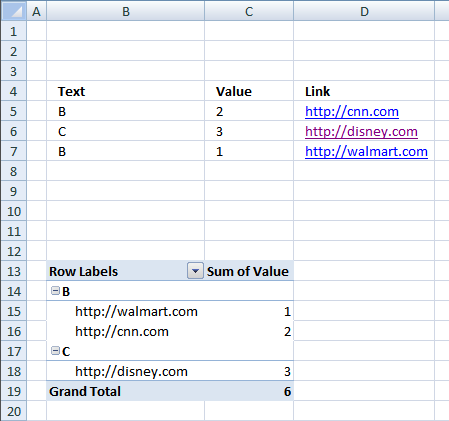
Vba code
The following macro is an Event macro meaning it must be located in a sheet module. It runs when a selection changes on a worksheet. For example, every time you select a cell on sheet1 the macro is rund.
'The Event name must be Worksheet_SelectionChange(ByVal Target As Range), you can't change this.
Sub Worksheet_SelectionChange(ByVal Target As Range)

'Declare variables and data types
Dim ptc As PivotTable, Value As Variant, Rng As Range

'Check if only 1 cell is selected
If Target.Cells.Count = 1 Then

    'Iterate through each pivot table in active worksheet
    For Each ptc In ActiveSheet.PivotTables

        'If selected cell intersects with pivot table cell range
        If Not Intersect(Target, Range(ptc.TableRange1.Address)) Is Nothing Then

            'Does the cell contain a http or https link?
            If Left(Target.Value, 7) = "https://" OR Left(Target.Value, 8) = "https://" Then

                'Open hyperlink
                ActiveWorkbook.FollowHyperlink Address:=Target.Value, NewWindow:=True
            End If
        End If
    Next ptc
End If

End Sub
How to use Event code
- Copy VBA code above.
- Press Alt + F11 to open the Visual Basic Editor.
- Double press with left mouse button on the sheet in project explorer that contains the Pivot Table.
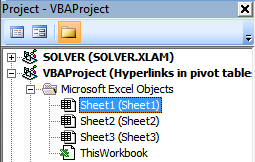
- Paste code to sheet module.
- Exit VBE and return to Microsoft Excel.
18. Normalize data - VBA
To be able to use a Pivot Table the source data you have must be arranged in way that a Pivot Table can handle. For example, the data set above in cell range B2:F5 has headers both horizontally and vertically. In other words, the data set is a two-dimensional table.
Months are arranged horizontally in row 2 and items are arranged vertically in column B, a Pivot Table can't work with data arranged in this way. The data must be arranged row by row meaning values on the same row belong together. Debra has a great post and video about normalizing data for excel pivot table.
This article describes and demonstrates a macro that normalizes data so you can use it in an Excel Pivot Table, meaning it rearranges a dataset layout from two dimensional to row by row. The following animated picture demonstrates the macro.
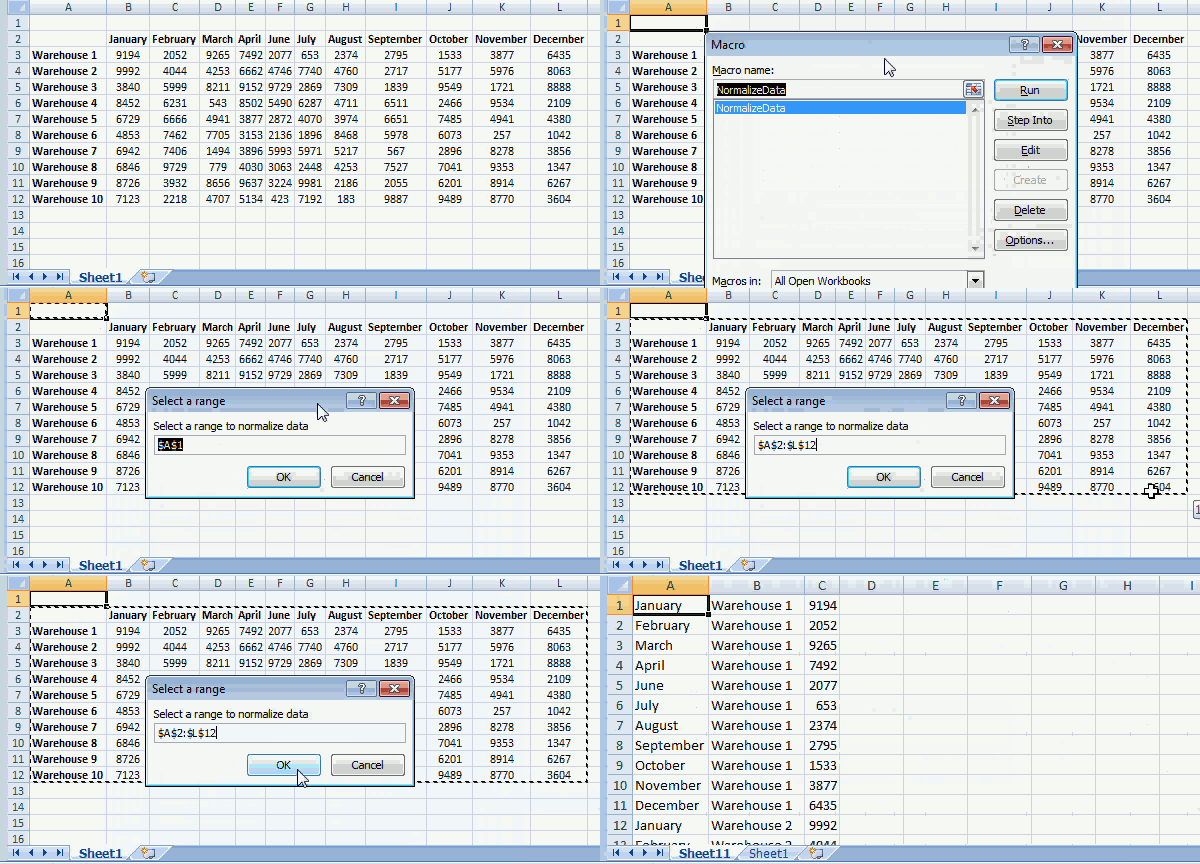
To view macros in your workbook simply press Alt + F8 to open the Macro dialog box, then press with left mouse button on NormalizeData macro and press with left mouse button on "OK" button to start the macro.
Now you will be prompted for a cell range that the macro can work with and rearrange the data, press with left mouse button on OK button when finished.
The macro creates a new worksheet and populates it with values from the cell range you selected.
Where to put the code
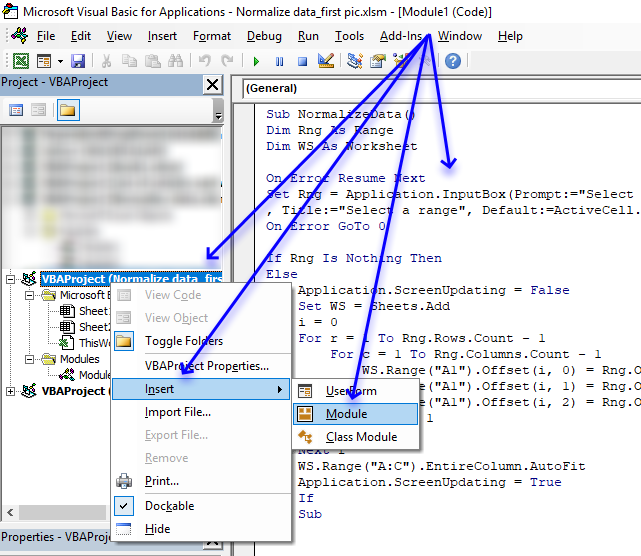
- Copy VBA code below.
- Press Alt+ F11 to open the Visual Basic Editor.
- Press with right mouse button on on your workbook in the Project Explorer.
- Press with left mouse button on Insert.
- Press with left mouse button on Module to insert a code module to your workbook.
- Paste code to module.
- Exit VB Editor and return to Excel.
VBA code
The VBA code below contains comments so you know what each line does. A comment begins with a ' which is a single quote or apostrophe, you can safely remove the comments if you don't want them in your code.
'Name macro
Sub NormalizeData()

'Dimension variables and declare data types
Dim Rng As Range
Dim WS As Worksheet

'Enable error handling
On Error Resume Next

'Show inputbox so the user can select a cell range and save result to object Rng
Set Rng = Application.InputBox(Prompt:="Select a range to normalize data" _
, Title:="Select a range", Default:=ActiveCell.Address, Type:=8)

'Disable error handling
On Error GoTo 0

'Check if object variable Rng is empty
If Rng Is Nothing Then

'If object variable Rng is not empty then continue with the following lines
Else

    'Don't show changes on screen
    Application.ScreenUpdating = False

    'Add a worksheet and save it to object variable WS
    Set WS = Sheets.Add

    'Save value 0 (zero) to variable i
    i = 0

    'Iterate through 1 to the number of rows in the cell range the user selected
    For r = 1 To Rng.Rows.Count - 1

        'Go through 1 to the number of columns in the cell range the user selected
        For c = 1 To Rng.Columns.Count - 1

            'Save values from cell range to worksheet
            WS.Range("A1").Offset(i, 0) = Rng.Offset(0, c).Value
            WS.Range("A1").Offset(i, 1) = Rng.Offset(r, 0).Value
            WS.Range("A1").Offset(i, 2) = Rng.Offset(r, c).Value

            'Add 1 to variable i
            i = i + 1

        'Continue with next column
        Next c

    'Continue with next row
    Next r

    'Adjust column widths
    WS.Range("A:C").EntireColumn.AutoFit

    'Show changes to the user
    Application.ScreenUpdating = True
End If

'Stop macro
End Sub
If your data is concatenated to a cell then this article may interest you:
19. Disable autofit column widths for Pivot table
I read this interesting article Quick Trick: Resizing column widths in pivot tables on the Microsoft Excel blog. It is about Excel automatically making column widths too wide when using URLs in pivot tables. Stacey Armstrong demonstrates how to disable this setting.
Here are the steps to manually disable Excel resizing column widths automatically.
- Press with right mouse button on on any cell in the Pivot table.
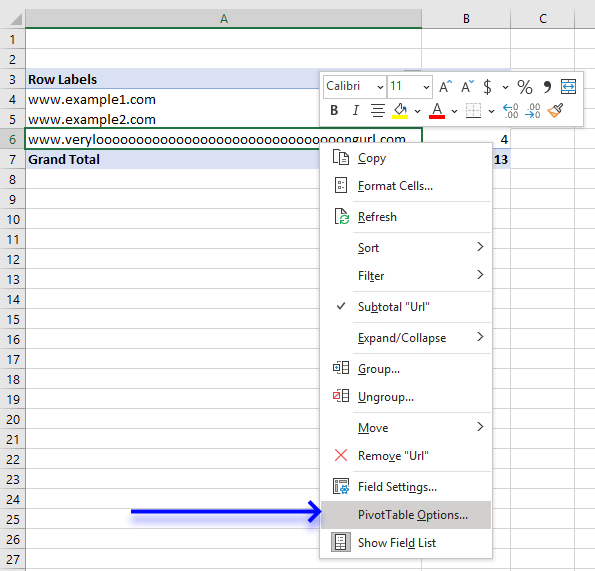
- Press with mouse on "Pivot Table Options".
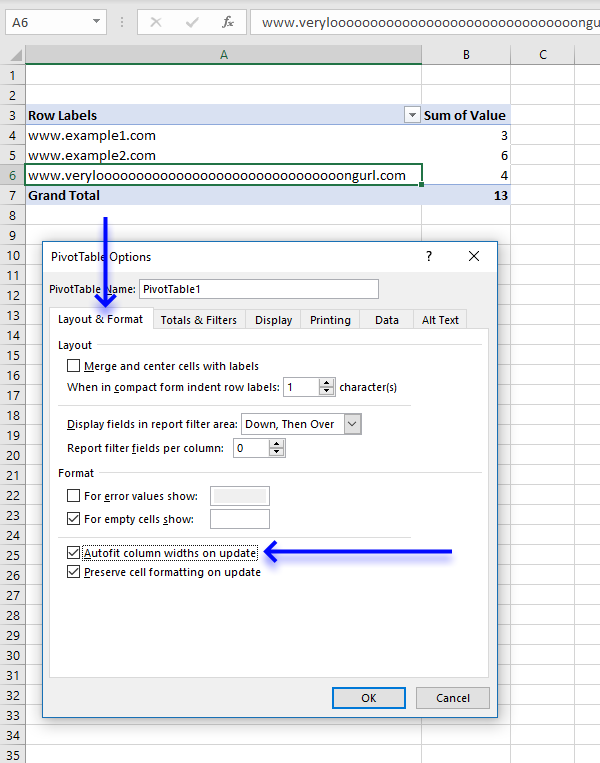
- Press with mouse on the "Layout and Format" tab, then press with left mouse button on the box next to "Autofit column widths on update" to uncheck it.
- Press with left mouse button on OK button to close the dialog box.
Lindsay Hughes commented:
I recommend that you create a personal macro workbook and save the following macros to that workbook. This will make it easier for you to change this setting automatically, simply run the macro to apply this setting to all Pivot tables in the active workbook.
If you use it really often then I recommend adding the macro to the Quick Access Toolbar located at the very top of Excel.
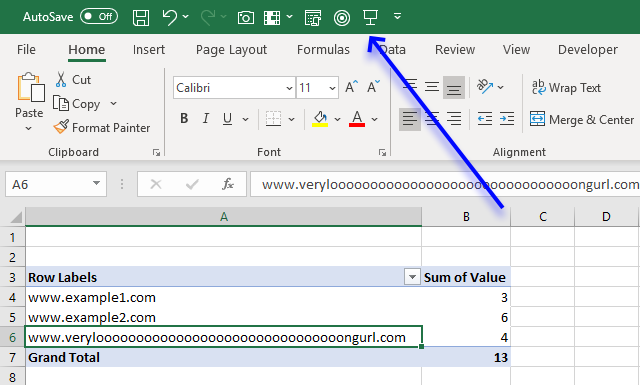
The following Event macro disables this setting for a Pivot Table named PivotTable1 in a worksheet named Sheet1. An event in Excel is a thing that happens that triggers something else to happen.
In this case, if any worksheet in the workbook is activated the code is rund.
'Event code is exectued when any sheet is activated
Private Sub Workbook_SheetActivate(ByVal Sh As Object)

'Save False to HasAutoFormat property for worksheet Sheet1 and PivotTable named PivotTable1
Worksheets("Sheet1").PivotTables("PivotTable1").HasAutoFormat = False
End Sub
I can't change it to the default setting but the code below automatically disables this setting for all pivot tables on the active sheet.
Private Sub Workbook_SheetActivate(ByVal Sh As Object)

'Dimension variable and declare datatype
Dim pt As PivotTable

    'Iterate through pivottables in active worksheet
    For Each pt In ActiveSheet.PivotTables

        'Change property HasAutoFormat to False
        pt.HasAutoFormat = False

    'Continue with next pivot table
    Next pt
End Sub
This macro changes the setting for all pivot tables in all worksheets in the active workbook.
Private Sub Workbook_SheetActivate(ByVal Sh As Object)

'Dimension variables and declare datatypes
Dim pt As PivotTable
Dim WS as Worksheet

'Go through each worksheet in the worksheets object collection
For Each WS In Worksheets

    'Iterate through pivottables in active worksheet
    For Each pt In WS.PivotTables

        'Change property HasAutoFormat to False
        pt.HasAutoFormat = False

    'Continue with next pivot table
    Next pt

'Continue with next worksheet
Next WS
End Sub
The following macro disables the setting for pivot tables in all open workbooks
Private Sub Workbook_SheetActivate(ByVal Sh As Object)

'Dimension variables and declare datatypes
Dim pt As PivotTable
Dim WS as Worksheet
Dim j As Single

'Go through all open workbooks
For j = 1 To Workbooks.Count
   'Go through each worksheet in the worksheets object collection
   For Each WS In Workbooks(j).Worksheets

       'Iterate through each pivot table
       For Each pt In WS.PivotTables
           'Change property HasAutoFormat to False
           pt.HasAutoFormat = False

       'Continue with next PivotTable
       Next pt

       'Continue with next WorkSheet
   Next WS

'Continue with next workbook
Next j
End Sub
19.1 Where to put the code?
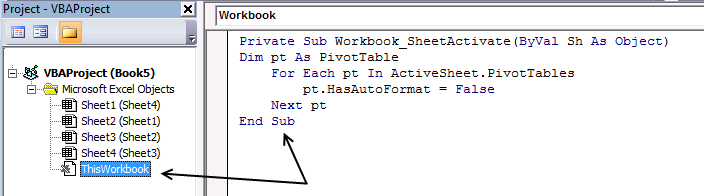
- Copy above VBA code.
- Press Alt+F11 to open the Visual Basic Editor.
- Double press with left mouse button on your workbook to expand the object list.
- Double press with left mouse button on Thisworkbook in the project explorer window to show the workbook module.
- Paste VBA code to the workbook module.
- Exit VB Editor and return to Excel.
Pivot table category
Table of Contents Introduction to pivot tables Create pivot table Group data Analyze data (pivot table) Compare performance, year to […]
Rodney Schmidt asks: I am a convenience store owner that is looking to make a spreadsheet formula. I want this […]
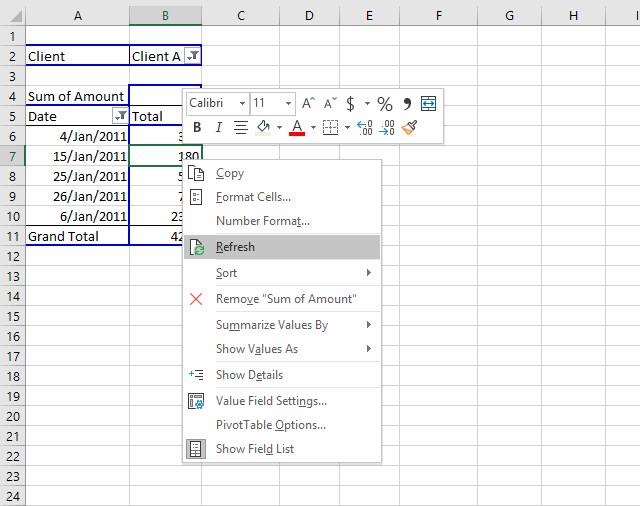
Table of Contents How to create a dynamic pivot table and refresh automatically Auto refresh a pivot table 1. How […]
Excel categories
61 Responses to “How to use Pivot Tables – Excel’s most powerful feature and also least known”
Leave a Reply
How to comment
How to add a formula to your comment
<code>Insert your formula here.</code>
Convert less than and larger than signs
Use html character entities instead of less than and larger than signs.
< becomes < and > becomes >
How to add VBA code to your comment
[vb 1="vbnet" language=","]
Put your VBA code here.
[/vb]
How to add a picture to your comment:
Upload picture to postimage.org or imgur
Paste image link to your comment.

Oscar,
That seems to work a treat. because I have 3 pivot tables on individual worksheets that are not the same worksheet as the pivot data, I have placed the code on each of the pivot table sheets. I'm assuming this is correct, as it didn't work on the other pivot table sheets where I hadn't included the code.
Any chance to could add comments to the code, so that I can work out what the subroutine is doing ?
The help is appreciated and hopefully it will help others as well.
Kind Regards
Sean
Sean,
Thanks!
I have added comments to the code.
This code works for all pivotTables in a workbook.
Copy/paste the code below to "ThisWorkbook" code module in project explorer (Alt+F11)
Private Sub Workbook_SheetSelectionChange(ByVal Sh As Object, ByVal Target As Range)

Dim ptc As PivotTable, Value As Variant, Rng As Range

For Each ptc In Worksheets(Sh.Name).PivotTables
    If Not Intersect(Target, Range(ptc.TableRange1.Address)) Is Nothing Then
        If Left(Target.Value, 7) = "https://" Then
            ActiveWorkbook.FollowHyperlink Address:=Target.Value, NewWindow:=True
        End If
    End If
Next ptc

End Sub
Get the Excel *.xlsm file
Hyperlinks-in-pivot-tables-in-a-workbook.xlsm
The follow code from above works well except that the first time I press with left mouse button on a hyperlink, I get a Run Time Error 13. When I reset and press with left mouse button again, it's fine. What could be the cause of this. Code is below:
Sub Worksheet_SelectionChange(ByVal Target As Range)
Dim ptc As PivotTable
'Find every pivotTable in ActiveSheet
For Each ptc In ActiveSheet.PivotTables
'Check if selected cell is a pivot table cell
If Not Intersect(Target, Range(ptc.TableRange1.Address)) Is Nothing Then
'Check if the cell value begins wih https://
If Left(Target.Value, 7) = "https://" Then
'Follow hyperlink using cell value as hyperlink address
ActiveWorkbook.FollowHyperlink Address:=Target.Value, NewWindow:=True
End If
End If
Next ptc
End Sub
Brian,
Run Time Error 13 - Type mismatch
Which line is the problem?
Hey Brian,
I get the same Error 13, when I select a range of cells.
Following Line is (according to Excel) the problem:
If Left(Target.Value, 7) = "https://" Then
Best,
Christian
Sorry, Oscar of course :)
Christian,
You are right. If you select more than one cell you get an error.
Try this:
Sub Worksheet_SelectionChange(ByVal Target As Range)
Dim ptc As PivotTable, Value As Variant, Rng As Range
If Target.Cells.Count = 1 Then
    For Each ptc In ActiveSheet.PivotTables
        If Not Intersect(Target, Range(ptc.TableRange1.Address)) Is Nothing Then
            If Left(Target.Value, 7) = "https://" Then
                ActiveWorkbook.FollowHyperlink Address:=Target.Value, NewWindow:=True
            End If
        End If
    Next ptc
End If

End Sub
Thanks for commenting!
Oscar,
The original code works well for me, however, I also get the mismatch error in selecting multiple cells. I tried the new code that you posted to fix this error, but when using it, the follow hyperlink no longer works. Any ideas?
The Attachement has no Excel files :(
Code is not working with xl 2007
deepak ji paulson,
I opened both files and they work here. I am using excel 2007.
This is a simple and beautiful solution! Thanks!
My pivot table is called "PivotTable"
I created a macro, put the code in:Sub ChangeDataSource()
With ActiveSheet.Shapes(Application.Caller).ControlFormat
ActiveSheet.PivotTables("PivotTable").PivotTableWizard SourceType:=xlDatabase, SourceData:= _
.List(.Value)
End With
End Sub
Now when I try to change the data source via drop-down i receive this error: Run-time error '1004' Reference is not valid.
...all ok with exampke untill the moment of questions: if for e.g. i have two uniques values with the same amount of records.. then dividing will be nothing worse....
..."nothing worth" i have meant (sorry :) )
Jeff,
I am guessing, the names in the combo box don´t match the table names in your workbook?
How to find the table names
1. Select a cell in a table
2. Go to tab "Design" on the ribbon
Andrius,
Yes..
I am not sure I understand.
[...] Disable autofit column widths for all Pivot Tables in a sheet (VBA) [...]
The code above did not work for me. I pasted into the suggested location and the pivot tables are still autofitting on update.
Is there something I am missing?
Thanks!
Bob,
I tried the code and it works in in excel 2007 and 2010.
Did you double press with left mouse button on Thisworkbook in the project explorer window?
Oscar, you are awesome! millions of thanks
HI,
THe link is working fine but if i need to press with left mouse button on the Text or value column and if the hyperlink has to be opened what could be the solution for that?.
Harshitha,
Sub Worksheet_SelectionChange(ByVal Target As Range)
Dim ptc As PivotTable, Value As Variant, Rng As Range

For Each ptc In ActiveSheet.PivotTables
    If Not Intersect(Target, Range(ptc.TableRange1.Address)) Is Nothing Then
        If Left(ptc.TableRange1.Cells(Target.Row - ptc.TableRange1.Row + 1, 1).Value, 7) = "https://" Then
            ActiveWorkbook.FollowHyperlink Address:=ptc.TableRange1.Cells(Target.Row - ptc.TableRange1.Row + 1, 1).Value, NewWindow:=True
        End If
    End If
Next ptc

End Sub
You probably need to change this line:
If Left(ptc.TableRange1.Cells(Target.Row - ptc.TableRange1.Row + 1, 1).Value, 7) = "https://" Then
Bolded value is the column number for the links in the Pivot table range.
I am also getting a run-time rror'1004: Application-defined or object-defined error on:
ActiveSheet.PivotTables("PivotTable2").PivotTableWizard SourceType:=x1Database, SourceData:= _
.List(.Value)
I changed the pivot table name as instructed above, but that has not corrected the error. Any suggestions? Thanks.
Jennifer Long,
Is the attached file working?
Did you spell the table names correctly? (Read my answer to Jeff)
I get the same error if I use a table name that does not exist.
Hello,
I did automate the process in a vba macro that add a unique count datafield in the pivot, automatically updated when you change the configuration of the pivot.
Let me know your thoughts.
https://lazyvba.blogspot.com/2010/11/improve-your-pivot-table-to-count.html
lazyvba,
I did try your code and it seems to work with my example pivot table!
It converted my data to a table and added new columns, maybe you mentioned that on your website?
Thanks a lot! This solution saved me some hours.
Ben,
Thanks for commenting!
Dear Oscar,
Is it possible to make change not pivot table, but pivot chart using drop down list of several pivot table ?
Hi Oscar,
I found your code very helpful and easy to apply despite that I am a VBA bigginer.
In my case the pivot table is in a different worksheet named "data2" , from the Combo box which is in "Data1".
Is there any way to modify you code so I can still update the pivot table?
Many Thanks.
Bill,
Yes there is!
Sub ChangeDataSource() With ActiveSheet.Shapes(Application.Caller).ControlFormat Worksheets("data2").PivotTables("PivotTable1").PivotTableWizard SourceType:=xlDatabase, SourceData:= _ .List(.Value) End With End SubMany Thanks Oscar,
Works fine.
great idea! thank you
[...] Use a VBA solution, as described here: Follow hyperlinks in a pivot table | Get Digital Help - Microsoft Excel resource [...]
Boss you are genius. Hv been searching this for quite some time.
I used this simple code. I cannot follow the hyperink i the expanded pivot table. However, the hyperlink i working on the cell that it was created in BEFORE the pivot was collapsed. Any ideas anyone?
Range("L7").Select
Selection.End(xlDown).Select
irow = ActiveCell.Row
Range("e6:e" & irow).Select
For Each Cell In Selection
Cell.Select
If Cell.Value "" Then
If Left(Cell.Value, 7) = "https://" Then
URL = Cell.Value
Else
URL = "https://" + Cell.Value
End If
ActiveSheet.Hyperlinks.Add anchor:=Cell, _
Address:=URL, TextToDisplay:=Cell.Value
End If
Next
Hello Oscar,
I used your code above and it worked wonderfully. Despite being my first macro I have ever used I even managed to alter the code to get it to control 3 pivot tables at the same time based on one combo box.
I now have a more difficult problem. I need to consolidate some of my tables into my pivots.... I have 43 different tables, and some times I need to "join" / "consolidate" / "sum up" different tables. So for example if I wanted to create an "entire company consolidated" pivot I would need to join all 43 tables together.
Andrew,
I found this:
https://blog.laptopmag.com/excel-2013-pivot-table-from-multiples
Hi Oscar,
I found this very helpful! So thank you very much for this! However, I have one issue with it. I have multiple pivot tables that I'm trying to switch between and each one of them have different values (Revenue, GOP, NI, etc.).
So, under your code, each time I switch between them, I have to add the values that I'm looking for. Is there a way to make is so that I don't have to do this each time?
Any help would be appreciated. Thanks!
This was very helpful to me. Thanks for the post.
this code is good but this is not working for me.i am getting unable to get the pivot table property of the worksheet class.what it means please help me i am new vba.
Hi Oscar,
Your code is very helpful, thank you. But I have a little problem. I have 5 tables with I did one pivot table, and other 4 pivot tables with 5 tables each one, the data is almost the same. I want to change the 5 pivot tables with one drop down list. Is it possible?
Thanks for your help.
Neat trick! Thanks for sharing! I'm pretty new to VBA. How would you get this to work with named data ranges in separate Excel workbooks?
Katie,
I am not sure this works, change the table names in the drop down list to:
[Book2]Sheet1!namedrange
Book2 - Your workbook name
Sheet1! - Your worksheet name
namedrange - Your named range
Excellent article, Debra!
Thank you, Felipe.
lol I'm terrible sorry - I wrote Debra because I was at Debra's site looking for pivot table articles and then I visited yours.
Excellent article, *OSCAR!
Thanks for writing this!! It's exactly what I was looking for.
BNR
Hey Thank you so much, really effective and simple solution.
This is amazing and saved me a lot of work. THANKS!!!
hello Oscar,
please guide how to change 2 pivot tables at a time.
the code you shared can change 1 pivot at a time
prashant
Sub ChangeDataSource() With ActiveSheet.Shapes(Application.Caller).ControlFormat Worksheets("Sheet1").PivotTables("PivotTable1").PivotTableWizard SourceType:=xlDatabase, SourceData:= _ .List(.Value) Worksheets("Sheet2").PivotTables("PivotTable2").PivotTableWizard SourceType:=xlDatabase, SourceData:= _ .List(.Value) End With End Subthanks for the help
Made my day. Works like a charm
Nav,
thanks.
Hello,
I am trying to update 3 pivot tables with the selection from Drop Down menu. I used your code but it is giving me a run-time error 1004 (syntax error)
on code -
Worksheets("Sheet2").PivotTables("PivotTable2").PivotTableWizard SourceType:=xlDatabase, SourceData:= _
.List(.Value)
Could anyone explain what it does and how to fix the issue with ---> SourceData:=_ ?
I really appreciate your assistance.
Regards,
Anoop
Anoop Jain
The code uses the selected value from the drop down list to change the Pivot Table's data source.
Perhaps you are using a value that is not an Excel Table?
Hello,
I have a question about the hyper-link code.
If I understand correctly, the code you wrote works for hyper-links to websites.
What if i have in my worksheet hyper-links to files on my computer?
Thank you,
Leanor
Hii, thank u very much for all ur help here,
I did the macro u wrote above here,
My links are pic and because I cannot put pic in pivot I use the link with ur macro, Is there a possibility that moving with the mouse the images will appear? Thank u
I have been working on a pivot table for work. When I pasted in all the hyperlinks, one set posted short links which work with the internal security measures. When I change the link to the full address link, it will not allow employees to access the page.
I have 2 columns of links. One is working. One is not. I assume bc it's a short link.
Also if I click on the shortened hyperlink in the original dataset, it works. When I go to the pivot table, it no longer is clickable. Is there a fix for this??