Excel calendar
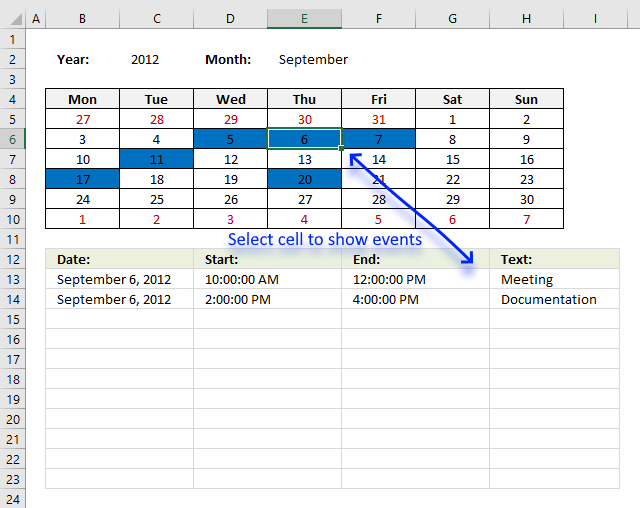
Table of Contents
- Excel monthly calendar - VBA
- Calendar
- Conditional formatting
- Formulas
- Visual basic for applications
- Get excel *.xlsm file
- Excel weekly calendar with scheduling - VBA
- Get Excel *.xlsm file
- Weekly schedule template
- Setting up your work hours in a weekly schedule
- Highlight specific time ranges in a weekly schedule
- Weekly appointment calendar
- Schedule recurring expenses in a calendar
- Count groups in calendar
- Free School Schedule Template
- Populate cells dynamically in a weekly schedule
- Populate multiple cell values in a single cell in a weekly schedule - vba
- Find empty hours in a weekly schedule
- Pivot Table calendar
1. Excel monthly calendar - VBA
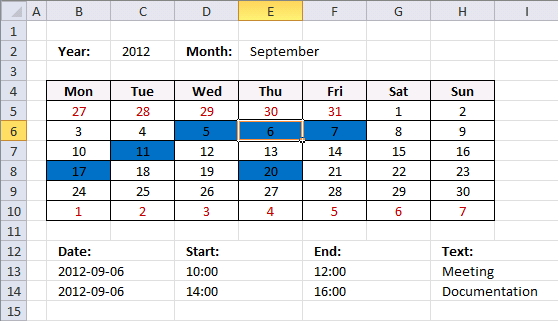
This workbook contains two worksheets, one worksheet shows a calendar and the other worksheet is used to store events. The calendar sheet allows you to enter a year and use a drop down list to select a month.
A small VBA event code tracks which cell you have selected and shows the corresponding events accordingly.
How this workbook works
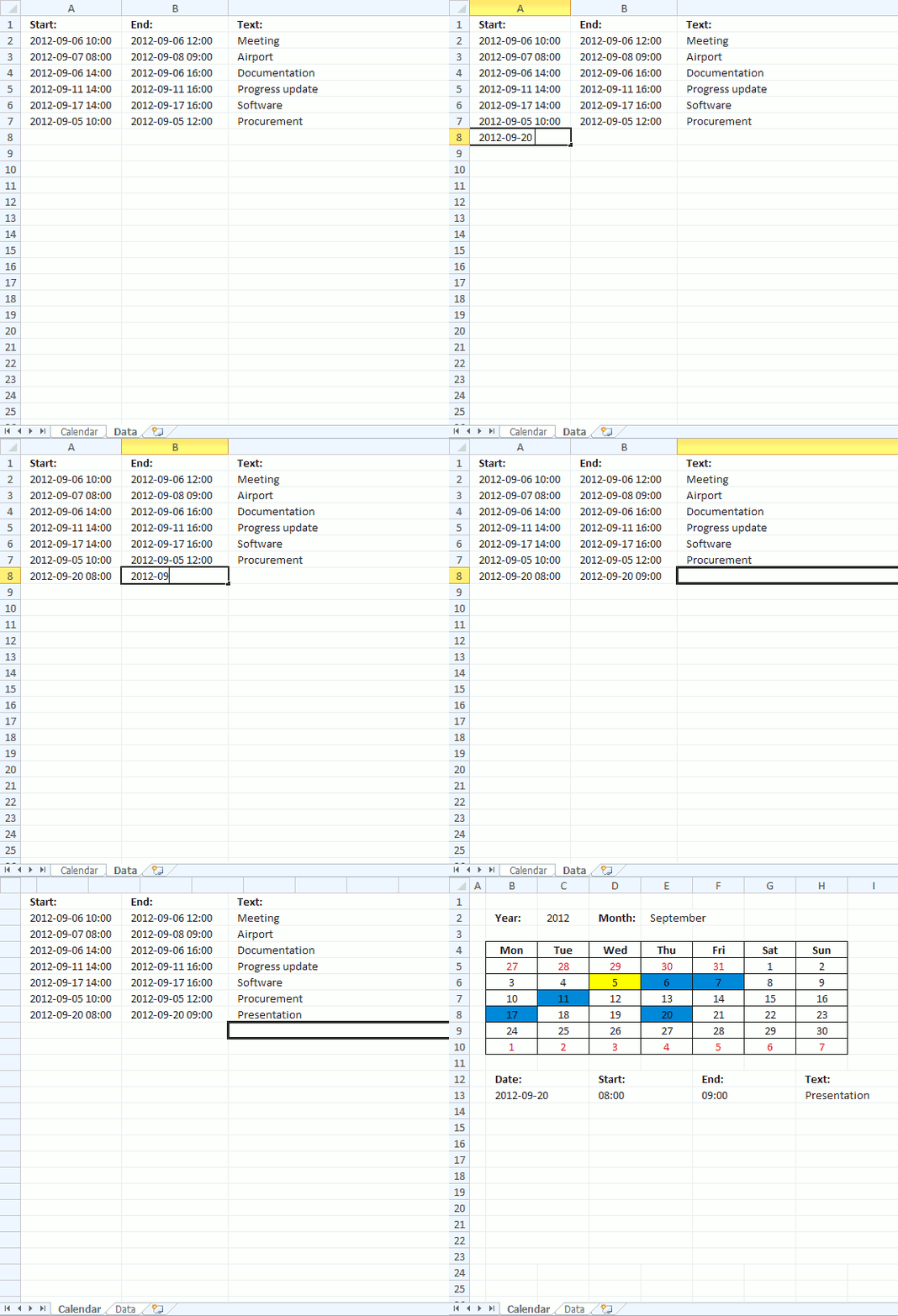
The animated image above shows how to enter data and how to select a given date. Today's date is highlighted yellow, days with one or more events are also highlighted, in this example blue.
Excel extracts data dynamically meaning the named range grows automatically when new data is entered, we don't need to change the formula cell references.
Drop down lists
Select year
- Select cell B2
- Go to tab "Data"
- Press with left mouse button on "Data Validation" button
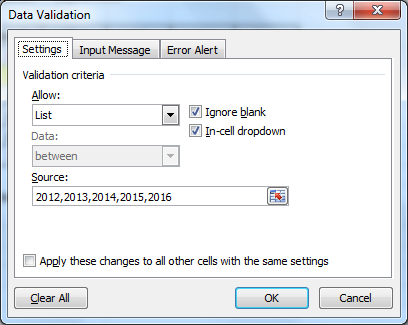
- Allow: List
- Source:2012,2013,2014,2015,2016
- Press with left mouse button on OK
Select month
- Select cell E4
- Go to tab "Data"
- Press with left mouse button on "Data Validation" button
- Allow: List
- Source:January, February, March, April, May, June, July, August, September, October, November, December
- Press with left mouse button on OK
Headers
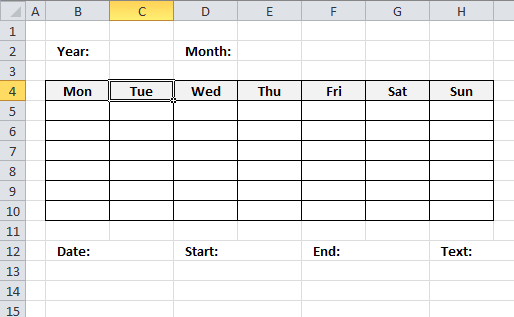
Type Year: in cell B2, Month: in cell E2 and so on...
Calculating dates (formula)
- Select cell B5
- Formula:
=DATE($C$2,MATCH($E$2,{"January"; "February"; "March"; "April"; "May"; "June"; "July"; "August"; "September"; "October"; "November"; "December"},0),1)-WEEKDAY(DATE($C$2,MATCH($E$2,{"January"; "February"; "March"; "April"; "May"; "June"; "July"; "August"; "September"; "October"; "November"; "December"},0),1),2)+1
- Select cell B6
- Formula:
=B5+1
- Copy cell B6 (Ctrl + c)
- Select cell range D5:H5
- Paste (Ctrl + v)
- Select cell B6
- Formula:
=B5+7
- Copy cell range C5:H5
- Select cell range C6:H6
- Paste (Ctrl + v)
- Copy cell range B6:H6 (Ctrl + c)
- Select cell range B7:H10
- Paste (Ctrl + v)
Conditional formatting
Highlight Today
- Select cell range B5:H10
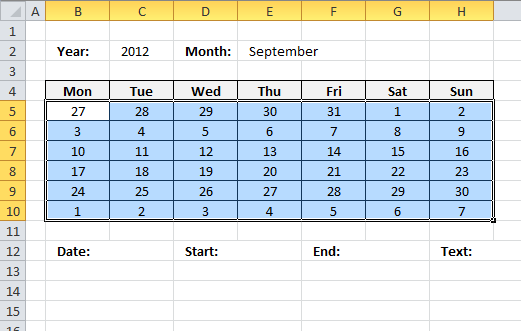
- Go to tab "Home"
- Press with left mouse button on "Conditional formatting" button
- Press with left mouse button on "New Rule..."
- Press with left mouse button on "Use a formula to determine which cells to format"
- Format values where this formula is true:
=B5=TODAY() - Press with left mouse button on "Format..." button
- Go to "Fill" tab
- Pick a color
- Press with left mouse button on OK
- Press with left mouse button on OK
Change font color for dates not in selected month
- Repeat 1-5 steps above
- =MONTH(B5)<>MONTH($B$6)
- Press with left mouse button on "Format..." button
- Go to "Font" tab
- Pick a color
- Press with left mouse button on OK
- Press with left mouse button on OK
Highlight days with events
- Repeat 1-5 steps above
- =OR(B5=INT(INDEX(Data,0,1)))
- Press with left mouse button on "Format..." button
- Go to "Fill" tab
- Pick a color
- Press with left mouse button on OK
- Press with left mouse button on OK
Formulas
Dynamic named range
- Select sheet "Data"
- Go to tab "Formulas"
- Press with left mouse button on "Name Manager" button
- Press with left mouse button on "New..."
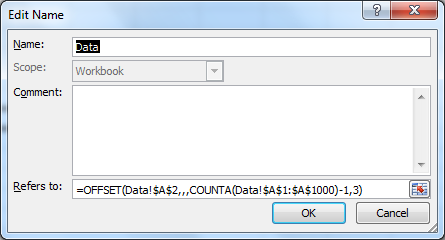
- Name: Data
- Refers to:
=OFFSET(Data!$A$2,,,COUNTA(Data!$A$1:$A$1000)-1,3) - Press with left mouse button on OK!
- Press with left mouse button on Close
Event formulas
- Select sheet "Calendar"
- Select cell B13
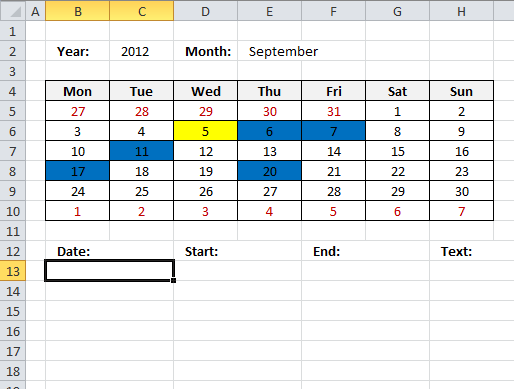
- Array formula:
=IFERROR(INT(INDEX(Data, SMALL(IF(INT(INDEX(Data, 0, 1))=$G$2, MATCH(ROW(Data), ROW(Data)), ""), ROW(A1)), COLUMN(A1))), "")
- Enter this formula as an array formula, see these steps if you don't know how.
- Select cell D13
- Array formula:
=IFERROR(INDEX(Data, SMALL(IF(INT(INDEX(Data, 0, 1))=$G$2, MATCH(ROW(Data), ROW(Data)), ""), ROW(B1)), COLUMN(A1)), "")
- Select cell F13
- Array formula:
=IFERROR(INDEX(Data, SMALL(IF(INT(INDEX(Data, 0, 1))=$G$2, MATCH(ROW(Data), ROW(Data)), ""), ROW(C1)), COLUMN(B1)), "")
- Select cell H13
- Array formula:
=IFERROR(INDEX(Data, SMALL(IF(INT(INDEX(Data, 0, 1))=$G$2, MATCH(ROW(Data), ROW(Data)), ""), ROW(D1)), COLUMN(C1)), "")
How to create an array formula
- Select a cell
- Press with left mouse button on in formula bar
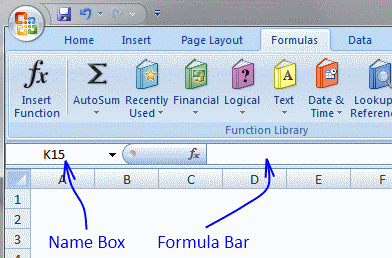
- Paste array formula
- Press and hold Ctrl + Shift
- Press Enter
Visual basic for applications
- Press with right mouse button on on Calendar sheet
- Press with left mouse button on "View code"
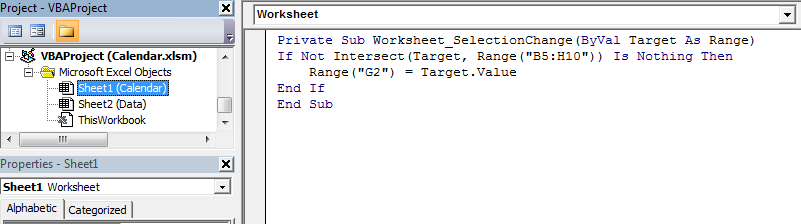
- Copy vba code below.
'Event code that is rund every time a cell is selected in worksheet Calendar Private Sub Worksheet_SelectionChange(ByVal Target As Range) 'Check if selected cell address is in cell range B5:H10 If Not Intersect(Target, Range("B5:H10")) Is Nothing Then 'Save date to cell G2 Range("G2") = Target.Value End If End Sub - Paste to worksheet module.
Hide value in cell G2
- Select cell G2
- Press Ctrl + 1
- Go to tab "Number"
- Select category: Custom
- Type ;;;
- Press with left mouse button on OK!

2. Calendar with scheduling
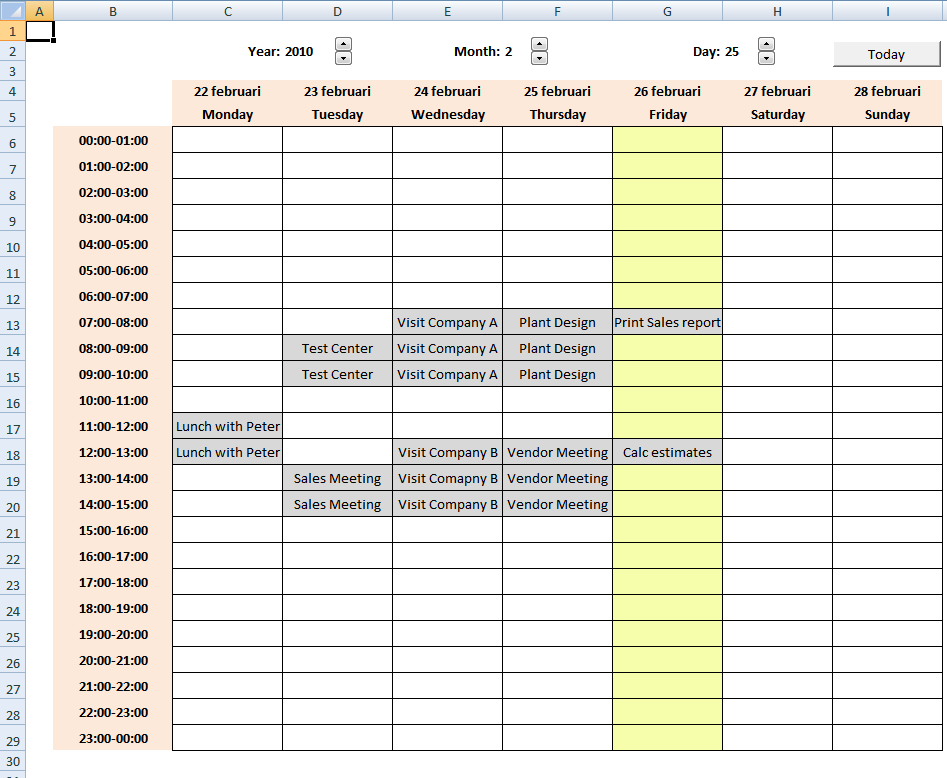
Here is my contribution to all excel calendars out there. My calendar is created in Excel 2007 and uses both vba and formula.
I will explain how I created this calendar in an upcoming post. You can get the excel calendar file here: Excel calendar.xlsm You need to enable macros to use this calendar.
Instructions:
Select a week
- Select a week using spinner buttons or type a date in date cells
How to add a record
- Double press with left mouse button on a cell
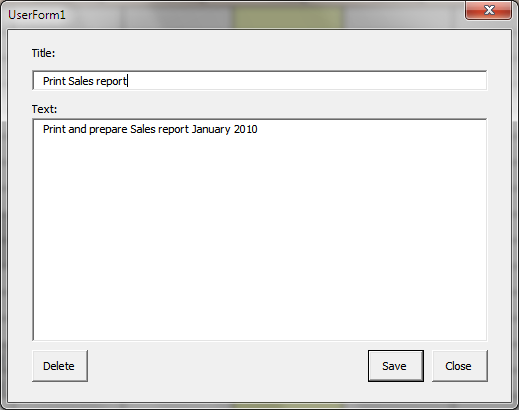
- Type text in title window and text window
- Press with left mouse button on Save button on userform
How to delete a record
- Double press with left mouse button on a cell
- Press with left mouse button on Delete button on userform
Overview Calendar
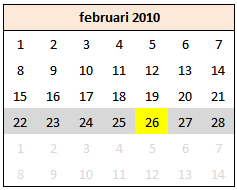
The overview calendar makes spinner button navigation easier. The selected week is colored gray and the date today is yellow.
3. Weekly schedule template
I would like to share this simple weekly schedule I created.
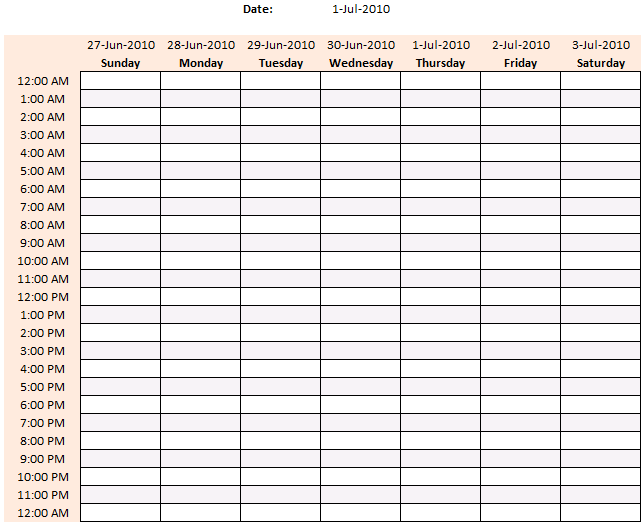
How to use weekly schedule
- Type any date in cell F2 and press Enter.
Now what?
All dates in chosen week are dynamically updated. See cell range C4:I4.
Why?
You can easily create and print multiple weekly schedules quickly without editing each date in week.
Monthly calendars
If you are looking for a monthly calendars, this might be of interest:
Get excel template
Create a weekly schedule.xls
(Excel 97-2003 Workbook *.xls)
Formula in C4:
Formula in D4:
Added features
- How to highlight specific time ranges
- How to find empty hours
- How to populate cells dynamically
- Setting up your work hours
- Schedule recurring events in a weekly schedule in excel
4. Setting up your work hours in a weekly schedule
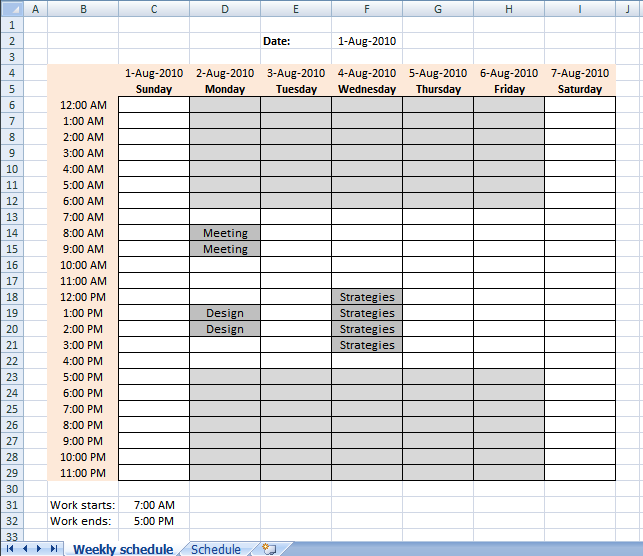
The image above demonstrates conditional formatting highlighting hours outside work hours, those cells are filled with grey except weekends.
Conditional formatting formula applied on cell range C6:I29:
This formula checks if the weekday in C4:I4 is 2,3,4,5 or 6. (Monday to Friday) and if the time in cell range B6:B29 is outside workhours specified in cell C31 and C32. If formula returns TRUE, the cell is filled grey.
Explaining conditional formatting in cell C9
Step 1 - Check if time $B6 is less than start hour $C$31
$B6<$C$31
returns TRUE.
Step 2 - Check if time $B6 is larger than or equal to start hour $C$32
$B6>=$C$32
returns FALSE
Step 3 - If any of the logical expressions evaluate to TRUE then return TRUE
The OR function checks whether any of the arguments are TRUE or FALSE and returns FALSE if all arguments are FALSE.
OR($B6<$C$31, $B6>=$C$32)
becomes
OR(TRUE, FALSE)
and returns TRUE.
Step 4 - Check if weekday is less than 7 (Saturday)
The WEEKDAY function returns a number from 1 to 7 identifying the day of the week of a date.
WEEKDAY(C$4)<7
becomes
WEEKDAY(40391)<7
and returns TRUE.
Step 5 - Check if weekday number is larger than 1 (Sunday)
WEEKDAY(C$4)>1
becomes
WEEKDAY(40391)<1
and returns FALSE.
Step 6 - Both logical expressions must be TRUE
The AND function checks whether all arguments are TRUE and returns TRUE if all arguments are TRUE.
AND(WEEKDAY(C$4)<7, WEEKDAY(C$4)>1)
becomes
AND(TRUE, FALSE)
and returns FALSE.
Step 7 - AND logic
AND(OR($B6<$C$31, $B6>=$C$32), AND(WEEKDAY(C$4)<7, WEEKDAY(C$4)>1))
becomes
AND(TRUE, FALSE)
and returns FALSE. Cell C6 is not highlighted.
5. Highlight specific time ranges in a weekly schedule
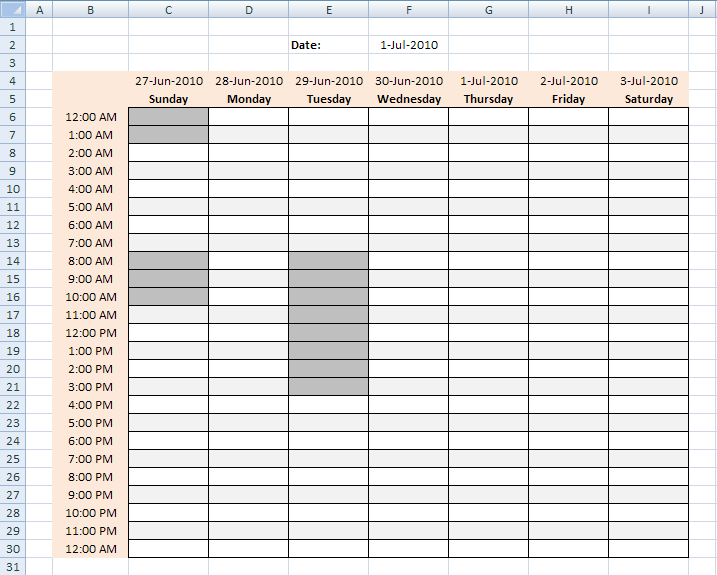
In a previous post I created a simple weekly schedule with dynamic dates, in this post I am going to highlight hours using date and time ranges, demonstrated in the picture above Here are some random date and time ranges:
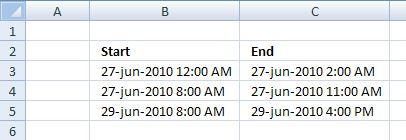
Try change date in cell F2 and see how any other week has no highlighted cells (hours).
How to highlight cells in a weekly schedule (conditional formatting)
Conditional formatting does not accept cell references outside current worksheet.
But there is a workaround.
Create a named range for each column and use the named ranges in a conditional formatting formula.
Create named ranges
- Select sheet "Time ranges"
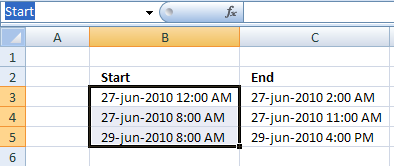
- Select range B3:B5
- Type "Start" in name boxand press Enter
- Select range C3:C5
- Type "End" in name box and press Enter
Create conditional formatting (Excel 2007)
- Select sheet "Weekly schedule"
- Select cell range C6:I30
- Press with left mouse button on "Home" tab on the ribbon
- Press with left mouse button on "Conditional formatting"
- Press with left mouse button on "New Rule.."
- Press with left mouse button on "Use a formula to determine which cells to format"
- Type in "Format values where this formula is true" window:
=SUMPRODUCT((C6>=Start)*(C6<End)) - Press with left mouse button on "Format..." button
- Select "Fill" tab
- Select a color
- Press with left mouse button on Ok
- Press with left mouse button on Ok
- Press with left mouse button on Ok
6. Weekly appointment calendar
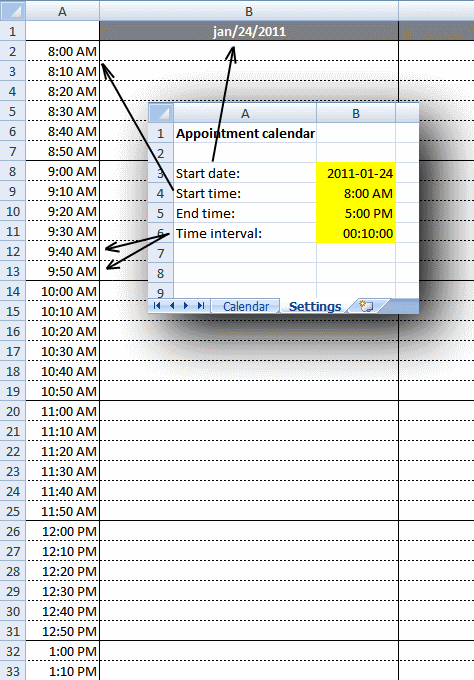
This weekly calendar is easy to customize, you can change calendar settings in sheet "Settings":
-
- Start date (preferably a Sunday or Monday)
- Start and end time
- Time interval
The calendar changes instantly based on the input values in sheet "Settings", then simply print the calendar.
Formula in cell B1:
This is a cell reference to sheet Settings and cell A3.
Formula in cell C1:
This returns the date in cell B1 and adds 1 meaning next day. Copy cell C1 and paste to cells to the right of cell C1.
Row 1 has the following cell formatting applied:
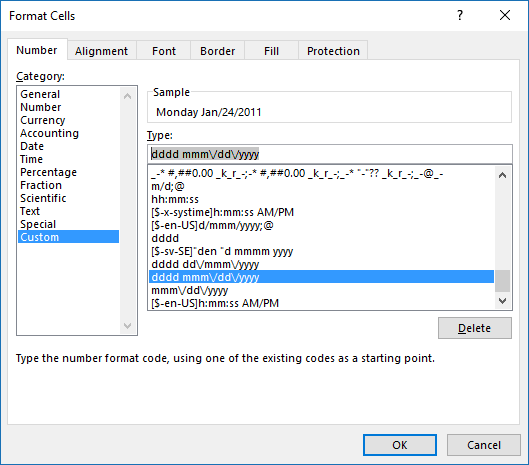
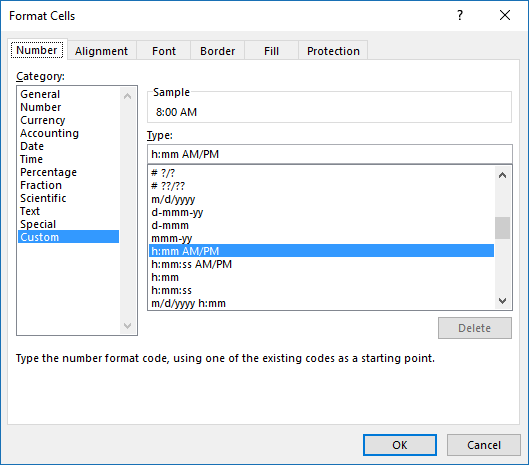
Simply select cell C1 and press CTRL+ 1 to open the "Format Cells" dialog box, shown in the above picture. dddd returns the weekday, mmm returns month name abbreviated to three letters. dd returns the day of the date and yyyy returns the year.
Formula in cell A2:
This is a cell reference to sheet Settings and cell B4.
Formula in cell A3:
Copy cell A3 and paste to cells below as far as needed.
Explaining formula in cell A3
Step 1 - Add time value to interval value
A2+Settings!$B$6
becomes
0.333333333+0.00694444444444444
and returns 0.340277777777778
Step 2 - Check if value is larger than end time
The greater than sign is a logical operator that evaluates if the value is greater than end time value, we only want time values inside the range given in sheet settings cell B3 and B4.
(A2+Settings!$B$6)>Settings!$B$5
becomes
0.340277777777778>0.708333333333333
and returns FALSE.
Step 3 - Return nothing if TRUE and date + time value if FALSE
The IF function has three arguments, the first one must be a logical expression. If the expression evaluates to TRUE then one thing happens (argument 2) and if FALSE another thing happens (argument 3).
IF((A2+Settings!$B$6)>Settings!$B$5,"",A2+Settings!$B$6)
becomes
IF(FALSE,"",A2+Settings!$B$6)
becomes
IF(FALSE,"",0.340277777777778)
and returns 0.340277777777778.
Step 4 - If above cell is empty return nothing
IF(A2="", "", IF((A2+Settings!$B$6)>Settings!$B$5, "", A2+Settings!$B$6))
and returns 0.340277777777778 formatted to 8:00 AM.
The image below shows the cell formatting applied to column A.
7. Schedule recurring expenses in a calendar
Below is an excel table containing recurring expenses and corresponding amounts, dates and recurring intervals. An excel table allows you to easily add/delete records without changing the formulas, in other words cell refs to the table are dynamic.
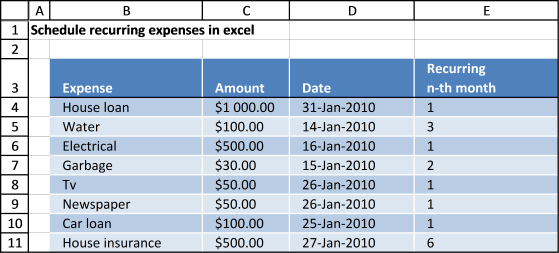
I am going to use this data set and create a calendar with each expense at the correct date (and recurring dates).
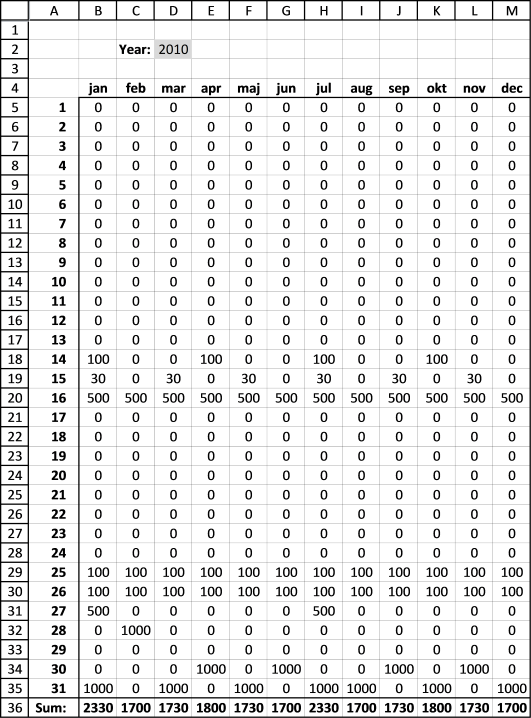
The data above is also dynamic, if you change the year in cell D2 formulas in cell range B5:M35 are recalculated.
Array formula in B5:
How to create an array formula
- Type the formula in the formula bar
- Press and hold CTRL + SHIFT
- Press Enter once
If you made it right the formula is now surrounded by curly brackets, like this: {=array_formula} in the formula bar.
Copy formula
Copy cell B5 and paste it down to cell B35.
Copy cell range B5:B35 and paste it to the right all the way to M5:M35.
Formula in B4:
Copy cell B4 and paste it right to cell M4.
Formula in B36:
Copy cell B36 and paste it to the right to cell M36.
Explaining array formula in cell B5
Step 1 - Calculate date in cell B5
DATE($D$2,MONTH(B$4),$A5)
becomes
DATE(2010,1,1)
and returns 2010-1-1 (1/1/2010)
Step 2 - Build an array of recurring dates
EDATE(TRANSPOSE(Table1[Date]), (ROW($1:$1000)-1)*TRANSPOSE(Table1[Recurring
n-th month]))
I can't show all dates here, there are two many. 1000 recurring dates for each date. I have to simplify, I am now using three recurring dates moving forward.
{40209, 40192, ... , 40570}
Step 3 - Check if current date is equal to any of the recurring dates and return the corresponding amount
IF(DATE($D$2, MONTH(B$4), $A5)=EDATE(TRANSPOSE(Table1[Date]), (ROW($1:$1000)-1)*TRANSPOSE(Table1[Recurring
n-th month])), TRANSPOSE(Table1[Amount]), "")
returns {"","",... ,""}
Step 4 - Sum values
SUM(IF(DATE($D$2, MONTH(B$4), $A5)=EDATE(TRANSPOSE(Table1[Date]), (ROW($1:$1000)-1)*TRANSPOSE(Table1[Recurring
n-th month])), TRANSPOSE(Table1[Amount]), ""))
becomes
SUM({"",...,""})
and returns 0 (zero) in cell B5.
Get Excel *.xlsx file
Schedule-recurring-expenses-in-excel-2
8. Count groups in calendar
Question:
Sam asks:
Is there a formula that can count blocks
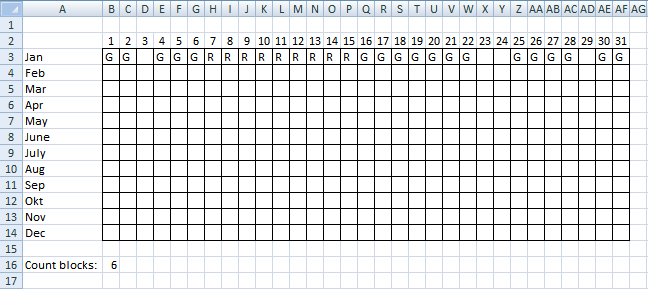
For eg in your picture (see picture above) if the green blocks had the letter G and the Red blocks had the letter R and I had to return 4 as the answer -3G + 1R
Is this possible through a formula?
Answer:
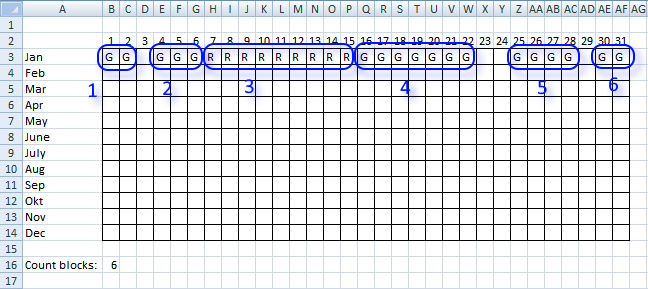
The image above shows the groups in row 3, the formula in cell B16 counts the number of groups.
Formula in B16:
Explaining formula in cell B16
Step 1 - Check if next cell is not equal to current cell
--($B$3:$AE$3<>$C$3:$AF$3)
returns {0, 1, ..., 0}
Step 2 - Check if cells are empty
--($C$3:$AF$3<>"")
returns {1, 0, ... , 1}
Step 3 - Check if first cell is not empty
=SUMPRODUCT(--($B$3:$AE$3<>$C$3:$AF$3), --($C$3:$AF$3<>""))+($B$3<>"")
($B$3<>"")
returns TRUE
Step 4 - All together
=SUMPRODUCT(--($B$3:$AE$3<>$C$3:$AF$3), --($C$3:$AF$3<>""))+($B$3<>"")
becomes =5+TRUE
and returns 6.
9. Free School Schedule Template
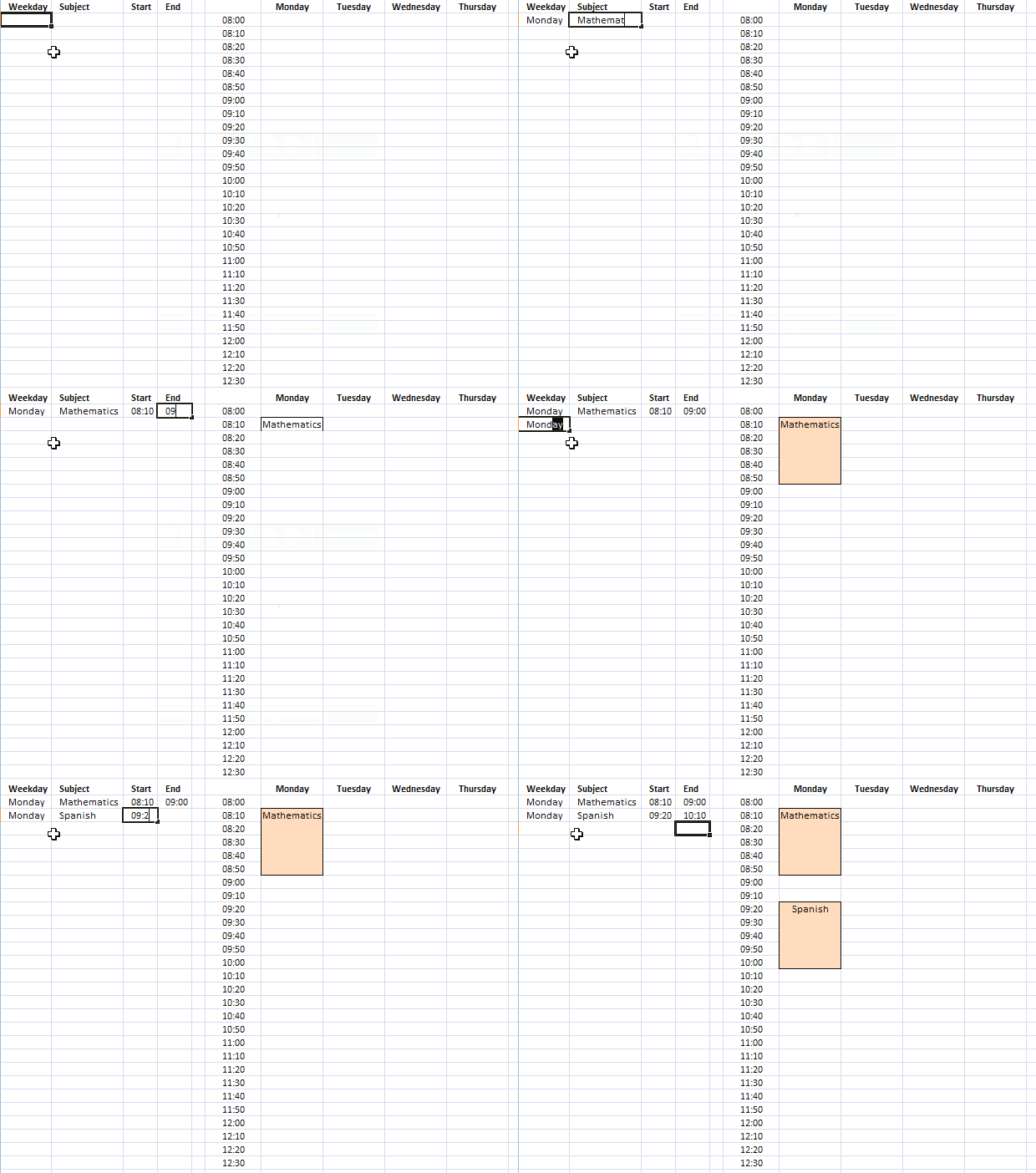
This template makes it easy for you to create a weekly school schedule, simply enter the time ranges and the formula takes care of the rest. See the animated image above.
The time ranges are entered in an Excel defined Table that expands automatically when new values are added, no need for dynamic named ranges.
The template has hours divided into 10-minute intervals, follow the instructions below and you will with ease create another interval if you prefer to use that.
If you don't like the look of the ranges I am using you can easily change the conditional formatting color that highlights the ranges in the schedule.
There is a workbook for you to get at the very end of this article.
How I created this dynamic template
The schedule contains formulas, conditional formatting, and an Excel defined Table, it updates instantly when you add/delete new records.
Weekdays
- Select cell G1
- Type Monday
- Select cell H1
- Type Tuesday
Repeat above steps for remaining cells and weekdays in cell range H1:M1.
10-minute intervals
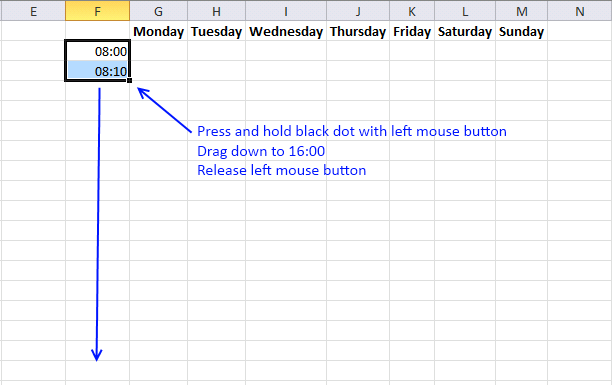
- Select cell F2
- Type 8:00
- Select cell F3
- Type 8:10
- Select cell range F2:F3
If you want to use a 12-hour clock AM/PM then simply select all time values in column F and press CTRL + 1 to open a dialog box that allows you to change cell formatting.
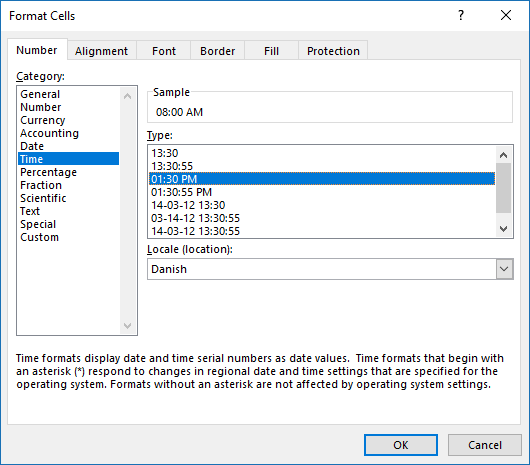
Press with left mouse button on "Time" and then pick a format that you prefer.
Create headers
- Select cell A1
- Type Weekday
- Select cell B1
- Type Subject
- Select cell C1
- Type Start
- Select cell D1
- Type End
Create Excel defined Table
- Select cell A1.
- Press CTRL + T to create an Excel defined Table.
My table looks like this:
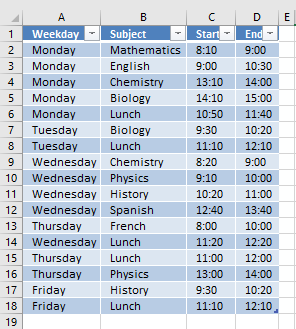
It contains some random data.
Enter array formulas
- Select cell G2
- Press with left mouse button on in the formula bar
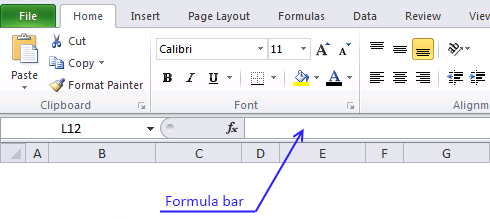
- Type:
=IFERROR(IF(SUMPRODUCT((Table1[Start]=$F2)*(G$1=Table1[Weekday]))=0, "", INDEX(Table1[Subject], SUMPRODUCT((Table1[Weekday]=G$1)*(Table1[Start]=$F2)*(MATCH(ROW(Table1[Weekday]), ROW(Table1[Weekday])))))), "")
- Press and hold Ctrl + Shift
- Press Enter
Copy array formula
- Select cell G2
- Copy cell (Ctrl +c)
- Select cell range H2:M2
- Paste (Ctrl + v)
- Select cell range G2:M2
- Copy (Ctrl + c)
- Select cell range C3:M50
- Paste (Ctrl + v)
Create conditional formatting
- Select cell range G2:M50
- Go to tab "Home"
- Press with left mouse button on "Conditional Formatting" button
- Press with left mouse button on "New Rule..."
- Press with left mouse button on "Use a formula to determine which cells to format"
- Type =SUMPRODUCT((G$1=Weekday)*($F2=>Start))
in "Format values where this formula is TRUE" field.
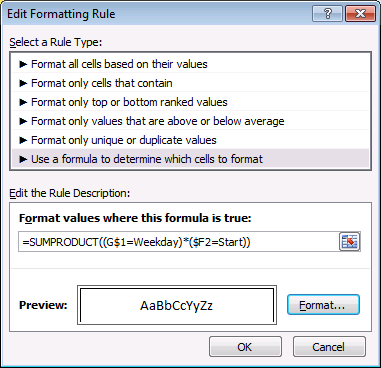
- Press with left mouse button on "Format..." button
- Press with left mouse button on Border tab
- Press with left mouse button on to create three borders
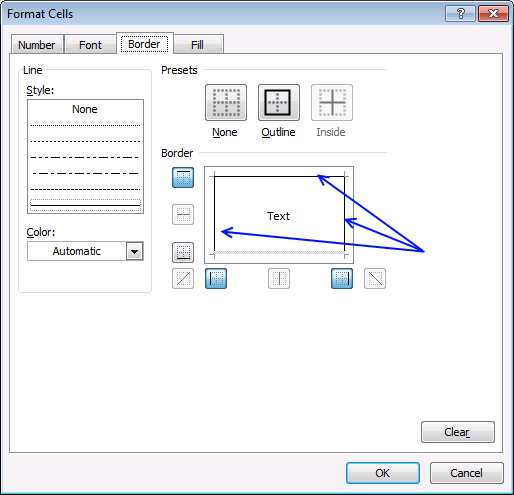
- Press with left mouse button on OK
- Press with left mouse button on OK
Repeat above steps with remaining conditional formatting rules:
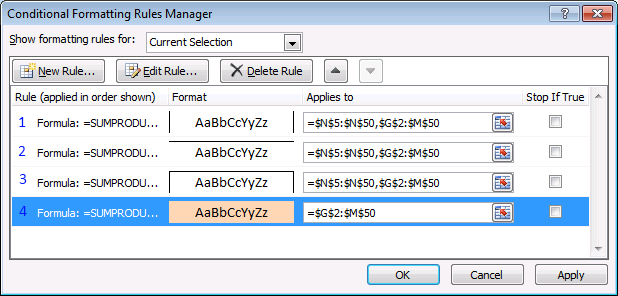
The border and fill formatting are also shown in the picture above.
1 : =SUMPRODUCT((G$1=Weekday)*($F2>=Start)*($F2<End))
2: =SUMPRODUCT((G$1=Weekday)*($F2=End))
3: =SUMPRODUCT((G$1=Weekday)*($F2=Start))
4: =SUMPRODUCT((G$1=Weekday)*($F2>=Start)*($F2<End))
10. Populate cells dynamically in a weekly schedule
Here is a picture of the schedule sheet:
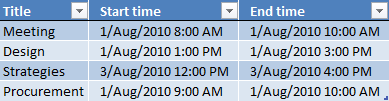
From the above picture we see that:
On the 1 of August from 8:00 AM to 10:00 AM the word "Meeting" will populate two cells on weekly schedule.
On the 1 of August from 9:00 AM to 10:00 AM the word "Procurement" will populate one cell on weekly schedule, shared with "Meeting"
On the 1 of August from 1:00 PM to 3:00 PM the word "Design" will populate two cells on weekly schedule.
On the 3 of August from 12:00 PM to 4:00 PM the word "Strategies" will populate four cells on weekly schedule.
Now let us see what happens if we change the date in cell F2 to 9-Aug-2010.
Formula in C4:
Explaining formula in cell C4
Step 1 - Return weekday number
The WEEKDAY function converts a date to a weekday number from 1 to 7 based on when week starts.
WEEKDAY($F$2,1)
becomes
WEEKDAY(40391,1)
and returns 1.
Step 2 - Calculate first date in week
$F$2-WEEKDAY($F$2,1)+1
becomes
40391-1+1
and returns 40391.
If your week starts on a Monday then change the formula to $F$2-WEEKDAY($F$2,1)+2
Formula in D4:
Copy cell C5 and paste it into cells E4:I4
Array formula in C6:
Copy cell C6 and paste it into cell range C6:I29.
Explaining formula in cell C6
The array formula uses cell references that points
Step 1 - Identify events based on date and time
Cell reference C$4 is locked to row 4, the column reference changes only when the cell is copied to another column, this makes sure that the formula only gets values from row 4 (dates).
Cell reference $B6 is locked to column B, the row reference changes only when the cell is copied to another row, this makes sure that the formula only gets values from column B (time value).
The formula checks if the current cell is inside one or more event ranges.
(C$4+$B6)>=Table1[Start time])*((C$4+$B6)<Table1[End time])
becomes
(40391)>=Table1[Start time])*((40391)<Table1[End time])
and returns {0;0;0;0}. This means that 8/1/2010 12:00 AM has no events scheduled.
Step 2 - Convert array to event name if equal to 1
The IF function has three arguments, the first one must be a logical expression. If the expression evaluates to TRUE (1) then one thing happens (argument 2) and if FALSE (0) another thing happens (argument 3).
IF(((C$4+$B6)>=Table1[Start time])*((C$4+$B6)<Table1[End time]),Table1[Title],"")
becomes
IF({0;0;0;0},Table1[Title],"")
and returns
{"";"";"";""}.
Step 3 - Concatenate values
The TEXTJOIN function uses CHAR(10) as a delimiting character, this will display each event name on a new row in one cell.
TEXTJOIN(CHAR(10),TRUE,IF(((C$4+$B6)>=Table1[Start time])*((C$4+$B6)<Table1[End time]),Table1[Title],""))
becomes
TEXTJOIN(CHAR(10),TRUE,{"";"";"";""})
and returns "" (nothing) in cell C6.
Conditional formatting
I highlighted populated cells using a conditional formatting formula:
11. Populate multiple cell values in a single cell in a weekly schedule - vba
Katerina Georgiadou asks:
Answer:
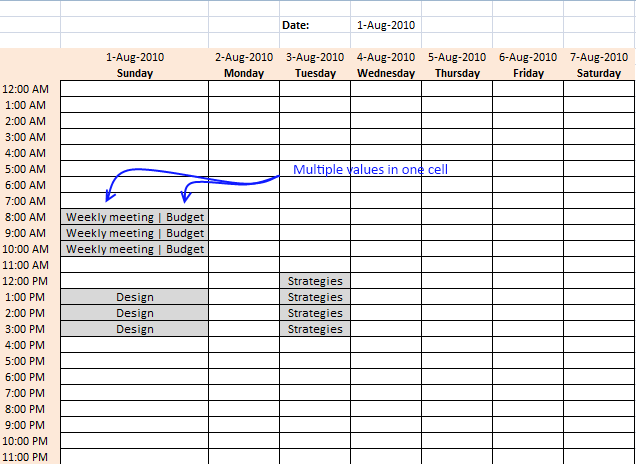
VBA code
Function Lookup_concat(SearchDate As String, _
StartDate As Range, EndDate As Range, Return_val_col As Range)
Dim i As Long
Dim result As String
For i = 1 To StartDate.Count
    If (StartDate(i, 1) * 1) <= SearchDate Then If (EndDate(i, 1) * 1) > SearchDate Then
            result = result & Return_val_col.Cells(i, 1).Value & " | "
        End If
    End If
Next i
result = Left(result, Len(result) - 3)
Lookup_concat = Trim(result)
End Function
Where do I copy/paste vba code?
- Press Alt-F11 to open visual basic editor
- Select your workbook in project explorer
- Press with left mouse button on Module on the Insert menu
- Copy and paste the above user defined function
- Exit visual basic editor
12. Find empty hours in a weekly schedule
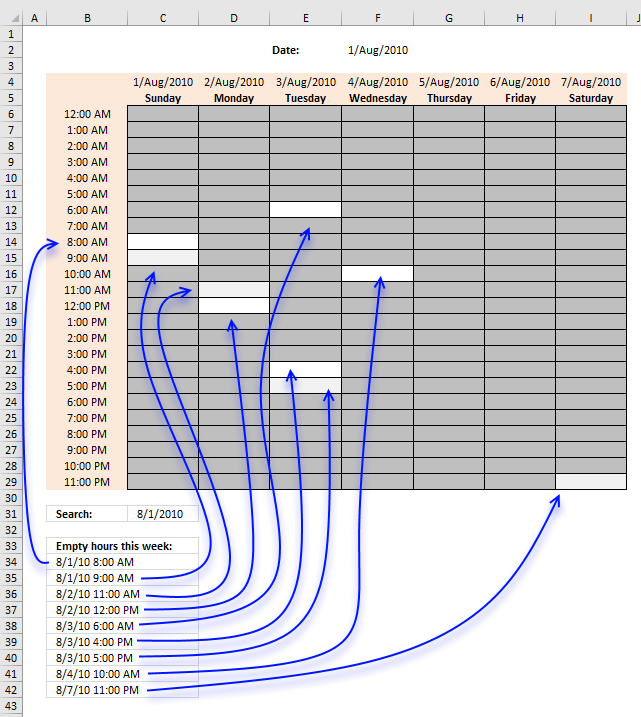
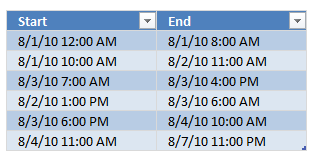
The image above demonstartes an array formula in cell B34 that extracts empty hours in a weekly calendar. I have created some random time ranges located in an Excel defined table. We are going to use these time ranges to extract empty hours between ranges.
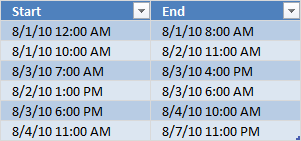
I have reused the same weekly schedule template as in this post: Highlight specific time ranges in a weekly schedule As you can see in the top picture, I have applied conditional formatting to "highlight" the random date/time ranges I created earlier.
You can easily spot empty hours but how do you filter all the empty hours for this week? The following array formula demonstrates how:
Array formula in B34:
Excel 365 dynamic array formula in cell B34:
How to enter an array formula
- To enter an array formula, type the formula in a cell.
- Press and hold CTRL + SHIFT simultaneously.
- Press Enter once.
- Release all keys.
The formula bar now shows the formula with a beginning and ending curly bracket telling you that you entered the formula successfully. Don't enter the curly brackets yourself.
How to copy the array formula
Copy cell B34 and paste it down as far as needed.
How to search in the chosen week
Cell C31 contains the start search date. In this example 8/1/2010. Simply create a cell reference to cell F2 if you want to search from the beginning of the chosen week.
Explaining the array formula in cell B34
Excel dates are whole numbers in Excel 1/1/1900 is 1 and 1/2/1900 is 2, and so on.
Hours are fractions, 1/24 is 1:00 AM, 12/24 is 12:00 PM, and so on.
Step 1 - Create a sequence of numbers from 1 to 168
There are 24 hours in one day and seven days in one week. 24*7 = 168 hours in one week.
ROW($1:$168)
returns
{1; 2; 3; ... ; 167; 168}
Step 2 - Divide numbers by 24
The division character lets you divide numbers in an Excel formula.
ROW($1:$168)/24
becomes
{1; 2; 3; ... ; 167; 168}/24
returns
{0.0416666666666667; 0.0833333333333333; 0.125; 0.166666666666667; ... ; 6.95833333333333; 7}.
Step 3 - Add sequence to search date
The plus sign lets you add numbers in an Excel formula.
$C$31+ROW($1:$168)/24
becomes
40391+{0.0416666666666667; 0.0833333333333333; 0.125; 0.166666666666667; ... ; 6.95833333333333; 7}
and returns
{40391.0416666667;40391.0833333333;40391.125; ... ;40397.9583333333;40398}
Step 4 - Multiply 24 by 60
The asterisk lets you multiply numbers in an Excel formula. 24 hours multiplied by 60 minutes equals 1440 minutes in one day.
24*60
retruns
1440.
Step 5 - Divide one with 1440
1/(24*60)
becomes
1/1440
and returns
0.000694444444444444
Step 6 - Subtract the array with one minute in Excel time
$C$31+ROW($1:$168)/24-1/(24*60)
becomes
{40391.0416666667;40391.0833333333;40391.125; ... ;40397.9583333333;40398} - 0.000694444444444444
and returns
{40391.0409722222; 40391.0826388889; 40391.1243055556; ... ;40397.9576388889; 40397.9993055556}
Step 7 - Check if date and time values are larger than END values
The TRANSPOSE function converts a vertical range to a horizontal range, or vice versa.
Function syntax: TRANSPOSE(array)
$C$31+ROW($1:$168)/24-1/(24*60)>TRANSPOSE(Table1[End])
becomes
{40391.0409722222; 40391.0826388889; 40391.1243055556; ... ;40397.9576388889; 40397.9993055556}>TRANSPOSE({40391.3333333333; 40392.4583333333; 40393.6666666667; 40393.25; 40394.4166666667; 40397.9583333333})
becomes
{40391.0409722222; 40391.0826388889; 40391.1243055556; ... ;40397.9576388889; 40397.9993055556}>{40391.3333333333, 40392.4583333333, 40393.6666666667, 40393.25, 40394.4166666667, 40397.9583333333})
and returns
{FALSE, FALSE, FALSE, ... , TRUE, TRUE}
Step 8 - Check if date and time values are smaller than the START values
This part of the formula creates Excel date and time values based on hours, it then compares these values with the time ranges in the Excel defined Table to determine if outside range.
The parentheses lets you control the order of operation.
($C$31+ROW($1:$168)/24-1/(24*60))<TRANSPOSE(Table1[Start])
returns
{FALSE, TRUE, TRUE, ... , FALSE}.
Step 9 - Filter hours not in time ranges
If the hour value is outside all ranges in Excel defined table the IF function returns the value and if FALSE then returns nothing "".
IF(($C$31+ROW($1:$168)/24-1/(24*60)>TRANSPOSE(Table1[End]))+(($C$31+ROW($1:$168)/24-1/(24*60))<TRANSPOSE(Table1[Start])), $C$31+ROW($1:$168)/24-1/(24*60), "")
becomes
IF({0,1,1, ... ,1,1}, {40391.0409722222; 40391.0826388889; 40391.1243055556; ... ;40397.9576388889; 40397.9993055556}, "")
and returns
{""; 40391.0826388889; 40391.1243055556; ... ;40397.9576388889; 40397.9993055556}
Step 10 - Count hour values
The FREQUENCY function calculates the frequency of how many date and time values are outside the ranges specified in the Excel-defined table.
FREQUENCY(IF(($C$31+ROW($1:$168)/24-1/(24*60)>TRANSPOSE(Table1[End]))+(($C$31+ROW($1:$168)/24-1/(24*60))<TRANSPOSE(Table1[Start])), $C$31+ROW($1:$168)/24-1/(24*60), ""), $C$31+ROW($1:$168)/24-1/(24*60))
becomes
FREQUENCY{""; 40391.0826388889; 40391.1243055556; ... ;40397.9576388889; 40397.9993055556}, $C$31+ROW($1:$168)/24-1/(24*60))
becomes
FREQUENCY{""; 40391.0826388889; 40391.1243055556; ... ;40397.9576388889; 40397.9993055556}, {40391.0409722222; 40391.0826388889; 40391.1243055556; ... ;40397.9576388889; 40397.9993055556})
and returns
{5; 5; 5; ... ; 6; 0}
Step 11 - Compare the sum to the number of ranges
If the frequency is equal to the number of ranges in the Excel defined Table then return the date and time value.
IF(FREQUENCY(IF(($C$31+ROW($1:$168)/24-1/(24*60)>TRANSPOSE(Table1[End]))+(($C$31+ROW($1:$168)/24-1/(24*60))<TRANSPOSE(Table1[Start])), $C$31+ROW($1:$168)/24-1/(24*60), ""), $C$31+ROW($1:$168)/24-1/(24*60))=ROWS(Table1[End]), ($C$31+ROW($1:$168)/24)-1/(24), "")
becomes
IF({5; 5; 5; ... ; 6; 0}=ROWS(Table1[End]), ($C$31+ROW($1:$168)/24)-1/(24), "")
becomes
IF({5; 5; 5; ... ; 6; 0}=6, {40391; 40391.0416666667; 40391.0833333333; ... ; 40397.9166666667; 40397.9583333333}, "")
and returns
{""; ""; ""; ""; ""; ""; ""; ""; 40391.3333333333; 40391.375; ""; ""; ""; ""; ""; ""; ""; ""; ""; ""; ""; ""; ""; ""; ""; ""; ""; ""; ""; ""; ""; ""; ""; ""; ""; 40392.4583333333; 40392.5; ""; ""; ""; ""; ""; ""; ""; ""; ""; ""; ""; ""; ""; ""; ""; ""; ""; 40393.25; ""; ""; ""; ""; ""; ""; ""; ""; ""; 40393.6666666667; 40393.7083333333; ""; ""; ""; ""; ""; ""; ""; ""; ""; ""; ""; ""; ""; ""; ""; ""; 40394.4166666667; ""; ""; ""; ""; ""; ""; ""; ""; ""; ""; ""; ""; ""; ""; ""; ""; ""; ""; ""; ""; ""; ""; ""; ""; ""; ""; ""; ""; ""; ""; ""; ""; ""; ""; ""; ""; ""; ""; ""; ""; ""; ""; ""; ""; ""; ""; ""; ""; ""; ""; ""; ""; ""; ""; ""; ""; ""; ""; ""; ""; ""; ""; ""; ""; ""; ""; ""; ""; ""; ""; ""; ""; ""; ""; ""; ""; ""; ""; ""; ""; ""; ""; ""; ""; 40397.9583333333; ""}
Step 12 - Extract the k-th smallest number
The SMALL function extracts the k-th smallest number in array based on the number in the second arguemnt. SMALL( array, k). This allows us to return different values in each cell.
SMALL(IF(FREQUENCY(IF(($C$31+ROW($1:$168)/24-1/(24*60)>TRANSPOSE(Table1[End]))+(($C$31+ROW($1:$168)/24-1/(24*60))<TRANSPOSE(Table1[Start])), $C$31+ROW($1:$168)/24-1/(24*60), ""), $C$31+ROW($1:$168)/24-1/(24*60))=ROWS(Table1[End]), ($C$31+ROW($1:$168)/24)-1/(24), ""), ROW(A1))
becomes
SMALL({""; ""; ""; ""; ""; ""; ""; ""; 40391.3333333333; 40391.375; ""; ""; ""; ""; ""; ""; ""; ""; ""; ""; ""; ""; ""; ""; ""; ""; ""; ""; ""; ""; ""; ""; ""; ""; ""; 40392.4583333333; 40392.5; ""; ""; ""; ""; ""; ""; ""; ""; ""; ""; ""; ""; ""; ""; ""; ""; ""; 40393.25; ""; ""; ""; ""; ""; ""; ""; ""; ""; 40393.6666666667; 40393.7083333333; ""; ""; ""; ""; ""; ""; ""; ""; ""; ""; ""; ""; ""; ""; ""; ""; 40394.4166666667; ""; ""; ""; ""; ""; ""; ""; ""; ""; ""; ""; ""; ""; ""; ""; ""; ""; ""; ""; ""; ""; ""; ""; ""; ""; ""; ""; ""; ""; ""; ""; ""; ""; ""; ""; ""; ""; ""; ""; ""; ""; ""; ""; ""; ""; ""; ""; ""; ""; ""; ""; ""; ""; ""; ""; ""; ""; ""; ""; ""; ""; ""; ""; ""; ""; ""; ""; ""; ""; ""; ""; ""; ""; ""; ""; ""; ""; ""; ""; ""; ""; ""; ""; ""; 40397.9583333333; ""}, ROW(A1))
becomes
SMALL({""; ""; ""; ""; ""; ""; ""; ""; 40391.3333333333; 40391.375; ""; ""; ""; ""; ""; ""; ""; ""; ""; ""; ""; ""; ""; ""; ""; ""; ""; ""; ""; ""; ""; ""; ""; ""; ""; 40392.4583333333; 40392.5; ""; ""; ""; ""; ""; ""; ""; ""; ""; ""; ""; ""; ""; ""; ""; ""; ""; 40393.25; ""; ""; ""; ""; ""; ""; ""; ""; ""; 40393.6666666667; 40393.7083333333; ""; ""; ""; ""; ""; ""; ""; ""; ""; ""; ""; ""; ""; ""; ""; ""; 40394.4166666667; ""; ""; ""; ""; ""; ""; ""; ""; ""; ""; ""; ""; ""; ""; ""; ""; ""; ""; ""; ""; ""; ""; ""; ""; ""; ""; ""; ""; ""; ""; ""; ""; ""; ""; ""; ""; ""; ""; ""; ""; ""; ""; ""; ""; ""; ""; ""; ""; ""; ""; ""; ""; ""; ""; ""; ""; ""; ""; ""; ""; ""; ""; ""; ""; ""; ""; ""; ""; ""; ""; ""; ""; ""; ""; ""; ""; ""; ""; ""; ""; ""; ""; ""; ""; 40397.9583333333; ""}, 1)
and returns
40391.3333333333 (8/1/2010 8:00:00 AM)
12.2. Highlight non-empty hours in a weekly schedule
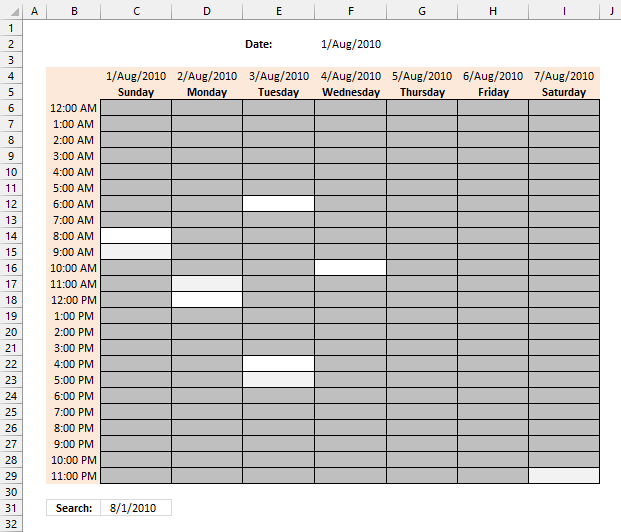
The image above shows a weekly schedule, the grey cells are occupied hours. The white cells are empty blank hours.
Conditional formatting formula applied to cell range C6:I29:
12.2.1 Explaining CF formula
Step 1 - Create a structured reference to an Excel Table
Table1[Start]
Step 2 - Workaround
The INDIRECT function returns the cell reference based on a text string and shows the content of that cell reference.
Function syntax: INDIRECT(ref_text, [a1])
INDIRECT("Table1[Start]")
Step 3 - Compare
C6>=INDIRECT("Table1[Start]"))
Step 4 - AND logic
The asterisk character lets you multiply numbers and boolean values in an Excel formula.
(C6>=INDIRECT("Table1[Start]"))*(C6<INDIRECT("Table1[End]"))
Step 5 - Add numbers and return total
The SUMPRODUCT function calculates the product of corresponding values and then returns the sum of each multiplication.
Function syntax: SUMPRODUCT(array1, [array2], ...)
SUMPRODUCT((C6>=INDIRECT("Table1[Start]"))*(C6<INDIRECT("Table1[End]")))
12.2.2 How to create Conditional Formatting
- Select cell range C6:I29.
- Go to tab "Home" on the ribbon.
- Press with left mouse button on the "Conditional Formatting" button on the ribbon.
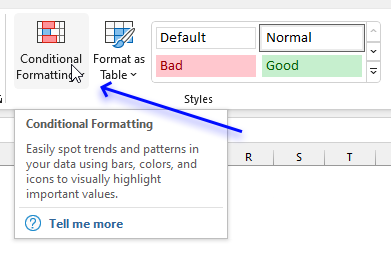
- A popup menu appears.
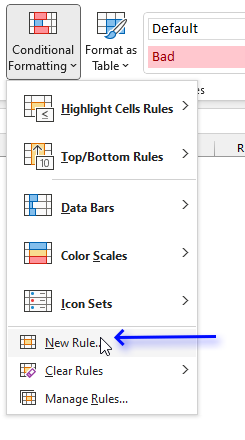
- Press with left mouse button on the "New Rule..." button.
- A dialog box appears.
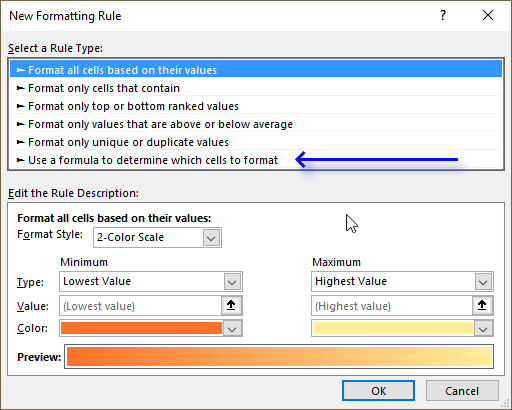
- Select "Use a formula to determine which cells to format".
- Copy/Paste the following formula in "Format values where this is true:":
=SUMPRODUCT((C6>=INDIRECT("Table1[Start]"))*(C6<INDIRECT("Table1[End]")))
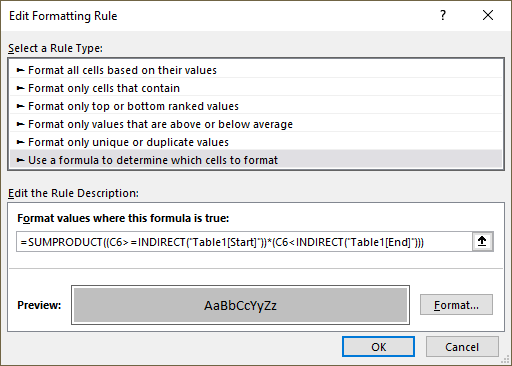
- Press with left mouse button on the "Format..." button. A new dialog box shows up.
- Press with left mouse button on tab "Fill" on the dialog box.
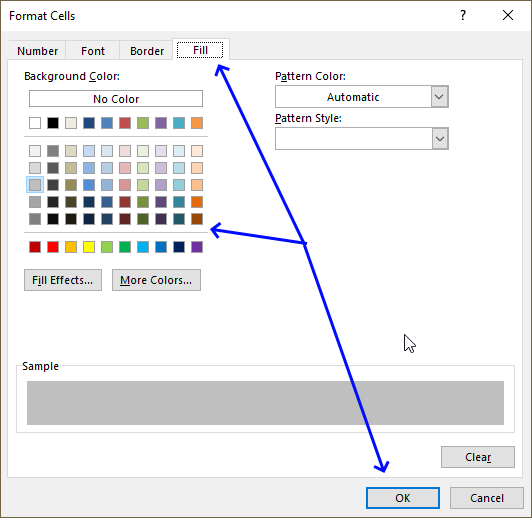
- Pick a color.
- Press with left mouse button on OK button.
- Press with left mouse button on OK button to return to the worksheet.
13. Pivot Table calendar
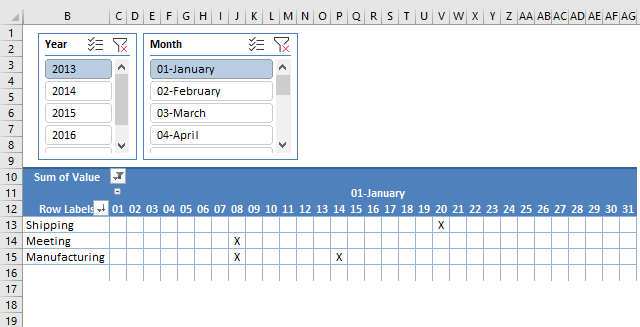
This article demonstrates how to build a calendar in Excel. The calendar is created as a Pivot Table which makes it lightning-fast and easy to navigate.
The image above shows the calendar with dates horizontally and month. Above the calendar are two slicers, they allow you to select what year and month to show.
Calendar Events are displayed vertically to the left of the dates, duplicate events are merged into one distinct event. An X shows the date and the given event.
There are no VBA macros or UDFs in this workbook, it is all powered by the Pivot Table and a few formulas. The events and the dates are located on another worksheet in an Excel Table.
13.1 Instructions
I saved my calendar data on another worksheet named "Data". The following step describes how to convert the calendar data to an Excel Table.
13.2 Create an Excel Table
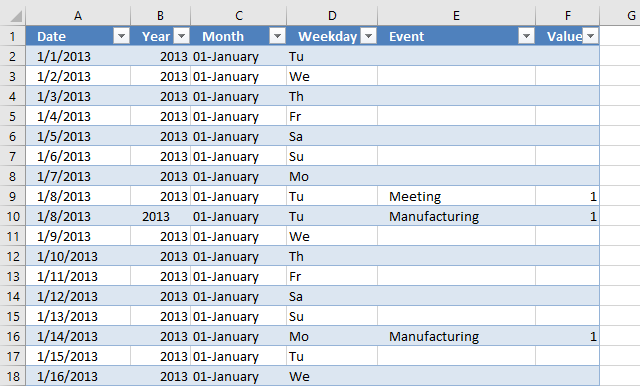
The reason I am using an Excel Table in this example is that they are easy to reference. They are called "structured references" and don't change when data is added or deleted. You need to adjust regular cell references when data is added or deleted, using Excel Tables make this problem go away.
You will often add data to the calendar so the Excel Table will be a huge time saver. We will link the Pivot Table data source to the Excel Table in a later step. The steps below describe how to set up the data for the calendar.
- Create a new worksheet, I named my worksheet "Data".
- Type header names shown in the picture below.
- Create an Excel Table.
- Select headers.
- Go to tab "Insert" on the ribbon.
- Press with left mouse button on "Table" button and a dialog box appears.
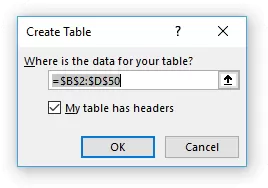
- Press with left mouse button on check box "My table has headers".
- Press with left mouse button on OK to apply settings and create an Excel Table.
13.2.1 Populate Date column
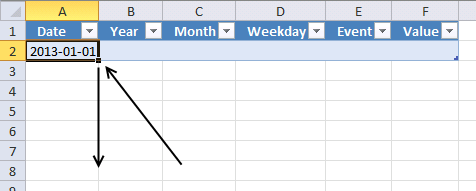
The Calendar needs a record for each date or you won't see dates that have no events. It is easy to add many dates to the calendar in no time, see steps below.
- Select cell A2, see image above.
- Type the first date 1/1/2013.
- Press and hold on the black dot.
- Drag down a few hundred rows depending on how many dates you want in your calendar.
13.2.2 Add formulas to Excel Table
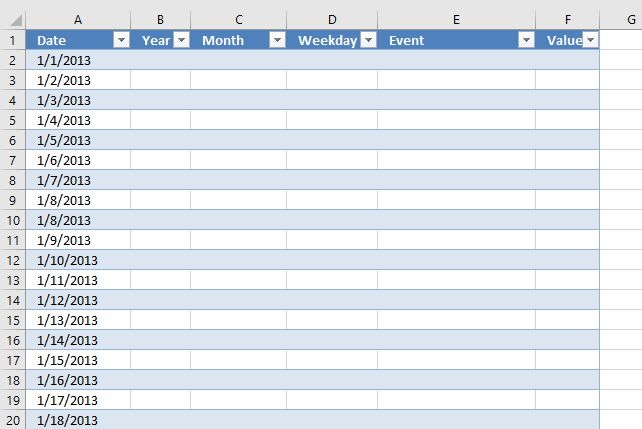
The next steps demonstrate how to add formulas to the Excel Table, they extract the year, month and weekday from the date in column A.
The first formula in cell B2 extracts the year from the corresponding date on the same row. The Pivot Table will use this value to populate a slicer that will be located above the Pivot Table calendar.
- Select cell B2.
- Type:
=YEAR([@Date])
- Press Enter.
[@Date] is a structured reference pointing to a value in column A on the same row as the formula.
When you press Enter after typing the formula in cell B2 the Excel Table will automatically copy the formula in cell B2 to cells below in the Excel Table. This is another great feature that saves you time.
- Select cell C2
- Type:
=INDEX({"01-January";"02-February";"03-March";"04-April";"05-May";"06-June";"07-July";"08-August";"09-September";"10-October";"11-November";"12-December"},MONTH([@Date]))
This formula will add a number before the month name, this to make sure that the months are in the correct order when populated in the slicer.
- Select cell D2
- Type:
=INDEX({"Mo";"Tu";"We";"Th";"Fr";"Sa";"Su"},WEEKDAY([@Date],2))
The following formula creates a blank in column E if the date is missing in column A.
- Select cell E2
- Type:
=IF([@Date]<>""," ","")
This formula returns 1 in column F if the event is equal to a blank (space character).
- Select cell F2
- Type:
=IF([@Event]<>" ",1,"")
13.3 Insert Pivot Table
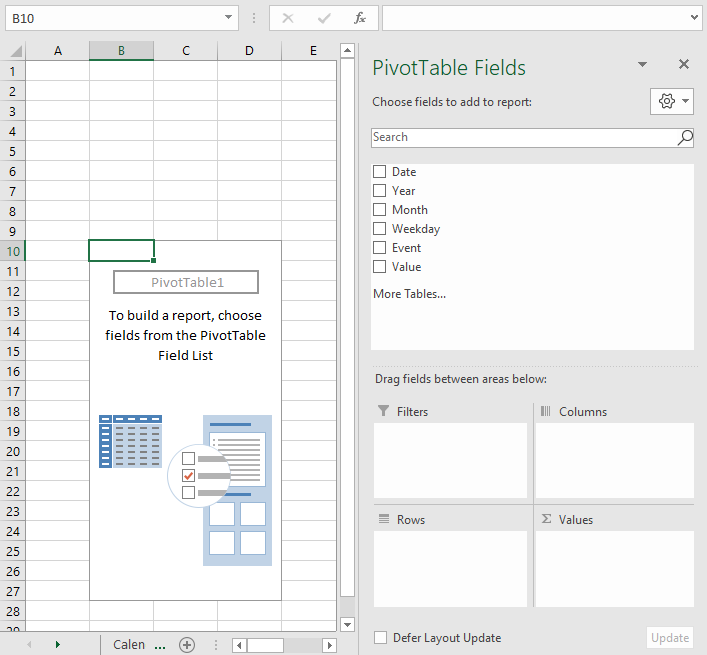
A Pivot Table is a feature in Excel that is perhaps the most powerful of all features but also least known. It allows you to quickly summarize and analyze data, it is incredibly fast and easy to work with.
The image above shows an empty Pivot Table placed on a worksheet, the task pane to the right allows you to quickly configure the Pivot Table. The task pane appears automatically when you select any cell in the Pivot Table and disappears when you go outside the Pivot Table.
-
- Go to a new sheet, I named it "Calendar".
- Go to tab "Insert" on the ribbon.
- Press with left mouse button on "Pivot table" button located on the ribbon.
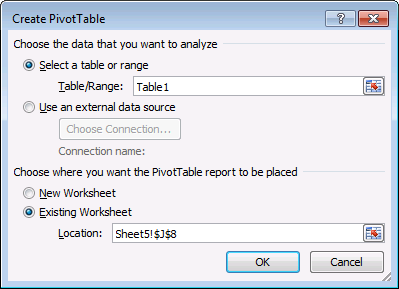
- Select your Table and a where to put the Pivot Table.
- Press with left mouse button on OK button.
13.4 Configure Pivot Table settings
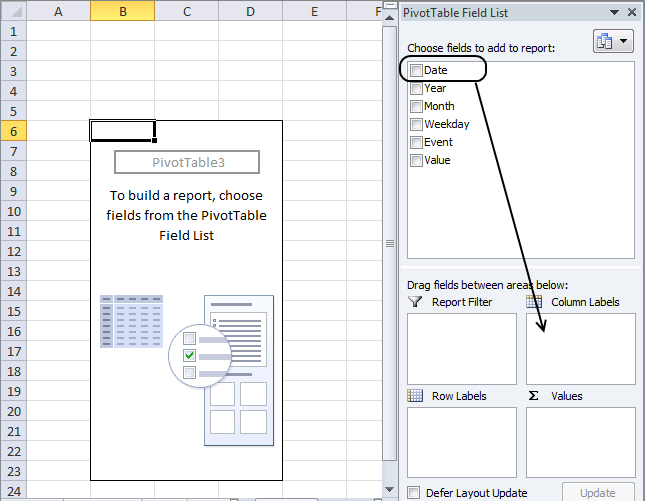
The Task Pane contains fields representing column header names in your Excel Table. Press and hold on a specific field and then drag to the desired area. Detailed instructions below.
-
- Press with left mouse button on any cell in the Pivot Table.
- The PivotTable Field list appears to the right.
- Left-press and hold on "Date" field, drag it down to Column Labels area. Release left mouse button. See image above.
- Repeat with "Month" field.
- Press with left mouse button on and drag "Event" to Row Labels area.
- Press with left mouse button on and drag "Value" to Values area.
13.4.1 Change Value field setting
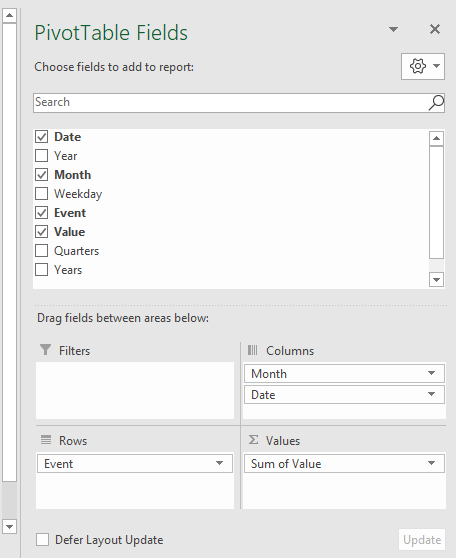
The fields appear in the desired area when you release the left mouse button. They now have a black arrow pointing down next to the field name.
You can press with left mouse button on this arrow with left mouse button to access more settings for a given field. A context menu or pop-up menu appears, press with left mouse button on a menu item to open a dialog box or perform an action.
-
- Press with mouse on the black arrow next to Value in Values area, see image below.
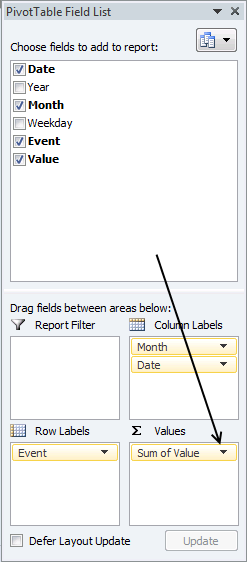
- Press with mouse on "Value field settings...".
- Go to "Summarize value field by" tab.
- Select Sum, see image below.
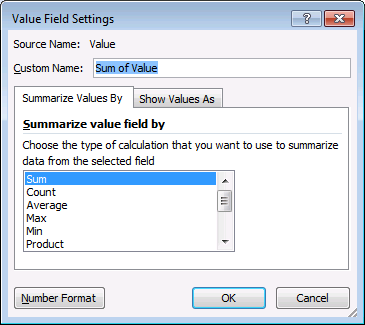
- Press with left mouse button on OK button.
- Press with mouse on the black arrow next to Value in Values area, see image below.
Field "Count of Value" changes to "Sum of Value" in the Values area.
13.4.2 Change cell formatting
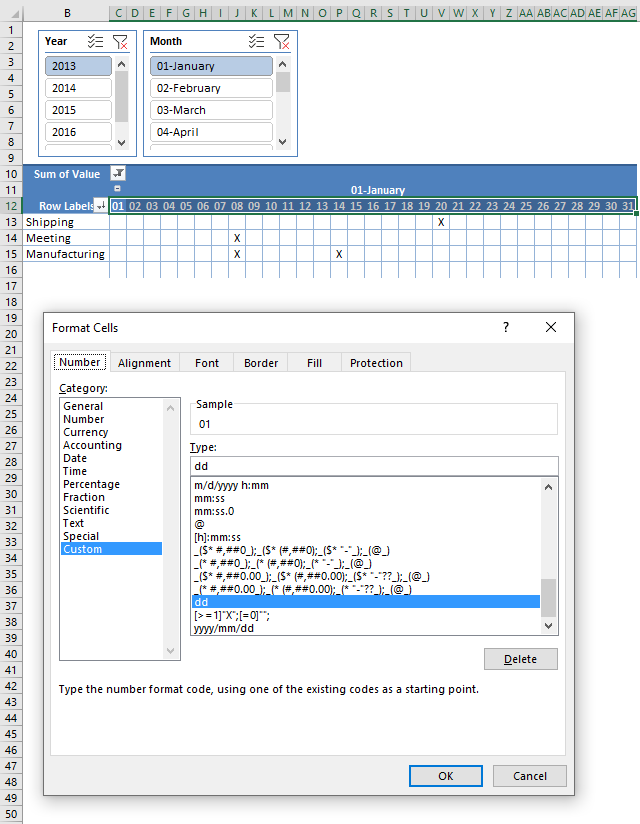
-
- Select all dates displayed on the pivot table.
- Press with right mouse button on on selected cells and a pop-up menu appears.
- Press with left mouse button on "Format cells..." and a dialog box shows up.
- Go to tab Number.
- Select category "Custom".
- Type D.
- Press with left mouse button on OK button to apply changes.
13.5 Create slicers
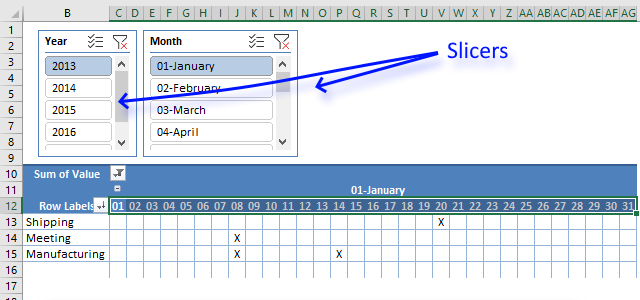
Slicers let you control what the Pivot Table will show, press with left mouse button on an item in the slicer to select it and the Pivot Table changes accordingly.
Thee are two buttons next to the slicer name, the first one lets you select multiple items in the slicer. The second button clears the selection.
-
- Press with left mouse button on any cell on the pivot table to show tab "Pivot Table Analyze" on the ribbon..
- Go to tab "Pivot Table Analyze" on the ribbon.
- Press with left mouse button on "Insert slicers" button and a dialog box appears.
- Select Year and month.
- Press with left mouse button on OK button.
- Move slicers above the pivot table.
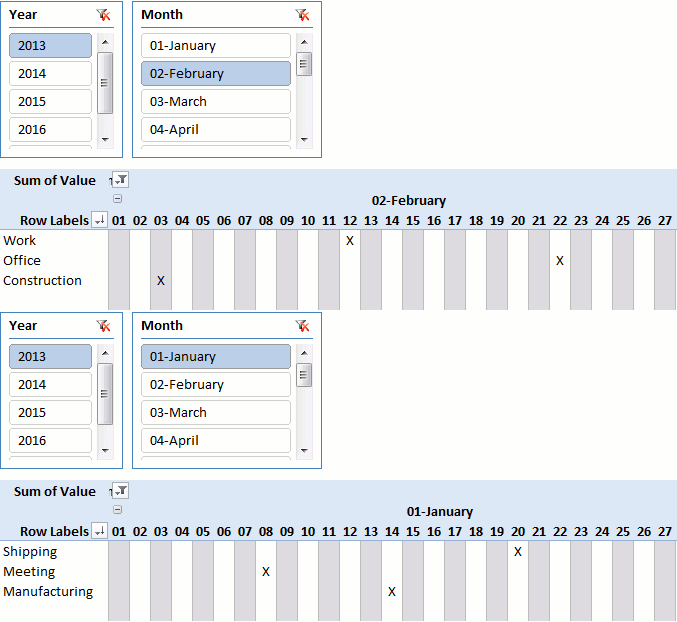
- Press with left mouse button on 2013 and 01 - January and the Pivot Table changes showing only events for January 2013.
13.6 Change pivot table field settings (cell width)
13.6.1 Change cell width to 21
-
- Select all date columns in the Pivot Table.
- Press with left mouse button on with left mouse button and hold on a line separating the column letters.
- Drag with mouse until width is 21.
13.6.2 Autofit column widths on update
-
- Press with right mouse button on on a date in the Pivot Table.
- Select "PivotTable options..."
- Go to tab Layout & Format
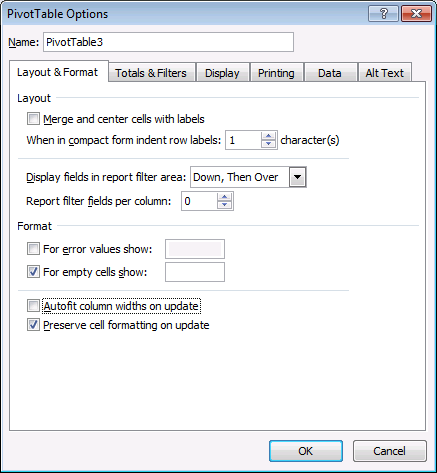
- Uncheck "Autofit column widths on update".
- Press with left mouse button on OK button-
Recommended articles
Have you ever wanted Excel to react automatically when something changes in your spreadsheet? With Event Code in VBA you […]
13.7 Use text in a Pivot Table
A Pivot Table is designed to work with numbers, however, there is a workaround that allows you to display text.
Pivot tables can´t use text as values so you need to format values to show text. 1 = X and 0 = "" (nothing)
-
- Select all cell values, see image below.
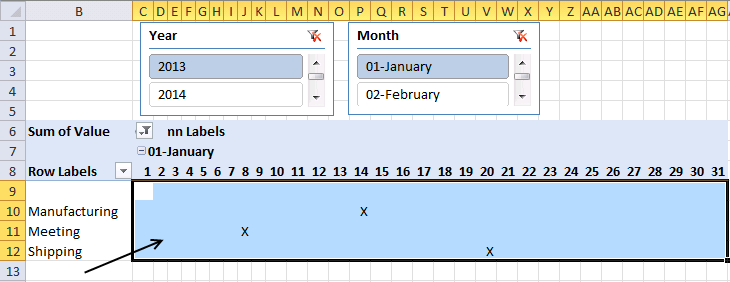
- Press with right mouse button on on selected values.
- Press with mouse on "Format Cells..." to open the "Format Cells" dialog box.
- Select category Custom, see image below.
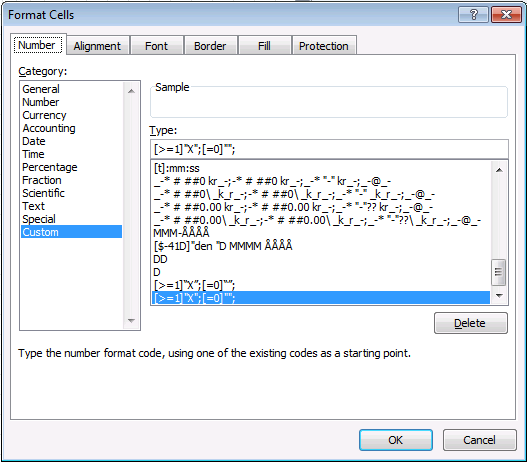
- Type: [>=1]"X";[=0]"";
- Press with left mouse button on OK.
- Select all cell values, see image below.
Read more here: Displaying Text Values in Pivot Tables without VBA
13.8 Change Pivot Table design
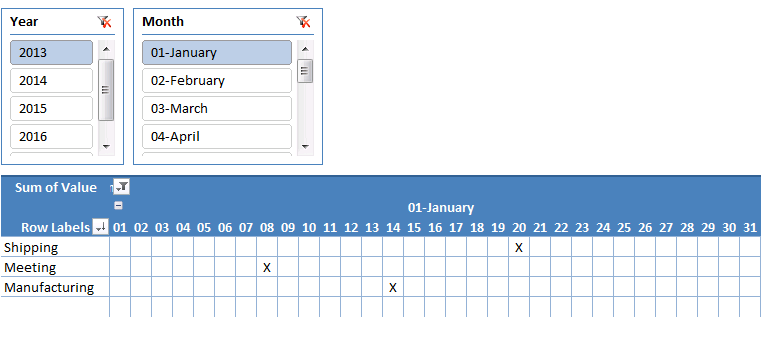
-
- Select a cell on the pivot table
- Go to tab "Design" on the ribbon
- Select a pivot table style that you prefer.
13.9 Optional - Refresh pivot table automatically
You need to refresh the Pivot Table each time you edit or add/delete values in the Excel Table. Press with right mouse button on on any cell in the Pivot Table to open a context menu.
Press with mouse on "Refresh" and the Pivot Table recalculates using the new values in the Excel Table. There is a workaround that lets you skip this, however, it requires a small macro. See link below.
Recommended articles
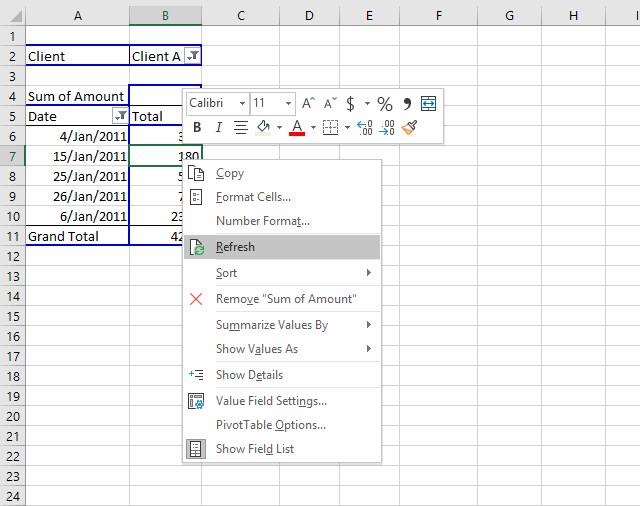
Table of Contents How to create a dynamic pivot table and refresh automatically Auto refresh a pivot table 1. How […]
13.10 Animated image
Recommended articles
- Create a PivotTable to analyze worksheet data
- How to Create a Pivot Table in Excel - Contextures
- Overview of Excel tables
Calendar category
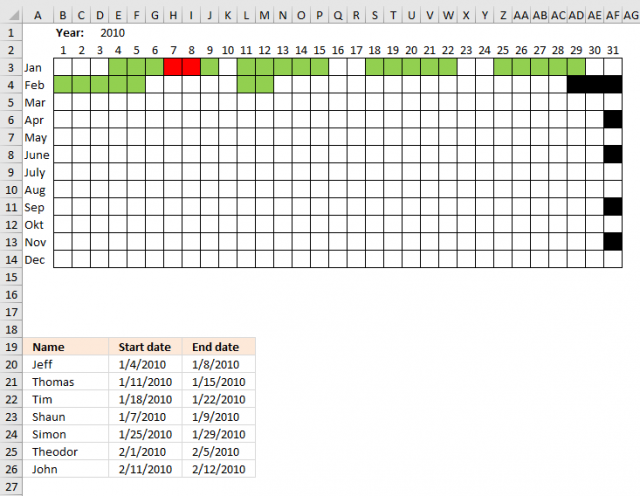
Table of Contents Plot date ranges in a calendar Plot date ranges in a calendar part 2 Highlight events in […]
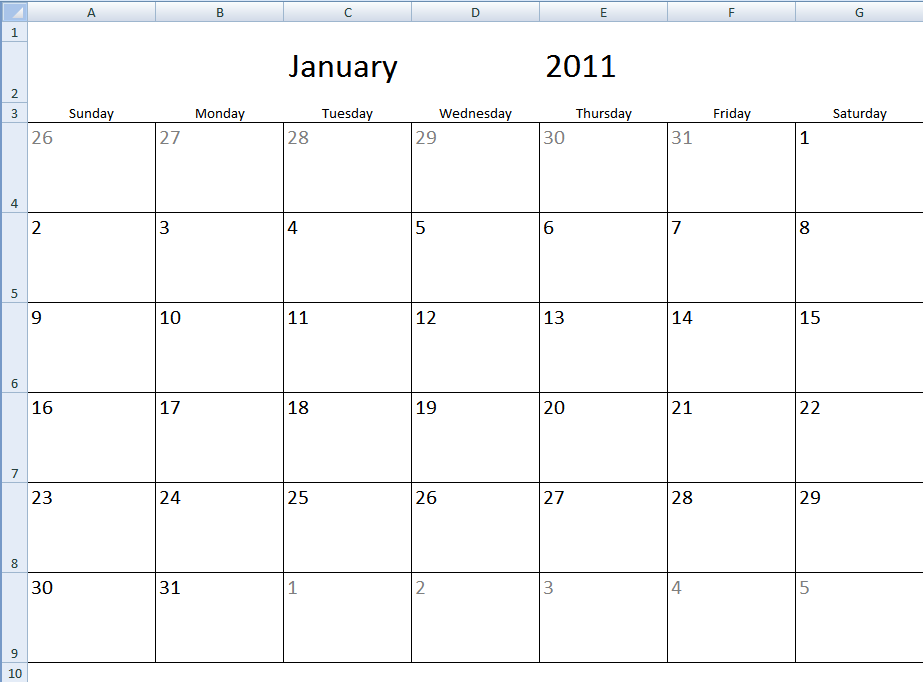
Table of Contents Monthly calendar template Monthly calendar template 2 Calendar - monthly view - Excel 365 Calendar - monthly […]
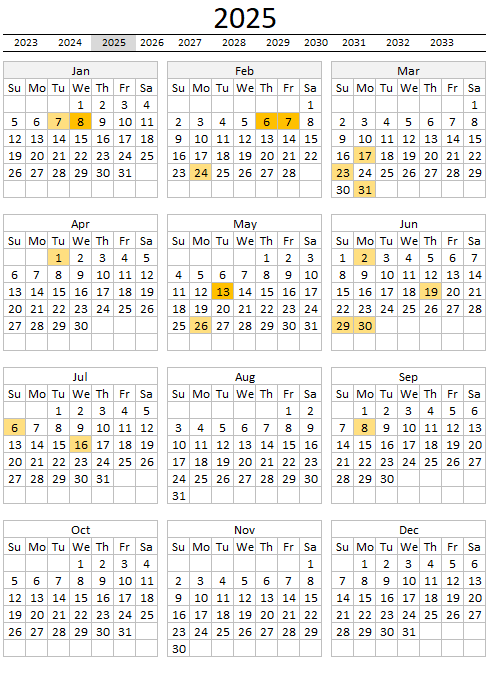
The image above demonstrates a calendar in Excel that allows you to: Add events. An event contains a date and […]
If then else statement category
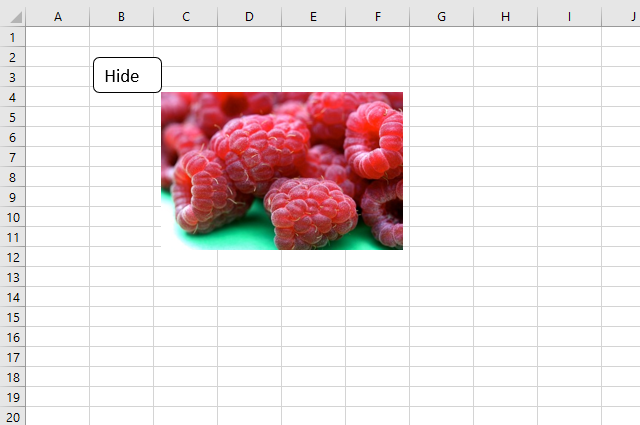
This article explains how to hide a specific image in Excel using a shape as a button. If the user […]
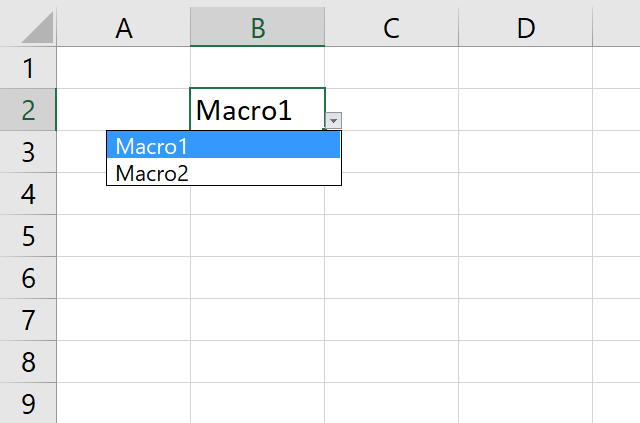
This article demonstrates how to run a VBA macro using a Drop Down list. The Drop Down list contains two […]
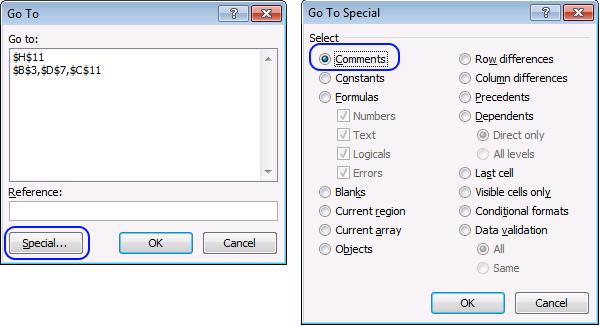
Did you know that you can select all cells containing comments in the current sheet? Press F5, press with left […]
Macro category
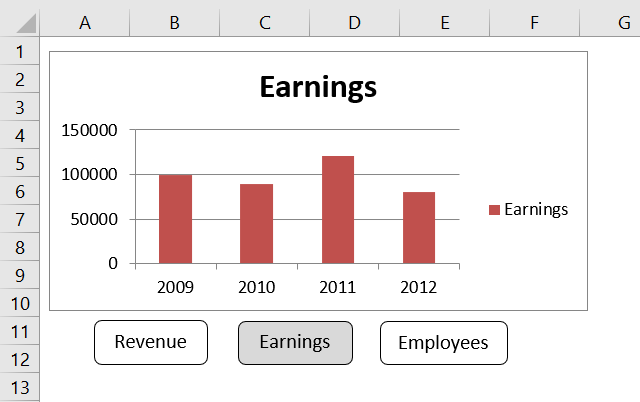
Table of Contents How to create an interactive Excel chart How to filter chart data How to build an interactive […]
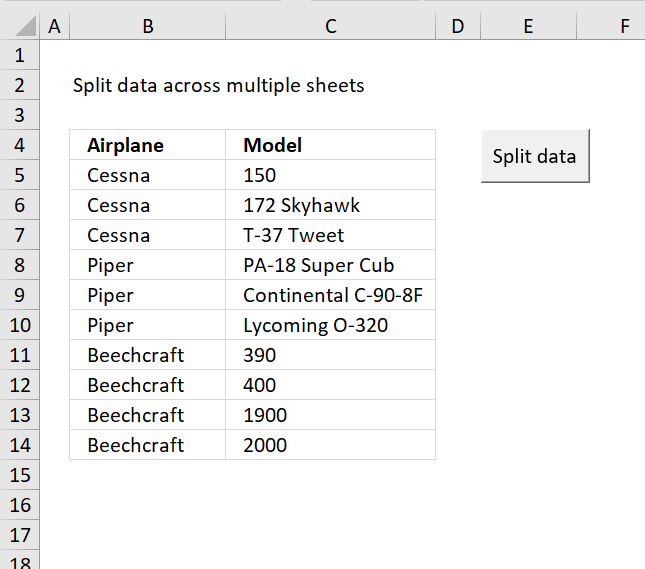
Table of Contents Split data across multiple sheets - VBA Add values to worksheets based on a condition - VBA […]
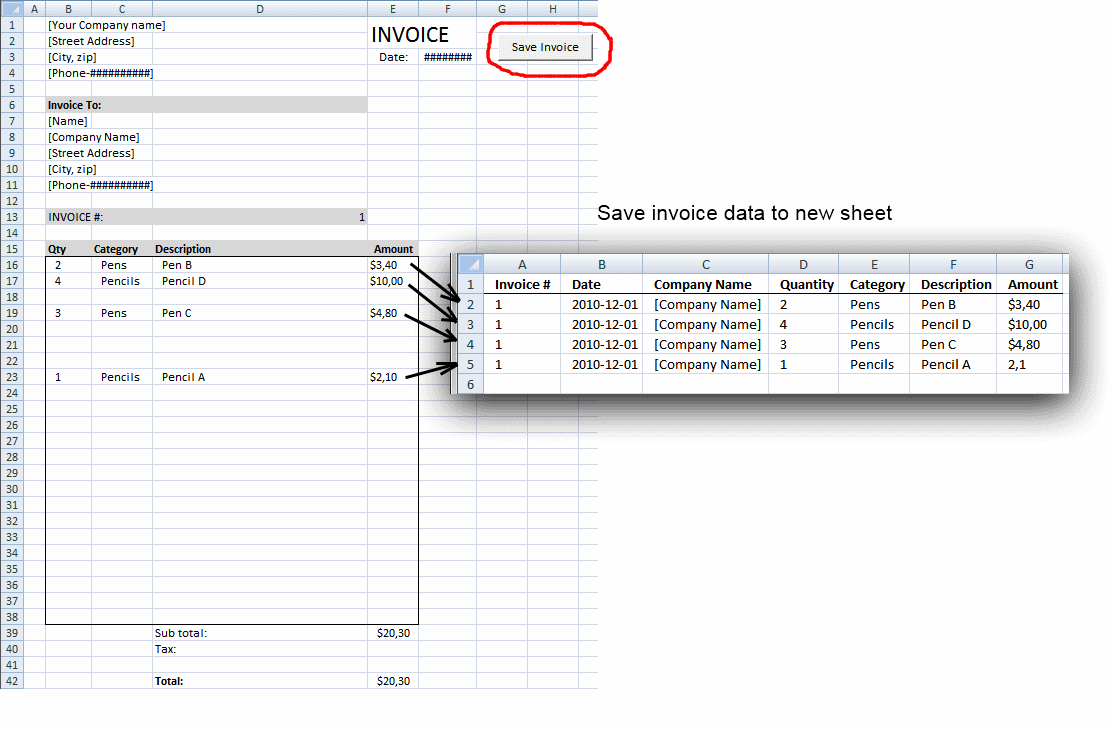
Table of contents Save invoice data - VBA Invoice template with dependent drop down lists Select and view invoice - […]
Excel categories
113 Responses to “Excel calendar”
Leave a Reply
How to comment
How to add a formula to your comment
<code>Insert your formula here.</code>
Convert less than and larger than signs
Use html character entities instead of less than and larger than signs.
< becomes < and > becomes >
How to add VBA code to your comment
[vb 1="vbnet" language=","]
Put your VBA code here.
[/vb]
How to add a picture to your comment:
Upload picture to postimage.org or imgur
Paste image link to your comment.

Oscar..Thanks for this brilliant formula.
One more question for the Calendar that you have set up above can we have a excel formula which will give us a below table
StarWk EndWk Name
1 2 G
4 6 G
7 15 R ... and so on
Sam,
Read this post: https://www.get-digital-help.com/extract-dates-from-a-cell-block-schedule-in-excel/
Hello Oscar,
I think this is a great schedule template! Thank you! I have been playing around with it and here is my question. On the schedule sheet I want to be able to continue adding different titles and times i.e. continuing the list. How can I do that (bit of an excel novice here) so that it continues to populate as the first three lines do?
Best,
John
John,
Let's say you wish to add 3 more titles, so your range becomes from row3 to row8:
COMPLICATED WAY:
Replace formula as follows:
=IFERROR(INDEX(Schedule!$B$3:$B$8,SMALL(IF(((C$4+$B6)>=Schedule!$C$3:$C$8)*((C$4+$B6)=Start)*((C$4+$B6)<End), ROW(Start)-MIN(ROW(Start))+1, ""), 1)), "") + CTRL + SHIFT + ENTER. or COMMAND + RETURN on a mac.
and just modify the named ranges (INSERT/NAME/DEFINE) then change the ranges from row 5 to row 8 for each of the names (End, Start and Title).
Cheers.
Cyril.
Hi Oscar (Create-a-weekly-schedule)
I am trying to use the weekly planner where it has to summarise in the Monthly plans in excel. Some what i received templates from various sources. But not exactly.
When i select first week i should be able to enter the details(description) of it and for 2nd, 3rd, 4th week the dates should change at the same time the data which i updated for the first week should not appear there. so that i can plan/update for every week.
In the Monthly sheet when i select particular month then the summary of all 4 weeks should appear there.
Thanks you
Babu
weird my reply got mixed up:
=IFERROR(INDEX(Schedule!B3:B8,SMALL(IF(((C$4+$B6)>=Schedule!C3:C8)*((C$4+$B6)<Schedule!D3:D8),ROW(Schedule!C3:C8)-MIN(ROW(Schedule!C3:C8))+1,""),1)),"") should be the complicated formula changes
the easiest is just to change the ranged names and modifying the range for each category from 5 to 8 assuming you wish to add 3 more titles (from row 3 to 8 therefore)
Still wondering why my reply got truncated and mixed up...
Cyril
Cheers Cyril!! I took the easy route and modified the ranges!
Best,
John
Cyril,
Thanks for commenting! WordPress removes html characters https://codex.wordpress.org/Writing_Code_in_Your_Posts
John,
You could create dynamic named ranges:
https://www.get-digital-help.com/create-a-dynamic-named-range-in-excel/
hello,
I need your support regarding your above material - Schedule recurring expenses in a calendar.
I tried to use your formulas in LibreOffice 3.4.4(linux) and into any others OpenOffice versions but it doesn't work. It give me next errors - error 508 or #value! .
What do I have to do to convert your excel formulas into libreoffice format,please?!
Thank you in advance for your answers and helping!
Hey.
I'm testing this function but putting the calendar transmuted, put the dates vertically and horizontally put the hours. I do not think it works and the matrix. Do not know how to send an example.
Thanks, I learn to like it a lot to your page.
(translated with google)
Hi,
I have a question, please help me! What should I change if I have two different which start and end the same date time ? As it is now, only the first one is displayed. How I can divide them in order to see both of them?
Katerina Georgiadou,
you can´t unless you use vba:
Excel udf: Lookup and return multiple values concatenated into one cell
Katerina Georgiadou,
See attached file:
Populate-time-ranges-in-a-weekly-schedule-version2.xlsm
In the "Calculating dates (formula)" section, Step #2... you misspelled "January" as "Janauary" in the latter part of the formula.
Thanks!
[...] number formats, and much more. Home > Excel > Automate > Use a calendar to filter a table← Previous post - Use a calendar to filter a tableFiled in Automate, Drop down lists, Excel, Search/Lookup on Sep.10, [...]
[...] How to create an Excel calendar with VBA [Get Digital Help] [...]
when i add an entry to Friday 12:30, it does not work?
TCKY,
I opened the attached excel file and added an entry to Friday 12:30 - 14:00 and it works here.
Your excel version?
hi,i am new to this blog.
but i hope i can get some help regarding a pop up calendar.
i found a pop up calendar for excel 2007,but when i try to use it in Excel 2010, the calendar does not appear. and i think it is related with the format behind.can you help me?thank you for any help and sorry for my poor English.
auni,
Do you have a link to the pop up calendar?
https://www.fontstuff.com/vba/vbatut07.htm
[...] Free School Schedule Template [...]
Hi, I would like to use this example with my data set however I'd like to visually show the amount of events per date to understand when are we the busiest, slowest, etc. and be able to forecast using this data. Ideally I would like some sort of data bar or color change indicating the level for each date (Jan 1 has 10 items while Jan 2 has 3 and I can visually see that in each cell instead of seeing numbers or a solid color for each cell (here yellow and blue).
Also, would it be possible to have Excel know the days of the month as in first 7 days of the month, last day of the month, every Monday of the month. I'd eventually like to get formulas set up to tell me on average how busy we are during these periods.
David,
Here is a basic example. It looks like a heat map.
Highlight dates VBA
Private Sub Worksheet_Change(ByVal Target As Range)
Set Rng = Range("B5:H10")
If Target.Address = "$C$2" Or Target.Address = "$E$2" Then
    'Remove previous formatting
    With Rng.Interior
        .Pattern = xlNone
        .TintAndShade = 0
        .PatternTintAndShade = 0
    End With
    For Each Cell In Rng
        For Each Value In Worksheets("Data").Range("Data1")
            If Int(Value) = Cell Then a = a + 1
        Next Value
        'Set color
        If a > 0 Then
            With Cell.Interior
                .Pattern = xlSolid
                .PatternColorIndex = xlAutomatic
                .ThemeColor = xlThemeColorAccent4
                .TintAndShade = 1 - (a / 4)
                .PatternTintAndShade = 0
            End With
        'Reset counter a
        a = 0
        End If
    Next Cell
End If
Get the Excel *.xlsm file
Calendar-David.xlsm
Contact me if you want more features.
[...] David asks: [...]
I teach and would like to show the schedule for a 3 month period. For instance, I teach CLASS 1 Every Monday and Wednesday at 1000 from 1 April 2013 until 14 April 2013. I teach CLASS 2 Every Monday and Wednesday at 1400 from 1 April 2013 until 14 April 2013. I teach CLASS 3 Every Tuesday and Thursday at 1000 from 1 April 2013 until 14 April 2013
Hi there, I have opened the above calendar - and want to add another filter so I can categorize the events/meetings in the calendar, e.g. Reg for regulatory, Ben for benefits - and so when you press with left mouse button on these it will filter for that type - is this possible to do? Appreciate your help with this.
Thanks
Rosie,
Yes, it is possible. Upload a file and I´ll see what I can do.
Have you already published the code? I am very interested as i do not only want to use this, i also want to understand the reason behind it.
Hi,
I have a year maintenance schedule. There are some reccuring rule, 1 month, 3 month and so on. I want to automatically populate my schedule into weekly term. can anyone help me for the formula expression in excel,
Zul,
Can you explain in greater detail?
Hi OScar is it ok to send you a sample file I need looking at, it is a course schedule calendar that uses spin boxes to see each time slot occupied, I ma having trouble designating the time slots.
I implemented your instructions above and it has solved a series of problems for me, but also created some new ones.
Yours sincerely
John Dalton
Hi,
thank you for this awesome guide.
Is it possible to make this work if more than one event takes place per date? For instance a shipping and a manufacturing meeting on the same date? How would one go about doing that?
Thanks!
Did you ever get an answer? I have the same issue. Thanks!
Dawn,
It seems to work fine, see date 1/8/2013 in the attached file. I only inserted a new record to the Excel defined table and used the same date.
Pivot-table-calendarv2.xlsx
This looks great. I would like to use your calendar for a spreadsheet I am currently using. How could I just change where the event section refers to so it will automatically fill in the dates and times I need.
To give you context, I have a spreadsheet with many columns containing information. In these columns I have multiple dates/times for some rows. I want to create a calendar that references my spreadsheet with its events. I would like to keep all the information so that I can look at it still in the detailed view of each day (with all the information from the original row and also be able to reference the spreadsheet for multiple times for the same row but on different days).
How would I change the where the events are referenced to?
How could I add another option for dates so that I can add an extra column of values (I have the original dates column in the data sheet linked to another workbook?
Hi I have used the VBA to bring multiple values into one cell is great and works very well. However what do I need to do to have the multiple values to be separated by a new row in the cell rather than by the "|"? I'm a novice at using VBA's but managed to copy across the VBA script, but do not know how to change it to do what I'm looking for. Any help available would be much appreciated.
The spreadsheet also seems to be limited by the three data entry rows in the sample spreadsheet. Is there a way to dynamically change the range based on rows with values?
Per-Olof,
I need to do to have the multiple values to be separated by a new row in the cell rather than by the "|"?
The spreadsheet also seems to be limited by the three data entry rows in the sample spreadsheet. Is there a way to dynamically change the range based on rows with values?
This custom function allows you to enter multiple ranges. It also also separates values with a new row. Remember to format cells and "Wrap text"
Function Lookup_concat(SearchDate As String, _
StartDate As Range, EndDate As Range, ParamArray Return_val_col() As Variant)
Dim i As Long
Dim result As String
For i = 1 To StartDate.Count
    If (StartDate(i, 1) * 1) <= SearchDate Then
        If (EndDate(i, 1) * 1) >= SearchDate Then
            For Each Rng In Return_val_col
                    result = result & Rng.Cells(i) & Chr(10)
            Next Rng
        End If
    End If
Next i
result = Left(result, Len(result) - 1)
Lookup_concat = Trim(result)
End Function
Get the Excel file
Populate-time-ranges-in-a-weekly-schedule-version3.xlsm
Thanks this is brilliant!
I've been playing around with it now and the macro works really great.
Regards,
Per-Olof
This is brilliant. is it possible to use with one date rage rather than start & end and multiple titles on different calendar rows. i did attempt an update to the UDF must unsuccessful.
ie: i have one date multiple times with different titles. A calendar box for one date that has 5 rows, so when there are multiple titles i do a offset+1 row.
Hope you can assist.
Much appreciated. Tammy
[…] I got this codes from: https://www.get-digital-help.com/excel-calendar-vba/ […]
Hi
As a excel novice I have been working through an issue trying to use the above. I am trying to populate a calendar for the year with service intervals that change based on run hours. The below formula kind of works but not if the service starts and ends on the same day e.g. start 23rd ends 23rd.
=IFERROR(INDEX(Schedule!$B$3:$B$7, SMALL(IF((C$4>=Schedule!$C$3:$C$7)*(C$4=Schedule!$D$3:$D$7), ROW(Schedule!$C$3:$C$7)-MIN(ROW(Schedule!$C$3:$C$7))+1, ""), 1)), "")
I am trying to get the dates to populate with the service interval description e.g 1500, over the dates it would last. Example start and end dates are shown below.
Service Start date End Date
1500 23 Apr 15 23 Apr 15
48000 22 Sept 15 27 Sept 15
Any help would be greatly appreciated as I have reached my limit (a while back).
Thanks
Thanks for the help.
If I wanted to make this a schedule that lasted a week and instead of times it was more focused on dates. Would that work?
What I mean, I have someone scheduled to work from June 3 - June 7. and I want that to populate a schedule. It would have there job role displayed on each day(like how on this one is says meeting). What would I need to change?
Thanks
Hi,
This is great and incredibly helpful!
Is there a way to modify this to schedule not just monthly, but weekly/bi-weekly/daily expenses as well? (specifically bi-weekly)
I have been looking at this as well as the post on creating a weekly schedule, but can't seem to figure it out.
Many thanks!
Dear Sir
Please I would like to know how to highlight 2nd and fourth Saturday and all sunday as weekend. Can you please suggest vba code or formula.
advance thanks.
Yours faithfully
buvanamali
[…] How to create an Excel calendar with VBA [Get Digital Help] […]
Hi,
Thank you so much for the helpful template. This is awesome! However, when I choose January, it gives me all N/A values, can you please let me know what's going on? Thanks
There seems to be an error in the Dec 31 calculation. Why is it showing $2330 when the recurring for the 31st should only be $1000? Can't seem to find where it is getting the extra amount from.
Deb,
You are right and I don't know why. I made a new smaller array formula, this one seems to work as intended.
Hi,
There seems to be a problem with values entered for the 1st of the month repeating for the last day of the month.
thanks,
Billy
Hi,
This is brilliant, thanks!
I was wondering whether it's possible to postulate multiple cells values, but in different columns? e.g. using the same answer you gave to Katerina Georgiadou, but instead of the result coming in the same column with a separator, it comes in a different column?
Thanks
Oscar, thank you for this tutorial. I successfully created a pivot table calendar. However, mine does not show the individual days of each month, as does yours in Step 6 (showing 31 days in January). How do I create that view?
Need some help please. I need the calendar and schedule on the same sheet and start times but no end times with multiple event entries to the calendar. I'll need to drop these onto existing worksheets for individual clients. When I try to alter the formulas to adapt them to each sheet I get all kinds of hung up. Help????
Hi David
When I try to alter the formulas to adapt them to each sheet I get all kinds of hung up.
Can you provide the sheet names?
Hello, this article is fantastic and it has helped me tremendously, thank you! I am trying to adapt this to use in a schedule that shows daily activity for multiple trainers at my company by month (Dates down column A, Trainer Names across Row 3). The source data I have is a list of dates (Start and End), with the name of the trainer and what they are scheduled to do along side each in separate columns.
I have tried changing the formula to incorporate an AND statement so that it will only populate the cell if the dates match up and if the Trainer also matches, but I cannot get it to pull results. How would I go about doing this?
This is the adapted formula that isn't working (Full_Detail is the activity I need it to show): =IFERROR(INDEX(Full_Detail, SMALL(IF(AND(((A4)>=Start_Date)*((A4)<End_Date),(Trainer)=$O$3), ROW(Start_Date)-MIN(ROW(Start_Date))+1, ""), 1)), "")
Any help is greatly appreciated, thank you.
Jon G
I think you need to use relative and absolute cell references combined.

This is the formula you need:
This formula changes cell refs as you copy and paste it to new cells.
You can read more here:
https://www.get-digital-help.com/absolute-and-relative-references-in-excel/
Hi Oscar, thanks ever so much for getting back to me on this. I still can't seem to get it working with your suggestions though. Am I doing something wrong?
This is the source data (linked to a SharePoint 2010 list): https://s22.postimg.org/xfxrky07l/Source_Data.png.
This is the schedule I am trying to populate using the formula: https://s13.postimg.org/u1sgdgkjr/Destination_Data.png.
I need the Schedule to populate with the correct information (Full_Detail) depending on Trainer and Start_Date. Staff Member 13 is the one I have been trying to get working but all the cells still appear empty. I feel I am close on this but not quite there, are you able to help please?
Jon G
I have been trying to get working but all the cells still appear empty.
If you use "Evaluate formula" on tab "Formulas" on your cell, which part of the formula results in an error?
Hi Oscar, this is great!!! you are a genius, How easy is it to modify this for recurring tasks (weekdays, weekly, monthly, quarterly and yearly) and maybe show a monthly view? Times are less important than just showing what is due on what day. I would be very interested in something like that. Please contact me directly if needed.
Tesh,
I made a calendar (monthly view) for you.
https://www.get-digital-help.com/calendar-monthly-view/
[…] Tesh asks: […]
I didn't understand why COLUMN($A$1:$BH$1)
Why reference to $BH$1?
Only formula COLUMN($A$1:$BH$1) gives result 1.
Nenad Deusic
I made a much smaller array formula and added a complete explanation, see article again.
Thank you for telling me.
I too would love to know how to have 2 events on the same day other than that its a great table
Mr. Oscar,
Sir your obviously a talented and generous guy. I am hoping you have a solution in my case. I have need to create a rotation schedule. Some of the code above looks like it might work but I'm having trouble getting started assembling it. I want to create a list with names for a crew of up to 200 guys in rows in column A, a start date in column B, and end Date in column C, a schedule ON shift in days in column D, and a schedule OFF time in days in Column F then a group of cells in columns to the right beginning from a sheets rotation schedule reference date that is manually updated for a given day in the year. Of course all of the start and end dates would be near and should be after the rotation schedule reference date by design so they would show up on the schedule. I want enough cells to the right to populate for a years worth of days from the rotation schedule reference date. I want to be able to take all of the cells between the start and end date and shade them in each row then when the last cell or end date cell is complete I want to use the column F schedule OFF time and skip that many days and then begin shading the next cell for the number of ON days from column D and then keep going until those days are complete and then begin the schedule OFF again until done then repeat ON and OFF then ON and OFF until complete to the end of the years worth of cells. Does this make sense? I am taking a persons first schedule which might not be an exact match of ON days and then projecting what it would be once ended based on a number of days cycle entered. Probably a drop list maybe. For example 28 days ON and 14 days OFF is most typical in my environment. It doesn't appear to be too complicated except I can't wrap my head around how to do it but I have trouble with simple things. I was not sure if could be done without VBA which I'm not savy with at all. I can use a lot of formulas but nesting all the functional requirements to satisfy this has me unable to break it down. I would greatly appreciate your help. Grateful in Advance, Keith
Can you help ne with this one
=SUM(IF(DATE($d$2,MONTH(b$4), $a5)=ENDATE(TRANSPOSE Table3"DATE"),(row($45:$1000)-1)*TRANSPOSE(Table,3"recurring n-th month")),TRANSPOSE(Table3"amount")''''))
I have tried changes the prentices and quotation marks around.
Charles,
I am not sure what you are trying to do, I can't see your workbook.
If you are not familiar with excel tables read this post:
Excel Tables
Is it possible to have this calendar not read a specific date but read something along the lines of 4th Wednesday, or 3rd Tuesday?
Also trying to get it populate more information than just the meeting name - such as location.
Thank you!
I love this template. I am trying to find a way to be able to show student schedules, and I think I could use this but I would have to alter it and I'm not completely sure what I am doing. I have students that come to me for a 3 week rotation. I want a monthly calendar that will highlight the time each student is with me and then also allows me to input schedules for each day. Example student one is with me for 7/3 to 7/23, then on 7/3 they have orientation, on 7/5 they have conference and department meeting. Etc.
Emily
Have you seen this calendar?
https://www.get-digital-help.com/calendar-monthly-view/
I think it will suit your requirements better.
Hi, your calendar is great for me. I want to add a new column D in the Data sheet and show the details in the calendar sheet (I added a new column right after the "Text:", how can I revise the array formula to show it properly?
Hello, thanks for this! I have data that I have pulled from Outlook. I have the date, start time, end time, and end date each in it's own field. I noticed you have your date and time combined into one field. If I want to populate the calendar (mine is in increments of 15 minutes, how would I format the formula to look for each piece of criteria (in its own cell) and populate properly on the calendar. I have created a calendar that is a revolving 91 day calendar beginning with =TODAY()-7. I want the user to be able to look one week backward if need be.
Kathy,
I think you are looking for this:
D_Start : Start Date
T_Start : Start Time
D_End : End Date
T_End : End Time
Hi Oscar,
Do you have either a 2D or 3D working example of this model?
Your model is quite interesting, but I need to create a roster for (say) Patient treatments.
So my user wants to see the patient (could be a Title so that now makes it a 2D model requirement); their treatments (could be several per patient throughout a day, evening or night shift) and which staff members will perform these treatments - so constraints and rostering issues. Plus my user wants to be able to edit/modify on the go ....
How would you approach this, please?
Thank you
Murray
PS we worked on the Yahoo historic stock data issue together.
Hey Oscar,
Thanks so much for your post on the weekly schedule.
I am currently planning my school schedule and I'm having a hard time managing time conflicts/overlaps.
For example,
I have Course 1 @ 8-9 am on Monday
and Course 2 @ 8-9 am on Monday as well.
What I think might work is:
1) When a duplication occurs on the left chart (day/subject/start/end), highlight both duplication time schedules
2) If time is in 10 min intervals and a course is about 1 hr, three's enough space to both course names in the conflicting time slot in the weekly calendar
3)Another idea for 2 is that a text dialogue can be added to the sheet permanently so that if you press with left mouse button on a conflicting time slot on the weekly schedule, the names of the courses that are in conflict can be depicted there.
Anyways thanks for your time. If you have any advice on the coding or how I should go about in this project or if my ideas would even work, I would greatly appreciate your feedback.
Joseph
So I just reviewed the main formula and I realized that to see conflicts, the course start and end has to be the same.
Another issue that occurs is:
Course 1 is lets say 9:00-11:50
Course 2 is at 9:30-12:50
^That type of overlap cant be detected.
Also, the highlight formula doesn't really help play a role in this overlap situation...
Looks like some form of excel VBS might be needed.
I appreciate the time and effort for for the help. Meanwhile, Imma try to find a solution. If my solution works, I'll post it here :D
Joseph
Oscar,
Why do you create an array of 1000 recurring dates for each date? Since your calendar is only a year long, even if there was a bill each day of the year, that would only require 365?
Hi Oscar,
Great article!
I believe this knowledge is helpful especially in Finance (for recurring payment) and Maintenance (recurring preventive maintenance) industry.
I just need to ask one thing. Based on my understanding from your method, I tried to manipulate the template a bit so that the expense(or in my case, tasks) is in the left side, with the schedule at the right side (instead of days at the y axis).
I'm trying to generate forecast of recurring maintenance activity on monthly basis instead of daily basis. However, I failed where the range of the first set of array data does not match range of second set of array data in sequence. For example, using date formula, with Month in x axis, data set is {Jan 2017, Feb 2017, ...Dec 2017}. However, using edate formula (with transpose) the data set starts with whatever date the first occurrence will be, such as {March 2017, ...}
Is there any workaround for this formula so that data set with edate formula will return TRUE or any number as long as it is contained within second data set, regardless of its sequence?
Hi Oscar,
I love your work here, but I was wondering if it could be duplicated for Google Sheets. It looks like Google Sheets does not recognize "lookup_concat" function.
The formula I used was:
=IFERROR(VLOOKUP(C$3&B5,Schedule!$A$4:$F$100,6,0),"")
I'm trying to create a better way to do a VLOOKUP function and populate calendar events to a dynamic weekly schedule. If you could help, I would be super grateful!
The problem I'm struggling with is to populate multiple cells in a column based on the start and end time of an event. For example, if I have a meeting starting at 7:00 AM and ending at 9:00 AM, I should see a span of cells moving from 7:00 AM to 9:00 AM with the cell populating with "Meeting".
Bonus problem: Also, have you figured out a way to assign a time value to an event or task? I want to create a snowball effect that all task cells will be assigned a time value and will populate empty cells on the calendar, based on priority. If you have any thoughts on this, I would be grateful!
Here's my spreadsheet: https://docs.google.com/spreadsheets/d/1agI2hbyoEEQKTXGpOTHE812Lp9nKMv-ayzyi7WuFdrs/edit?usp=sharing
Let me know your thoughts. Thanks!
Brad
Hi Brad
It looks like Google Sheets does not recognize "lookup_concat" function.
Yes, it is a custom Excel Function I made. It won't work in Google Spreadsheets.
I'm trying to create a better way to do a VLOOKUP function and populate calendar events to a dynamic weekly schedule
I am using this formula in Excel to populate cells in the calendar:
=IFERROR(INDEX(Title, SMALL(IF(((C$4+$B6)>=Start)*((C$4+$B6)<End), ROW(Start)-MIN(ROW(Start))+1, ""), 1)), "")
The named ranges Title, Start and End are cell references to the events.
If you convert those to cell references I believe the formula should work in Google Spreadsheets.
Thanks for commenting.
To update what I am looking to do from my last post, this is exactly what I am looking to do but need to show a few more columns from the schedule on the monthly view. I am not able to figure out how to add more columns to view. Can you advise how I can do that?
can you help me with Populate cells dynamically in a weekly schedule, what if its just time nothing else just time when the time is entered on a specific cell it would highlight the cells that it covers.. is that possible
Hi Oscar
Congratulations, for your job.
I would like to know, How can I do to add a field in USERFORM?
Warmest Regards
Wagner,
Try this:
https://www.excel-easy.com/vba/userform.html
Thank You!
I Want to Know how to set end date for individual expenses.
I have changed the time interval from 10 min to 15 min. Now the formatting for the following time are not working. i.e. top/bottom border and subject
15:30
16:15
17:00
17:45
18:30
19:15
19:30
20:00
example:
Monday Martial-Arts 17:00 18:00
I am missing the subject and the top border, if I change it to
Monday Martial-Arts 17:15 17:45
The bottom border is missing
So error times are the same for Start and End
Hi, I would need a help on case where event lasts for more than one day. I've managed to fix conditional formating so that color is shown well in callendar however I'm stucked on event formulas. I'd like to show first events which are from previous day and then current day ones. Could you advice how to build these table formulas correctly?
I have been searching for a way to incorporate a monthly calendar that is continuous for recurring bills which gets data from an excel spreadsheet of monthly bills. So I already have a spreadsheet with my monthly bills. I just want to add a calendar that populates with the spreadsheet information, to put it another way. Is there anything available for Excel that does this? Thank you to anyone who might be able to help!
Hi,
I am still learning excel, and hopefully you will still get a notification for this since it is about 3 years old now; but I am having the values from the 1st show up on the 31st again. How do I change that? Thank you
Hannah,
you are right. Thanks for telling me.
I have changed the formula in the article and uploaded a new file.
Hello, Thank you for this tool. How do I fix the problem of an event that ends at 10:00 shows on the schedule as occurring at 10:00?
Amanda,
thank you for telling me, that is an error that I made.
I have uploaded a new file and changed the VBA macro shown in the article.
May I know why once I change the date in Cell F2, all the other cells in the schedule become "#NAME?" ? Thanks Thank you
Kube,
May I know why once I change the date in Cell F2, all the other cells in the schedule become "#NAME?" ? Thanks Thank you
Is macros disabled? Which workbook did you try out?
I found your free-school-schedule-template and find it useful but not quite what I need. I am not a newbie, nor as experienced in formulas as you are, and would love to find a solution to make my life easier.
SITUATION:
Event Staff Scheduling. When we attend events we need to schedule staff to cover the booth while others may be in meetings or attending events.
BOB =
Monday from 1-4pm and 6-8pm
KEVIN =
Tuesday from 9-12, 1-2, 3-6
Wednesday from 9-12, 2-4
SARA =
Monday from 9-1, 3-6
Tuesday from 1-3, 4-5
Wednesday from 10-1, 3-5
I tried reconfiguring your example so that the TIME BLOCKS run horizontally (top)
Names would be in rows (left side)(in reality have 25 people)
I think a Sheet for each DAY would work well
I think it would be great to have a data entry (the table you have for classes) on a separate sheet... easier to import/input the data.
Why do the first 3 conditional formatting rules apply to a different selection of cells rather than the whole table? My table is larger so the cell range needs to adjust but the top 3 appear to be applying formatting to an EMPTY section just to the right of the live table data.
Just wondering how it is used to know if I need to replicate that when I have more rows and columns. Thanks
Used this to create a meeting schedule table and works fine with my Excel 2019 but my beta testers were running lower versions. can you recommend a fix for say like index-match, if array as an alternative to textjoin function?
=TEXTJOIN(CHAR(10),TRUE,IF((($D$2+M$5)>=Main1[Start_1])*(($D$2+M$5)<=Main1[End_1])*($C$12=Main1[Room])*($D13=Main1[Title]),1,""))
You are amazing!
Is there a way to adapt this formula?
I have a list of 400-800 classes, each with day, time, and teacher name.
I have an individual sheet for each of my teachers (100 teachers)
I would like each individual teacher sheet to sort through the whole class list, and only populate the classes for the teacher.
I feel like this formula just needs an extra "if the sheet name (teacher name) is the same as the teacher name on the class list, then populate"
Is there anyway to do this?
Your help would be so appreciated.
I'm currently doing a Meeting room scheduler that you might want to look into as a model. The teacher name can be one of the variables of your database and use the small formula to extract your schedule. I can send you my working file for reference.
Hi
Thank you so much for this. This has been what I have been wanting for ages. I've messaged twice over the last four days as I worked crazily on developing a dynamic timetable that imports and manipulates data from our Master Schedule and adapts it to the format needed by this timetable.
My university files are all within the Google Suite, so once I mastered the Excel version, using yours as a foundation, I went over to Google. Two days later, I succeeded in importing data dynamically and updating the timetable for each teacher in real-time.
I thought I'd share the link to the basic equivelent of a static timetable that I created in Google Sheets. It's not perfect (I have to learn about the conditional formatting of borders in Google Drive), but it might help someone else who finds this page like I did.
It also has a conflict checker built in to make sure that no two classes overlap.
Here is the link to the sheet https://docs.google.com/spreadsheets/d/16xmtGbBIrD3Irm66zIs-qJbn0dKXriiyCZV9RSGfYBI/edit?usp=sharing
Thank you again. I wouldn't have been able to achieve any of this without this webpage.
Hi Oscar,
Love the spreadsheet! Is there a way to generate the calendar for 2020 and beyond?
Go to 'Calendar' tab and select cell 'D2'
Go to the data tab at the top and hit data validation, and change 'allow' from 'list' to 'any value'.
This is epic, only I can't figure out how to make weekly or bi-weekly payments work on this one properly. They multiply to the right monthly sum, but rather spread out over 4 payments they are together as one.
Hi,
I’ve added a lot of lines of expenses to the first tab and at first the amounts were showing x1000 on the calendar for example 1000 will show as 1000000 so I adjusted the formula to divide by 1000 but now it’s showing random amounts on the calendar.
One thing to note is that I’m using vlookups to upload the expanses to the table. And I’ve also adjusted the data validation on both sheets.
Any idea for what I should different?
Thanks in advance
Thanks for share, Works great!!
Hi Oscar,
Is there a way to summarise the total monthly amount into one cell without having all of the days in the month listed as seperate rows? E.g i would like to only have 1 row which sums the total amount for all the days in the month for each month.
Thank you in advance
hello how can I add 3 more weeks onto this so I have the whole month infront of me?
Thankyou
Thank for sharing! I was looking something like that days now!
is it possible when highlight (choose a date) it will open a new sheet? in order to enter cashier data?
And highlight red that date if all the info from the above table are completed?
The table is look like that
https://i.postimg.cc/vBxZqxcp/2021-06-22-231754.png
Also if it is possible new tab will named as the date.
Hope you understand what I am saying. (Apologies, I am Greek so English are not my native language)
Thank you!
Hi Oscar,
I've been looking for this spreadsheet for a long time. It's fantastic, thanks so much.
How do I create payments that are weekly and bi-weekly too? I'd love to be able to put all my expenses into this.
Thanks again
Hi Oscar,
I am no bright light with pivot tables but I have managed to create an excel calendar (vba) and it works great!!! Thank you so much!!!!
I have just one question as so far I have entered ones off events in it but I would like to also add recurring events (every monday there is a meeting). Short question: is that possible?
Hi Oscar,
Is it possible to only populate the cells that fit within the time of the start and end date? I have a meeting that will occur M-F from 8am-12pm. When the dates and time are inputted all time slots in between 8am on Monday and 12pm on Friday are populated (I.E. all time slots of Tuesday are highlighted). Is it possible to only populate 8am-12pm for M-F without having to input each meeting separately? I appreciate any help.