Excel template: Getting Things Done [VBA]
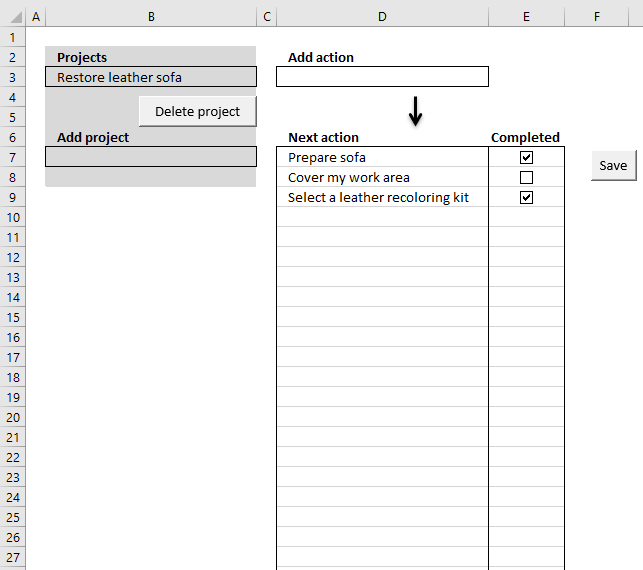
In this article, I am going to demonstrate a simple workbook where you can create or delete projects and add "next" actions to each project. You can also mark actions completed. The ideas here are based on the "Getting things done" mindset.
Source: Wikipedia
Add a project
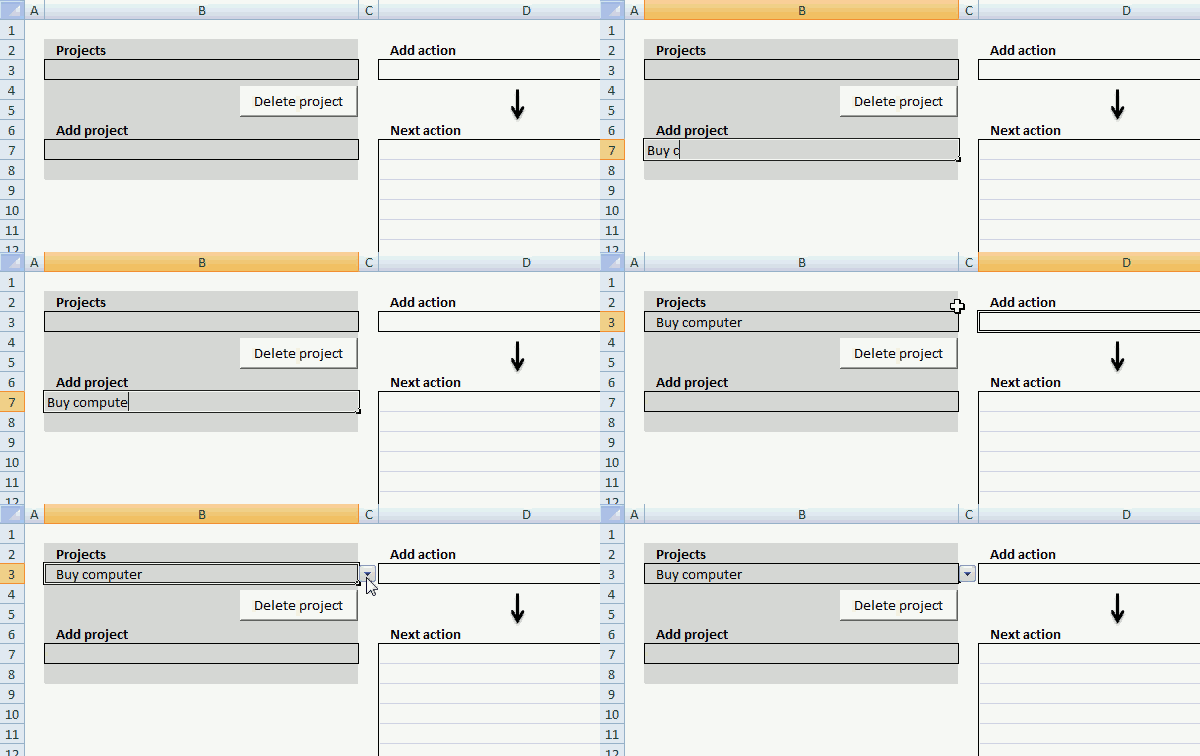
Simply enter a project name in cell B7 and then press Enter, the project now appears in the drop-down list in cell B3.
The following event code monitors if cell B3 is changed in worksheet "Overview" and runs macro AddProject.
'Event code located in the "Overview" worksheet module and is triggered if cell is changed.
Private Sub Worksheet_Change(ByVal Target As Range)

'Check if changed cell is B3
If Target.Address = "$B$3" Then

    'Start macro RefreshList
    Call RefreshList

End If

'Check if changed cell is B7
If Target.Address = "$B$7" Then

    'Start macro AddProject
    Call AddProject

End If

'Check if changed cell is D3
If Target.Address = "$D$3" Then

    'Start macro AddProject
    Call AddAction

End If

End Sub
This macro populates the list on worksheet Projects with the value entered in cell B7.
'Name macro
Sub AddProject()

'Dimension variable and declare datatypes
Dim r As Single

'Check if cell B7 is not empty
If Range("B7") <> "" Then

'Calculate the cell row below the last value in column A in worksheet Projects
r = Worksheets("Projects").Range("A" & Rows.Count).End(xlUp).Row + 1

'Copy cell B7 and paste to first empty value
Worksheets("Projects").Range("A" & r) = Range("B7").Value

'Copy cell B7 and paste to cell B3
Range("B3").Value = Range("B7").Value

'Clear cell B7
Range("B7").Value = ""

'Select cell D3
Range("D3").Select
End If

End Sub
Delete a project
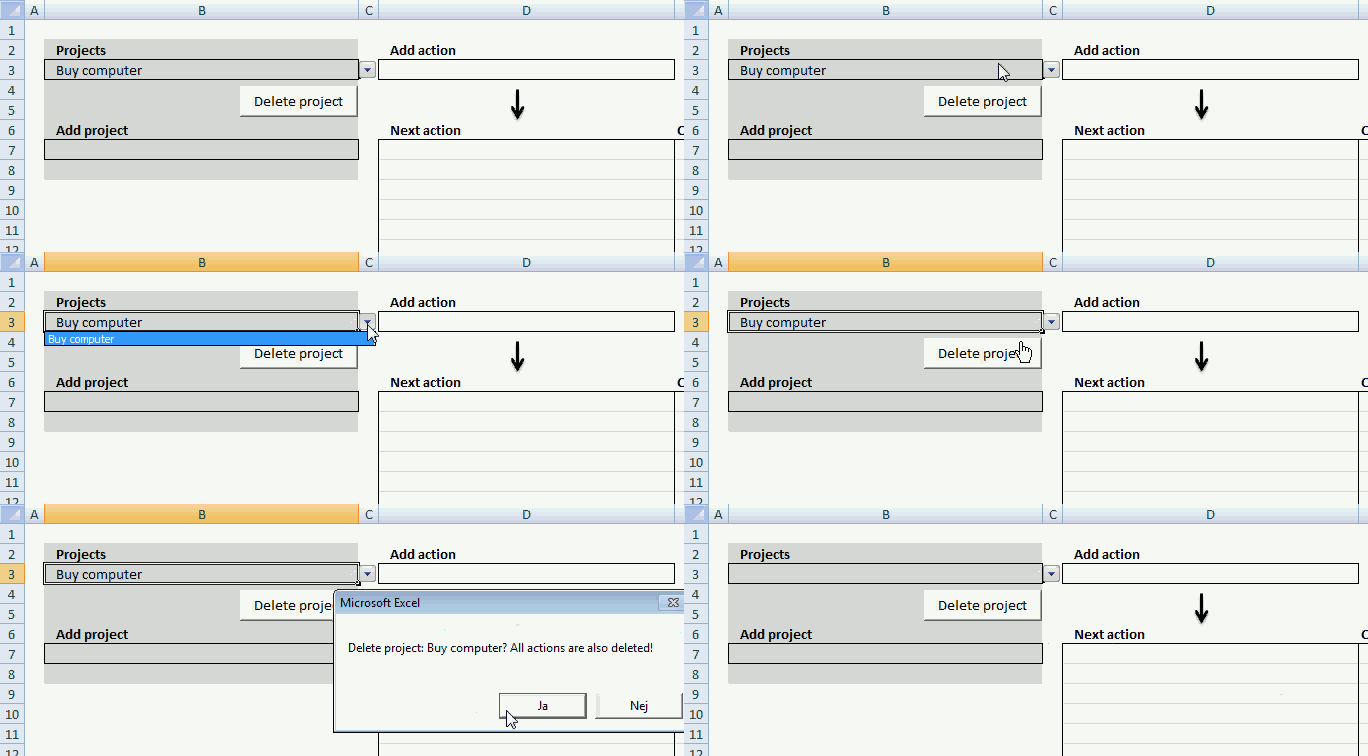
Select a project in the drop down list in cell B3. Press with left mouse button on "Delete project" button, a dialog box warns you that all the actions that belong to the project also will be removed.
Press with left mouse button on Yes to remove the selected project.
'Name macro
Sub DeleteProject()

'Dimension variables and declare data types
Dim rP As Single, rA As Single

'Save row number of last non empty cell in worksheet Projects to variable rP
rP = Worksheets("Projects").Range("A" & Rows.Count).End(xlUp).Row

'Save row number of last non empty cell in worksheet Projects to variable rA
rA = Worksheets("Actions").Range("A" & Rows.Count).End(xlUp).Row

'Show Messagebox and prompt for Yes or No, save answer to variable Ans
Ans = MsgBox("Delete project: " & Range("B3") & "? All actions are also deleted!", vbYesNo)

'Check if variable Ans is equal to 6
If Ans = 6 Then

'Check if variable rP is larger than 1
If rP > 1 Then

'Create a loop
Do

   'Check which row are equal to value in cell B3
   If Worksheets("Projects").Range("A" & rP) = Range("B3").Value Then

      'Delete row which are equal to value in cell B3
      Worksheets("Projects").Range("A" & rP).Delete Shift:=xlUp

      'Stop loop
      Exit Do
   End If

'Subtract value in variable rP with 1
rP = rP - 1

'Continue loop until variable rP is equal to 1
Loop Until rP = 1

'Check if variable rA is larger than 1
If rA > 1 Then

'Create loop
Do

   'Check i value in column B in worksheet Actions is equal to value in cell B3 (worksheet Overview´)
   If Worksheets("Actions").Range("B" & rA) = Range("B3").Value Then

      'Delete row
      Worksheets("Actions").Range(rA & ":" & rA).Delete Shift:=xlUp
   End If

'Subtract value in variable rA with 1
rA = rA - 1

'Continue loop until variable rA is equal to 1
Loop Until rA = 1
End If
End If

'Clear value in cell B3
Range("B3").Value = ""
End If
End Sub
Select a project
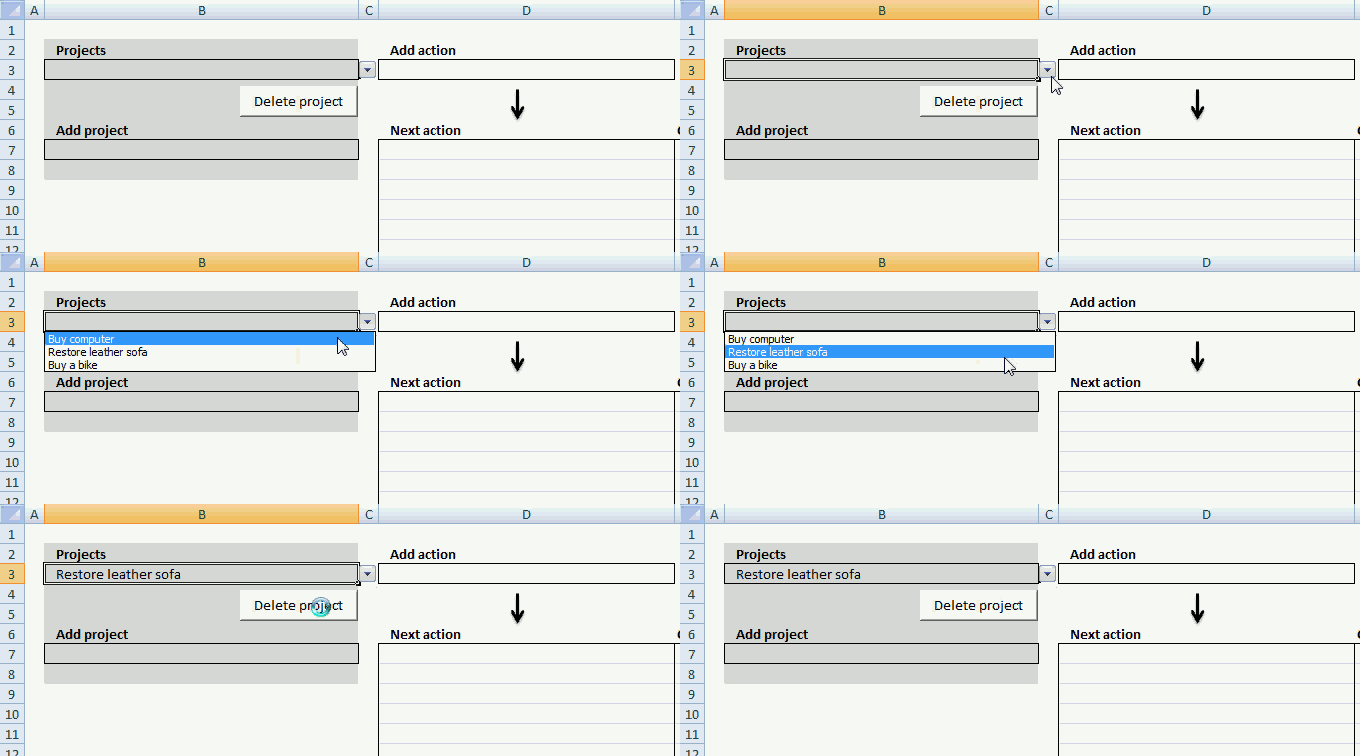
The drop-down list in cell B3 allows you to select a project and see the corresponding actions in column D, the following macro makes that happen.
There is also event code that runs this macro when the value in cell B3 is changed, that code is shown above under header "Add a project".
The macro lists corresponding actions to selected project and checkboxes next to actions that allows you to mark actions completed.
'Name macro
Sub RefreshList()

'Dimension variables and declare data types
Dim rA As Single, rO As Single
Dim Rng As Range
Dim CLeft As Double, CTop As Double, CHeight As Double, CWidth As Double

'Disable window to refresh
Application.ScreenUpdating = False

'Save Selection to object Rng
Set Rng = Selection

'Clear task list
Range("D7:D" & Rows.Count) = ""

'Save last nonempty cell's row number to variable rA
rA = Worksheets("Actions").Range("B" & Rows.Count).End(xlUp).Row

'Delete all checkboxes on active worksheet
ActiveSheet.CheckBoxes.Delete

'Check if cell B3 (sheet Overview) is not empty and variable rA is above 1
If Range("B3").Value <> "" And rA > 1 Then

   'Create a loop
    Do

        'Check if project in sheet Actions is equal to chosen project in cell B3 (sheet Overview) based on row number in variable rA
        If Worksheets("Actions").Range("B" & rA) = Range("B3").Value Then

            'Save row number of first empty cell to variable rO
            rO = Worksheets("Overview").Range("D" & Rows.Count).End(xlUp).Row + 1

            'Use row number in variable rO and rA to copy corresponding action to Overview sheet
            Worksheets("Overview").Range("D" & rO) = _
            Worksheets("Actions").Range("C" & rA).Value

            'Save number of points to left border from cell in column E based on row number in variable rO, to variable CLeft
            CLeft = Cells(rO, "E").Left

            'Save number of points to top border from cell in column E based on row number in variable rO, to variable CTop
            CTop = Cells(rO, "E").Top

            'Save cell height in points of cell in column E based on row number in variable rO, to variable CTop
            CHeight = Cells(rO, "E").Height

            'Save height in points of cell in column E based on row number in variable rO, to variable CTop
            CWidth = Cells(rO, "E").Width

            'Add checkbox based on points saved in variables CLeft, CWidth, CTop, CHeight, this also selects the cell
            ActiveSheet.CheckBoxes.Add(CLeft + CWidth / 2 - 8, CTop, CWidth, CHeight).Select

            'With - With End statement allows you to write shorter code by referring to an object only once instead of using it with each property.
            With Selection

                'Clear caption
                .Caption = ""

                'Check if checkbox is checked or unchecked in list
                If Worksheets("Actions").Range("D" & rA).Value = 1 Then
                    .Value = 1
                Else
                    .Value = xlOff
                End If
                .Display3DShading = False
            End With
        End If

        'Subtract variable rA with 1
        rA = rA - 1

    'Continue loop until rA is equal to 1
    Loop Until rA = 1
End If

'Select Rng object
Rng.Select

'Show changes to user
Application.ScreenUpdating = True
End Sub
Add actions to a project
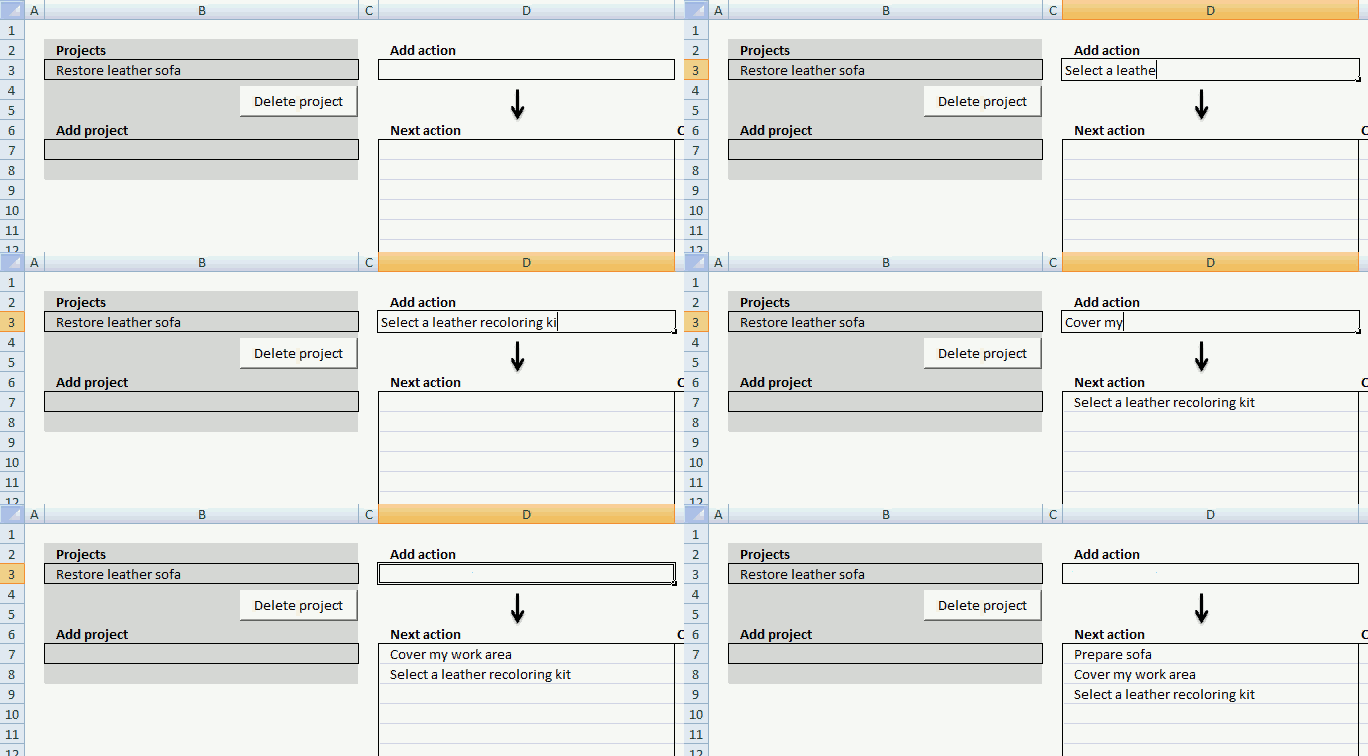
Enter the name of the action you want to add in cell D3. Event code makes sure that macro AddAction is rund when a new value is enter in cell D3.
'Name macro
Sub AddAction()

'Dimension variables and data types
Dim r As Single

'Disable screen updating while macro is rund, this speeds up the macro
Application.ScreenUpdating = False

'Check if cell D3 is not empty
If Range("D3") <> "" Then

    'Save row number of first empty cell to variable r
    r = Worksheets("Actions").Range("A" & Rows.Count).End(xlUp).Row + 1

    'Check if cell above first empty cell contains a numerical value
    If IsNumeric(Worksheets("Actions").Range("A" & r - 1)) Then

        'Save number + 1 to first empty cell in worksheet actions
        Worksheets("Actions").Range("A" & r) = _
        Worksheets("Actions").Range("A" & r - 1) + 1

    Else
        'Save 1 to first empty cell
        Worksheets("Actions").Range("A" & r) = 1

    End If

    'Copy value in cell B3 to cell in column B in worksheet actions based on value in variable r
    Worksheets("Actions").Range("B" & r) = Range("B3").Value

    'Copy value in cell D3 to cell in column C in worksheet actions based on value in variable r
    Worksheets("Actions").Range("C" & r) = Range("D3").Value

    'Clear cell D3
    Range("D3").Value = ""

End If

'Select cell D3
Range("D3").Select

'Show changes to user
Application.ScreenUpdating = True

'Run macro RefreshList
Call RefreshList

End Sub
Mark an action completed
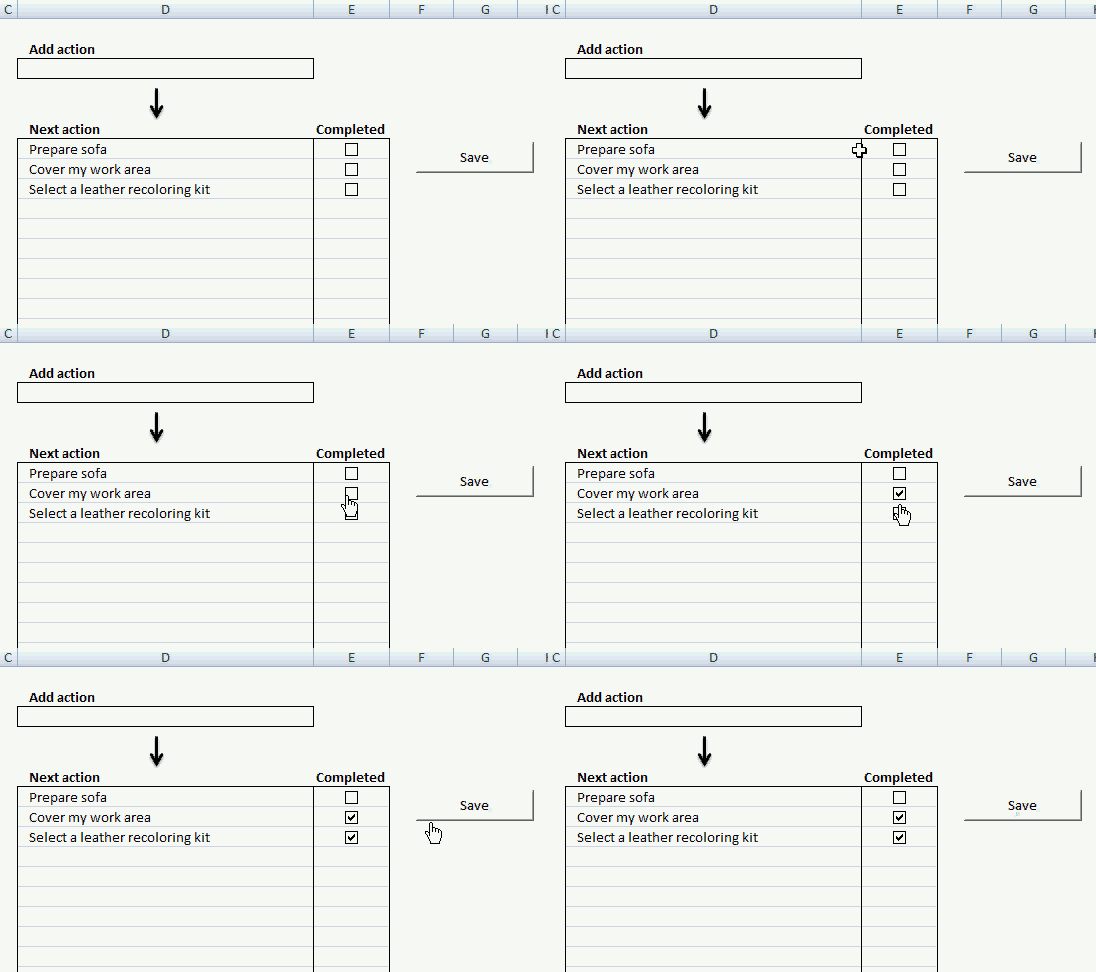
The Save button allows you to save completed actions, the button is linked to macro ActionComp.
'Name macro
Sub ActionComp()

'Dimension variables and declare data types
Dim rO As Single, rA As Single

'Save cell D7 (sheet Overview) to object checkO
Set checkO = Worksheets("Overview").Range("D7")

'Save cell C1 (sheet Actions) to object checkA
Set checkA = Worksheets("Actions").Range("C1")

'Save row number of first empty cell in column C (sheet Actions) to variable rA
rA = Worksheets("Actions").Range("C" & Rows.Count).End(xlUp).Row

'Save row number of first empty cell in column D (sheet Overview) to variable rO
rO = Worksheets("Overview").Range("D" & Rows.Count).End(xlUp).Row

'Iterate through 0 (zero) to value in variable rO minus 7
For o = 0 To rO - 7

    'Iterate through 1  to value in variable rA minus 1
    For a = 1 To rA - 1

        'Check if value in column D (sheet Overview) based on row number in variable o is equal to value in column C (sheet Actions) based on row number in variable a AND value in cell B3 is equal to value in column B (sheet Actions) based on row number in variable a
        If checkO.Offset(o, 0).Value = checkA.Offset(a, 0).Value _
        And Worksheets("Overview").Range("B3").Value = checkA.Offset(a, -1).Value Then

            'Save checkbox value to column D (sheet Actions) based on row number in variable a
            checkA.Offset(a, 1).Value = ActiveSheet.CheckBoxes(o + 1).Value
        End If
    Next a
Next o

End Sub
Where to put the macro and event code?
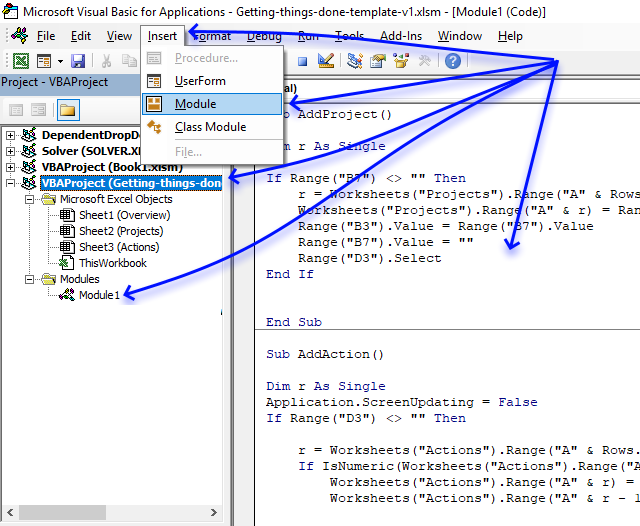
- Press Alt+ F11 to open the Visual Basic Editor.
- Double press with left mouse button on the workbook you want to attach the code to in the Project Explorer.
- Press with mouse on "Insert" on the menu.
- Press with mouse on "Module" to insert a module to the selected workbook.
- Paste code to code module.
The event code is not saved to a code module, it is saved to a sheet module named Sheet1 (Overview) object, simply double press with left mouse button on it to show the sheet module. Paste event code to the sheet module.

Macro category
Table of Contents Excel monthly calendar - VBA Calendar Drop down lists Headers Calculating dates (formula) Conditional formatting Today Dates […]
Table of contents Save invoice data - VBA Invoice template with dependent drop down lists Select and view invoice - […]
This blog post demonstrates how to create, populate and change comboboxes (form control) programmatically. Form controls are not as flexible […]
Templates category
This article describes how to build a calendar showing all days in a chosen month with corresponding scheduled events. What's […]
Geoff asks: Hi Oscar, I have a cross reference table we use for shift scheduling. The x-axis is comprised of […]
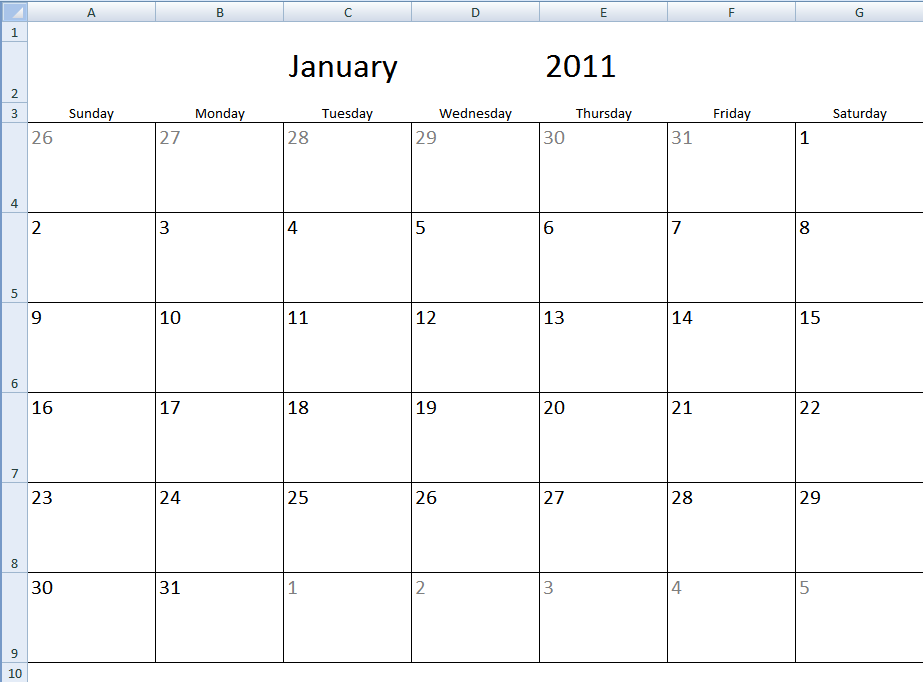
Table of Contents Monthly calendar template Monthly calendar template 2 1. Monthly calendar template The image above shows a calendar […]
Excel categories
14 Responses to “Excel template: Getting Things Done [VBA]”
Leave a Reply
How to comment
How to add a formula to your comment
<code>Insert your formula here.</code>
Convert less than and larger than signs
Use html character entities instead of less than and larger than signs.
< becomes < and > becomes >
How to add VBA code to your comment
[vb 1="vbnet" language=","]
Put your VBA code here.
[/vb]
How to add a picture to your comment:
Upload picture to postimage.org or imgur
Paste image link to your comment.

The save bottom doesn't work, when press with left mouse button on completed and save, cannot pass 1 to completed status.
John,
you are right. I believe it is working now. I have uploaded a new file:
Getting-things-done-template-v1.xlsm
I would love to use an excel template for GTD, which is why I opened yours. I don't know how to use all the files found in the zip file though. They open as lines of code on webpages
Do you have just an excel sample worksheet that I can use?
Thanks for any help,
Zelda
Zelda,
The attached file is a excel *.xlsm file. I am not sure why it is opened as lines of code on webpages. It works here.
Thanks.
When I save the file to to my computer, it saves & therefore opens as a winzip file, with many files within. Should I pick one of the files to open?
I'm using MS Excel 2007. When I try to "open with" Excel doesn't come up as one of the options.
Sorry for the trouble!
Zelda,
When I save the file to to my computer, it saves & therefore opens as a winzip file, with many files within
I am not sure why it saves as a zip file. Here it saves as a xlsm file.
Try changing file name to Getting-things-done-template-v1.xlsm
Thanks Oscar. I tried your idea: changing file name to Getting-things-done-template-v1.xlsm, with the same result. I also tried .xls...same.
It's ok. I'll keep looking.
Please solve this question on excel 4 me: Using excel spreadsheet application type the following; Carl made a purchase of various items: milk 10 6.00 each, rice Y bags 16.00 each oil 1 bottle 3.00. Apply auto sum for the total quantity of items purchased
Thanks; awesome job! I tried to create a column 'Date Due'... it appears on the 'Overview' sheet but not on the "Actions" sheet. What do I do to make it appear on "Actions".
Thanks in advance.
Hi, very good job, how can I add an expiration date to an action?
nicolás
Hello,
I am running the below code I am getting the error as after opening the file from sharePoint PPT, "run time error '- 2147467259 80004005 )': method open of object presentations failed" can you please help!!!!..
Below is the code.
Private Sub ManufacturingViwe_Click_1()
Dim PPT As PowerPoint.Application
Dim MyPresentation As Presentation
Dim fileName As Variant
Dim WS1 As Worksheet
Dim rng As Range
Set PPT = New PowerPoint.Application
Set WS1 = ThisWorkbook.Worksheets("Sheet1")
Set rng = WS1.Range("G5") ' SharePoint linke is placed
fileName = rng
PPT.Visible = True
PPT.Presentations.Open fileName
End Sub
Thanks for sharing this Oscar. I look forward to using this now!!
Good job, very simple but useful Excel macro.
BTW, can I or you please help to add two more columns of each action saved, for example, Percentage% and Note. These two filed can be direct keyin in the action table and being saved into the sheets. The most important is can be reloaded when recall the projct.
thanks!
~Mike.
He aprendido más en esta página que en muchos libro de Excel