Working with LIST BOXES (Form Controls)
This blog post shows you how to manipulate List Boxes (form controls) manually and with VBA code.
Table of Contents
- Introduction
- Create a List Box
- Create a List Box with VBA
- Assign macro to a List Box
- Assign macro to a List Box with VBA
- Add values to a List Box
- Add values to a List Box with VBA
- Link List Box to a cell
- How to link a List box to a cell programmatically
- Delete values in a List Box
- Set default value to a List Box
- Allow multiple selected values in a List Box
- Allow multiple selected values in a List Box programmatically
- Read selected values
- Populate a list box with unique distinct values from a filtered Excel table - VBA
1. Introduction
What is a list box (Form Control)?
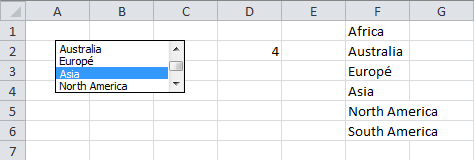
The list box shows you a number of values, with a scroll bar (if needed), from which the user can select. This example demonstrated in the image above shows that the selected value is Asia and it is the fourth (4) value in list F1:F6. It links the relative position of selected value (4) in a list, here it is linked to cell D2. In other words, the list box is linked to Cell D2 and cell D2 shows 4 which means that the selected value is the fourth value in the list box.
Both the Form Control List box and ActiveX List Box allow multi-selection, however the ActiveX list box requires VBA to get it working properly. The list box (form control) can be populated using a predefined range of cells. It works well in Excel and earlier Excel versions without requiring additional coding meaning no VBA required.
What is VBA?
VBA (Visual Basic for Applications) is a programming language developed by Microsoft that is used for automating tasks in Microsoft Office applications such as Excel, Word, and Access. It allows users to create macros, automate repetitive tasks, and enhance Office functionality with custom scripts.
What is the Visual Basic Editor (VBE)?
The Visual Basic Editor (VBE) is an integrated development environment (IDE) within Microsoft Office applications (such as Excel, Word, and Access) that allows users to write, edit, and debug Visual Basic for Applications (VBA) code.
How to open the Visual Basic Editor?
You can open the Visual Basic Editor (VBE) using any of the following methods:
- Method 1: Using Keyboard Shortcut
- Press Alt + F11 on your keyboard.
- The Visual Basic for Applications (VBA) Editor window will open.
- Method 2: Using the Developer Tab
- Press with mouse on the Developer tab in the ribbon.
- Press with left mouse button on Visual Basic to open the VBE.
What are the differences between form controls and ActiveX controls?
- Form controls are not as flexible as ActiveX controls but are compatible with earlier versions of Excel.
- Form controls work across different versions of Excel, including Mac unlike ActiveX controls which may not work on Mac.
- ActiveX controls support events, enhancing their functionality. In contrast, Form controls allow macros to be assigned which run when a user selects a value. While assigning a macro to a Form control is optional, it adds flexibility.
How to enable developer tab?
Here is how to enable the "Developer" tab if it is missing on the ribbon:
- Press with left mouse button on "File" located above the ribbon, a new pane appears.
- Press with mouse on the "Options" button to access Excel settings.
- Press with mouse on "Customize Ribbon" and then on the right side press with left mouse button on the checkbox next to the tab "Developer" to enable it.
- Press with left mouse button on "OK" button to apply changes.
The "Developer" tab is now visible on the ribbon. Here are instructions for Excel 2007, Excel 2010 and Excel 2013
What is the difference between a combo box and a list box?
A combo box requires less space on the worksheet but the user needs to interact with the combo box by press with left mouse button oning the down arrow to display the available items.
2. How to create a List Box
Steps to build a List Box:
- Go to tab "Developer" on the ribbon.
- Press with left mouse button on "Insert" button.
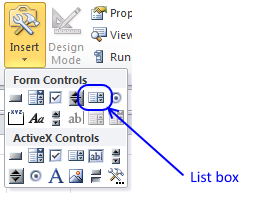
- Press with left mouse button on List Box button.
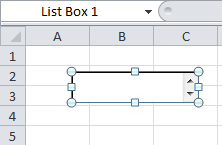
- Press and hold and then drag with mouse on sheet.
3. How to create a List Box with VBA
You can build a List Box with vba code, here is how:
'Name macro
Sub Macro2()

'Insert Listbox to worksheet Sheet1 with dimensions:
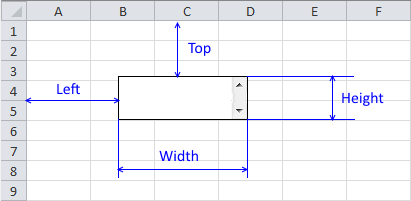
'Left=100, Top=50, Width=96.75, Height=32.25 and name it "List box 100"
'Syntax: Worksheets("Sheet1").ListBoxes.Add(Left, Top, Width, Height)

Worksheets("Sheet1").ListBoxes.Add(100, 50, 96.75, 32.25).Name = "List box 100"
End Sub
4. Assign a given macro to List Box manually and programmatically
- Press with right mouse button on with mouse on list box.
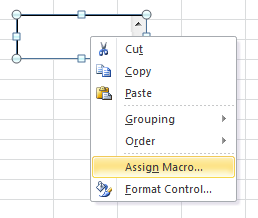
- Press with left mouse button on "Assign macro...".
- Select a macro in the list.
- Press with left mouse button on OK.
5. Assign a given macro to List Box programmatically
You can assign macro to a List Box by using VBA code. The name of the list box is required to properly assign the right one.
Sub Macro3()
'Assign Macro2 to Listbox named List box 100
Worksheets("Sheet1").Shapes("List box 100").OnAction = "Macro2"
End Sub
6. How to add values to a List Box manually and programmatically
You can add values to a List box with these steps:
- Press with right mouse button on on the List Box.
- Press with left mouse button on "Format Control...".
- Go to tab "Control".
- Select an Input range.
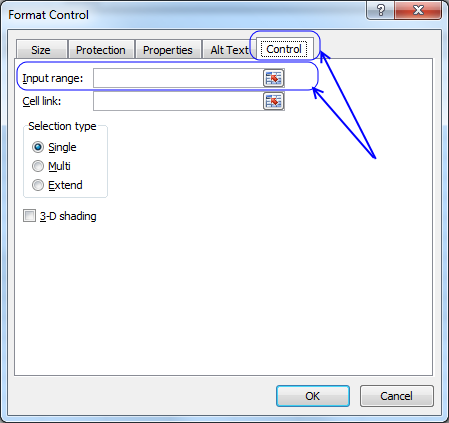
- Press with left mouse button on OK
7. How to add values to a List Box programmatically
The following vba macro adds E1:E3 to the List Box input range.
Sub PopulateListBox2()

'Set input range for ListBox "List box 100"
'on worksheet Sheet1 equal to E1:E3

Worksheets("Sheet1").Shapes("List Box 100").ControlFormat.ListFillRange = _
"E1:E3"
End Sub
The VBA macro below adds the values in cell range E1:E3 to "List Box 100" without manipulating the input range. I recommend using the macro above, if values change in cell range E1:E3 they are instantly changed in List Box also. On the other hand, you can´t delete specific values using a VBA macro.
Sub PopulateListBox()
'Programmatically add an input range to
'a list box with the name List box 100

Worksheets("Sheet1").Shapes("List Box 100").ControlFormat.List = _
Worksheets("Sheet1").Range("E1:E3").Value
End Sub
If your cell range size often changes, consider using a named range. Use technique demonstrated here: Populate combox with values from a dynamic named range
You can also populate a List Box with excel table values:
Populate combox with values from a table
8. How to link a List box to a cell manually and programmatically
This example demonstrates a macro that links a list box to a specific cell meaning when a user selects an item in the list box the linked cell shows the relative number of the selected item in that particular list.
- Press with right mouse button on on List Box.
- Press with left mouse button on "Format Control..."
- Go to tab "Control"
- Select a cell to link.
- Press with left mouse button on OK
9. How to link a List box to a cell programmatically
The following macro shows how to link a List box to a given cell programmatically using VBA.
Sub LinkCell()
'Link cell A1 to ListBox "List box 100"
'located on worksheet Sheet1
Worksheets("Sheet1").Shapes("List box 100").ControlFormat.LinkedCell = "A1"
End Sub
Sub LinkCell2()

'The WITH ... END WITH statement simplifies working with
'a specific object by allowing you to run multiple
'actions on it without repeatedly referencing the object.
'This also makes the code shorter and easier to read.
With Worksheets("Sheet1").Shapes("List box 100").ControlFormat

'Retrieves the actual value (text) of the selected item and saves it to cell B1
Worksheets("Sheet1").Range("B1").Value = .List(.ListIndex)
End With
End Sub
10. Delete values in a List box
The following macro deletes all values in "List Box 100". It also removes the cell reference in "Input range:"
The RemoveItem method cannot be used to remove items from a list box if the list box is linked to a range on a worksheet.
You will get this error message: Run-time error '1004': RemoveItem method of ListBox class failed.
Sub RemoveAllItems()

'Remove all items in list box 100
Worksheets("Sheet1").Shapes("List Box 100").ControlFormat.RemoveAllItems
End Sub
This macro deletes the first value in "List Box 100".
Sub RemoveAllItems()
'Delete item in relative position 1 in ListBox List box 100 on worksheet Sheet1
Worksheets("Sheet1").Shapes("List box 100").ControlFormat.RemoveItem 1
End Sub
11. Set default value in a List Box
This macro sets default value to the first value in a List Box. The default value meaning which value is selected before user interaction.
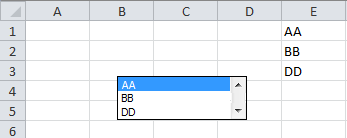
Sub ChangeSelectedValue()
'Set item 1 the selected value in ListBox List box 100 on Sheet1
Worksheets("Sheet1").ListBoxes("List box 100").Selected = 1
End Sub
12. Allow multiple selected values in a List Box
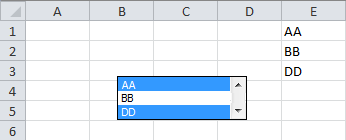
- Press with right mouse button on on List Box.
- Press with left mouse button on "Format Control...".
- Go to tab Control.
- Press with left mouse button on Multi in "Selection type" window.
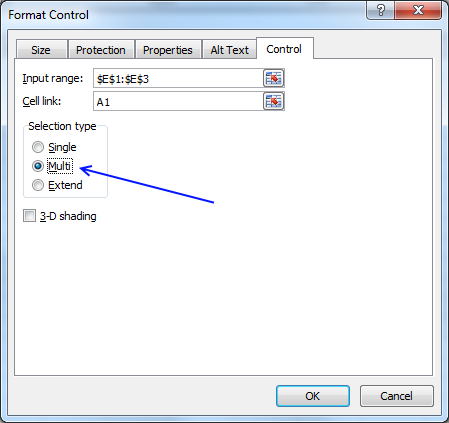
- Press with left mouse button on OK button.
13. Allow multiple selected values in a List Box programmatically
This macro enables "Multiselection" for List Box 100.
Sub Allowmultiselect()
Worksheets("Sheet1").ListBoxes("List box 100").MultiSelect = xlSimple
End Sub
14. Read selected value from List box
This macro returns the relative position of all selected values.
Sub ReadSelectedValue()

'With .. End With statement
With Worksheets("Sheet1").ListBoxes("List box 100")

'For ... Next statement
For i = 1 To .ListCount

'If ... Then statement, show a message box containing value in variable i if item i is the selected value
If .Selected(i) Then MsgBox i
Next i
End With
End Sub
Alternatively you can return the selected value with .List(.ListIndex) property.
Sub ReadSelectedValue()
With Worksheets("Sheet1").ListBoxes("List box 100")
For i = 1 To .ListCount
If .Selected(i) Then MsgBox .List(.ListIndex)
Next i
End With
End Sub

15. Populate a list box with unique distinct values from a filtered Excel table - VBA
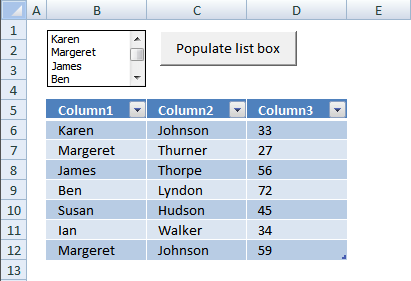
In this VBA tutorial I will show you how to populate a list box with unique distinct values from an Excel defined Table with a filter applied.
What is an Excel Table?
Excel defined Tables, introduced in Excel 2007, sort, filter and organize data any way you like. You can also format data and choose from many professional looking styles.
How to create an Excel Table?
- Select the data set.
- Go to tab "Insert" on the ribbon.
- Press with left mouse button on "Table" button.
- A dialog box appears.
- Make the sure the cell range is correct.
- Enable the check box if the data set has headers.
- Press with left mouse button on the "OK" button.
Alternatively, press short cut keys CTRL + T to open the "Create Table" dialog box.
What are unique distinct values?
Unique distinct values are all values except duplicates. Duplicates are merged into one distinct value meaning there is only one instance of each value.
Unique distinct values are great in a List box. This reduces the number of items making it easier to use.
Instructions
- Sort or/and filter the table.
- Press the "Populate list box" button.
Only unique distinct visible values from Column1 are added to the list box. Hidden values are filtered out when you apply a filter to the Excel Table.
VBA code
'Name macro
Sub FilterUniqueData()

'Declare variables and data types
 Dim Lrow As Long, test As New Collection, i As Single
 Dim Value As Variant, temp As Range

'Ignore errors in macro and continue with next line
On Error Resume Next

'Save values from first column in Table1 to temp object
Set temp = Worksheets("Sheet1").ListObjects("Table1").ListColumns(1).Range

'Iterate through values in first column except header value
For i = 2 To temp.Cells.Rows.Count
    'Save value to test if the number of characters are more than 0 and the row is not hidden
    If Len(temp.Cells(i)) > 0 And Not temp.Cells(i).EntireRow.Hidden Then
        test.Add temp.Cells(i), CStr(temp.Cells(i))
    End If

'Continue with next value
Next i

'Delete all items in listbox
Worksheets("Sheet1").Shapes("List Box 1").ControlFormat.RemoveAllItems

'Iterate through all values saved to test
For Each Value In test

   'Add value to listbox
   Worksheets("Sheet1").Shapes("List Box 1").ControlFormat.AddItem Value

'Continue with next value
Next Value

'Delete object test
Set test = Nothing

End Sub
15.1 Where do I put the code in my workbook?
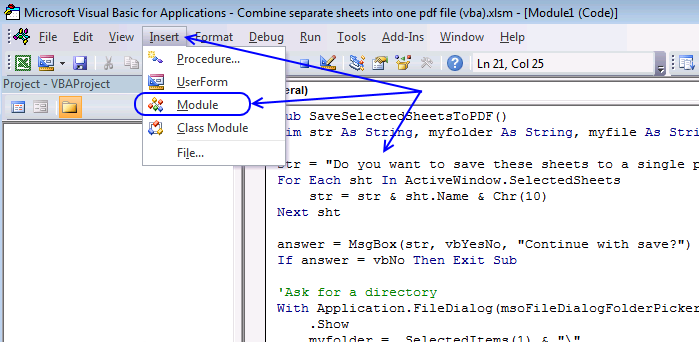
- Start the Visual Basic Editor (Alt+F11).
- Press with left mouse button on "Insert" on the top menu, see image above.
- Press with left mouse button on "Module".
- Paste code to window.
- Return to Excel.
LISTBOXES examples
This blog post shows you how to manipulate List Boxes (form controls) manually and with VBA code. Table of Contents […]
SHAPES examples
Check boxes in Excel are a great way to make your spreadsheets more interactive. They can be used for task […]
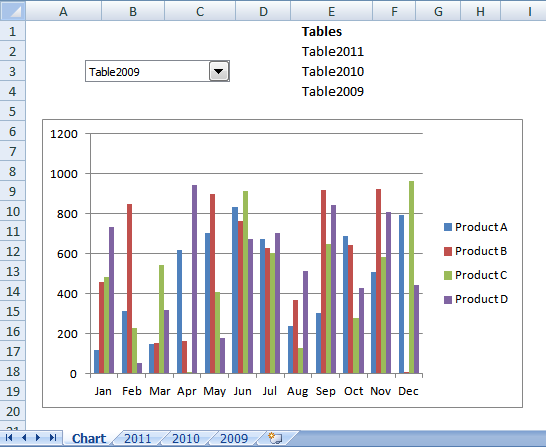
In this article I will demonstrate how to quickly change chart data range utilizing a combobox (drop-down list). The above […]
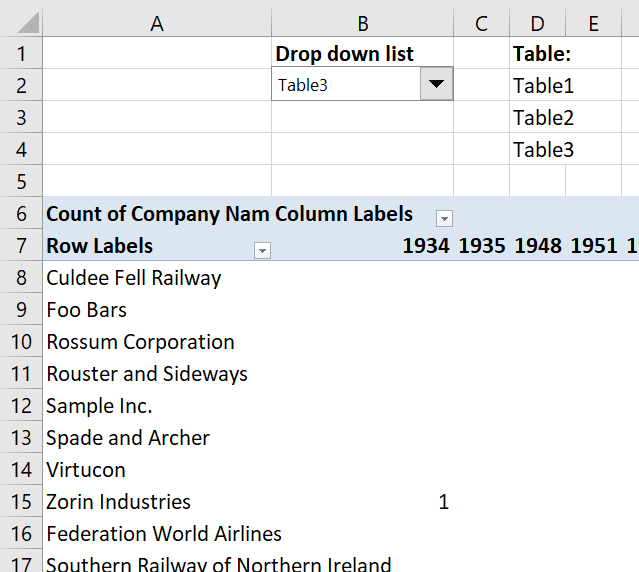
In this article, I am going to show you how to quickly change Pivot Table data source using a drop-down […]
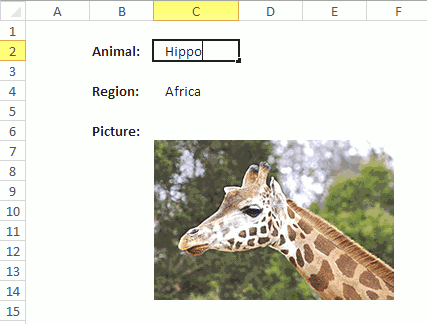
Rahul asks: I want to know how to create a vlookup sheet, and when we enter a name in a […]
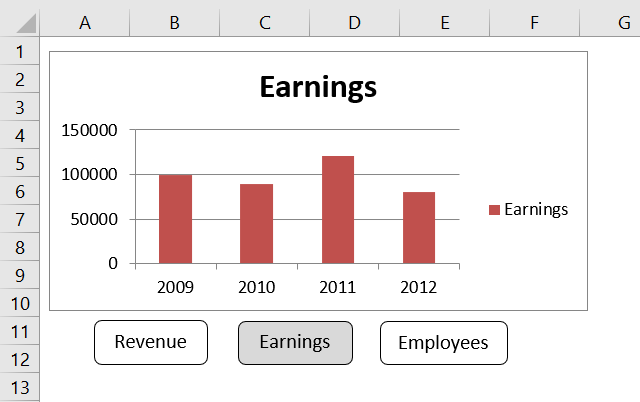
Table of Contents How to create an interactive Excel chart How to filter chart data How to build an interactive […]
This article demonstrates how to insert and use a scroll bar (Form Control) in Excel. It allows the user to […]
Table of Contents List all hyperlinks in worksheet programmatically Find cells containing formulas with literal (hardcoded) values Extract cell references […]
This article demonstrates how to locate a shape in Excel programmatically based on the value stored in the shape. The […]
This article demonstrates how to move a shape, a black arrow in this case, however, you can use whatever shape […]
Today I will share a To-do list excel template with you. You can add text to the sheet and an […]
In this tutorial I am going to explain how to: Create a combo box (form control) Filter unique values and […]
Excel defined Tables, introduced in Excel 2007, sort, filter and organize data any way you like. You can also format […]
This article demonstrates how to run a VBA macro using a Drop Down list. The Drop Down list contains two […]
This article explains how to hide a specific image in Excel using a shape as a button. If the user […]
This article demonstrates how the user can run a macro by press with left mouse button oning on a button, […]
This blog post demonstrates how to create, populate and change comboboxes (form control) programmatically. Form controls are not as flexible […]
This blog post shows you how to manipulate List Boxes (form controls) manually and with VBA code. Table of Contents […]
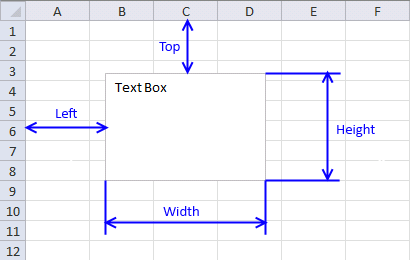
What is a Text Box? A Text Box (Form Control) in Excel is an interactive element that allows users to […]
Form controls category
This blog post demonstrates how to create, populate and change comboboxes (form control) programmatically. Form controls are not as flexible […]
This article describes how to create a button and place it on an Excel worksheet, then assign a macro to […]
What is a Text Box? A Text Box (Form Control) in Excel is an interactive element that allows users to […]
Listbox category
More than 1300 Excel formulasExcel categories
11 Responses to “Working with LIST BOXES (Form Controls)”
Leave a Reply
How to comment
How to add a formula to your comment
<code>Insert your formula here.</code>
Convert less than and larger than signs
Use html character entities instead of less than and larger than signs.
< becomes < and > becomes >
How to add VBA code to your comment
[vb 1="vbnet" language=","]
Put your VBA code here.
[/vb]
How to add a picture to your comment:
Upload picture to postimage.org or imgur
Paste image link to your comment.

I have searched relentlessly for the answer to this question. How can I get the listbox to return the unique value but include the corresponding column 3 in your excample? I have a product list that has Kit and Lot number. I want the unique Kit but the correspoinding lot number for the kit with description.
Glenda,
Form listboxes don´t support multi columns. Try an active x control.
Google "vba multi column listboxes" and you'll find plenty of examples.
Thanks very much but i want to show two column1 and column 2. i do not how to show them, pls help me!
Hoang,
VBA code
Sub PopulatemulticolumnListbox()
Dim temp() As Variant
temp = Worksheets("Sheet2").Range("Table2").Value
With ActiveSheet.ListBox1
    .ColumnCount = 3
    .List = temp
End With
End Sub
Get the Excel *.xlsm file
Excel-table-List-boxv2.xlsm
Two columns
Sub PopulatemulticolumnListbox() Dim temp() As Variant temp = Worksheets("Sheet2").Range("Table2[[Column1]:[Column2]]").Value With ActiveSheet.ListBox1 .ColumnCount = 2 .List = temp End With End SubHow can I display the item selected from the listbox in an excel cell?
Your interest on this regard is much appreciated
RHansen,
hi thanks for the tutorial
when i executed your readselectedvalue macro, excel debugged here:
MsgBox .List(.ListIndex)
Any way to scroll via vba?
I use as a console output but have to display messages bottom-to-top since I can't auto-scroll to the last row of the listbox.
Hello, How do you link a List Box or Combo box to a Text box?
For example, I am trying to set a specific value in the listbox, which is "Others" and when the user selects that, it moves over (activates) to the Text box.
[…] Populate a list box with visible unique values from an excel table (vba) […]
Thanks Oscar for your precious work. I modified your code and adapted it to a combobox.
Dim Lrow As Long, test As New Collection
Dim Value As Variant, temp As Range
Dim i As Single
On Error Resume Next
Set temp = Worksheets("Sheet1").ListObjects("Table1").ListColumns(1).Range
For i = 2 To temp.Cells.Rows.Count
If Len(temp.Cells(i)) > 0 And Not temp.Cells(i).EntireRow.Hidden Then
test.Add temp.Cells(i), CStr(temp.Cells(i))
End If
Next i
UserForm1.ComboBox1 = Clear
For Each Value In test
UserForm1.ComboBox1.AddItem Value
Next Value
Set test = Nothing
Now, I would like to know how to sort those data filtered in the combobox. Thank you