Search for a file in folder and subfolders – UDF
Table of Contents
- Search for a file in folder and sub folders - User Defined Function
- Search for a file in folder and sub folders using the FSO object
- List files in a folder and sub folders - UDF
- Unzip files in folder and sub folders
- Find and replace strings in file names, folder name and subfolders
- Open Excel files in a folder - VBA
- List files in folder and create hyperlinks - VBA
- Filter duplicate files in a folder and subfolders
1. Search for a file in folder and subfolders - UDF
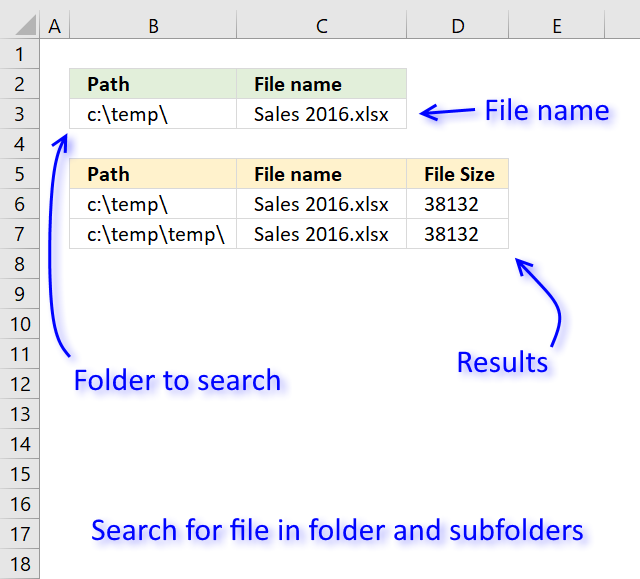
The image above demonstrates a user-defined function in cell range B6:D7 that allows you to search a folder and subfolders for a file name. It returns the exact path to the file, file name, and the file size.
A user defined function is a custom function that you can build yourself if none of Excel's built-in functions works for you.
Array formula in cell range B6:D7:
To enter an array formula, select cell range B6:D7. Type the formula and then press and hold CTRL + SHIFT simultaneously, now press Enter once. Release all keys.
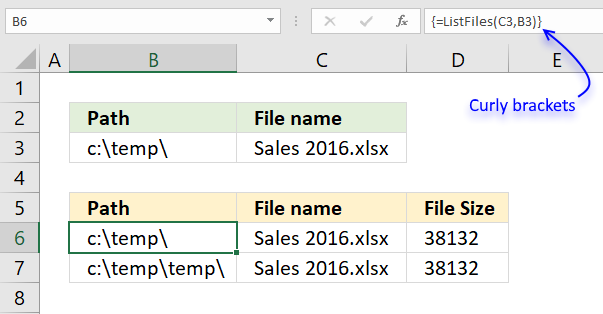
The formula bar now shows the formula with a beginning and ending curly bracket telling you that you entered the formula successfully. Don't enter the curly brackets yourself.
1.1 User Defined Function Syntax
ListFiles(filename, path)
1.2 Arguments
| filename | Required. The filename you are looking for. |
| path | Required. The full path to the folder you want the UDF to begin searching in. The function will also search in all subfolders of this folder. |
1.3 VBA Macro
There are actually two user-defined functions in order to search all subfolders and a variable that needs to be located at the very top of your workbook's code module.
Public temp() As String
Here is the first UDF, it makes sure that the result doesn't contain any error values.
Function ListFiles(FileName As String, FolderPath As String)
Dim k As Long, i As Long
ReDim temp(2, 0)
If Right(FolderPath, 1) <> "\" Then
    FolderPath = FolderPath & "\"
End If
Recursive FileName, FolderPath
k = Range(Application.Caller.Address).Rows.Count

If k < UBound(temp, 2) Then
Else
    For i = UBound(temp, 2) To k
          ReDim Preserve temp(UBound(temp, 1), i)
            temp(0, i) = ""
            temp(1, i) = ""
            temp(2, i) = ""
    Next i
End If
ListFiles = Application.Transpose(temp)
ReDim temp(0)
End Function
The second UDF is recursive meaning that a new instance of this UDF is created for each subfolder.
Function Recursive(FileName As String, FolderPath As String)
Dim Value As String, Folders() As String
Dim Folder As Variant, a As Long
ReDim Folders(0)
If Right(FolderPath, 2) = "\\" Then Exit Function
Value = Dir(FolderPath, &H1F)
Do Until Value = ""
    If Value = "." Or Value = ".." Then
    Else
        If GetAttr(FolderPath & Value) = 16 Then
            Folders(UBound(Folders)) = Value
            ReDim Preserve Folders(UBound(Folders) + 1)
        Else
            If Value = FileName Then
                temp(0, UBound(temp, 2)) = FolderPath
                temp(1, UBound(temp, 2)) = Value
                temp(2, UBound(temp, 2)) = FileLen(FolderPath & Value)
                ReDim Preserve temp(UBound(temp, 1), UBound(temp, 2) + 1)
            End If
        End If
    End If
    Value = Dir
Loop
For Each Folder In Folders
    Recursive FileName, FolderPath & Folder & "\"
Next Folder
End Function
1.4 Where to put the code?
Follow these steps to insert the code into your workbook.
- Copy macro.
- Go to VB Editor (Alt+F11).
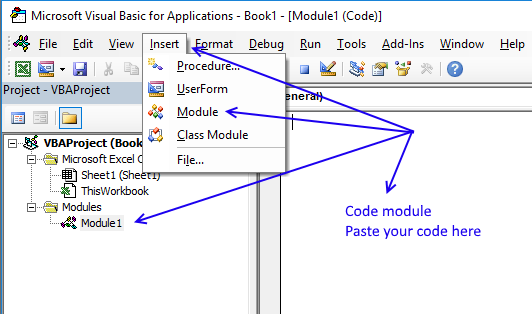
- Press with mouse on "Insert" on the top menu.
- Press with left mouse button on "Module" to insert a module into the workbook.
- Paste macro to the code module.
- Exit VB Editor.
- Save the workbook as a macro-enabled workbook (*.xlsm).
If you don't the macro will be gone the next time you open the workbook.

2. Search for a file in folder and subfolders using the FSO object
The following User defined Function, shown in the image above, allows you to search through folders and subfolders for a specified file name.
The first UDF above utilizes the DIR function that sometimes returns error 52 which translates to "Bad file name or number", the FSO object seems to handles this better.
VBA code
Public temp() As String

Function ListFiles(FileName As String, FolderPath As String)
Dim k As Long, i As Long
ReDim temp(2, 0)
If Right(FolderPath, 1) <> "\" Then
    FolderPath = FolderPath & "\"
End If
Recursive FileName, FolderPath
k = Range(Application.Caller.Address).Rows.Count

If k < UBound(temp, 2) Then
Else
    For i = UBound(temp, 2) To k
          ReDim Preserve temp(UBound(temp, 1), i)
            temp(0, i) = ""
            temp(1, i) = ""
            temp(2, i) = ""
    Next i
End If
ListFiles = Application.Transpose(temp)
ReDim temp(0)
End Function
Function Recursive(FileName As String, FolderPath As String)
Dim objFSO As Object
Dim Value As String, Folders() As String
Dim Folder As Variant, a As Long
ReDim Folders(0)

Set objFSO = CreateObject("Scripting.FileSystemObject")
Set objFolder = objFSO.GetFolder(FolderPath)

If Right(FolderPath, 2) = "\\" Then Exit Function

    For Each objFile In objFolder.Files
        If objFile.Name = FileName Then

            temp(0, UBound(temp, 2)) = FolderPath
            temp(1, UBound(temp, 2)) = objFile.Name
            temp(2, UBound(temp, 2)) = objFile.Size
            ReDim Preserve temp(UBound(temp, 1), UBound(temp, 2) + 1)

        End If

    Next objFile

    For Each objFolder In objFolder.Subfolders

            Folders(UBound(Folders)) = objFolder.Name
            ReDim Preserve Folders(UBound(Folders) + 1)

    Next objFolder

For Each Folder In Folders

    On Error Resume Next
    Recursive FileName, FolderPath & Folder & "\"
    On Error GoTo 0

Next Folder

End Function
3. List files in a folder and sub folders - UDF
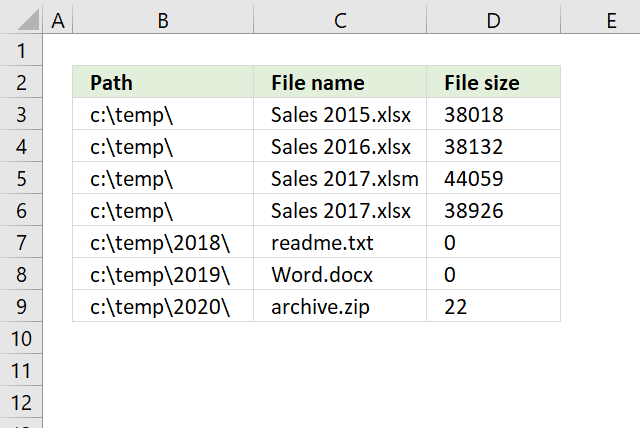
This section of the article demonstrates a user defined function that lists files in a given folder and sub folders. A user defined function is a custom function in Excel that anyone can build, simply copy the VBA code and paste to your workbook's code module and you are good to go.
Array formula in cell range B3:D9:
To enter an array formula, select the cell range, type the formula, then press and hold CTRL + SHIFT simultaneously, now press Enter once. Release all keys.
The formula bar now shows the formula with a beginning and ending curly bracket telling you that you entered the formula successfully. Don't enter the curly brackets yourself.
3.1 User defined Function Syntax
ListFiles(FolderPath)
3.2 Arguments
| Parameter | Text |
| FolderPath | Required. The path to the folder you want to use. |
3.3 Where to copy vba code?
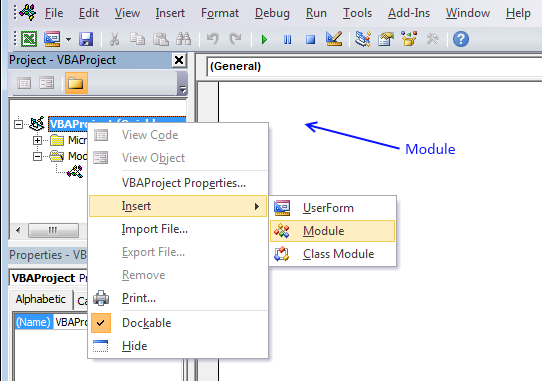
- Press Alt-F11 to open visual basic editor
- Press with left mouse button on Module on the Insert menu
- Copy and paste vba code, both functions below.
- Exit visual basic editor
'Declare a public variable meaning it will exist for both functions below.
Public temp() As String

'Name function and declare parameters
Function ListFiles(FolderPath As String)
'Declare arguments and data types
Dim k As Long, i As Long
'Redimension array variable temp so it can contain more values if needed.
ReDim temp(2, 0)
'Add and ending backslash to pathe if missing
If Right(FolderPath, 1) <> "\" Then
    FolderPath = FolderPath & "\"
End If
'Start second function named Recursive with folder path
Recursive FolderPath
'Count cells the UDF is using
k = Range(Application.Caller.Address).Rows.Count
'Return a message if cell range needs to be larger in order to show all values
'or fill array values with blanks to avoid error values when no more values is to be shown
If k < UBound(temp, 2) Then
    MsgBox "There are more rows, extend user defined function"
Else
    For i = UBound(temp, 2) To k
          ReDim Preserve temp(UBound(temp, 1), i)
            temp(0, i) = ""
            temp(1, i) = ""
            temp(2, i) = ""
    Next i
End If
'Return values
ListFiles = Application.Transpose(temp)
ReDim temp(0)
End Function
'Name function and declare parameter
Function Recursive(FolderPath As String)
'Declare variables and data types
Dim Value As String, Folders() As String
Dim Folder As Variant, a As Long
'Redimension array variable Folders so it can contain more folder paths if needed.
ReDim Folders(0)
'If folder path ends with \\ then end function
If Right(FolderPath, 2) = "\\" Then Exit Function
'Open folder path and populate Value with file names/folders
Value = Dir(FolderPath, &H1F)
'Repeat code until all file names have been retrieved
Do Until Value = ""
    'Ignore file name . and ..
    If Value = "." Or Value = ".." Then
    Else
        'If value is a folder then save value to variable Folders
        If GetAttr(FolderPath & Value) = 16 Then
            Folders(UBound(Folders)) = Value
            ReDim Preserve Folders(UBound(Folders) + 1)
        Else
            'If value is a file name then save path, name and size to variable temp
            temp(0, UBound(temp, 2)) = FolderPath
            temp(1, UBound(temp, 2)) = Value
            temp(2, UBound(temp, 2)) = FileLen(FolderPath & Value)
            ReDim Preserve temp(UBound(temp, 1), UBound(temp, 2) + 1)
        End If
    End If
    'Continue with next value in folder
    Value = Dir
Loop
'Start a new instance of function Recursive for each new folder
For Each Folder In Folders
    Recursive FolderPath & Folder & "\"
Next Folder
End Function
4. Unzip files in folder and sub folders

The VBA macro demonstrated in this article lets you unzip all zip files in a folder to a destination folder you specify. It continues with subfolders until all zip files have been unzipped.
4.1. VBA Code
Actually, there are two macros. Run macro named UnzipFiles to start unzipping files.
'Name macro
Sub UnzipFiles()

'Dimension variables and declare data types
Dim myfolder As Variant
Dim destfolder As Variant

'Ask for a source folder
With Application.FileDialog(msoFileDialogFolderPicker)
    .Show

    'Save selected folder path to variable myfolder
    myfolder = .SelectedItems(1) & "\"
End With

'Ask for a destination folder
With Application.FileDialog(msoFileDialogFolderPicker)
    .Show
    destfolder = .SelectedItems(1) & "\"
End With

'Run macro named Recursive with parameters myfolder and destfolder
Call Recursive(myfolder, destfolder)

End Sub
'Name macro and dimension parameters
Sub Recursive(FolderPath As Variant, destfolder As Variant)

'Dimension variables and declare data types
Dim Value As String, Folders() As String
Dim Folder As Variant, a As Long
Dim SApp As Object

'Redimension variable Folders
ReDim Folders(0)

'If...Then statement
'Check if last two characters are // and stop macro if true
If Right(FolderPath, 2) = "\\" Then Exit Sub

'Dir function returns a String representing the name of a file, directory, or folder, save string to variable Value
Value = Dir(FolderPath, &H1F)

'Do Until ... Loop statement
Keep iterating lines between Do Until and Loop
Do Until Value = ""

    'If ... Then ... Else ... Endif statement
    'Check if variable Value is equal to . or ..
    If Value = "." Or Value = ".." Then
    'Continue here if variable Value is not equal to . or ..
    Else

        'If ... Then ... Else ... Endif statement
        'Check if attribute for file is equal to 16 or 48 indicating it is a folder
        If GetAttr(FolderPath & Value) = 16 Or GetAttr(FolderPath & Value) = 48 Then

            'Save Folder name to variable Folders
            Folders(UBound(Folders)) = Value

            'Add another container to variable Folders, in other words, increase size of array variable Folders by 1
            ReDim Preserve Folders(UBound(Folders) + 1)

        'Continue here if attribute for file is equal to 16 or 48 indicating it is a folder
        Else

            'Check if last four characters in filename equals .zip
            If Right(Value, 4) = ".zip" Then

                'Unzip file to destination folder
                Set SApp = CreateObject("Shell.Application")
                SApp.Namespace(destfolder).CopyHere _
                SApp.Namespace(FolderPath & Value).items
            End If
        End If
    End If
    Value = Dir
Loop

'Start macro Recursive for each folder in variable Folders
For Each Folder In Folders
    Call Recursive(FolderPath & Folder & "\", destfolder)
Next Folder

End Sub
4.2. Where to put the code?
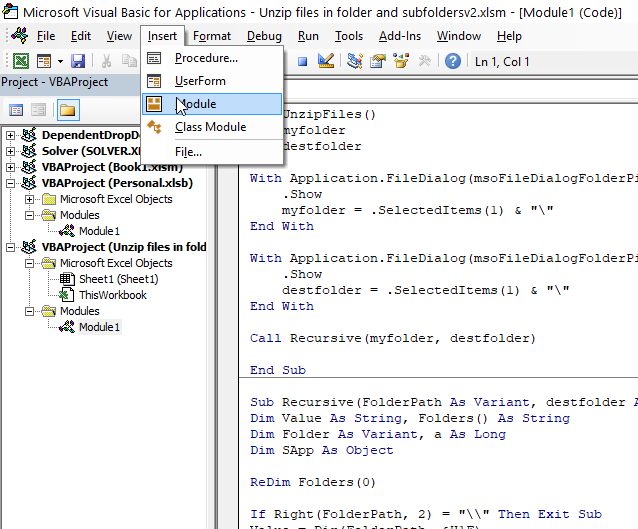
- Press Alt + F11 to open the Visual Basic Editor (VBE).
- Press with left mouse button on "Insert" on the top menu.
- Press with left mouse button on "Module" to create a new module.
- Paste VBA code to code window.
- Exit VBE and return to Excel.
Note, save your workbook with file extension *.xlsm (macro-enabled workbook).
-
- Press with left mouse button on "File" on the ribbon.
- Press with left mouse button on "Save as...".
- Press with mouse on the drop-down list below the file name.
- Select file extension *.xlsm
- Press with left mouse button on "Save".
4.3. How to run the macro?
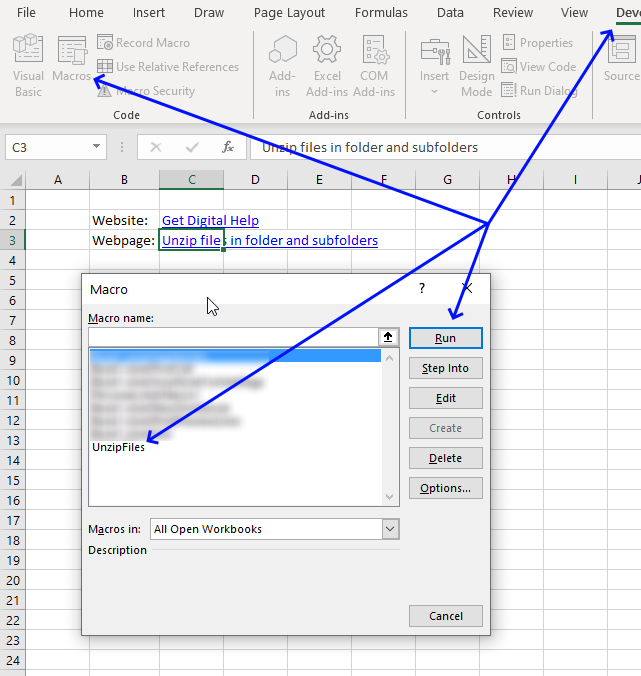
- Press Alt + F8 to open the Macro" dialog box.
- Press with left mouse button on the macro name to select it.
- Press with left mouse button on "Run" button.
4.4. What happens when you run the macro?
- Select a folder you want to search.
- Select a destination folder. This is where all unzipped files will be copied to.
- Macro unzips all zip files in folder and subfolders.
- Macro ends.
5. Find and replace strings in file names, folder name and subfolders
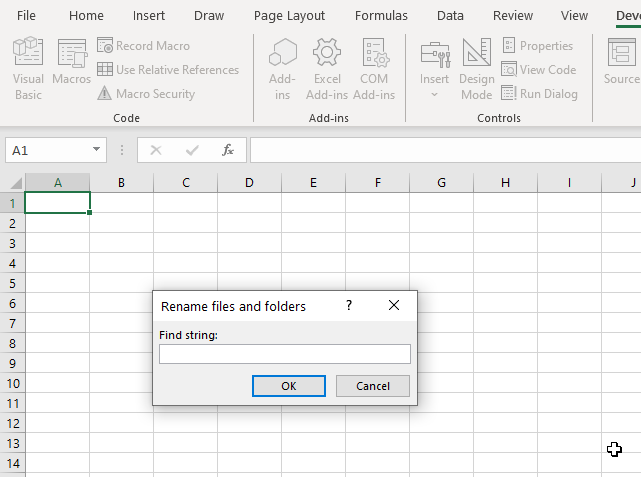
The following two macros FindReplace() and Recursive() let you rename files and folders recursively based on a search string. The file or folder is renamed if the name contains the search string.
The search string in the file name is replaced by another string you specify. A dialog box appears asking if you want to rename the found file name that matches the search string.
What's on this webpage
- VBA code
- Where to put the code?
- How to start the macro?
- What happens when you run the macro?
- Get Excel file
5.1. VBA macros
'Webpage: https://www.get-digital-help.comhttps://www.get-digital-help.com/search-for-a-file-in-folder-or-subfolders-vba/#5
'Name macro
Sub FindReplace()

'Dimension variables and declare data types
Dim myfolder As Variant
Dim Fnd As String, Rplc As String

'Display input box and ask for a string to search for
Fnd = Application.InputBox(prompt:="Find string:", Title:="Rename files and folders", Type:=2)

'Display another input box and ask for a string to replace with
Rplc = Application.InputBox(prompt:="Replace with:", Title:="Rename files and folders", Type:=2)

'Ask for a folder to search
With Application.FileDialog(msoFileDialogFolderPicker)
.Show
myfolder = .SelectedItems(1) & "\"
End With

'Start macro Recursive with parameters myfolder, Fnd, and Rplc
Call Recursive(myfolder, Fnd, Rplc)
End Sub
'Name macro and parameters
Sub Recursive(FolderPath As Variant, Fnd As String, Rplc As String)

'Dimension variables and declare data types
Dim Value As String, Folders() As String, Fname As String, Fext As String, Mtxt As String
Dim x As Integer
Dim Folder As Variant, a As Long

'Redimension array variable Folders
ReDim Folders(0)

'If ... Then statement
'Check if two last characters equals \\
If Right(FolderPath, 2) = "\\" Then Exit Sub

'Dir function returns a String representing the name of a file, directory, or folder that matches a specified pattern
Value = Dir(FolderPath, &H1F)

'Do Until ... Loop statement
Do Until Value = ""

'Check if Value is equal to . or ..
If Value = "." Or Value = ".." Then

'Continue here if Value is not equal to . or ..
Else

'Check if Value is a folder
If GetAttr(FolderPath & Value) = 16 Or GetAttr(FolderPath & Value) = 48 Then

'Enable error handling
On Error Resume Next

'Concatenate text with value in variable Value and show the new file name
Mtxt = "Rename folder " &  Value & " to " & WorksheetFunction.Substitute(Value, Fnd, Rplc) & "?"

'Show message box containing buttons Yes, No, and Cancel
x = MsgBox(Mtxt, vbYesNoCancel)

'End macro If user press with left mouse button ons Cancel button
If x = vbCancel Then Exit Sub

'Check if user press with left mouse button ons Yes
If x = vbYes Then

'Rename file if user press with left mouse button ons yes
Name FolderPath & Value As FolderPath &  WorksheetFunction.Substitute(Value, Fnd, Rplc)
End If

'Substitute string specified in Fnd with string in Rplc and save to variable Value
Value = WorksheetFunction.Substitute(Value, Fnd, Rplc)

'Check if an error has occurred
If Err <> 0 Then

'Show message box containing text "Error"
MsgBox "Error"

'Stop macro
Exit Sub
End If

'Disable error handling
On Error GoTo 0

Save string in variable Value to array variable Folders
Folders(UBound(Folders)) = Value

'Add another container to array variable Folders
ReDim Preserve Folders(UBound(Folders) + 1)

'Continue here if an error has not occurred
Else

'Enable error handling
On Error Resume Next

'Save extension text to variable Fext
Fext = Split(Value, ".")(UBound(Split(Value, ".")))

'Save file name without extension to variable Fname
Fname = Left(Value, Len(Value) - Len(Split(Value, ".")(UBound(Split(Value, ".")))) - 1)

'Replace search string (Fnd) with replace string (Rplc) in variable Fname and save to Fname
Fname = WorksheetFunction.Substitute(Fname, Fnd, Rplc)

'Check if value is not equal to Fname, dot and Ftext
If Value <> (Fname &  "." & Fext) Then

'Create text string and save to variable Mtxt
Mtxt = "Rename file " & Value & " to " & Fname & "." & Fext &  "?"

'Show message box containing text in variable Mtxt with buttons Yes, No, and Cancel. Save result to variable x
x = MsgBox(Mtxt, vbYesNoCancel)

'Check if variable x is equal to vbCancel meaning the user press with left mouse button oned Cancel button, stop macro if true
If x = vbCancel Then Exit Sub

'Check if user press with left mouse button on Yes
If x = vbYes Then

'Rename file
Name FolderPath &  Value As FolderPath & Fname &  "." & Fext
End If
End If

'Check if an error has occurred
If Err <> 0 Then

'Display message box containing text Error
MsgBox "Error"

'Stop macro
Exit Sub
End If

'Disable error handling
On Error GoTo 0
End If
End If

'Save a new item in current Folder to variable Value
Value = Dir

'Go back to Do Until, see above
Loop

'Iterate through all folders in array variable Folders
For Each Folder In Folders

'Start macro Recursive using folder name and path
Call Recursive(FolderPath &  Folder &  "\", Fnd, Rplc)
Next Folder
End Sub
5.2. Where to put the code?
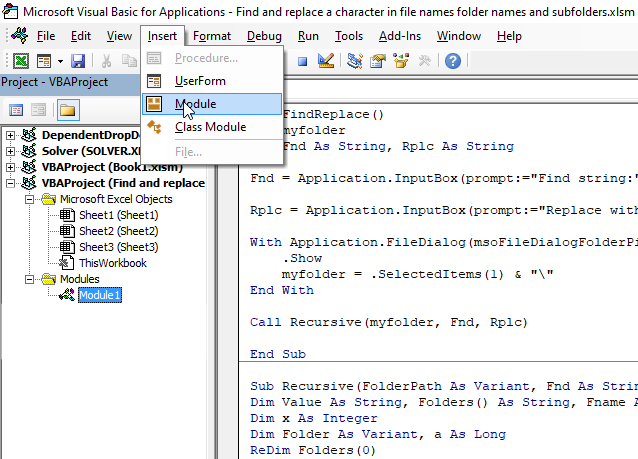
- Press Alt + F11 to open the Visual Basic Editor (VBE), see image above.
- Press with left mouse button on "Insert" on the top menu, a popup menu appears.
- Press with left mouse button on "Module". A new module is created in your workbook.
- Copy VBA code above and paste to code window, see image above.
- Exit VBE and return to Excel.
5.3. How to start the macro?
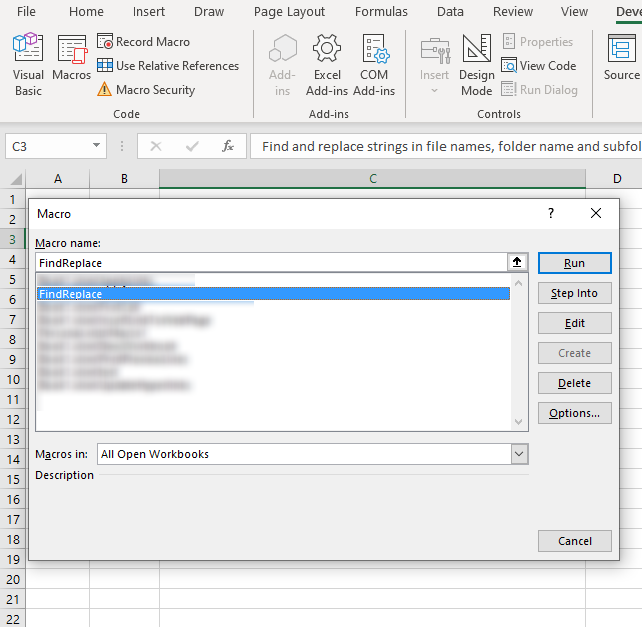
- Press Alt + F8, a dialog box appears. See the image above.
- Press with mouse on "FindReplace" to select it.
- Press with left mouse button on "Run" button.
5.4. What happens when you run macro?
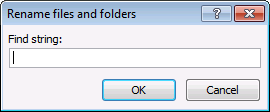
- Type a text string you want to find in the dialog box.
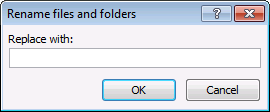
- In the next dialog box, type a text sting you want to replace it with.
- Select a folder, press with left mouse button on OK.
- The macro prompts you each time it finds a file name or folder with the text string you are looking for and ask if you want to rename it.
- Your options are: Yes, No, and Cancel. Cancel exits the macro.
- The macro continues until all files and folders are processed.
The macro does NOT change the file extension name.
6. Open Excel files in a folder - VBA
This tutorial shows you how to list excel files in a specific folder and create adjacent checkboxes, using VBA. The last macro opens selected files.
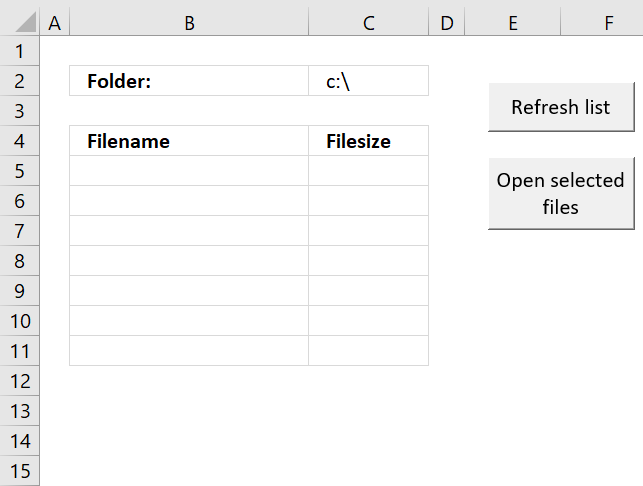
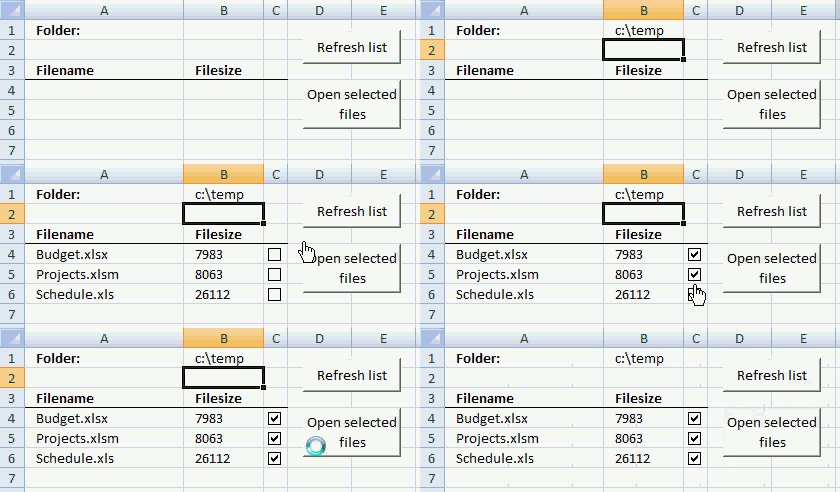
The animated image below shows the user typing the folder name in cell B1, press with left mouse button on "Refresh list" button and cell range A4:B6 is populated with file names, file sizes and checkboxes.
The checkboxes allow the user to select workbook files to open, the selected workbooks are opened as soon as the user press with left mouse button ons on "Open selected files" button located on the worksheet.
What you will learn in this article
- How to insert buttons on the worksheet.
- How to assign macros to the buttons.
- How to use macros.
- How to list files and file sizes from a given folder on a worksheet using VBA.
- How to insert checkboxes programmatically.
- How to open selected files programmatically.
- How to save VBA code to your workbook.
6.1 List files in a folder
The following macro is assigned to the "Refresh list" button. It lists all *.xls, *.xlsx and *.xlsm files in the folder specified in cell B1.
'Name macro
Sub ListFiles()

'Dimension variables and declare data types
Dim cell As Range, selcell As Range
Dim Value As String
Dim Folder As Variant, a As Long
ReDim Folders(0)

'Save cell A4 to object cell
Set cell = Range("A4")

'Save selected cell (range) to variable selcell
Set selcell = Selection

'Clear cell range A4:B10000
Range("A4:B10000").Value = ""

'Save value in cell B1 to variable Folderpath
Folderpath = Range("B1").Value

'Check if variable Folderpath ends with \ (backslash)
If Right(Folderpath, 1) <> "\" Then

  'Add a backslash if missing
  Folderpath = Folderpath & "\"
End If

'Return first file name in path specified in variable Folderpath
Value = Dir(Folderpath, &H1F)

'Continue iterate through files in folder until it is empty
Do Until Value = ""

    'Make sure file name is not . (current directory) or .. (parent directory)
    If Value <> "." And Value <> ".." Then

        'Make sure file name is not a folder
        If GetAttr(Folderpath & Value) <> 16 Then

            'Make sure file name ends with .xls or .xlsx or .xlsm
            If Right(Value, 4) = ".xls" Or Right(Value, 5) = ".xlsx" Or Right(Value, 5) = ".xlsm" Then

                'Save file name and file size to cell A4 and cell B4 respectively
                cell.Offset(0, 0).Value = Value
                cell.Offset(0, 1).Value = FileLen(Folderpath & Value)

                'Move to cell below
                Set cell = cell.Offset(1, 0)
            End If
        End If
    End If
'Continue with next file
Value = Dir

'Go back to Do Until
Loop

'Start macro Addcheckboxes
Call Addcheckboxes

'Select the same cells that were selected when the macro started
selcell.Select

End Sub
Recommended reading
Recommended articles
Today I'll show you how to search all Excel workbooks with file extensions xls, xlsx and xlsm in a given folder for a […]
6.2 Add checkboxes to column C
'Name macro
Sub Addcheckboxes()

'Dimension variables and declare data types
Dim cell, LRow As Single
Dim chkbx As CheckBox
Dim CLeft As Double, CTop As Double, CHeight As Double, CWidth As Double

'Stop Excel screen from updating, this makes the macro a lot faster
Application.ScreenUpdating = False

'Delete all old checkboxes on active worksheet
ActiveSheet.CheckBoxes.Delete

'Save row number of cell containing non-empty values to variable LRow
LRow = ActiveSheet.Range("A" & Rows.Count).End(xlUp).Row

'Iterate through number 4 to number stored in variable LRow
For cell = 4 To LRow

    'Make sure cell is not empty
    If Cells(cell, "A").Value <> "" Then

        'Save the number of pixels between cell in column C based on the row number stored in variable cell and left edge
        CLeft = Cells(cell, "C").Left

        'Save the number of pixels between cell in column C based on the row number stored in variable cell and top
        CTop = Cells(cell, "C").Top

        'Save the height (number of pixels) of cell in column C based on the row number stored in variable cell
        CHeight = Cells(cell, "C").Height

        'Save the cell width (in pixels) of cell in column C based on the row number stored in variable cell
        CWidth = Cells(cell, "C").Width

        'Insert and select checkbox based on left, top, width and height
        ActiveSheet.CheckBoxes.Add(CLeft, CTop, CWidth, CHeight).Select

        'Remove text and make sure checkbox is not checked
        With Selection
            .Caption = ""
            .Value = xlOff
            .Display3DShading = False
        End With
    End If
Next cell

'Show Excel screen changes
Application.ScreenUpdating = True
End Sub
Recommended reading
Recommended articles
This article demonstrates macros that allow you to search for a text string(s) in multiple worksheets and workbooks located in […]
6.3 Open selected files
The macro below is assigned to "Open selected files" button. It checks if a checkbox is enabled and opens the excel file.
'Name macro
Sub OpenFiles()

'Dimension variables and declare data types
Dim Folderpath As String
Dim cell As Range
Dim r As Single, LRow As Single
Dim CWB As Workbook

'Save value in cell B1 to variable Folderpath
Folderpath = Range("B1").Value

'Save Active Workbook to object CWB
Set CWB = ActiveWorkbook

'Check if last character in folder path is not a backslash
If Right(Folderpath, 1) <> "\" Then

  'Add backslash
  Folderpath = Folderpath & "\"
End If

'Iterate through checkboxes located on active worksheet
For Each chkbx In ActiveSheet.CheckBoxes

    'Check if checkbox is enabled
    If chkbx.Value = 1 Then

        'Count cells above checkbox in order to open the right file
        For r = 1 To Rows.Count

            'Check if pixel count is the same between cell and checkbox
            If Cells(r, 1).Top = chkbx.Top Then

                'Open workbook based on name in cell
                Workbooks.Open Filename:=Folderpath & Range("A" & r).Value

                'Stop macro
                Exit For
            End If

        'Continue with next row number
        Next r

        'Activate workbook
        CWB.Activate
    End If
Next

End Sub
6.4 Where to put the macros?
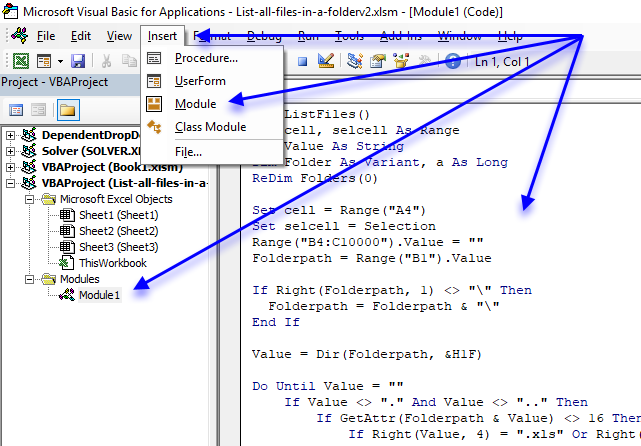
- Press Alt + F11 to open the Visual Basic Editor.
- Press with left mouse button on "Insert" on the top menu.
- Press with left mouse button on "Module" to insert a code module. It will appear in the project explorer, see image above.
- Copy above VBA code and paste to the code module.
- Exit VB Editor and return to Excel.
7. List files in folder and create hyperlinks - VBA
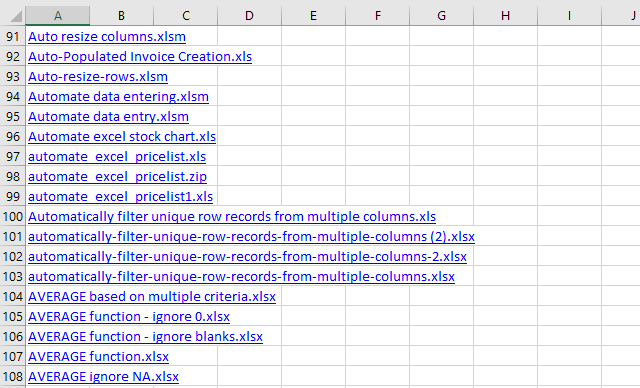
Table of Contents
- List files in a folder and create hyperlinks (VBA)
- How to navigate quickly in a complex workbook using hyperlinks
7.1. List files in a folder and create hyperlinks (VBA)
This section demonstrates a macro that populates a new worksheet with filenames from the active folder which is the same folder as the workbook was saved in. The filenames are hyperlinks that make it easy for you to quickly open any file.
What you will learn in this article
- How to not show changes made from macro, until it is finished processing, in order to speed up the macro.
- Save a worksheet object to a variable.
- Create a new worksheet and save it to an object.
- Iterate through files in a given folder programmatically.
- Ignore the current folder and parent folder.
- Write hyperlinks to a worksheet programmatically.
- Move from one cell to another using VBA.
- Identify folders using DIR function.
How the macro works
The animated picture below shows how the macro works.
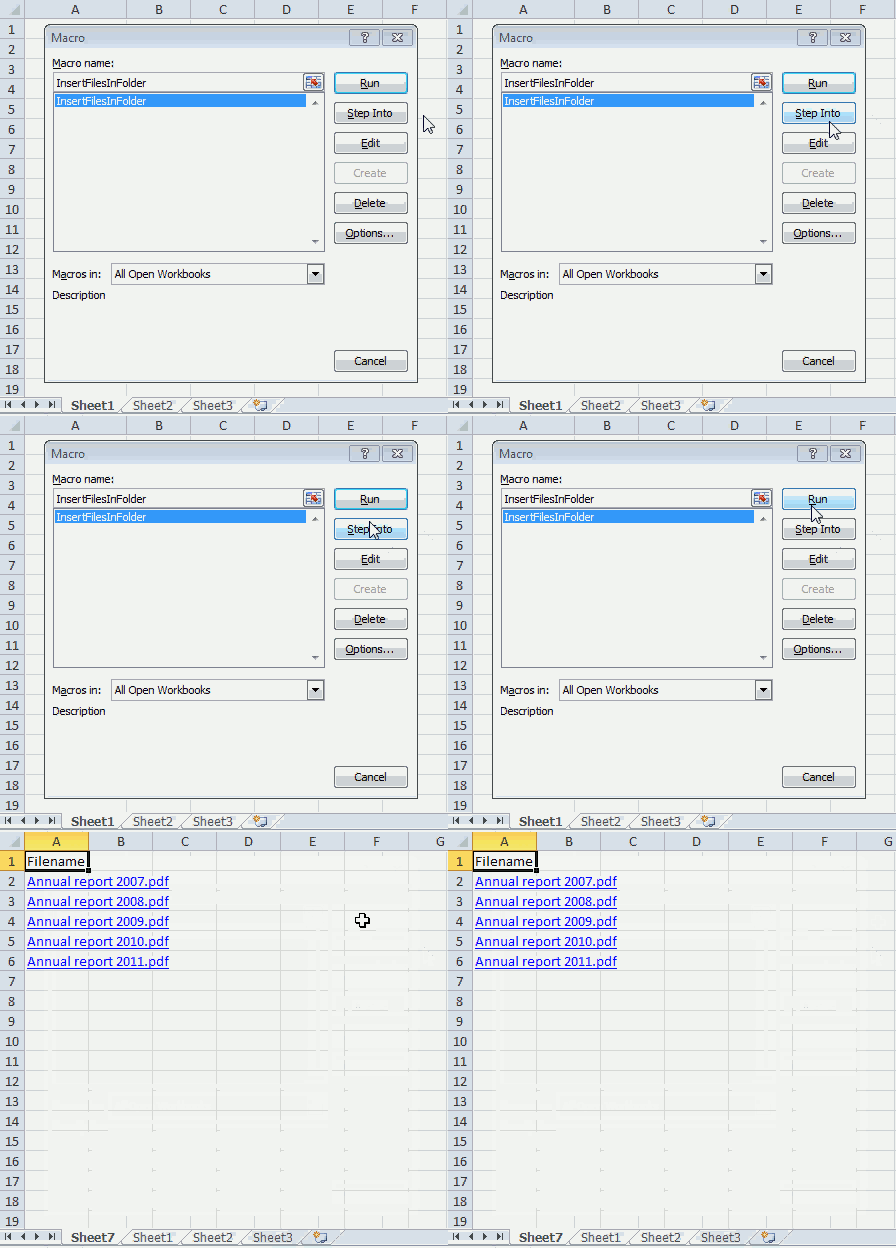
- Press Alt + F8 to open the macro dialog box.
- Press with mouse on InsertFilesInFolder to select it.
- Press with left mouse button on "Run" button to run the selected macro.
- A new worksheet is automatically inserted to your workbook.
- The macro populates column A with file names from the same directory that the workbook was saved in.
- The filenames are hyperlinks that you can press with left mouse button on to open.
VBA Code
'Name macro
Sub InsertFilesInFolder()

'Don't show changes on worksheet to user, this will speed up the macro a lot
Application.ScreenUpdating = False
'Dimension variables and declare data types
Dim sPath As String, Value As String
Dim WS As Worksheet

'Add a new worksheet and save it to variable WS
Set WS = Sheets.Add

'Save workbook path to variable sPath and append \
sPath = ActiveWorkbook.Path & "\"

'Get filename from files in folder sPath
Value = Dir(sPath, &H1F)

'Save text Filename to cell A1
WS.Range("A1") = "Filename"

'Save cell A2 to variable StartCell
Set StartCell = WS.Range("A2")

'Loop through filenames until value is equal to nothing
Do Until Value = ""

'Ignore . (represents the folder you are in) and .. which is the parent folder
If Value = "." Or Value = ".." Then

'Continue with the following lines if value is not equal to . or ..
Else

    'Check if value is a folder name
    If GetAttr(sPath & Value) = 16 Then

    'Continue with values that are not folder names or . or ..
    Else

        'Check if value is equal to your workbook name or a temporary file that is created when the workbook is opened
        If Value <> ActiveWorkbook.Name And Value <> "~$" & ActiveWorkbook.Name Then

            'Create hyperlink
            StartCell.Hyperlinks.Add Anchor:=StartCell, Address:= _
            Value, TextToDisplay:=Value

            'Move to cell below
            Set StartCell = StartCell.Offset(1, 0)
        End If
    End If
  End If

'Move to next value in folder
Value = Dir

'Continue macro with Do
Loop

'Show changes on worksheet to user
Application.ScreenUpdating = False
End Sub
Where to put the code?
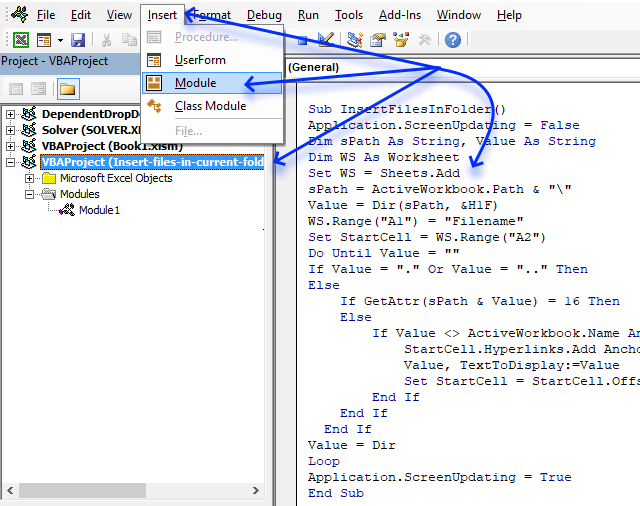
- Copy above VBA code
- Press Alt+F11 to open the VB Editor.
- Select your workbook in the Project Explorer
- Press with mouse on "Insert" on the menu.
- Press with mouse on "Module" to create a module in your workbook.
- Paste VBA code to code module.
- Return to Excel.
Note, make sure you save your workbook with the *.xlsm file extension. This will save the VBA code to the workbook.
7.2. How to navigate quickly in a complex workbook using hyperlinks
Question: I have a workbook containing a lot of worksheets and data. I need a way to find certain data/sheets quickly. How can I do this?
Answer: Create a table of contents and use hyperlinks to move around in a large complex workbook.
Here is how to do this in Excel:
- On your front sheet create a list with important workbook sheets you often visit
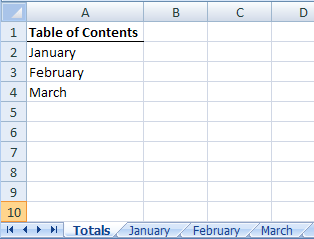
- Press with right mouse button on on January and select Hyperlink...
- Press with left mouse button on "Link to: A place in this document"
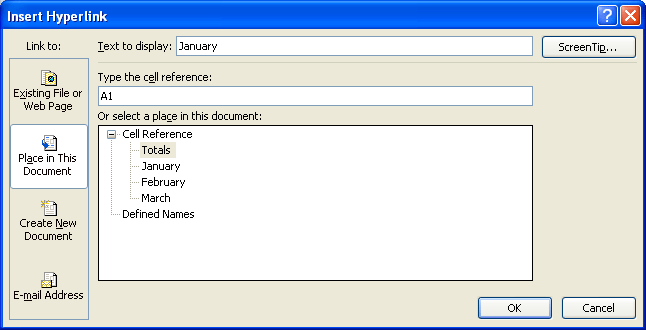
- Type cell reference. You can link to the same sheet as many times as you want. But by using a cell reference you can link to a certain place in that sheet, creating a more sophisticated navigation system.
- Press with left mouse button on OK!
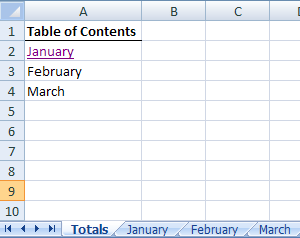
- Try press with left mouse button oning on January. Now can find important places in a workbook really quick!
- Repeat with remaining sheets.
Get Excel sample file for this tutorial.
table-of-contents.xls (Excel 97-2003 Workbook *.xls)
8. Filter duplicate files in a folder and subfolders
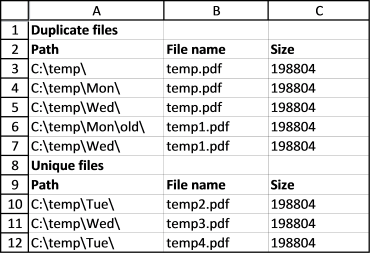
This is a follow up to my last post Compare file names in two different folder locations and their subfolders, the obvious question after reading that article is "How do I find duplicate files in a single folder and its subfolders?"
This article answers that question, there are two macros below: "FindDuplicateFiles" and "Recursive". These macros are perhaps more useful for my blog readers than the macro in my last post.
I imagine the macros would be great for finding duplicate mp3 or picture files. Note, they compare only the file names, not the file sizes.
What's on this section
- VBA code - Filter duplicate files in a folder and subfolders
- Where to put the code?
- How do I start the macro?
- What happens when I run the macro?
- Get Excel file
8.1. VBA Code
Check article Compare file names in two different folder locations and their sub folders where I explain the VBA code.
Sub FindDuplicateFiles()
Dim pth1 As String
Dim arrd() As Variant
Dim arru() As Variant
ReDim arrd(0 To 2, 0)
ReDim arru(0 To 2, 0)

With Application.FileDialog(msoFileDialogFolderPicker)
.Show
pth1 = .SelectedItems(1) & "\"
End With

Sheets.Add
Set x = ActiveSheet

Application.ScreenUpdating = False
x.Range("A1") = "Duplicate files"
x.Range("A2") = "Path"
x.Range("B2") = "File name"
x.Range("C2") = "Size"
x.Range("A:F").Font.Bold = False
x.Range("A1:C2").Font.Bold = True

Recursive pth1

Lrow = ActiveSheet.Range("A" & Rows.Count).End(xlUp).Row
x.Range("A2:C" & Lrow).Sort Key1:=x.Range("B1"), Header:=xlYes

arr1 = x.Range("A3:C" & Lrow).Value

x.Range("A3:C" & Lrow).Clear

For r1 = LBound(arr1, 1) + 1 To UBound(arr1, 1)

    If arr1(r1, 2) = arr1(r1 - 1, 2) Then

        arrd(0, UBound(arrd, 2)) = arr1(r1 - 1, 1)
        arrd(1, UBound(arrd, 2)) = arr1(r1 - 1, 2)
        arrd(2, UBound(arrd, 2)) = arr1(r1 - 1, 3)

        ReDim Preserve arrd(UBound(arrd, 1), UBound(arrd, 2) + 1)

        arr1(r1 - 1, 1) = ""
        arr1(r1 - 1, 2) = ""
        arr1(r1 - 1, 3) = ""

        chk = True

    Else

        If chk = True Then

            arrd(0, UBound(arrd, 2)) = arr1(r1 - 1, 1)
            arrd(1, UBound(arrd, 2)) = arr1(r1 - 1, 2)
            arrd(2, UBound(arrd, 2)) = arr1(r1 - 1, 3)
            chk = False

            ReDim Preserve arrd(UBound(arrd, 1), UBound(arrd, 2) + 1)

            arr1(r1 - 1, 1) = ""
            arr1(r1 - 1, 2) = ""
            arr1(r1 - 1, 3) = ""

        Else

            arru(0, UBound(arru, 2)) = arr1(r1 - 1, 1)
            arru(1, UBound(arru, 2)) = arr1(r1 - 1, 2)
            arru(2, UBound(arru, 2)) = arr1(r1 - 1, 3)

            ReDim Preserve arru(UBound(arru, 1), UBound(arru, 2) + 1)

            arr1(r1 - 1, 1) = ""
            arr1(r1 - 1, 2) = ""
            arr1(r1 - 1, 3) = ""

        End If

    End If

Next r1

If chk = True Then
    arrd(0, UBound(arrd, 2)) = arr1(r1 - 1, 1)
    arrd(1, UBound(arrd, 2)) = arr1(r1 - 1, 2)
    arrd(2, UBound(arrd, 2)) = arr1(r1 - 1, 3)
Else
    arru(0, UBound(arru, 2)) = arr1(r1 - 1, 1)
    arru(1, UBound(arru, 2)) = arr1(r1 - 1, 2)
    arru(2, UBound(arru, 2)) = arr1(r1 - 1, 3)
End If

x.Range("A3").Resize(UBound(arrd, 2) + 1, UBound(arrd, 1) + 1) = Application.Transpose(arrd)

x.Range("A" & UBound(arrd, 2) + 3) = "Unique files"
x.Range("A" & UBound(arrd, 2) + 4) = "Path"
x.Range("B" & UBound(arrd, 2) + 4) = "File name"
x.Range("C" & UBound(arrd, 2) + 4) = "Size"
x.Range("A" & UBound(arrd, 2) + 3 & ":C" & UBound(arrd, 2) + 4).Font.Bold = True
x.Range("A" & UBound(arrd, 2) + 5).Resize(UBound(arru, 2) + 1, UBound(arru, 1) + 1) = Application.Transpose(arru)

x.Columns("A:C").AutoFit

End Sub

Sub Recursive(FolderPath As String)
Dim Value As String, Folders() As String
Dim Folder As Variant, a As Long
ReDim Folders(0)
If Right(FolderPath, 2) = "\\" Then Exit Sub
Value = Dir(FolderPath, &H1F)
Do Until Value = ""
    If Value = "." Or Value = ".." Then
    Else
        If GetAttr(FolderPath & Value) = 16 Or GetAttr(FolderPath & Value) = 48 Then
            Folders(UBound(Folders)) = Value
            ReDim Preserve Folders(UBound(Folders) + 1)
        Else
            Lrow = ActiveSheet.Range("A" & Rows.Count).End(xlUp).Row + 1
            ActiveSheet.Range("A" & Lrow) = FolderPath
            ActiveSheet.Range("B" & Lrow) = Value
            ActiveSheet.Range("C" & Lrow) = FileLen(FolderPath & Value)
        End If
    End If
    Value = Dir
Loop
For Each Folder In Folders
    Recursive FolderPath & Folder & "\"
Next Folder
End Sub
8.2. How do I use this macro?
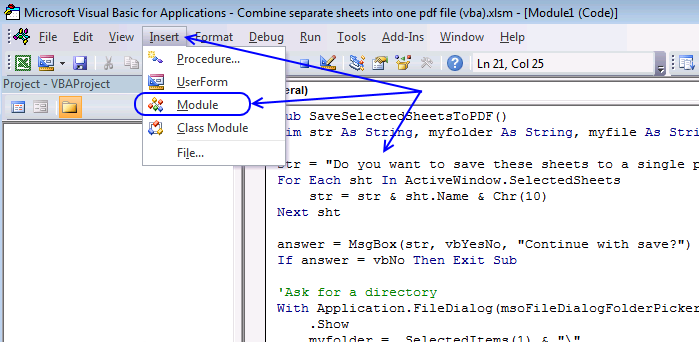
The easiest way to go is to get the excel file at the bottom of this post and run it from there. But if you want to copy the macro to your workbook, follow these steps:
- Copy the code above.
- Go to the VB Editor (Alt+F11).
- Press with left mouse button on "Insert" on the menu.
- Press with left mouse button on "Module".
- Paste code to code window.
- Return to Excel.
8.3. How do I start the macro?
- Go to "Developer" tab on the ribbon.
- Press with left mouse button on "Macros" button.
- Select macro name "FindDuplicateFiles".
- Press with left mouse button on "Run" button.
8.4. What happens when I run the macro?
- Select a folder on your harddrive or network drive.
- A new sheet is inserted.
- Sheet is populated with data.
- Macro ends.
Save the macro in your personal macro workbook
If you save the macro in a personal macro workbook, you can access that macro no matter what workbook you have open.
Read this: Copy your macros to a Personal Macro Workbook
Files and folders category
Today I'll show you how to search all Excel workbooks with file extensions xls, xlsx and xlsm in a given folder for a […]

Table of Contents Working with FILES Compare file names in two different folder locations and their sub folders Which Excel […]
Working with multiple Excel workbooks can be time-consuming, especially when dealing with large datasets spread across multiple files. Fortunately, VBA […]
User defined function category
This article demonstrates two formulas that extract distinct values from a filtered Excel Table, one formula for Excel 365 subscribers […]
Excel categories
83 Responses to “Search for a file in folder and subfolders – UDF”
Leave a Reply
How to comment
How to add a formula to your comment
<code>Insert your formula here.</code>
Convert less than and larger than signs
Use html character entities instead of less than and larger than signs.
< becomes < and > becomes >
How to add VBA code to your comment
[vb 1="vbnet" language=","]
Put your VBA code here.
[/vb]
How to add a picture to your comment:
Upload picture to postimage.org or imgur
Paste image link to your comment.

This is a great tool, However any idea on how to make it work for excel for mac 2011?
Run-time error '5': invalid prodedure call or argument on Value = Dir(Folderpath, &H1F)
Cyril,
Try this:
Value = Dir(Folderpath)
Run-time error '68': device unavailable on Value = Dir(Folderpath)
Now could he be related with the way the path is written? No c:\ in mac... Any suggestion?
Cyril,
I found this and Dir seems to work on excel for mac 2011:
https://stackoverflow.com/questions/7294838/loop-though-files-in-a-folder-on-mac-os-x-vba-excel-2011
Oscar, what's this "&H1F" supposed to do?
chrisham,
great question, I am not sure where I got it from.
You can find the attributes here: https://www.techonthenet.com/excel/formulas/dir.php
Hi OScar,
how about a macro to close open workbooks?
Danilo,
I think this i what you are looking for:
https://www.mrexcel.com/forum/excel-questions/31760-visual-basic-applications-close-all-workbooks-macro.html
This is great tool. But in my case, i need to list all xls from folder, and its subfolders. Can you help me with this ?
I love this and will be using it everyday from today, but when I try to open the files I get one only to open and get a error "code execution has been interrupted". Can you help me with this?
ok I found this, it seems that it is an excel bug, you just need to put this code as the first line in your sub and thats it...
But be aware that if you have coded endless loops, and you insert the above code, you can't interrupt it using Esc or Ctrl+Pause/Break!!!!
ScottyG,
I found this answer from Dick Kusleika:
It's most likely a corruption of the p-code that's created when you compile. Some people have had success by choose Clear All Breakpoints from the Debug menu. The rock solid method is to export all of your modules, delete them, then reimport them. This round trip through plain text forces a complete rebuild of the p-code. Google for Rob Bovey's Code Cleaner for a free utility that automates this process.
https://stackoverflow.com/questions/6033953/why-does-vba-stop-if-enablecancelkey-is-not-disabled
Hi, do you know why there is a syntax in the code? Please see my post. thank you
seems like there is a syntax with the &:
If GetAttr(Folderpath & Value) 16 Then
How can I fix?
Also, how can I use the xlm files? They dont appear to be .xls files.
thank you
OK I think it is a copy and paste issue. I see the & changes to & Value but must be careful and if it doesnt change then do it manually.
Where do you put the file path at?
Tony,
Thank you for letting me know about the amp error. I removed it from the code. It happens sometimes when I update a post in wordpress, I don´t know why.
Also, how can I use the xlm files? They dont appear to be .xls files.
The following code also lists *.xlm files:
Sub ListFiles() Dim cell As Range, selcell As Range Dim Value As String Dim Folder As Variant, a As Long ReDim Folders(0) Set cell = Range("A4") Set selcell = Selection Range("A4:B10000").Value = "" Folderpath = Range("B1").Value If Right(Folderpath, 1) <> "\" Then Folderpath = Folderpath & "\" End If Value = Dir(Folderpath, &H1F) Do Until Value = "" If Value <> "." And Value <> ".." Then If GetAttr(Folderpath & Value) <> 16 Then If Right(Value, 4) = ".xls" Or Right(Value, 5) = ".xlsx" Or Right(Value, 5) = ".xlsm" Or Right(Value, 4) = ".xlm" Then cell.Offset(0, 0).Value = Value cell.Offset(0, 1).Value = FileLen(Folderpath & Value) Set cell = cell.Offset(1, 0) End If End If End If Value = Dir Loop Call Addcheckboxes selcell.Select End SubHI Oscar, thanks for the reply about the syntax. Where would I put the path to my folder on the network drive? I am not a programmer and dont know much about VBA so would appreciate a lamens explanation. thanks...
Regarding the xlm files, I thought that the link " List all files in a folder.xlsm" would provide xls files ie sample files?
Tony,
Where would I put the path to my folder on the network drive?
Enter the path in cell B1. See the first picture.
oh I see... thank you. Will circle back if I have any issues. I like your website. thanks...
Everything works just great, thank you very much!
I wonder if it would be possible to add another vba code that can uncheck the eventually checked boxes?
Nic,
I wonder if it would be possible to add another vba code that can uncheck the eventually checked boxes?
Sure!
Sub OpenFiles() Dim Folderpath As String Dim cell As Range Dim r, LRow As Single Dim CWB As Workbook Folderpath = Range("B1").Value Set CWB = ActiveWorkbook If Right(Folderpath, 1) <> "\" Then Folderpath = Folderpath & "\" End If For Each chkbx In ActiveSheet.CheckBoxes If chkbx.Value = 1 Then chkbx.Value = 0 For r = 1 To Rows.Count If Cells(r, 1).Top = chkbx.Top Then Workbooks.Open Filename:=Folderpath & Range("A" & r).Value Exit For End If Next r CWB.Activate End If Next End SubHi Oscar thank you for your replay,
I saw the change you made "chkbx.Value = 0" and I did realize that¨my question was not so complete... Sorry for that, my English is not that good, I'm not a programmer and I'm a simple excel user
I try again :)
I would like to have a button that clear the checked boxes, if i check more than one. Is that possible? If yes, what is the vba code?
Well thank you for your time and have a great day.
My best
Nic
I found the solution, it was too easy for me lol
I just need to reload the dir to uncheck the boxes. I have about 20 dir and about 150 files in each one.
I learned something today.
Thank you again
[...] List files in a folder and subfolders [...]
Oscar,
What check in the code above, are doing here
Value = ".."
Also,
Using the VBA Help, I notice there is nothing list as &H1F for the Dir Function. Can you explain that part in your code?
Dir(FolderPath, &H1F)
Thanks for your tutorials... Great job as usual.
chrisham,
What check in the code above, are doing here
Value = ".."
I think you are talking about this line?
List a directory in command prompt and you will find that the first two lines are named . and ..
I think they are reference to the current folder and the parent folder.
Using the VBA Help, I notice there is nothing list as &H1F for the Dir Function. Can you explain that part in your code?
Dir(FolderPath, &H1F)
I don´t think you need it:
https://www.techonthenet.com/excel/formulas/dir.php
Thanks Oscar... Got it!
Hi,
Firstly this is brilliant and just what I was looking for Thank you
ListFiles and Addcheckboxes run fine.
My only problem is I get an error when running the open files code. Run-time error `1004': Application-defined or object-defined error.
I am just starting out using VBA and have no idea how to correct this error, or even find it for that matter!
I am using Excel 2003
any help would be apreciated
Thanks again,
Mark
Hi,
I have got the code to work!
I was trying to use it to open a .doc word file. It works fine with excel files.
I have ammended to search for and list .doc files
Is there anyway to change this code to also open .doc files?
Thank you!
Mark,
I am happy you got it working!
I was trying to use it to open a .doc word file. It works fine with excel files.
I have ammended to search for and list .doc files
Is there anyway to change this code to also open .doc files?
Yes!
Sub ListFiles()
Dim cell, selcell As Range
Dim Value As String
Dim Folder As Variant, a As Long
ReDim Folders(0)

Set cell = Range("A4")
Set selcell = Selection
Range("A4:B10000").Value = ""
Folderpath = Range("B1").Value

If Right(Folderpath, 1) <> "\" Then
  Folderpath = Folderpath & "\"
End If

Value = Dir(Folderpath, &H1F)

Do Until Value = ""
    If Value <> "." And Value <> ".." Then
        If GetAttr(Folderpath & Value) <> 16 Then
            If Right(Value, 4) = ".xls" Or Right(Value, 5) = ".xlsx" Or Right(Value, 5) = ".xlsm" Or Right(Value, 5) = ".docx" Or Right(Value, 4) = ".doc" Then
                cell.Offset(0, 0).Value = Value
                cell.Offset(0, 1).Value = FileLen(Folderpath & Value)
                Set cell = cell.Offset(1, 0)
            End If
        End If
    End If
Value = Dir
Loop

Call Addcheckboxes

selcell.Select

End Sub

Sub Addcheckboxes()
Dim cell, LRow As Single
Dim chkbx As CheckBox
Dim CLeft, CTop, CHeight, CWidth As Double
Application.ScreenUpdating = False
ActiveSheet.CheckBoxes.Delete
LRow = ActiveSheet.Range("A" & Rows.Count).End(xlUp).Row
For cell = 4 To LRow
    If Cells(cell, "A").Value <> "" Then
        CLeft = Cells(cell, "C").Left
        CTop = Cells(cell, "C").Top
        CHeight = Cells(cell, "C").Height
        CWidth = Cells(cell, "C").Width
        ActiveSheet.CheckBoxes.Add(CLeft, CTop, CWidth, CHeight).Select
        With Selection
            .Caption = ""
            .Value = xlOff
            .Display3DShading = False
        End With
    End If
Next cell

Application.ScreenUpdating = True
End Sub

Sub OpenFiles()
Dim Folderpath As String
Dim cell As Range
Dim r, LRow As Single
Dim CWB As Workbook

Folderpath = Range("B1").Value
Set CWB = ActiveWorkbook

If Right(Folderpath, 1) <> "\" Then
  Folderpath = Folderpath & "\"
End If
Set wordapp = CreateObject("word.Application")
For Each chkbx In ActiveSheet.CheckBoxes
    If chkbx.Value = 1 Then
        For r = 1 To Rows.Count
            If Cells(r, 1).Top = chkbx.Top Then
                If Right(Cells(r, 1), 4) = ".xls" Or Right(Cells(r, 1), 5) = ".xlsx" Or Right(Cells(r, 1), 5) = ".xlsm" Then
                    Workbooks.Open Filename:=Folderpath & Range("A" & r).Value
                ElseIf Right(Cells(r, 1), 5) = ".docx" Or Right(Cells(r, 1), 4) = ".doc" Then
                    wordapp.documents.Open Folderpath & Cells(r, 1)
                    wordapp.Visible = True
                End If
                Exit For
            End If
        Next r
        CWB.Activate
    End If
Next

End Sub
Get the Excel *.xlsm file
List-all-files-in-a-folder-open-doc1.xlsm
Thank you !
This works absolutly perfect !
again, thanks for helping me out !
Mark
Hi again,
Thanks for your help already given.
I have been using the code a lot and found it really usefull.
I was wondering if there was anyway to also open .pdf .tiff and .jpeg files?
This would be really handy and include all the filetypes I need to be working with to open.
Thanks in advance for your help.
Mark
Hi Oscar, can you write a code for pdf, png (Snagit), txt, prn files?
Thanks in advance.
Hi There,
I get the message: "There are more rows, extend user defined function"
Is there anyways can I skip that? Because I want to see the whole of the L drive.
Many Thanks,
Ross
Ross,
Yes, delete this line from function ListFiles():
Mark and Anibal,
Get the Excel *.xlsm file
List-all-files-in-a-folder-open-any-file.xlsm
Oscar,
Hi and thanks for your reply.
I have been trying to add code to yours to open up .pdf files using .shell command. I got a code to work to open .pdf's the problem with this is it searches for and opens Acrobat reader (AcroRd32.exe) then opens the file. This created a long code and upon opening Acrobat reader caused it to crash anyway.
I see what you have done with this code . . .
[vb1="vbnet"language="."]
ActiveWorkbook.FollowHyperlink Folderpath & Range("A" & r).Value, NewWindow:=True
[/vb]
Using the folder path and filename as a hyperlink to open. Works every time. with any file extension. Even AutoCAD. where I was taking a similar approach using AutoCAD.Application and .Documents.Open which I couldn't get to work either.
I was totally stuck and writing longer and longer and more complicated codes! that didn't work!
the .FollowHyperlink is GENIUS! Simple and Genius
And all done in 1 line ! I would never of thought of this in a million years!
Thanks again so much for the help and thanks for your time.
This is a really useful Macro, I use it on a daily basis!
Thank you and compliments on a really helpful website.
Mark
Mark,
Thanks! I found out about the ActiveWorkbook.FollowHyperlink here:
https://www.vbaexpress.com/kb/getarticle.php?kb_id=905
It is great!
Hi,
I got the #VALUE! error. Any ideas why? I'm using Excel 2010 and changed my settings per this link:
https://production-scheduling.com/run-macros-excel-2007-2010/
Thanks.
ACL,
did you enter the custom function as an array formula?
Hi Oscar,
could it be possible to have another button that gives me the possibility to print the file/files I check, without the need to open them?
If yes, can you please write the code?
Thanks in advance
Nic
Nic,
Try this:
Sub OpenFiles() Dim Folderpath As String Dim cell As Range Dim r, LRow As Single Dim CWB As Workbook Folderpath = Range("B1").Value Set CWB = ActiveWorkbook If Right(Folderpath, 1) <> "\" Then Folderpath = Folderpath & "\" End If For Each chkbx In ActiveSheet.CheckBoxes If chkbx.Value = 1 Then For r = 1 To Rows.Count If Cells(r, 1).Top = chkbx.Top Then Workbooks.Open Filename:=Folderpath & Range("A" & r).Value ActiveWindow.SelectedSheets.PrintOut Copies:=1, Collate:=True Exit For End If Next r CWB.Activate End If Next End SubThat works just perfect Oscar!
Thank you so much for your help and your time
Have a nice summer
/Nic
Hi Oscar, can you pls help me on this...
lets say that i have 4 dirctories and in each dir I have 50 workbooks.
On the main workbook called index.xlsm, that works like a file explorer, I got 4 buttons linked to the dirs 1-2-3-4, here I'm using your code " list excel files in a specified folder ...." to see the files of each dir as a list.
In the index.xlsm i have put a 5th button called "förhandsgranska" (preview).
So when I Press with left mouse button on the button "1", in the index.xlsm, I see the files.
When the list is populated I Press with left mouse button on the button 5, a window pops up and it shows me the same file list that I see in the index.xlsm.
At this point when I select a file name, in the popup window, i see an image or preview of that file.
I would like to have a print button on the popup window that prints the preview of that file i choosed to view and that it doenst close the popup window.
The index.xlms is in the same folder [img] there the images are.
I found the code of that "popup window" on a site and I lost the link to it.
I made some small changes to the originnal to fit my needs.
Option Explicit

Private Sub CommandButton1_Click()
Unload Me
End Sub

'When a name in the listbox is double-pressed, select the corresponding row
Private Sub ListBox1_DblClick(ByVal Cancel As MSForms.ReturnBoolean)
      Dim Employee As Variant
      Dim Name As String
      Dim firstaddress As String
      If IsNull(ListBox1.Value) Then Exit Sub
      Employee = Empty
      'If you add more than 500 names you will need to increase this
      With ActiveSheet.Range("C1:C500")
            Name = ListBox1.Value
            Set Employee = .Find(what:=Name, LookIn:=xlValues)
            If Not Employee Is Nothing Then Employee.Rows.EntireRow.Select Else Exit Sub
      End With
      'closes the form when you double-pressed on a name
      Unload Me
      Set Employee = Nothing
End Sub
Private Sub UserForm_activate()

      Dim MyList(300, 0) 'as array type
      Dim R As Integer

      'The list box contains 1 data column.
      'You can configure the number of columns, their width and height below
      'as well as change the text in the ControlTipText of the listbox
      Application.ShowToolTips = True
      With ListBox1
            .ColumnCount = 1
            .ColumnWidths = 75
            .Width = 230
            .Height = 110
            .ControlTipText = "Klicka på en Ansedel"
      End With

      'Define the list and where it's obtained from (Columns A, D, G in this example)
      With ActiveSheet

            'MyList (Row{0 to 9}, Column{0 to 2}) = the ranges given
            For R = 0 To 300
                  MyList(R, 0) = .Range("C" & R + 1)

            Next R
      End With

     'populate the list box
      ListBox1.List = MyList

End Sub

'This sub uses the list box to select the name on the spreadsheet
'and display their picture if one is found
Private Sub listBox1_Click()

      Dim EmpFound As Range
      Dim fPath As String

    'selects the range to look for a name.  You have to have a range
    'named  myName set up on column A.  Go to insert-name-define to
    'see how this one is set up.
    With Range("mittNamn")
        Set EmpFound = .Find(ListBox1.Value)
        On Error Resume Next
        If EmpFound Is Nothing Then
            Image1.Picture = LoadPicture(fPath & "nopic.jpg")
        Else
            With EmpFound
                'Look in the directory where this workbook is located.
                fPath = ThisWorkbook.Path & "\"
                On Error Resume Next
                'If a matching picture is found then display it.
                Image1.Picture = LoadPicture(fPath & "\" & ListBox1.Value & ".jpg")
                'If No picture found then display the default picture.
                If Err = 0 Then Exit Sub
                Image1.Picture = LoadPicture(fPath & "nopic.jpg")
    End With
    End If
    End With
    Set EmpFound = Nothing
End Sub
Hope I was enough clear.... my English is still bad.
Thank you
/nic
Hi Oscar,
First off, thanks for the code - it is almost exactly what I have been trying to do!
I say almost as all I really needed to do was to move the cell locations around a little. Essentially the checkboxes go to column A and all is well and good. This works for the first file, but for the second and third the code "thinks" that none of the checkboxes are selected.
Any ideas?
Cheers,
Gary
Gary Hicks,
List-all-files-in-a-folderv2.xlsm
Oscar, what do you mean enter the function as an array formula? How would I do that?
Nevermind, I found my answer here: https://excelexperts.com/vba-tips-list-files-in-a-folder
I suppose this is what the hex-number is used for.
Syntax for dir is dir[(path [, attributes])]
Attribute &H1F is as binary: 011111, which means that attributes with values 1, 2, 4, 8, 16 shall be listed.
Use dir(path,&H10) only folders will be listed. &H14 will list folders and system files.
Zeth,
Thank you, I did not know.
[…] Read the full article here: Find and replace a text string […]
[…] Read the full article here: Find and Replace […]
Hi. Can you please guide me how to edit this code so that I want to select only directories with a specific pattern at each level and only .edf files.
Thanks in advance.
Sobia
Hi friends,
I am looking for a macro which will search and replace the complete file name. I have a list of old names in A column and new names in B column. The name of the old files are accruate only until 3 characters. Meaning if the file name is 83a6dfc0-1ce-110-058-e66a514c9effefe.docx then the same file will be in folder with starting "83a*". I want the macro to try finding such similar file names and replace it with new name.
I tried modifying the above codes, but was not successful.
Thanks a Ton in advance !
hello,
first af all I want to thank you to share this Code with us.it work fine but I want to make somthing additional. I would like to add some informations (in new columns) to each File/Filename. Is that possible? Is there any uniq identifier of the files readable with with VBA?
Thank You in advance for your Reply.
Zoltan
I would like to add some informations (in new columns) to each File/Filename. Is that possible?
Yes, make temp array variable larger. What kind of information?
Is there any uniq identifier of the files readable with with VBA?
Not that I am aware of, Windows won't allow you to have two identical file names in the same folder. The folder path together with file name makes each file unique.
Dear Sir
I have a zip file in D:\ , which I want to unzip so used the code to unzip the file(file is csv format).
The macro searches the folder and shows no files to unzip.
However there are two files to unzip which the macro is unable to detect
Please help.
Thank you very much for sharing your codes.
Hello Sir
I thank you to give us such nice information. actually I'm searching for a excel macro that will create a list of files in a given folder (Very similar as above), only thing when I run same macro for next time it will first compare the old list of file names in excel range with new one of given folder & then it will give remark at end of each row like,
if file not found then "File is deleted or moved"
If new file found then "New file added"
If same file found then "No change" etc....
Thank You in advance for your Reply.
Avinash...
Hi Oscar, can you pls help me on this...
My code opens files in a selected folder and perform some actions on the file before closing the file.
What I want to do is before opening the file, the code should check and skip all files that are not protected with a known password.
Thanks
Freeman Kwashie,
The macro demonstrated here: https://www.get-digital-help.com/search-all-workbooks-in-a-folder/
ignores workbooks with a password. Perhaps you can use the same technique to only open workbooks password-protected with a known password.
Probably something like this (not tested):
On Error Resume Next Workbooks.Open Filename:=Folderpath & Range("A" & r).Value, Password:="zzzzzzzzzzz" If Err.Number > 0 Then On Error Goto 0 Workbooks.Open Filename:=Folderpath & Range("A" & r).Value, Password:="correct_password" On Error Resume Next If Err.Number = 0 Then 'Code to execute End If End If On Error Goto 0Hello all,
my search string is 4 and my replace string is 04, but macro keeps asking me if I want to rename "ball" to "ball" or "grass" to "grass" for every file and every folder that doesn't match my search criteria. Is that how it's supposed to work?
Nebojsa,
Did you copy the code or try the file?
Wordpress (website software) changed some characters in the code so perhaps that is the cause to the error you are experiencing.
I also faced same issue of asking non matching folder names
Hi is the possible to have button that gives me the possibility to print all type of file that (atleast excel and word) I check, without the need to open them?
Ramesh,
no. Not that I know.
Thanks for this code.
I am not much of a VBA coder but I do pick up code and try to change to my requirements.
Can you help me with my query:
When my Folderpath is a system folder or a network folder - then I get #Value! all over. But if I change my folderpath to some sub-directory within, the code works.
For eg:
If my folderpath is:
C:\users\user\documents
It will not work
But if it is
C:\users\user\documents\Temp
The UDF works
Looking for your help!
Thanks!
Rasna,
Check the folder permissions, I believe that they may give you trouble.
Is there a way to work with all kinds of folders? I can read the folder; can add / delete items to the folder.. I just cannot delete the folder as it is a system folder. Should that make a difference? If yes, can we include it in our search criteria?
Thank you so much for your response! Really appreciate it.
Rasna
try this workbook:Check-if-file-exists-in-folder-or-subfolders-VBA-FSO.xlsm"
It seems to handle system folders as well.
Dear,
Your code is exactly what I need. But It doesn't work when I copy to other worksheets. I already active "trust center" to run VBA on my computer. the result return "#value!".
Also, your workbook doesn't allow to add or copy more line for functions. I am checking with more than 3 levels of sub folder.
Please help!
Thank you!
Dien
Code doesn't work in other worksheet,
You need to enter the user defined function as an array formula.
Here is how to enter an array formula using my example above.
1. Select cell range B6:D7 (Select a larger cell range if you need to).
2. Type =Listfiles(C3, B3)
3. Press and hold both CTRL + SHIFT simultaneously.
4. Press Enter.
5. Release all keys.
The are now curly brackets before and after the user defined function, don't enter these characters yourself. They appear when you successfully enter the array formula.
Like this:
{=Listfiles(C3, B3)}
Dear,
The code doesn't work on network drive (server). is there anyway to make it works?
Thanks
Anh
Code doesn't work in network drive,
Try the macro above that uses the FSO object or read my answer to Ransas question.
Hi Oscar,
Thank you for the code that finds files through system folders as well.. much much appreciated. It works for me.
Please do add it as another webpage within your site so that others can also find this useful code when they need it.
Thanks again!
Rasna
Rasna,
Thank you, I have added it to this article.
Dear Xlxs tech
I have a list in excel and i want to transfer the list from excel as folder names
how can i do it
I had a user lose (moved or deleted) a subfolder on a network. Can this code be modified to search for a particular subfolder that has been misplaced?
I recommend Windows Explorer to find a particular subfolder that has been misplaced. You don't need Excel to do that.
Thanks Oscar for the great code! Really helps.
Is there a chance to somehow search for e.g. all ".docx" files? Meaning not searching for an exact name but a file type.
Thanks a lot for your help!!
Is it possible to search for files using a wildcard or a string. I want to search for file starting with a certain string like test*
Your code is great, but it doesn't work in server correct? For example if open one in a computer where the unit has the letter C:\\ and I try later with another computer with the letter K:\\ it will no work, is it correct? Do you know what I should make to fix it?
Thank you so much for you help.
How can I turn off it prompting me for each folder or if it would only ask when it finds a folder matching my criteria that would work too? I didn't copy the code because it wouldn't work I downloaded the file and it runs well except for the issue I mentioned. I really appreciate you publishing this it really helps me thanks a ton!!!