Working with Excel tables programmatically
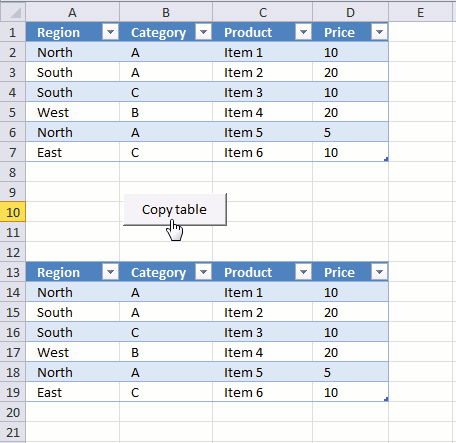
The image above demonstrates a macro linked to a button. Press with left mouse button on the button and the macro runs. It copies the Excel table in cell range A1:D7 to cell range A13:D19.
What's on this page
- Introduction
- How to copy an Excel Table programmatically
- How to copy the contents of a filtered Excel Table programmatically
- How to copy multiple filtered Excel tables to a new worksheet
- How to apply a filter to all Excel tables in a workbook
- How to apply filters to all Excel tables and copy the result to a new sheet
- Clear all filters from all tables in the active workbook programmatically
- Where to put code?
- Get Excel *.xlsx file
- Copy Excel Table filter criteria programmatically
- Sort values in an Excel table programmatically - VBA
1. Introduction
What is an Excel Table?
An Excel Table is a structured range of data that comes with built-in functionality to make managing and analyzing data easier. When you convert a range of cells into a table Excel automatically applies formatting, sorting, filtering, and structured referencing.
What is an Excel Table filter?
An Excel Table filter is a feature that allows you to display only the rows that meet certain criteria while hiding the rest. Filters are available in each column header when a table is created.
What is a macro?
Macros are sequences of instructions or actions that can be recorded and replayed in Excel to automate repetitive tasks.
- Automate tasks such as formatting, calculations, data manipulation, or interacting with other workbooks.
- You can record macros using the built-in Excel Macro Recorder, which generates VBA (Visual Basic for Applications) code for the actions you perform in Excel.
- Alternatively, you can write macros manually in the VBA editor for more control and flexibility.
- Macros can be run from the Developer tab, assigned to a button, or triggered through custom VBA code.
What is VBA?
VBA (Visual Basic for Applications) is a programming language developed by Microsoft that is used for automating tasks in Microsoft Office applications such as Excel, Word, and Access. It allows users to create macros, automate repetitive tasks, and enhance Office functionality with custom scripts.
What is the "Developer" tab?
The Developer tab is an advanced feature in Microsoft Excel that provides tools for automation, coding, and customization. It includes:
- VBA (Visual Basic for Applications): Write, record and edit macros.
- ActiveX Controls & Form Controls: Create buttons, check boxes, and interactive elements.
- XML Tools: Work with XML maps and data.
- Add-ins Management: Enable and configure Excel Add-ins.
How to enable the "Developer tab"?
Here is how to enable the "Developer" tab if it is missing on the ribbon:
- Press with left mouse button on "File" located above the ribbon, a new pane appears.
- Press with mouse on the "Options" button to access Excel settings.
- Press with mouse on "Customize Ribbon" and then on the right side press with left mouse button on the checkbox next to the tab "Developer" to enable it.
- Press with left mouse button on "OK" button to apply changes.
The "Developer" tab is now visible on the ribbon. Here are instructions for Excel 2007, Excel 2010 and Excel 2013
2. How to copy an Excel Table programmatically?
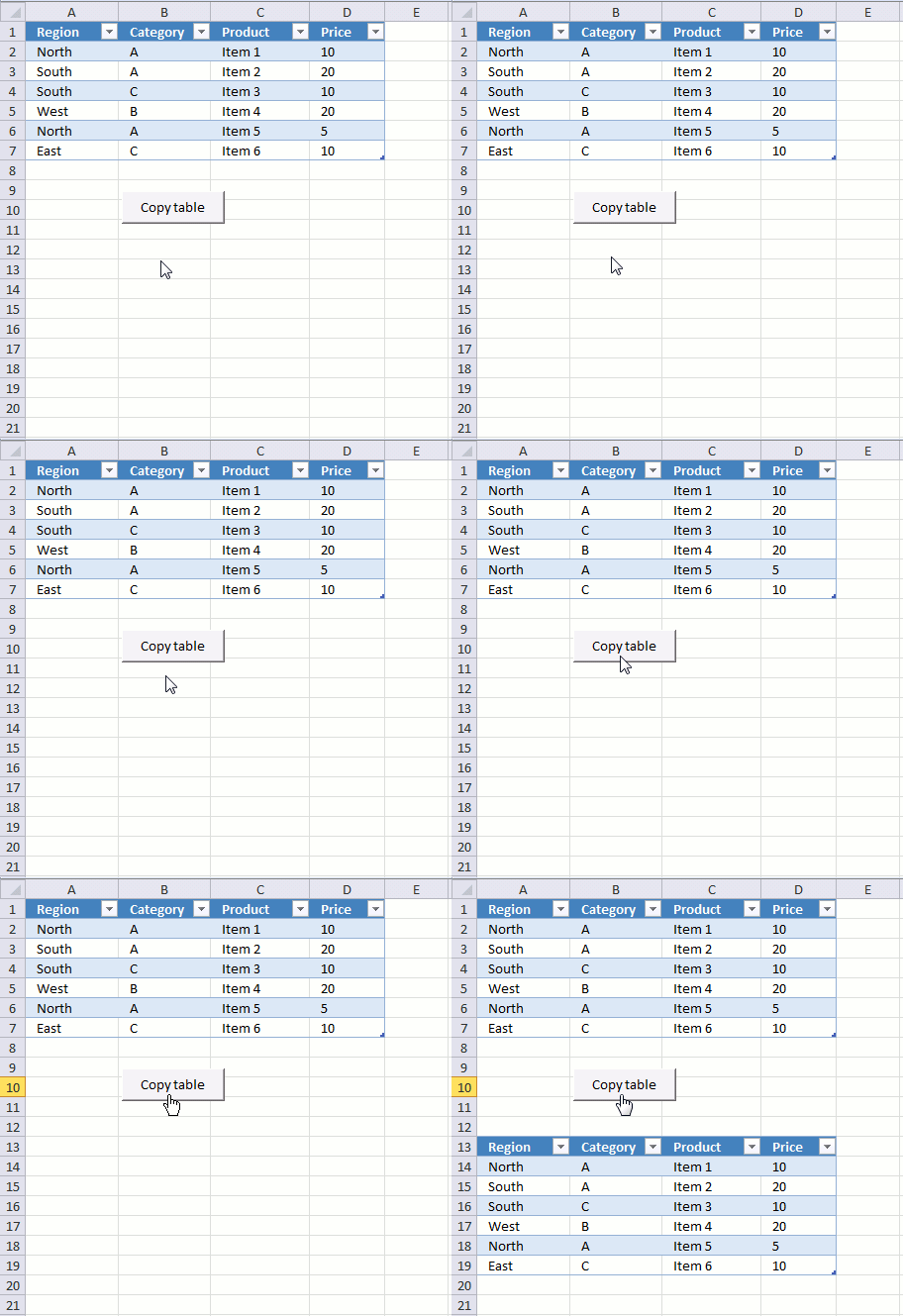
The animated image above shows what happens when you press with left mouse button on the button. The VBA code below copies Table1 (Excel Table) to cell range A13 and adjacent cells.
Sub CopyTable()
Range("Table1[#All]").Copy Destination:=Worksheets("2010").Range("A13")
End Sub
3. How to copy the contents of a filtered Excel Table programmatically
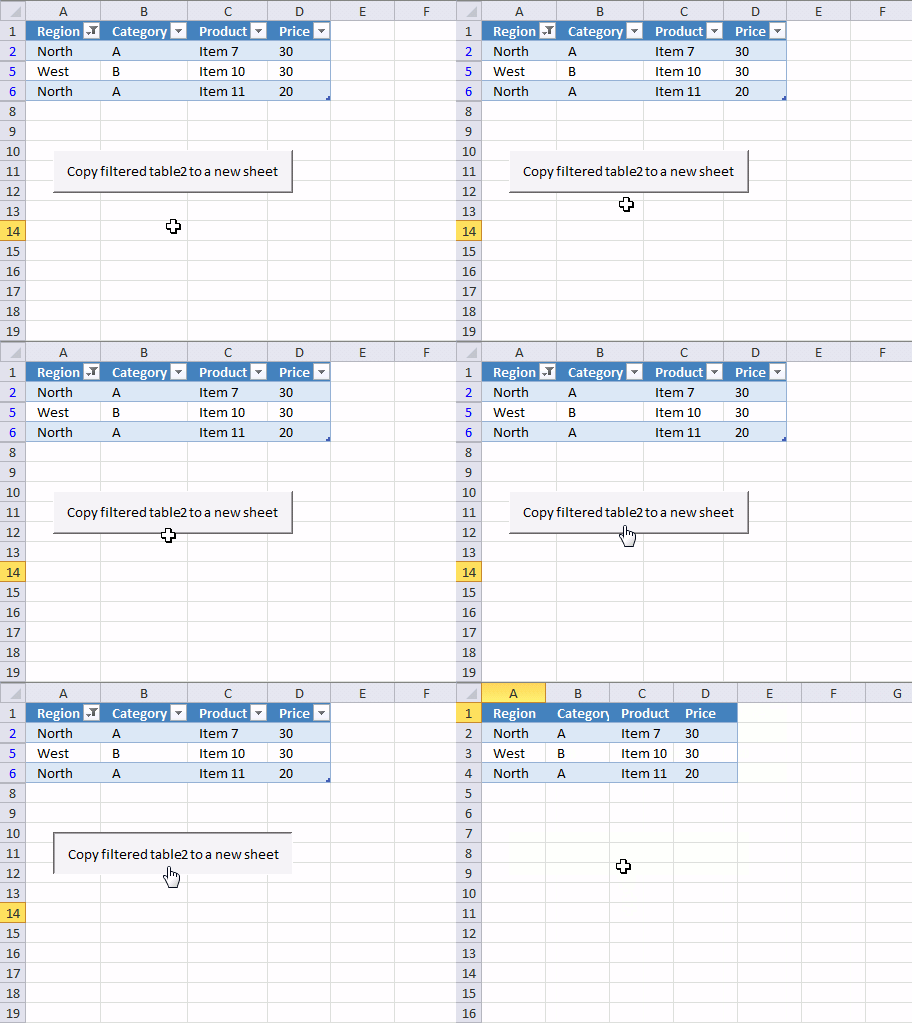
The macro above works great if there are no filters applied to the table. If there were filters applied, all data would have been copied anyway.
So how do we solve that problem? This macro checks if each row in Table1 is visible. If it is, it is copied to a new sheet.
'Name macro
Sub CopyFilteredTable()

'Dimension variables and declare datatypes
Dim rng As Range
Dim WS As Worksheet

'Go through rows in Table2
For Each Row In Range("Table2[#All]").Rows

    'Check if row is visible
    If Row.EntireRow.Hidden = False Then

        'The SET statement allows you to save an object reference to a variable, the image above demonstrates a macro that assigns a range reference to a range object.
        If rng Is Nothing Then Set rng = Row

        'Returns the union of two or more ranges.
        Set rng = Union(Row, rng)
    End If

'Continue with next row
Next Row

'Create a new worksheet
Set WS = Sheets.Add

'Copy rng to cell A1 in worksheet WS
rng.Copy Destination:=WS.Range("A1")
End Sub
Documentation: Range | Rows | If | Row | EntireRow | Hidden | Nothing | Set | Union | Sheets.add | copy | For Next | For Each Next |
4. How to copy the contents of multiple filtered Excel tables to a new worksheet
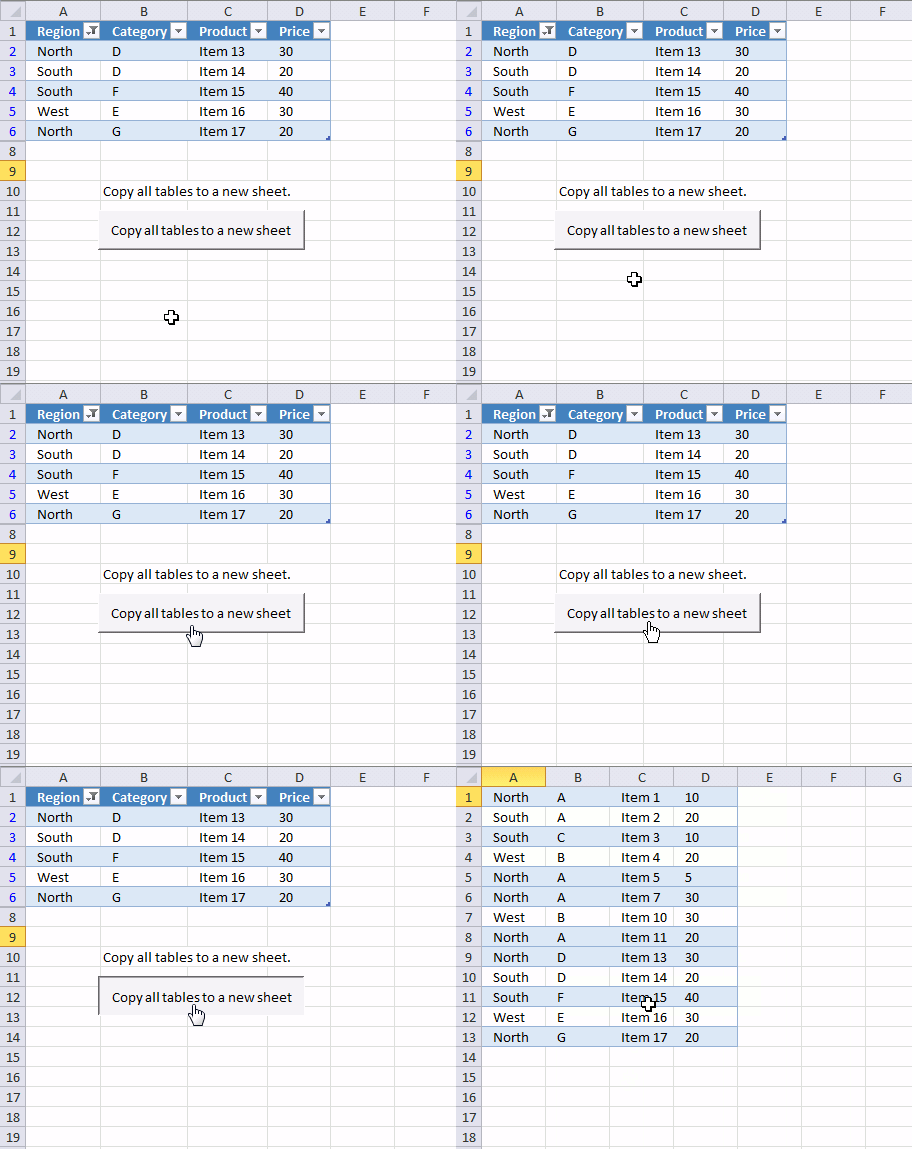
The following macro iterates through each sheet in the current workbook and looks for Excel tables. It copies all visible values from every excel table to a new sheet.
This is handy if you have many excel tables in a workbook and you want to merge all filtered values from all tables to a new sheet.
'Name macro
Sub CopyFilteredTables()

'Dimension variables and declare datatypes
Dim WS As Worksheet
Dim WSN As Worksheet
Dim tbl As ListObject
Dim rng As Range

'The SET statement allows you to save an object reference to a variable, the image above demonstrates a macro that assigns a range reference to a range object.
Set WSN = Sheets.Add

'Go through each worksheet in active workbook
For Each WS In Worksheets

    'Go through Excel Tables in active worksheet
    For Each tbl In WS.ListObjects

        'Clear rng object
        Set rng = Nothing

        'Go through rows in Excel Table
        For Each Row In tbl.DataBodyRange.Rows

            'Check if row is hidden
            If Row.EntireRow.Hidden = False Then

                'Make sure rng object i nothing and then save row to rng
                If rng Is Nothing Then Set rng = Row

                'Returns the union of two or more ranges.
                Set rng = Union(Row, rng)
            End If

        'Continue with next row in Excel Table
        Next Row

        'Save number of first non empty row to variable Lrow
        Lrow = WSN.Range("A" & Rows.Count).End(xlUp).Row

        'Check that number is larger than 1 and if so add 1 to variable Lrow
        If Lrow > 1 Then Lrow = Lrow + 1

        'Copy row
        rng.Copy Destination:=WSN.Range("A" & Lrow)

    'Continue with next Excel Table
    Next tbl

'Continue with next worksheet
Next WS
End Sub
Documentation: Union | Nothing | If | copy | Row | EntireRow | Hidden | Set | ListObjects |
5. How to apply a filter to all Excel Tables in a workbook
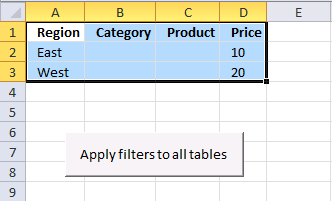
The image above demonstrates a macro that applies the same filter to all Excel Tables in the workbook. This is useful if they all share the same Table header names and you want to save time not having to manually manipulate each Excel Table.
Cell range A1:D1 contains header names and cells below contain filter conditions.
Instructions
- Type the corresponding header, make sure you spell it right.
- Type the critera below each header
- Select the criteria with your mouse
- Run macro ApplyFilterToTable
'Name macro
Sub ApplyFilterToTable()

'Dimension variables and declare datatypes
Dim filters As Range
Dim flV() As Variant

'The SET statement allows you to save an object reference to a variable, the image above demonstrates a macro that assigns a range reference to a range object.
Set fltrs = Selection

'Redimension variable
ReDim flV(0 To Selection.Rows.CountLarge - 2)

'Cycle through all sheets in active workbook
For Each WS In Worksheets
    'Cycle through all excel tables in sheet
    For Each tbl In WS.ListObjects
        'Compare table headers to selection
            For ct = 1 To tbl.DataBodyRange.Columns.Count
                For cf = 1 To fltrs.Columns.Count
                    'Build array with filter values
                    j = 0
                    For i = LBound(flV) To UBound(flV)
                        If fltrs.Cells(i + 2, cf) <> "" Then
                            flV(i) = CStr(fltrs.Cells(i + 2, cf))
                        Else
                            flV(i) = ""
                            j = j + 1
                        End If
                    Next i
                    'Check if headers match
                    If tbl.Range.Cells(1, ct) = fltrs.Cells(1, cf) Then
                        'Clear filter
                        tbl.Range.AutoFilter Field:=ct
                        'Apply new filter
                        If UBound(flV) <> j - 1 Then
                            tbl.Range.AutoFilter Field:=ct, Criteria1:=flV, Operator:=xlFilterValues
                        End If
                    End If
                Next cf
            Next ct
    Next tbl
Next WS
End Sub
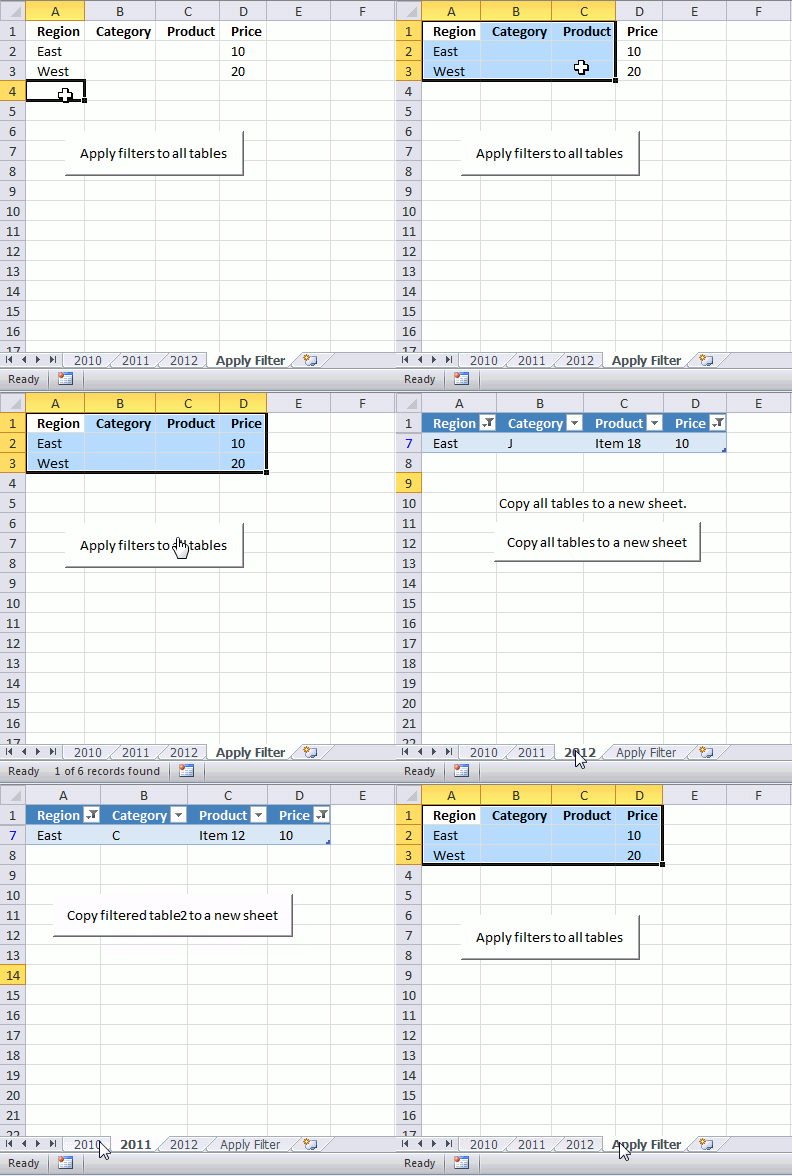
It cycles through all excel tables in a workbook and applies the filter you have selected on a sheet.
6. How to apply filters to all Excel tables and copy the result to a new sheet
So if you combine macro CopyFilteredTables and ApplyFilterToTable you can quickly apply multiple filters to all excel tables and then copy the filtered values from all excel tables to a new sheet. That saves you a lot of time.
Instructions
- Select the criteria. You also need to specify the corresponding header, make sure you spell it right.
- Run macro ApplyFilterToTable
- A new sheet is created and populated with values from all filtered
Sub ApplyCopy()

'Start macro named ApplyFilterToTable
ApplyFilterToTable

'Start macro named CopyFilteredTables
CopyFilteredTables

End Sub
7. How to clear all filters from all Excel Tables in the active workbook
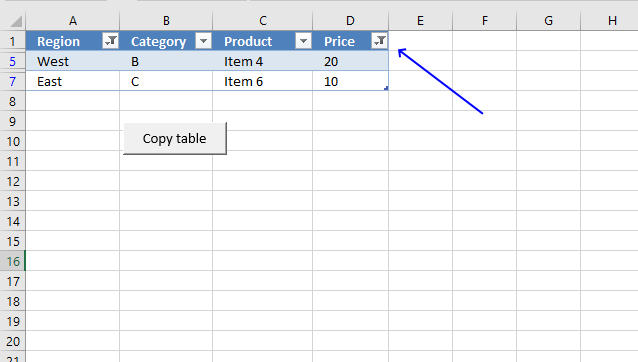
The image above shows an Excel Table with a filter applied, you can tell the Excel Table is filtered by the button next to the Table header name. The image below shows the same Excel Table
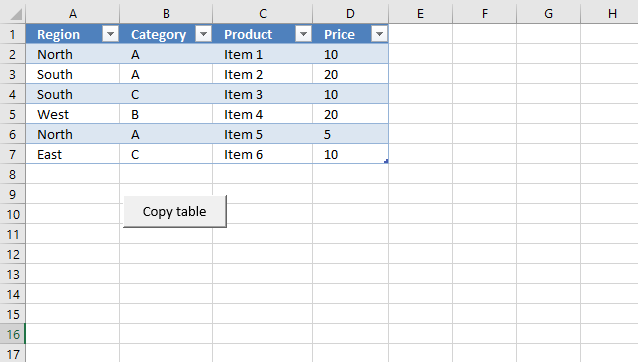
The macro below removes all filters in all Excel Tables in the active workbook.
'Name macro
Sub ClearFiltersAllTables()

'Go through all worksheets
For Each WS In Worksheets

    'Got through all Excel Tables in Worksheet
    For Each tbl In WS.ListObjects

            'Go through all columns
            For ct = 1 To tbl.DataBodyRange.Columns.Count

                'Remove filter
                tbl.Range.AutoFilter Field:=ct

            'Continue with next column
            Next ct

    'Continue with next Excel Table
    Next tbl
Next WS
End Sub
Documentation: AutoFilter | DataBodyRange | ListObjects | Worksheets
8. Where to put code?
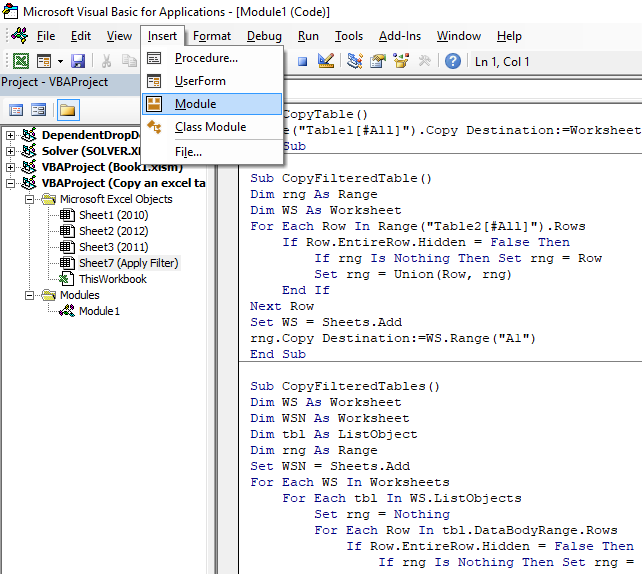
- Press Alt + F11 to open the Visual Basic Editor (VBE).
- Press with left mouse button on "Insert" on the menu.
- Press with left mouse button on Module to insert a new module to your workbook.
- Copy VBA code.
- Paste VBA code to the window, see image above.
- Exit VBE and return to Excel.

9. Copy Excel Table filter criteria programmatically
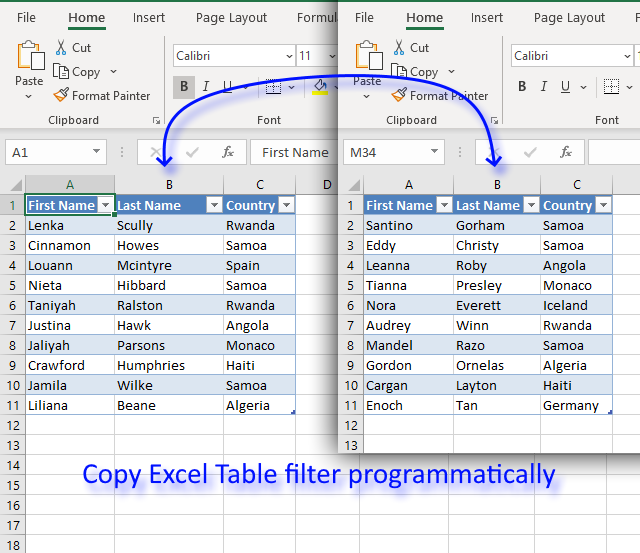
I will in this article demonstrate a macro that copies criteria from one Excel Table and applies them to another Excel Table.
How it works
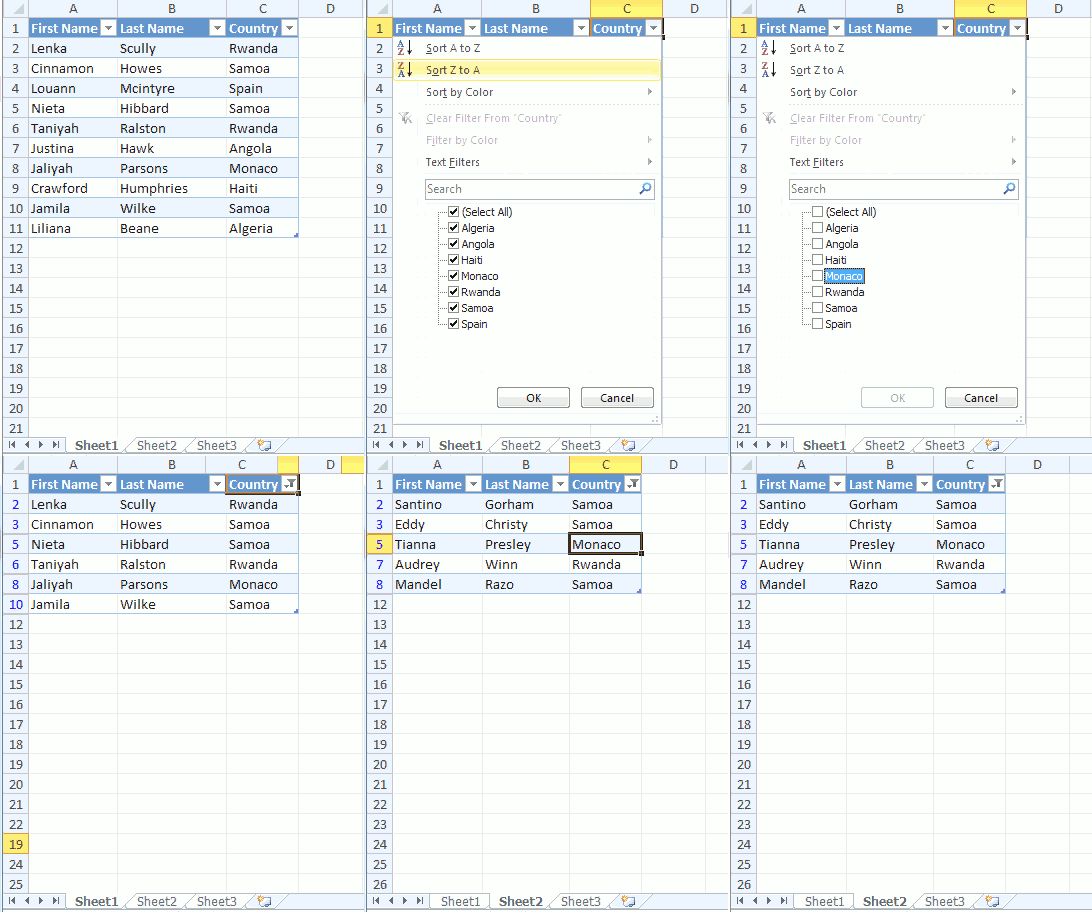
The animated image above shows selecting criteria manually in one Excel Table. An event macro then automatically copies the criteria to another table located on a different worksheet when that worksheet is activated.
It is required that both tables have the same column header names and the columns are arranged in the same order.
VBA code
'Event code located at a worksheet module
Private Sub Worksheet_Activate()

'Dimension variable and declare data types
Dim Value As Variant
Dim c As Integer
Dim Arr As Variant

'Redimension array variable Arr in order to programmatically increase array size
ReDim Arr(0)

'The With ... End With statement allows you to write shorter code by referring to an object only once instead of using it with each property.
With Worksheets("Sheet1").ListObjects("Table1").AutoFilter

'Check if FilterMode is True
If .FilterMode Then

    'Iterate through filters
    For c = 1 To .Filters.Count

        'Check if filter is on
        If .Filters(c).On Then

            'Check if filter contains multiple conditions
            If IsArray(.Filters(c).Criteria1) Then

                'Iterate through each criteria value
                For Each Value In .Filters(c).Criteria1

                    'Save criteria value to array variable Arr
                    Arr(UBound(Arr)) = Mid(Value, 2, Len(Value))

                    'Increase array size with 1
                    ReDim Preserve Arr(UBound(Arr) + 1)

                'Continue with next criteria value
                Next

                'Decrease array size with 1
                ReDim Preserve Arr(UBound(Arr) - 1)

            'Excel continues here if filter contains a single condition
            Else

                'Save criteria value to array variable Arr
                Arr(UBound(Arr)) = .Filters(c).Criteria1

                'Increase size of array variable Arr
                ReDim Preserve Arr(UBound(Arr) + 1)

                'Enable error handling
                On Error Resume Next

                'Save criteria value to array variable Arr
                Arr(UBound(Arr)) = .Filters(c).Criteria2

                'Check if an error has occured then decrease array size with 1
                If Err <> 0 Then ReDim Preserve Arr(UBound(Arr) - 1)

                'Disable error handling
                On Error GoTo 0

            'Exit If statement
            End If

            'Enable Excel Table filter for Table2
            Worksheets("Sheet2").ListObjects("Table2").Range.AutoFilter Field:=c

            'Apply Excel Table filter criteria for Table2 based on variable c
            Worksheets("Sheet2").ListObjects("Table2").Range.AutoFilter Field:=c, Criteria1:=Arr, Operator:=xlFilterValues
        End If
    Next
Else

'Iterate
For c = 1 To ActiveSheet.ListObjects("Table2").Range.Columns.Count
    ActiveSheet.ListObjects("Table2").Range.AutoFilter Field:=c
Next
End If
End With
End Sub
Where to put the code?
- Copy above VBA code.
- Press with right mouse button on on tab sheet2, you will find it at the very bottom of the Excel screen.
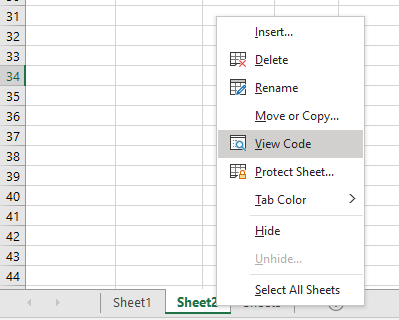
- Press with left mouse button on "View Code".
- Paste VBA code to sheet module.
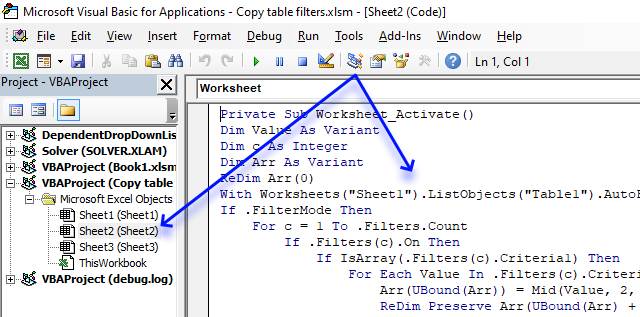
- Return to excel.
10. Sort values in an Excel table programmatically - VBA
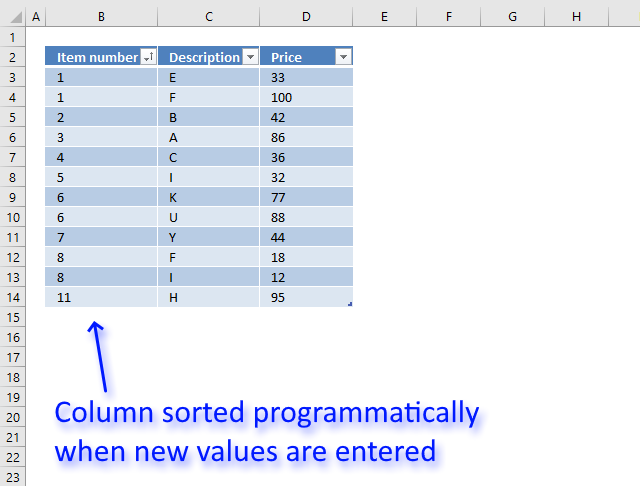
This article demonstrates how to sort a specific column in an Excel defined Table based on event code. The event macro is triggered when a record is entered and sorts the first column from small to large or A to Z.
Hey, can you do the opposite of this - not random order but this is my situation.
I have 3 rows.
A1 - Item Number
B1 - Description
C1 - Price
These will constantly be having new numbers put in.
Is there a way to have it when you add a number into the A column it will automatically sort into numerical order?
Or can I create a button that after I input all my data press with left mouse button on it and it updates all 3 rows into the numerical order based on row A
First I'll show you how to convert a dataset into an Excel defined table. There are several things that make it easier to work with the data if you convert it to an Excel defined Table.
10.1 Create an Excel defined Table
- Select any cell in your dataset.
- Go to tab "Insert" on the ribbon.
- Press with left mouse button on "Table" button.
This dialog box appears:
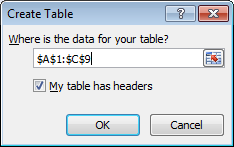
- Press with left mouse button on OK button.
10.2 How does it work?
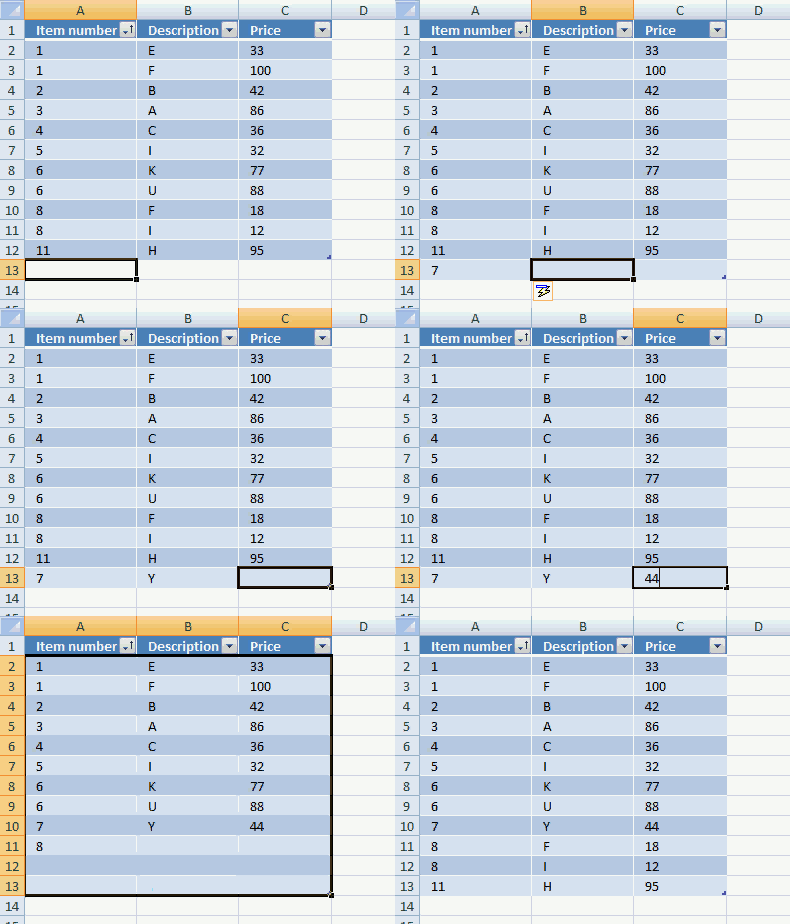
The event macro below sorts an Excel defined Table automatically (column A) when all cells on the same row contain a value. The animated picture above explains it all.
10.3 VBA code
'Event code name
Private Sub Worksheet_Change(ByVal Target As Range)

'Dimension variables and declare data types
Dim ACell As Range
Dim ActiveCellInTable As Boolean
Dim r As Single
Dim Value As Variant

'Save changed cell to object variable ACell
Set ACell = Target

'Enable error handling
On Error Resume Next

'
ActiveCellInTable = (ACell.ListObject.Name = "Table1")

'Disable error handling
On Error GoTo 0

'Make sure that Excel table named Table1 exists in workbook
If ActiveCellInTable = True Then

    'Subtract the relative row number of the Excel defined Table with the row number of changed cell and save the result to variable r
    r = Target.Row - Target.ListObject.Range.Row + 1

    'Iterate through each column in Excel defined Table
    For c = 1 To ActiveSheet.ListObjects(ACell.ListObject.Name).Range.Columns.Count

        'Check ff cell is empty and stop macro if so
        If ActiveSheet.ListObjects(ACell.ListObject.Name).Range.Cells(r, c).Value = "" Then Exit Sub

    'Continue with next column
    Next c

    'The With ... End With statement allows you to write shorter code by referring to an object only once instead of using it with each property.
    With ActiveSheet.ListObjects(ACell.ListObject.Name).Sort

        'Clear previous sorting criteria
        .SortFields.Clear

        'Add a new sort with an ascending order
        .SortFields.Add _
            Key:=Range("Table1[[#All],[Item number]]"), SortOn:=xlSortOnValues, Order _
            :=xlAscending, DataOption:=xlSortNormal
        .Apply
    End With
End If
End Sub
10.4 Where to copy the code?
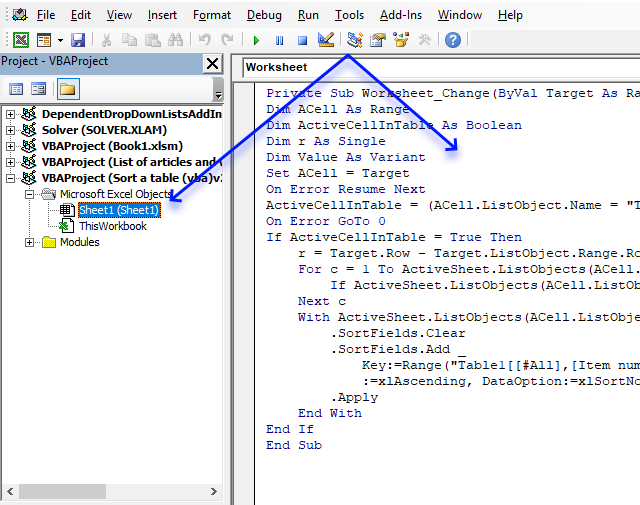
- Copy macro above.
- Press Alt+F11 to open the VBE (Visual Basic Editor).
- Doublepress with left mouse button on a worksheet in the Project Explorer to open the worksheet module.
- Paste code to worksheet module.
- Return to Excel.
- Save your workbook as a macro-enabled workbook (*.xlsm)
10.5 How to customize macro to your workbook
Change this table name Table1 to your specific table name, in the macro above.
Change also this Table1[[#All],[Item number]] to whatever table name and header name you want to sort on.
Table category
Table of Contents How to compare two data sets - Excel Table and autofilter Filter shared records from two tables […]
This article demonstrates different ways to reference an Excel defined Table in a drop-down list and Conditional Formatting formulas. The […]
This article demonstrates two formulas that extract distinct values from a filtered Excel Table, one formula for Excel 365 subscribers […]
Macro category
Table of Contents How to create an interactive Excel chart How to filter chart data How to build an interactive […]
Table of Contents Excel monthly calendar - VBA Calendar Drop down lists Headers Calculating dates (formula) Conditional formatting Today Dates […]
Table of Contents Split data across multiple sheets - VBA Add values to worksheets based on a condition - VBA […]
How to use Excel Tables
15 Responses to “Working with Excel tables programmatically”
Leave a Reply
How to comment
How to add a formula to your comment
<code>Insert your formula here.</code>
Convert less than and larger than signs
Use html character entities instead of less than and larger than signs.
< becomes < and > becomes >
How to add VBA code to your comment
[vb 1="vbnet" language=","]
Put your VBA code here.
[/vb]
How to add a picture to your comment:
Upload picture to postimage.org or imgur
Paste image link to your comment.

I believe you can replace these 5 lines from your code...
Dim r As Single
....
r = Target.Row - Target.ListObject.Range.Row + 1
For c = 1 To ActiveSheet.ListObjects(ACell.ListObject.Name).Range.Columns.Count
    If ActiveSheet.ListObjects(ACell.ListObject.Name).Range.Cells(r, c).Value = "" Then Exit Sub
Next c
with this single line of code...
If Not Intersect(Target.EntireRow, Target.ListObject.Range).Find("") Is Nothing Then Exit SubRick Rothstein (MVP - Excel),
I appreciate your comments, great value!
Oscar,
Do you have a vba to hide all columns of a range except columns whose header is found in specific cells?
eg:
B1 and B2 holds header names chosen by user.
range C1 to P2 holds all headers.
Hide ALL columns except those sharing name found in B1 and B2?
Where in this code do I modify if I want to sort by a different column then the first one?
Wen,
Replace this Table1[[#All],[Item number]] with your table name and column
suppose you dont want the header to be copied
shelly
Sub CopyFilteredTable() Dim rng As Range Dim WS As Worksheet For Each Row In Range("Table2").Rows If Row.EntireRow.Hidden = False Then If rng Is Nothing Then Set rng = Row Set rng = Union(Row, rng) End If Next Row Set WS = Sheets.Add rng.Copy Destination:=WS.Range("A1") End SubOscar did you just copy and paste the same code?
I am trying to copy a filtered table but I don't want to paste the header information.
How do you sort from Largest to Smallest using your code?
In the long .SortFields.Add line of code toward the bottom of the procedure... try changing the xlAscending to xlDescending.
Hi, how would you be abl eto sort by other factors instead of ascending/descending; such as high/medium/low
Nice! I added a userform, two list boxes (sheet name, table name), a button for source and a button for destination. Userform initializes, lists sheet names and table names. The source button chooses the sheet and table name from the listbox values as the source, the user selects another sheet name and table name for the destination and submits the destination button. Now i can quickly change filters for similar sheets all in one form.
I have a related challenge, but I can't work it out by using your code. I have one table, and when a user press with left mouse button on a button to perform an activity, I want to run some code that ensures that certain filters in the table are selected. I gather from your code that if I capture the selected filters in 'arr' I get the selected filters, but I can't work out how to add the required filters to 'arr'. Any suggestions appreciated... Cheers, Paul
Hi, for copying filtered tables there seems to be a much easier solution:
TargetTable.Range.SpecialCells(xlCellTypeVisible).Copy _
    Destination:=Sheets("Sheet8").Range("A1")
as can be found here:
https://stackoverflow.com/questions/16039774/excel-vba-copying-and-pasting-visible-table-rows-only
hello, this was very useful, but how do I exclude tables ( I think I might be getting an error because I have named tables of different sizes- these ones I do not want to include in my filtered data )
thank you much